avatarEvan Fang

Summary

The provided content discusses the intricacies of Android app development, focusing on the management of the activity back stack and the use of various launchMode attributes and intent flags to control activity behavior within tasks.

Abstract

The article delves into the complexities of handling the back stack and activity switching in Android applications. It emphasizes the importance of understanding attributes such as launchMode, taskAffinity, allowTaskReparenting, and intent flags like FLAG_ACTIVITY_NEW_TASK, FLAG_ACTIVITY_CLEAR_TOP, and FLAG_ACTIVITY_SINGLE_TOP. The author, who has experienced confusion with these concepts, advocates for practical learning through coding and testing on actual devices, rather than relying solely on documentation. A sample app is available on Google Play to facilitate this hands-on approach. The article breaks down the four launch modes (standard, singleTop, singleTask, and singleInstance) with visual examples and explanations of how each affects the activity stack, including when new instances are created or when existing instances are brought to the forefront with onNewIntent(). The author aims to clarify these concepts for developers and promises a follow-up article on intent flags.

Opinions

  • The author suggests that theoretical knowledge from documentation may not be sufficient for understanding activity behavior, advocating for practical, hands-on experience.
  • A strong recommendation is made to read the official Android documentation on tasks and the back stack to build a foundational understanding before diving into the code.
  • The author's personal experience indicates that the behavior of activities under different launch modes can be counterintuitive, necessitating empirical testing.
  • The use of a sample app is encouraged as a learning tool to observe the effects of different launch modes and intent flags in a real-world scenario.
  • The article implies that mastering these concepts is crucial for effective Android app development, particularly for managing user navigation and application flow.

Android Tasks and Back Stack

activity:launchMode in the AndroidManifest.xml
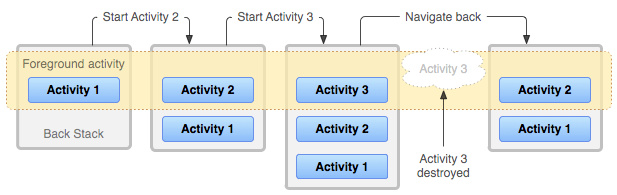
The back stack — from Android Developer

Every time I develop an Android app and handle back stack and switching between activities, I am confused with the using of activity attributes like launchMode, taskAffinity, allowTaskReparenting, etc, and lots of intent flags like FLAG_ACTIVITY_NEW_TASK, FLAG_ACTIVITY_CLEAR_TOP, FLAG_ACTIVITY_SINGLE_TOP...

Today I am going to relearn all of them by code (we’ll never know what will happen until we really build it on devices even though we have already read the docs). Let’s get started!

Here is the sample app on Google play, you can learn it with the app.

TasksAndBackStackSample

Prerequisites

First, I strongly recommend you read the doc on Android Developer Understand Tasks and Back Stack, it will help us to understand how the back stack works.

activity:launchmode

This attribute should be added to AndroidManifest.xml like below:

<manifest xmlns:android="http://schemas.android.com/apk/res/android"
    package="com.launchmode.example">
  <application ...>
    <activity
      android:name=".launchmode.LaunchModeStandardActivity"
      android:launchMode="standard" />
  </application>
</manifest>

Four launch mode

android:launchMode=”standard”

Simplest activity launch behavior, create a new instance of the activity on the top of the target task.
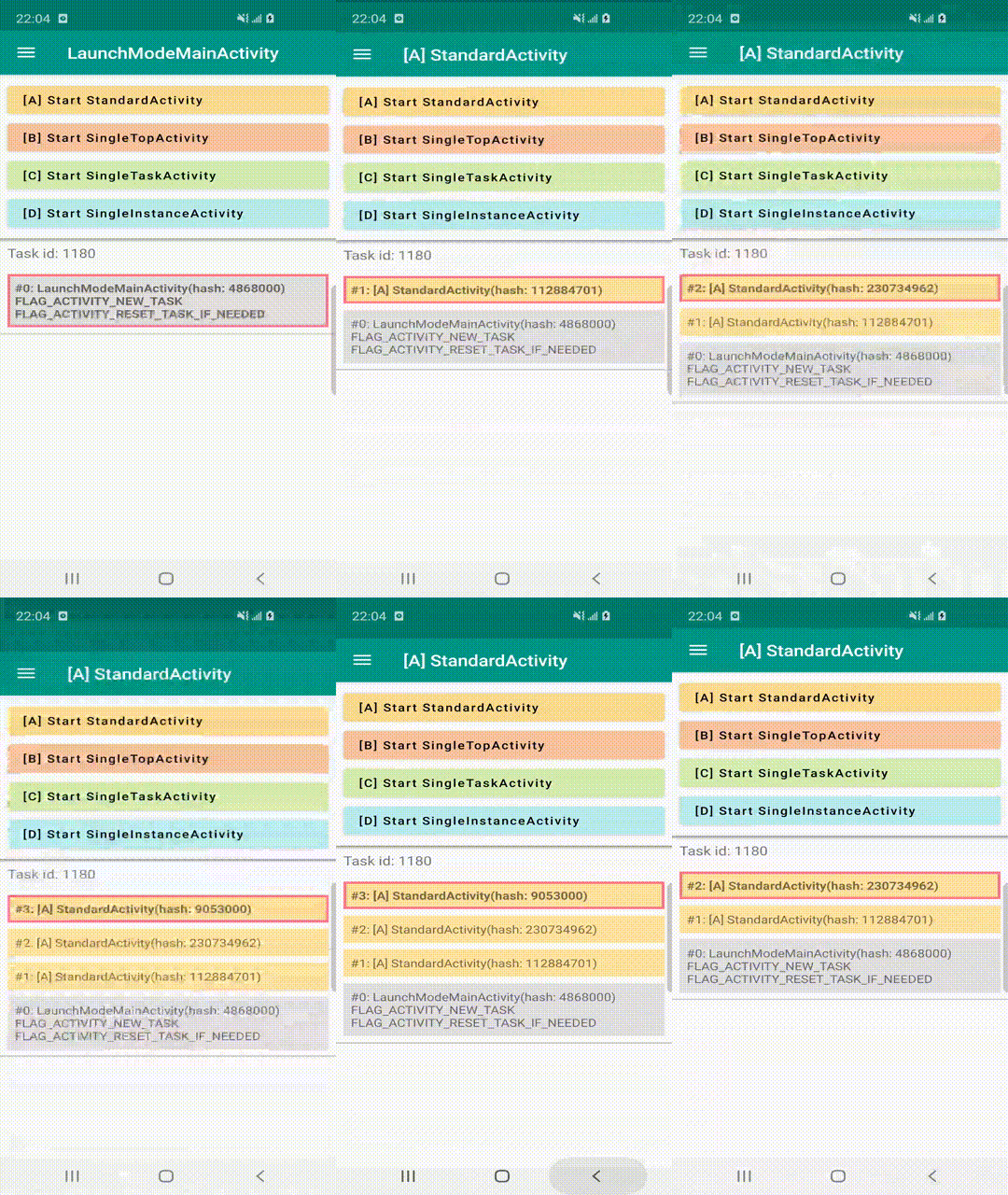
android:launchMode=”standard”, click [A] > [A] > [A]

android:launchMode=”singleTop”

  1. If the activity doesn’t exist, it will be created and put on the top of the task.
  2. If the activity exists but not on the top of the task, a new instance will be created and put on the top of the task.
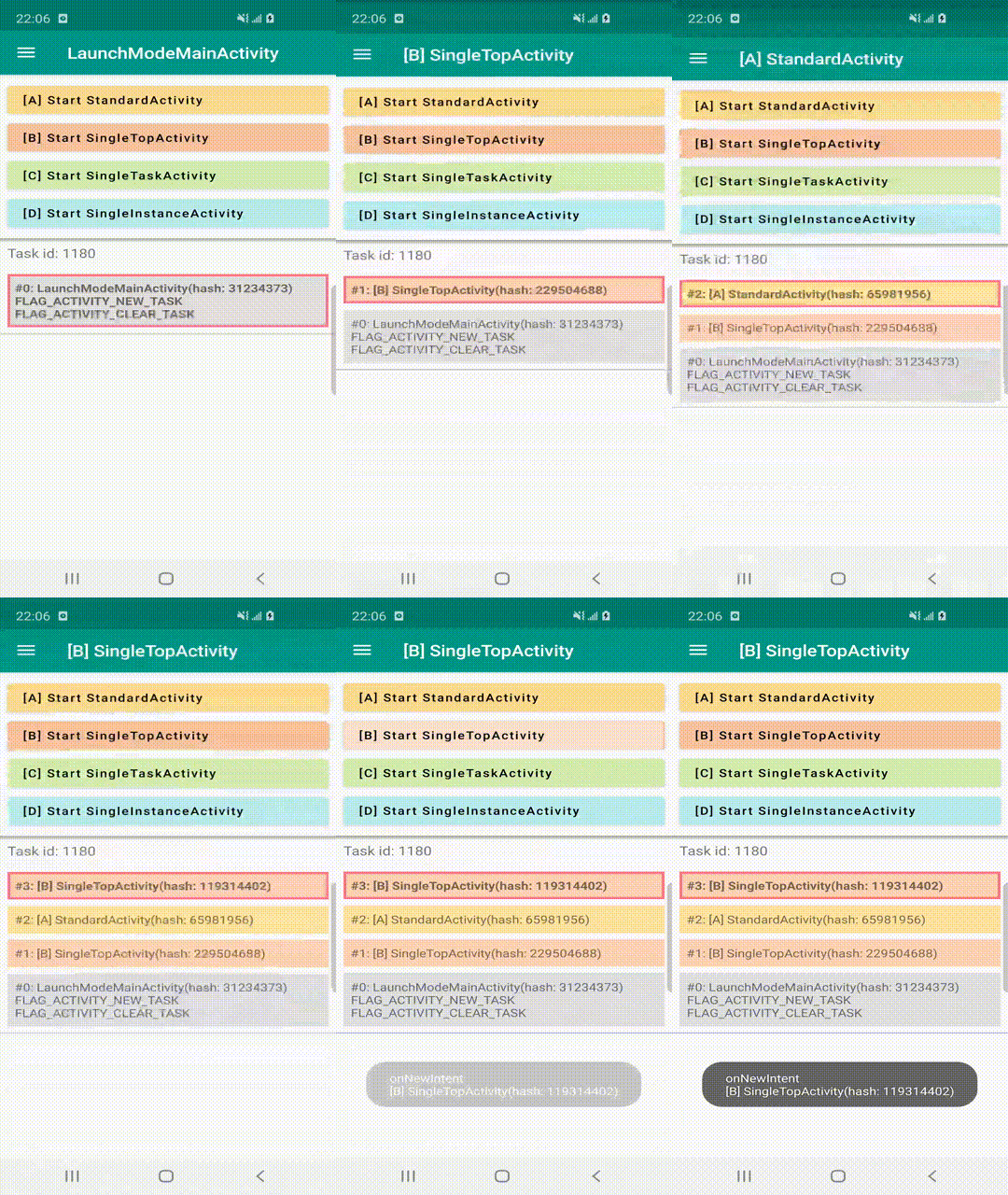
android:launchMode=”singleTop”, click [B] > [A] > [B] > [B]

3. If the activity is on the top of the task, it won’t create a new instance, but invoke top activity’s onNewIntent().
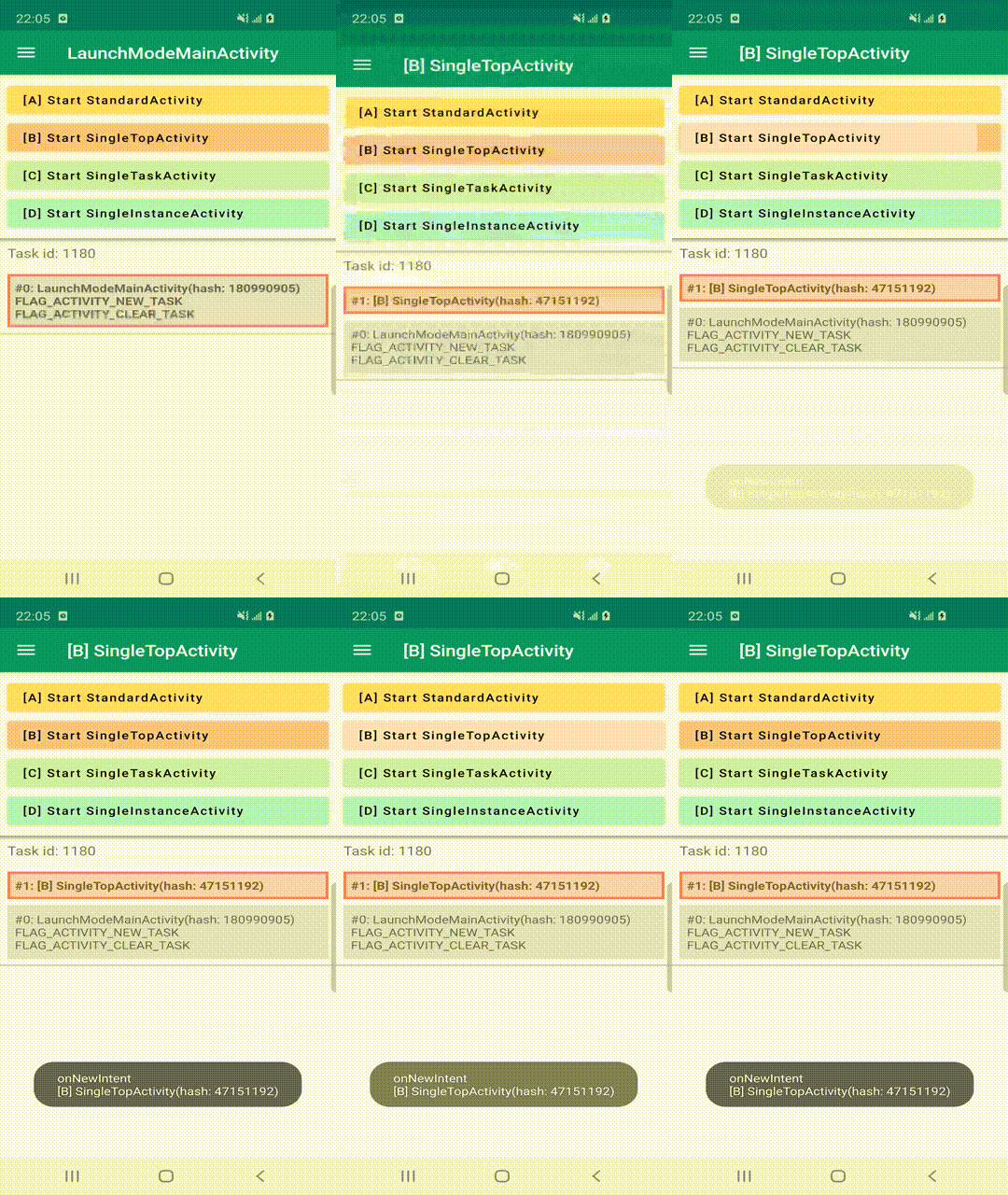
android:launchMode=”singleTop”, click [B] > [B]

android:launchMode=”singleTask”

  1. If the activity doesn’t exist, it will be created and put on the top of the task.
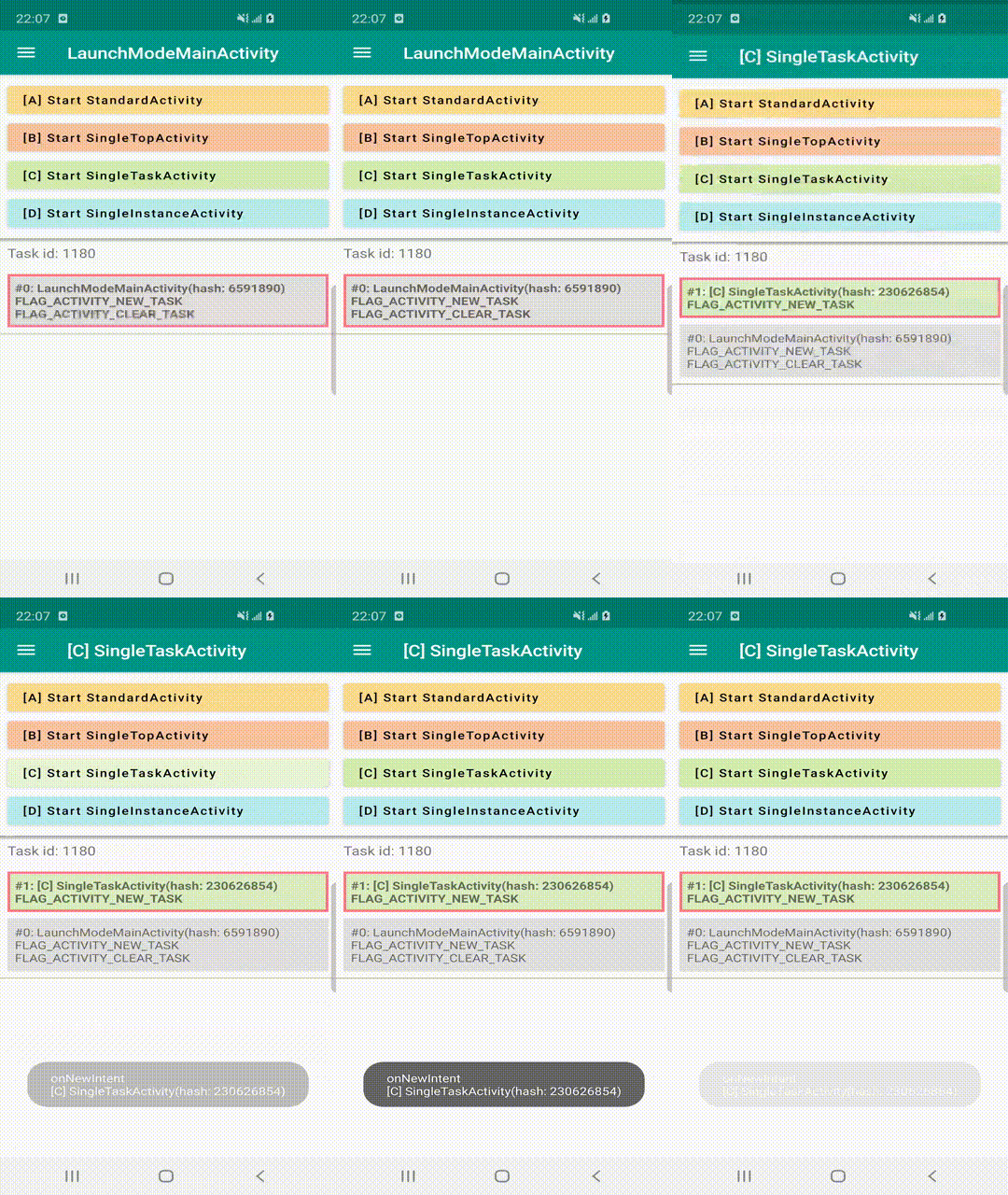
android:launchMode=”singleTask”, click [C] > [C]

2. If the activity exists, it won’t create a new instance, but invoke the existing activity’s onNewIntent() and clear all activities above it.
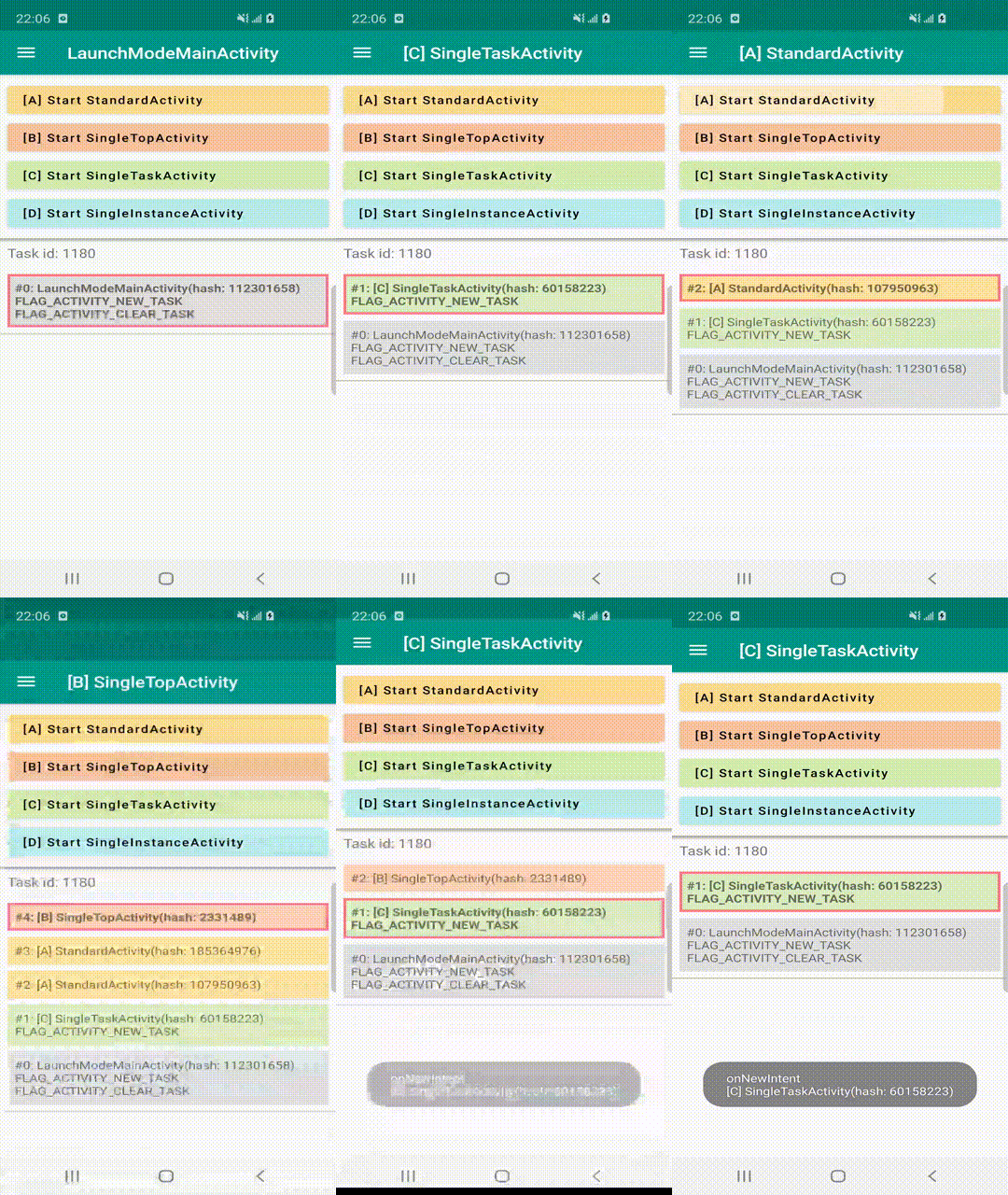
android:launchMode=”singleTask”, click [C] > [A] > [A] > [B] > [C]

android:launchMode=”singleInstance”

  1. If the activity doesn’t exist, a new task will be created and the activity will be the ONLY member of the task.
  2. If the other activities are created, they can’t be a member of the specific task.
  3. If the activity exists, it will go back to its own task and invoke onNewIntent().
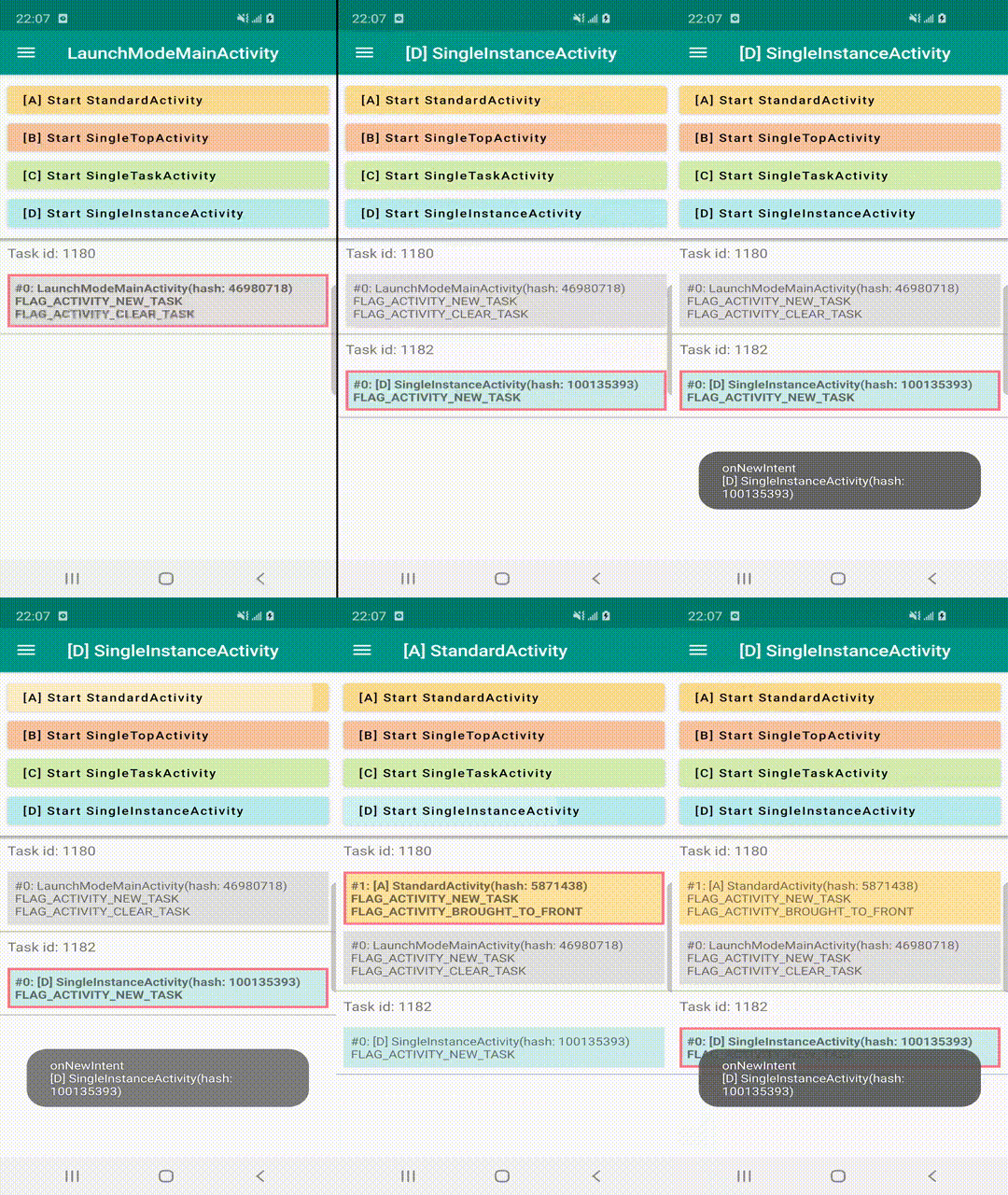
android:launchMode=”singleInstance”, click [D] > [D] > [A] > [D]

That’s all for the launch modes setting in AndroidManifest.xml. Hopefully, this article helps to clarify how to use them.

The next article will introduce Intent Flags , stay tuned! 😃

Android
Tasks And Backstack
Launch Mode
Activity
Recommended from ReadMedium