
How to do real time people tracking and recognition using DL
In an era of rapidly evolving technology, the utilization of deep learning for people recognition and tracking has revolutionized surveillance and security systems.
Deep Learning fundamentals
To understand people recognition and tracking using deep learning, it’s essential to grasp the basics of deep learning. Deep learning is a subset of machine learning that employs artificial neural networks, which can automatically learn patterns and representations from large amounts of data. Convolutional Neural Networks (CNNs) and Recurrent Neural Networks (RNNs) are the backbone of many deep learning models for this purpose.
Object Detection Object detection is a crucial step in recognizing people within an image or video stream. Deep learning models, such as Single Shot MultiBox Detector (SSD) and You Only Look Once (YOLO), are at the forefront of real-time object detection. These models can locate and classify individuals in an image or video frame with remarkable accuracy.
Face Recognition Face recognition is a subdomain of people recognition that has witnessed significant advancements due to deep learning. Deep neural networks, including FaceNet and VGGFace, have made it possible to accurately identify individuals based on facial features. These systems are widely used for access control, law enforcement, and authentication purposes.
class FaceNet:
    def __init__(
        self,
        detector: object,
        onnx_model_path: str = "assets/models/facenet512_weights.onnx",
        anchors: typing.Union[dict] = data,
        force_cpu: bool = False,
        threshold: float = 0.5,
        color: tuple = (255, 255, 255),
        thickness: int = 2,
        ) -> None:
        if not stow.exists(onnx_model_path):
            raise Exception(f"Model doesn't exists in {onnx_model_path}")

        self.detector = detector
        self.threshold = threshold
        self.color = color
        self.thickness = thickness

        providers = ['CUDAExecutionProvider', 'CPUExecutionProvider']

        providers = providers if ort.get_device() == "GPU" and not force_cpu else providers[::-1]

        self.ort_sess = ort.InferenceSession(onnx_model_path, providers=providers)

        self.input_shape = self.ort_sess._inputs_meta[0].shape[1:3]

        self.anchors = self.load_anchors(anchors) if isinstance(anchors, str) else anchors

    def normalize(self, img: np.ndarray) -> np.ndarray:
        mean, std = img.mean(), img.std()
        return (img - mean) / std

    def l2_normalize(self, x: np.ndarray, axis: int = -1, epsilon: float = 1e-10) -> np.ndarray:
        output = x / np.sqrt(np.maximum(np.sum(np.square(x), axis=axis, keepdims=True), epsilon))
        return output

    def detect_save_faces(self, image: np.ndarray, output_dir: str = "faces"):
        face_crops = [image[t:b, l:r] for t, l, b, r in self.detector(image, return_tlbr=True)]
        # face_crops = [face for f in self.detector(image,return_tlbr=True)]
        if face_crops == []:
            return False

        stow.mkdir(output_dir)

        for index, crop in enumerate(face_crops):
            output_path = stow.join(output_dir, f"face_{str(index)}.png")
            cv2.imwrite(output_path, crop)
            print("Crop saved to:", output_path)

        self.anchors = self.load_anchors(output_dir)

        return True

    def load_anchors(self, faces_path: str):
        anchors = {}
        if not stow.exists(faces_path):
            return {}

        for face_path in stow.ls(faces_path):
            anchors[stow.basename(face_path)] = self.encode(cv2.imread(face_path.path))

        return anchors

    def encode(self, face_image: np.ndarray) -> np.ndarray:
        face = self.normalize(face_image)
        face = cv2.resize(face, self.input_shape).astype(np.float32)

        encode = self.ort_sess.run(None, {self.ort_sess._inputs_meta[0].name: np.expand_dims(face, axis=0)})[0][0]
        normalized_encode = self.l2_normalize(encode)

        return normalized_encode

    def l1_distance(self, a: np.ndarray, b: typing.Union[np.ndarray, list]) -> np.ndarray:
        if isinstance(a, list):
            a = np.array(a)

        if isinstance(b, list):
            b = np.array(b)

        return np.sum(np.abs(a - b))

    def cosine_distance(self, a: np.ndarray, b: typing.Union[np.ndarray, list]) -> np.ndarray:
        if isinstance(a, list):
            a = np.array(a)

        if isinstance(b, list):
            b = np.array(b)

        return np.dot(a, b.T) / (np.linalg.norm(a) * np.linalg.norm(b))

    def draw(self, image: np.ndarray, face_crops: dict):
        for value in face_crops.values():
            t, l, b, r = value["tlbr"]
            cv2.rectangle(image, (l, t), (r, b), self.color, self.thickness)
            name = stow.name(value['name'])
            name = name.rsplit('_')[0]
            cv2.putText(image, name, (l, t - 10), cv2.FONT_HERSHEY_SIMPLEX, 0.9, self.color, self.thickness)

        return image

    def __call__(self, frame: np.ndarray,face_frame=False) -> np.ndarray:
        names = None
        if not face_frame:
            face_crops = {index: {"name": "", "tlbr": tlbr} for index, tlbr in enumerate(self.detector(frame, return_tlbr=True))}
            for key, value in face_crops.items():
                t, l, b, r = value["tlbr"]
                face_encoding = self.encode(frame[t:b, l:r])
                distances = self.cosine_distance(face_encoding, list(self.anchors.values()))
                if np.max(distances) > self.threshold:
                    face_crops[key]["name"] = list(self.anchors.keys())[np.argmax(distances)]
                    names = face_crops[key]["name"]
                    names = names.rsplit('_')[0]
                    print(names,np.max(distances))
        else:
            face_encoding = self.encode(frame)
            distances = self.cosine_distance(face_encoding, list(self.anchors.values()))
            if np.max(distances) > self.threshold:
                names = list(self.anchors.keys())[np.argmax(distances)].rsplit('_')[0]
                print(names,np.max(distances))

        return names
Tracking algorithms People tracking involves monitoring and following individuals as they move through a scene or across frames in a video. DeepSORT (Deep Learning for Single Object Tracking) and SORT (Simple Online and Realtime Tracking) are examples of tracking algorithms that leverage deep learning for improved accuracy and robustness.
Methodology
The system works as follows:
- The application grabs a new frame from the camera.
- The object detection system processes frames and extracts people from the scene. For each person, a sub-region of the frame is cropped for detailed processing.
- Each person’s region is processed by a face detector algorithm to extract a person’s face from the body.
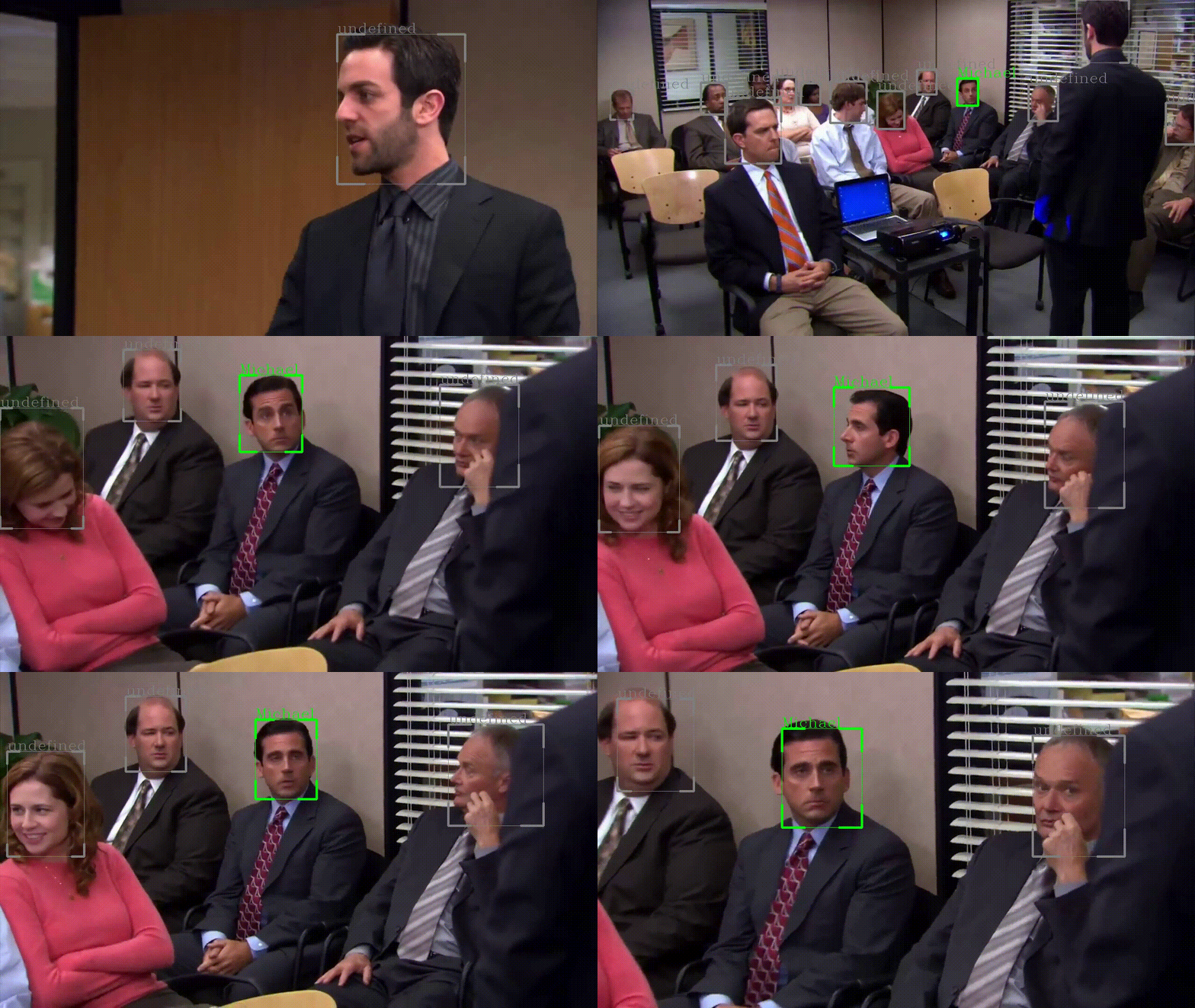
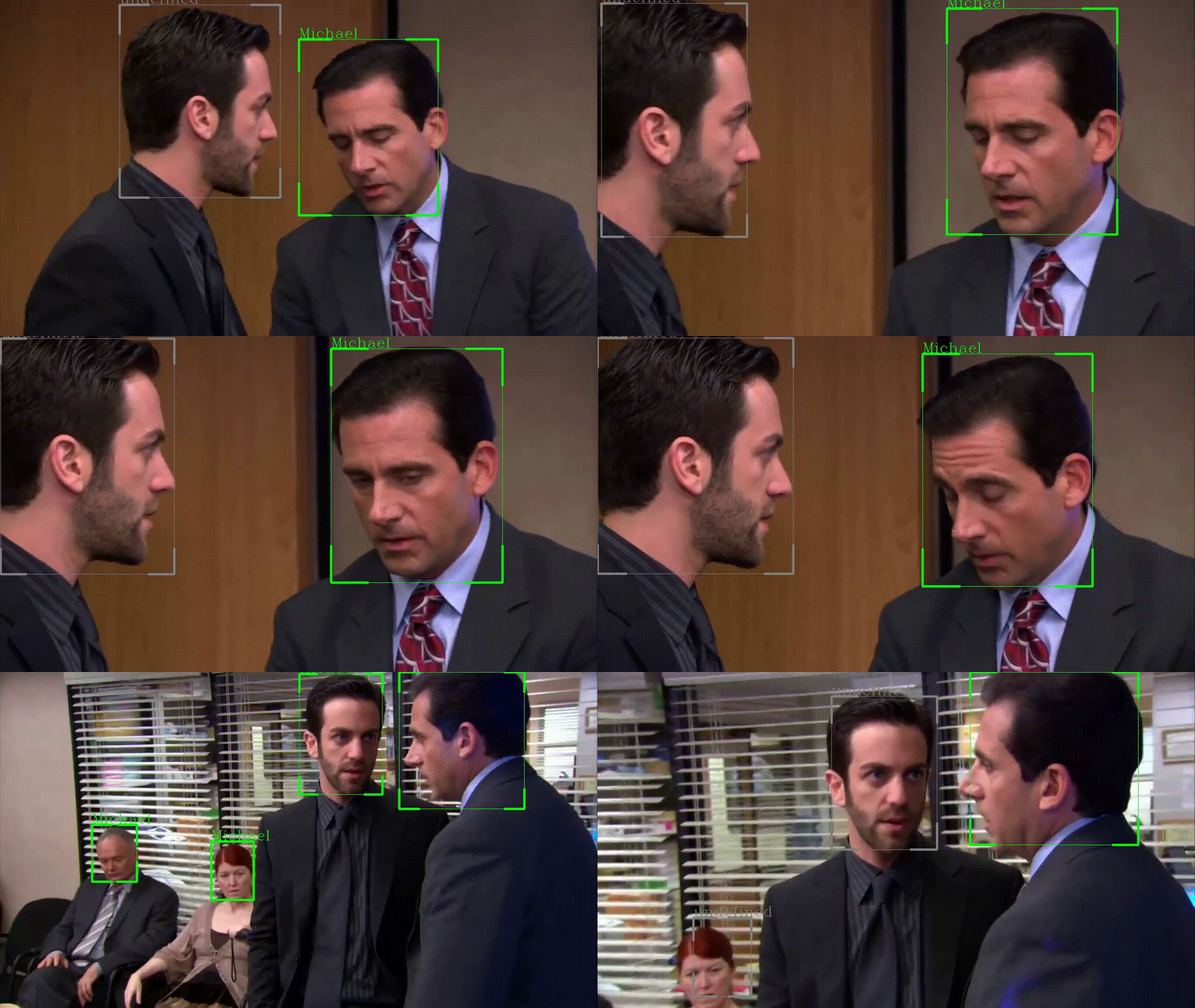
- Each face is scanned by a face recognition system that compares the current face with faces stored in the database. If a face is recognized, the name is returned, “undefined” is returned otherwise.

Associating recognition with a unique track ID is a common and effective approach in people recognition and tracking systems, especially in scenarios where individuals may move in and out of view or temporarily obstruct their faces. This method ensures that even if a person’s face is temporarily obscured or no longer visible in a given frame, the system can still recognize them based on their assigned track ID. Here’s how it works:
- Assignment of a Track ID: The system assigns a unique track ID to the detected person. This ID is associated with their facial features and other relevant information.
- Continued Tracking: As the video stream or frames progress, the tracking algorithm continuously monitors the movements and appearances of individuals. Even if a person’s face becomes temporarily obscured or is no longer visible, the system still tracks their movement based on their unique track ID.
- Re-Recognition: When the person’s face becomes invisible, the system can re-recognize them by matching their current track ID. This allows for the seamless tracking of individuals across different frames, even in challenging scenarios.
#**name is the output of face recognition calling**
if bool(name):
  to_remove = []
  for key, value in id_face_dictionary.items():
      if value == name:
          if id != key:
                  to_remove.append(key)
          loggers["recognition"].info(f"{name} already in dict. ID: {id}")
  for k in to_remove:
      id_face_dictionary.pop(k)

  #once deleted, we add new key
  id_face_dictionary[id] = name
  loggers["recognition"].info(f"Added {name} to key {id}")
By using track IDs, the system maintains a consistent identity for each individual throughout the video or sequence of frames, ensuring that recognition can be maintained even when the face is not visible at all times. This approach is valuable in various applications, including video surveillance, where continuous tracking and recognition are essential for security and analysis purposes.
Optimizing Real-Time Object Detection and Tracking
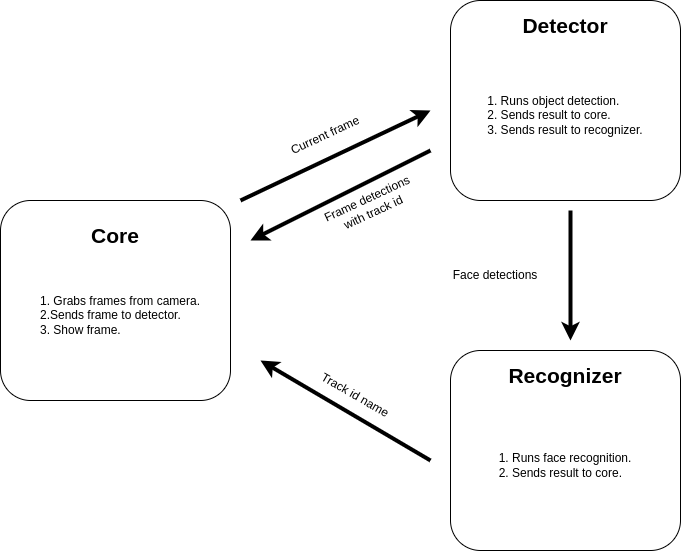
Real-time object detection and tracking are critical components in various applications such as surveillance, autonomous driving, and interactive systems. However, performing detection and tracking within the stringent time constraint of 30 milliseconds (ms) per frame, equivalent to the frame rate of 30 frames per second (fps), presents significant computational challenges. To overcome this, we propose a multi-threaded architecture that divides processing into three independent threads: Core, Detector, and Recognizer. Each is designed to operate concurrently, reducing processing latency and resource contention.
Core Thread: The Application Manager
The Core thread acts as the central coordinator. Its primary functions are to:
- Acquire video frames directly from the camera input.
- Dispatch these frames to the Detector thread without delay.
- Collect processed data from the Detector and Recognizer threads.
- Display the resulting frames with detected objects and recognized entities.
This thread ensures that the most recent frame is always the one being processed. If the Detector thread takes longer than 30ms to process a frame, the Core thread skips ahead, avoiding backlogs and ensuring real-time performance without queuing frames.
while vid.isOpened():
  ret, frame = vid.read()
  # out = None
  if ret:
      if queuepulls == 1:
          timer2 = time.time()
      # Capture frame-by-frame
      # if the input queue *is* empty, give the current frame to
      # classify
      if inputQueue.empty():
          inputQueue.put(frame)
      else:
          loggers["general"].debug("Skipping frame from face detection")


      # if the output queue *is not* empty, grab the detections
      if not outputQueue.empty():
          out = outputQueue.get()
      if out is not None:
          queuepulls += 1
          for output in out:
              bbox_left = int(output[0])
              bbox_top = int(output[1])
              bbox_w = int(output[2])
              bbox_h = int(output[3])
              if output.shape[0] == 7:
                  id = int(output[4])
                  prev_id = id
              else:
                  id =prev_id
              if id in id_face_dictionary:
                  name = id_face_dictionary[id]
              else:
                  name = "undefined"
              color = (255,0,0) # Use your custom color
              drawPerson(frame,bbox_left,bbox_top,bbox_w,bbox_h,name,color)
      cv2.imshow('frame', frame)
      if cv2.waitKey(1) & 0xFF == ord('q'):
          vid.release()
          cv2.destroyAllWindows()
          p.kill()
          pRec.kill()
          break
Detector Thread: The Object Detection Engine
Running in an infinite loop, the Detector thread is tasked with:
- Executing object detection algorithms on the current frame.
- Sending the detection results back to the Core thread.
- Forwarding information regarding face detections to the Recognizer thread.
The Detector is designed for speed and accuracy, utilizing optimized algorithms capable of identifying various objects within the 30ms time frame.
def object_detection_(model_path,confidence,inputQueue,outputQueue,recognitionQueue):
    global id_face_dictionary
    yolov8_detector = YOLO(model_path)
    device = torch.device('cuda' if torch.cuda.is_available() else 'cpu')
    yolov8_detector.to(device)
    loggers['tracking'].info("Detection initialized")
    while True:
        if not inputQueue.empty():
            frame = inputQueue.get()
            result = yolov8_detector.track(frame,verbose=False,conf=confidence,persist=True)[0] #Verbose False to avoid yolov8 messages
            data = result.cpu().numpy().boxes.data
            outputQueue.put(data)
            if recognitionQueue.empty():
                recognitionQueue.put((data,frame))
Recognizer Thread: The Identification Specialist
Parallel to the Detector, the Recognizer thread is responsible for:
- Performing face recognition tasks on detected facial data.
- Relaying recognition results back to the Core thread.
It also operates in an infinite loop, checking for new data from the Detector and processing it immediately to identify individuals or features in the video frame.
def recognize_algorithm(model_path,recognitionQueue,id_face_dictionary,confidence):
    detector = face_detector.FaceDetection()
    recog = face_recognition.FaceNet(
        detector=detector,
        threshold=confidence,
        onnx_model_path = model_path)
    loggers['recognition'].info("Recognition initialized")
    while True:
        if not recognitionQueue.empty():
            out = recognitionQueue.get()
            frame = out[1]
            boxes = out[0]
            for output in boxes:
                bbox_left = int(output[0])
                bbox_top = int(output[1])
                bbox_w = int(output[2])
                bbox_h = int(output[3])
                id = int(output[4])
                if bbox_w > 0 and bbox_h > 0:
                    person_frame = frame[bbox_top:bbox_h,bbox_left:bbox_w,:]
                    start_time = time.time()

                    name = recog(frame=person_frame,face_frame=True)
                    loggers['recognition'].debug(f"RECOGNITION - Inference time: {round(time.time()-start_time,2)}")

                    if bool(name):
                        to_remove = []
                        for key, value in id_face_dictionary.items():
                            if value == name:
                                if id != key:
                                        to_remove.append(key)
                                loggers["recognition"].info(f"{name} already in dict. ID: {id}")
                        for k in to_remove:
                            id_face_dictionary.pop(k)

                        #once deleted, we add new key
                        id_face_dictionary[id] = name
                        loggers["recognition"].info(f"Added {name} to key {id}")
Inter-Thread Communication
Inter-thread communication is a cornerstone of this architecture. It allows for the asynchronous processing of frames, where each thread independently checks for new frames and processes them. This design ensures that the system is always working on the latest available frame, thus maintaining real-time performance without lag. Each thread communicates via Python Queues, with synchronization mechanisms in place to prevent race conditions and data corruption.
  inputQueue = Queue(maxsize=1)
  outputQueue = Queue(maxsize=1)
  recognitionQueue = Queue()
  p = Process(target=object_detection_, args=(model_path,detection_confidence,inputQueue, outputQueue,recognitionQueue,))
  p.daemon = True
  p.start()

  pRec = Process(target=recognize_algorithm, args=(recognition_model_path,recognitionQueue,id_face_dictionary,recognition_confidence,))
  pRec.daemon = True
  pRec.start()
System specifications
The application is designed to run seamlessly on Python, making it accessible to a wide range of users across different operating systems. Its cross-platform compatibility ensures that it can be utilized on popular operating systems such as Windows, macOS, and various Linux distributions. While the application is versatile in terms of OS support, it’s important to note that for optimal real-time performance, a GPU (Graphics Processing Unit) is highly recommended, especially when working with resource-intensive deep learning models. A GPU can significantly accelerate the execution of these models, enabling faster processing and enhancing the application’s ability to perform real-time tasks efficiently.

Do you identify as Latinx and are working in artificial intelligence or know someone who is Latinx and is working in artificial intelligence?
- Get listed on our directory and become a member of our member’s forum: https://forum.latinxinai.org/
- Become a writer for the LatinX in AI Publication by emailing us at [email protected]
- Learn more on our website: http://www.latinxinai.org/
Don’t forget to hit the 👏 below to help support our community — it means a lot!