
Real-Time Emotion Recognition in Python with OpenCV and FER
A Comprehensive Python Guide for the Detection, Capture, and Analytical Interpretation of Live Emotional Data
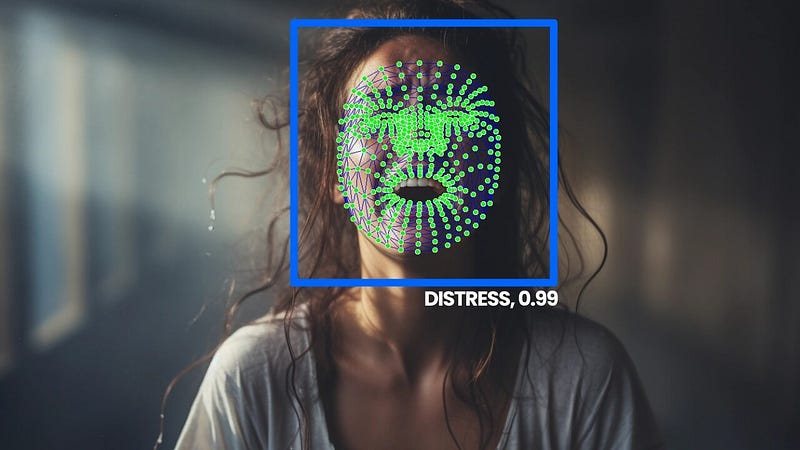
Emotion recognition technology presents an interesting intersection of psychology, AI and computer science. We harness the capabilities of OpenCV for video processing and the Facial Emotion Recognition (FER) library to offer a real-time emotion detection from video feeds.
The method involves capturing facial expressions, interpreting emotional states using deep learning models, and visualizing these emotions dynamically. Practical applications range from enhancing user experience in software to providing insights for emotion aware AI systems.
This article offers a practical, end-to-end code implementation. A plug-and-play solution enabling developers, and enthusiasts alike, to capture and analyze emotions in real-time through webcam or other video feeds such screen recordings or video files.
1. Technology Stack
1.1 FER (Facial Emotion Recognition)
FER is a Python library that focuses on detecting emotions from facial expressions. Utilizing a pre-trained deep learning model, FER analyzes images and video to identify various emotions such as anger, disgust, fear, happiness, sadness, surprise, and neutrality.
It’s designed for ease of use, allowing for straightforward integration into projects that require emotion detection. Source: PyPI — FER.
1.2 OpenCV (Open Source Computer Vision Library):
OpenCV is a foundational library in the field of computer vision. Initially developed by Intel, it’s widely used for processing images and videos. OpenCV supports a multitude of programming languages including Python, and it’s known for its high efficiency in real-time applications.
This library plays a crucial role in image and video manipulation, making it ideal for tasks like capturing webcam feeds, video processing, and drawing annotations over images. Source: OpenCV Documentation.
1.4 MediaPipe (Not used here)
In the context of our discussion on the technology stack for live emotion recognition, it’s also worth mentioning MediaPipe, although it is not used in this specific implementation, we think readers would benefit from knowledge.
MediaPipe is a framework developed by Google for building multimodal (audio, video, time series, etc.) applied machine learning pipelines. It offers customizable ML solutions for live and streaming media, and is particularly well-known for its capabilities in facial recognition, hand tracking, and pose estimation.
MediaPipe is a powerful tool that readers interested in exploring further into real-time image and video processing might find valuable.
It’s especially potent in scenarios requiring more complex or varied types of visual data processing and recognition tasks beyond facial emotion detection. Source: MediaPipe Github.
2. Python Implementation
The implementation is straightforward and primarily requires four libraries: FER, OpenCV, matplotlib, and imageio.
To set up your environment for running the emotion recognition code, we need to install the necessary libraries. Via the command prompt or terminal and run the following commands:
pip install fer
pip install opencv-python
pip install matplotlib
pip install imageio
2.1 Real-Time Emotion Detection
We introduce the basic concept of real-time emotion detection using Python. To keep things simple and accessible for now, we start with a basic script that demonstrates the core functionality.
This initial example will focus on capturing video from a webcam and using the FER library to detect emotions in real-time.
While our example uses live webcam feed, you can easily adapt the script to work with other sources. For instance, you might replace the webcam feed with a video file or even a live screen recording.
- Starting Webcam Feed: To begin, we use OpenCV to capture video from the webcam. OpenCV’s
VideoCapturefunction initializes the webcam feed. In most cases, passing0toVideoCaptureselects the default webcam. - Detecting Emotions: Next, we utilize the FER library, which offers a simple interface for detecting emotions in video frames. When a frame is captured from the webcam, FER processes the frame to detect faces and their corresponding emotions.
- Highlighting Detected Emotions: Once emotions are detected, we use OpenCV functions to draw bounding boxes and text annotations on the detected faces in the video frames. The text labels indicate the detected emotion and its confidence level.
from fer import FER
import cv2

# Initialize the detector
detector = FER(mtcnn=True)

# Start webcam
cap = cv2.VideoCapture(0)

try:
    while True:
        ret, frame = cap.read()
        if not ret:
            break

        # Detect emotions on the frame
        result = detector.detect_emotions(frame)
        for face in result:
            # Unpack the values
            box = face["box"]
            emotions = face["emotions"]

            x, y, w, h = box
            cv2.rectangle(frame, (x, y), (x+w, y+h), (0, 255, 0), 2)

            # Find the emotion with the highest score
            emotion_type = max(emotions, key=emotions.get)
            emotion_score = emotions[emotion_type]

            # Display the emotion type and its confidence level
            emotion_text = f"{emotion_type}: {emotion_score:.2f}"
            cv2.putText(frame, emotion_text, (x, y - 10), cv2.FONT_HERSHEY_SIMPLEX, 0.9, (0, 255, 0), 2)

        # Display the resulting frame
        cv2.imshow('Emotion Detection', frame)

        # Break the loop
        if cv2.waitKey(1) & 0xFF == ord('q'):
            break
except KeyboardInterrupt:
    print("Interrupted by user")
finally:
    # When everything is done, release the capture
    cap.release()
    cv2.destroyAllWindows()
2.2 Live Emotion Visualization
Building upon the basic real-time emotion detection script, we expand the functionality to include live emotion visualization.
This enhancement adds a more dynamic and interactive aspect to our emotion detection application, making the data more engaging and insightful.
Creating a Live Emotion Bar Chart: To visualize the emotions detected in each frame, we employ matplotlib, a powerful plotting library in Python. Here’s how we set it up:
- We initialize a matplotlib figure and create a bar chart with placeholders for each emotion.
- Each bar in the chart represents an emotion, and its height will be updated in real-time to reflect the confidence levels detected by FER.
import matplotlib.pyplot as plt

plt.ion()  # Turn on interactive mode
fig, ax = plt.subplots()
emotion_labels = ['angry', 'disgust', 'fear', 'happy', 'sad', 'surprise', 'neutral']
bars = ax.bar(emotion_labels, [0]*7, color='lightblue')
Interactive Mode in Matplotlib: By enabling the interactive mode (plt.ion()), matplotlib's plot gets updated in real-time. This allows the bar chart to refresh dynamically with each new frame processed by the emotion detection algorithm.
Updating the Chart: We create a function update_chart that takes the detected emotions and updates the height of each bar accordingly. This function is called for each frame processed, ensuring that the chart accurately reflects the current emotions detected.
def update_chart(detected_emotions, bars, ax, fig):
    ax.clear()
    ax.bar(emotion_labels, [detected_emotions.get(emotion, 0) for emotion in emotion_labels], color='lightblue')
    ### [Rest of Chart Formatting]
    fig.canvas.flush_events()
Integrating Chart Updates in the Main Loop: In the main loop of our script, after detecting emotions on each frame, we call update_chart with the latest emotion data. This keeps the visualization in sync with the video feed.
# Main loop for emotion detection and visualization
while True:
    # [Webcam capture and emotion detection code]

    if largest_face:
        # [Face processing and emotion scoring]

        # Update the live bar chart with the latest emotion data
        update_chart(current_emotions, bars, ax, fig)
Putting it all together, we get the following comprehensive Python script.
from fer import FER
import cv2
import matplotlib.pyplot as plt
import numpy as np
import pandas as pd
import imageio
import matplotlib
import time

"""
Real-Time Emotion Detection and Visualization

This script captures video from a webcam, detects emotions on faces in real-time,
and visualizes the results both in a live bar chart and in the video itself. It also
saves the video feed with detected emotions, the live bar chart as a GIF, and
cumulative emotion statistics over time as a static chart. The script uses OpenCV for
video processing, FER for emotion detection, matplotlib for live chart visualization,
and imageio for GIF creation.

Key Features:
- Real-time emotion detection from webcam feed.
- Live update of emotion confidence levels in a bar chart.
- Saving the video feed with bounding boxes around faces and emotion labels.
- Generating a GIF of the live emotion bar chart.
- Saving a cumulative chart of emotion statistics over time.
"""


# Set the backend for matplotlib to 'TkAgg' for compatibility with different environments
matplotlib.use('TkAgg')

# Initialize the FER (Face Emotion Recognition) detector using MTCNN
detector = FER(mtcnn=True)

# Start capturing video from the webcam (device 0)
cap = cv2.VideoCapture(0)

# Set a frame rate for recording the video (adjust based on your webcam's capabilities)
frame_rate = 4.3

# Initialize OpenCV's VideoWriter to save the video with the specified frame rate
fourcc = cv2.VideoWriter_fourcc(*'XVID')
out = cv2.VideoWriter('emotion_video.avi', fourcc, frame_rate, (640, 480))

# Set up a matplotlib figure for displaying live emotion detection results
plt.ion()  # Turn on interactive mode for live updates
fig, ax = plt.subplots()
emotion_labels = ['angry', 'disgust', 'fear', 'happy', 'sad', 'surprise', 'neutral']
bars = ax.bar(emotion_labels, [0]*7, color='lightblue') # Initialize bars for each emotion
plt.ylim(0, 1)
plt.ylabel('Confidence')
plt.title('Real-time Emotion Detection')
ax.set_xticklabels(emotion_labels, rotation=45)

# Initialize imageio writer to save live chart updates as a GIF
gif_writer = imageio.get_writer('emotion_chart.gif', mode='I', duration=0.1)

# List to store cumulative emotion statistics for each frame
emotion_statistics = []

# Function to update the live chart
def update_chart(detected_emotions, bars, ax, fig):
    # Clear the current axes and set up the bar chart again
    ax.clear()
    ax.bar(emotion_labels, [detected_emotions.get(emotion, 0) for emotion in emotion_labels], color='lightblue')
    plt.ylim(0, 1)
    plt.ylabel('Confidence')
    plt.title('Real-time Emotion Detection')
    ax.set_xticklabels(emotion_labels, rotation=45)
    fig.canvas.draw()
    fig.canvas.flush_events()

# Start the timer to measure the active time of the webcam
webcam_start_time = time.time()

try:
    while True:
        ret, frame = cap.read() # Read a frame from the webcam
        if not ret:
            break # Break the loop if no frame is captured

        # Detect emotions on the frame
        result = detector.detect_emotions(frame)
        largest_face = None
        max_area = 0

        # Find the largest face in the frame for primary emotion analysis
        for face in result:
            box = face["box"]
            x, y, w, h = box
            area = w * h
            if area > max_area:
                max_area = area
                largest_face = face

        # If a face is detected, display the emotion and update the chart
        if largest_face:
            box = largest_face["box"]
            current_emotions = largest_face["emotions"]

            # Store the emotion data
            emotion_statistics.append(current_emotions)

            x, y, w, h = box
            cv2.rectangle(frame, (x, y), (x+w, y+h), (0, 255, 0), 2)

            emotion_type = max(current_emotions, key=current_emotions.get)
            emotion_score = current_emotions[emotion_type]

            emotion_text = f"{emotion_type}: {emotion_score:.2f}"
            cv2.putText(frame, emotion_text, (x, y - 10), cv2.FONT_HERSHEY_SIMPLEX, 0.9, (0, 255, 0), 2)

            update_chart(current_emotions, bars, ax, fig)

            out.write(frame) # Write the frame to the video file

            # Save the current state of the bar chart as a frame in the GIF
            fig.canvas.draw()
            image = np.frombuffer(fig.canvas.tostring_rgb(), dtype='uint8')
            image = image.reshape(fig.canvas.get_width_height()[::-1] + (3,))
            gif_writer.append_data(image)

        cv2.imshow('Emotion Detection', frame) # Display the frame

        if cv2.waitKey(1) & 0xFF == ord('q'):
            break

except KeyboardInterrupt:
    print("Interrupted by user")

finally:
    webcam_end_time = time.time()  # End timer when webcam window closes
    print(f"Webcam active time: {webcam_end_time - webcam_start_time:.2f} seconds")

    cap.release()
    cv2.destroyAllWindows()
    plt.close(fig)

    out.release()
    gif_writer.close()

    emotion_df = pd.DataFrame(emotion_statistics)

    plt.figure(figsize=(10, 10))
    for emotion in emotion_labels:
        plt.plot(emotion_df[emotion].cumsum(), label=emotion)
    plt.title('Cumulative Emotion Statistics Over Time')
    plt.xlabel('Frame')
    plt.ylabel('Cumulative Confidence')
    plt.legend()
    plt.savefig('cumulative_emotions.jpg')
    plt.close()
2.3 Bonus — Combining Outputs
The real power of emotion detection technology shines when we can visualize the data in a comprehensive and engaging manner. To achieve this, we’ve developed a script that combines various outputs into a single visual presentation. This script effectively aligns three elements:
- Real-Time Video: Captured emotion detection from a webcam feed, saved as ‘emotion_video.avi’.
- Dynamic Bar Chart GIF: A live-updating representation of detected emotions, stored in ‘emotion_chart.gif’.
- Static Cumulative Emotion Chart: An image file, ‘cumulative_emotions.jpg’, showing the aggregated emotional data over time.
Key Snippets from the Script:
- Reading and processing inputs:
static_chart = Image.open('cumulative_emotions.jpg')
video = cv2.VideoCapture('emotion_video.avi')
bar_chart_gif = imageio.mimread('emotion_chart.gif')- Combining frames logic:
combined_frame = Image.new('RGB', (3 * desired_width, desired_height))
combined_frame.paste(video_frame_resized, (0, 0))
combined_frame.paste(gif_resized, (desired_width, 0))
combined_frame.paste(static_chart_resized, (2 * desired_width, 0))
For those interested in exploring the full code and further diving into the technical details, I encourage you to visit our webiste, Entreprenerdly.com, a resource that includes a range of technical tutorials and practical guides on AI, data science, and tech.
There, you’ll find the complete code for this project and many others, offering a hands-on approach to learning and implementing cutting-edge technology solutions.

5. Practical Applications
- Security Systems: Emotion recognition can add an additional layer to security systems, potentially identifying suspicious or anomalous behavior based on emotional cues.
- Healthcare and Mental Health: In clinical settings, emotion recognition can assist in monitoring patients’ mental health states. It can be particularly useful in teletherapy sessions, providing therapists with additional insights into patients’ emotional responses.
- User Experience and Interface Design: Websites and applications can use emotion recognition to tailor user experiences. For instance, detecting signs of confusion or dissatisfaction can trigger helpful prompts or guide users to more relevant content.
- Robotics and AI: In robotics, emotion recognition can make interactions with AI and robots more natural and intuitive, especially in caregiving or customer service robots.
- Accessibility Technology: For individuals with speech or hearing impairments, emotion recognition technology can facilitate communication by providing additional context about the speaker’s emotional state.
6. Limitations and Improvements
6.1 Limitations
- Accuracy and Dependence on Data: The accuracy of emotion detection largely depends on the training data of the FER model. Biases in this data can lead to incorrect or inconsistent emotion recognition, especially across different demographics.
- Contextual Understanding: The system lacks the ability to understand the context of emotions. It recognizes facial expressions but cannot infer the reasons behind these expressions or differentiate between genuine and simulated emotions.
- Lighting and Quality of the Feed: The quality of the webcam feed, including lighting conditions and resolution, can significantly impact the detection accuracy. Poor video quality may lead to unreliable emotion recognition.
- Privacy Concerns: Using emotion recognition, especially in public or semi-public spaces, raises privacy issues. Consent and ethical considerations are paramount when implementing such systems.
6.2 Areas for Improvement:
- Enhanced Machine Learning Models: Integrating more advanced machine learning models or customizing the existing FER model can improve accuracy and reduce bias.
- Context-Aware Algorithms: Developing algorithms that take into account the context of the situation can provide more nuanced emotion analysis.
- Optimization for Real-Time Processing: Optimizing the code for efficiency or using more powerful processing hardware can minimize latency in real-time applications.
- Addressing Privacy Concerns: Implementing strict privacy protocols and ensuring transparency in how the data is used can mitigate privacy concerns.
Conclusion
We’ve seen how these powerful tools can be combined to not only detect emotions in real-time but also to visualize this data in engaging and informative ways. The practical applications of this technology are vast and varied, from healthcare to marketing, offering novel ways to interact with and understand our emotional responses.
For readers, this article serves as a starting point — a way to understand the capabilities of current technologies and to envision their potential applications. Whether you’re a developer, a researcher, or just someone interested in the intersection of tech and emotion, the possibilities are as broad as your imagination.
Thank you for taking the time to read. If you found the article insightful, please consider clapping to support future content.👏


