
Real Time Deep Learning Vector Similarity Search
A production scale vector similarity search with only 100 lines of code
Implementing the infrastructure to dynamically update and query a similarity index like Facebook’s Faiss or Spotify’s Annoy is a huge implementation effort.
With the architecture in this article, we get it into production in minutes.
If you haven't worked in that topic space before, I can recommend checking out my other article before reading this one. It covers the basic terminologies that are needed.
Jump Directly to the Code
All the code for this article is ready to use in a GitHub repository. If you have questions, please reach out to me via LinkedIn.
Architecture
The Real-Time Vector Similarity Search includes a few building blocks.
- A Cloud Run service that provides an API. That API adds vectors to the index and returns the similarity-matching results.
- Vertex AI Matching Engine provides large-scale low latency similarity search.
- Vertex AI Endpoint to host our embedding model. That model transforms an image or text into a vector representing the input data.
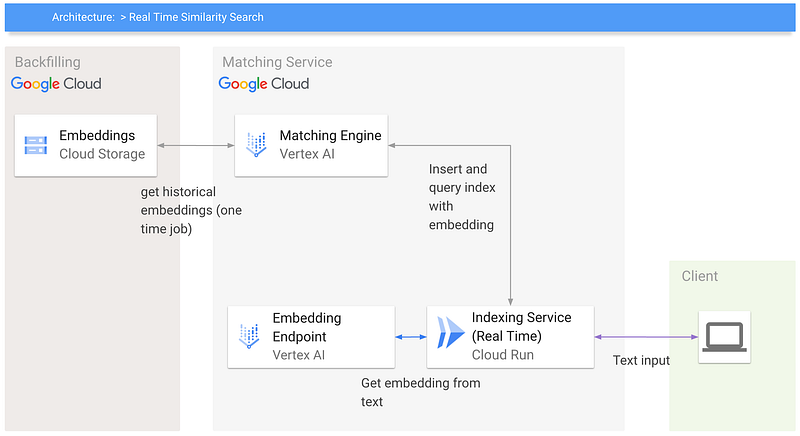
As you see, there are just a few components and not even a lot of code.
Index and Backfilling
When creating a Vertex AI Matching Engine Index, you can choose between two index types:
- Batch The index needs to be updated for every new batch. This can take some time, in median 45 minutes, and therefore not suitable for every use case.
- Streaming Adds your vectors in real-time to the index. We are talking about ms (milliseconds). Imagine a news website that wants breaking news as quickly as possible available in the index.
If you are interested in the batch approach, check out my other article. That article also covers the overall Matching Engine in great detail.
When creating a streaming index, we can backfill the initial index with existing vectors. This can only be done during index creation. After index creation, we can only add new vectors in real-time / streaming.
The backfill vectors are stored in a .json together with an identifier on Google Cloud Storage.
{"id":"0","embedding":[0.005268874,-0.019839665,0.003508414,0.05364392,-0.028307505,0.003756322,-0.040656105,0.0484233,0.03920062,-0.027807945]}Usage
The usage is streamlined via the API
Query
! curl --header "Content-Type: application/json" \
  -H "Authorization: Bearer $(gcloud auth print-identity-token)" \
  --request POST \
  --data '{"description":"Cats have up to 100 different vocalizations — dogs only have 10."}' \
  https://<your cloud run url>.run.app/query
Insert
! curl --header "Content-Type: application/json" \
  -H "Authorization: Bearer $(gcloud auth print-identity-token)" \
  --request POST \
  --data '{"description":"Cats have up to 100 different vocalizations — dogs only have 10."}' \
  https://<your cloud run url>.run.app/insert
Performance
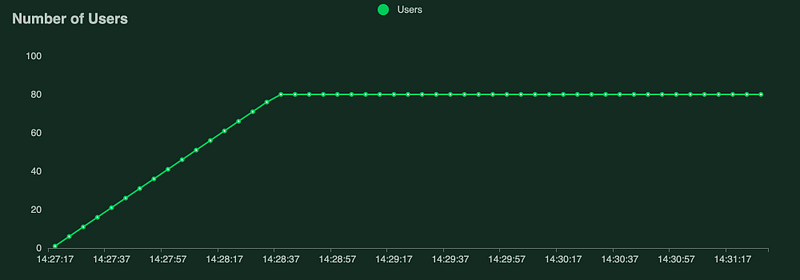
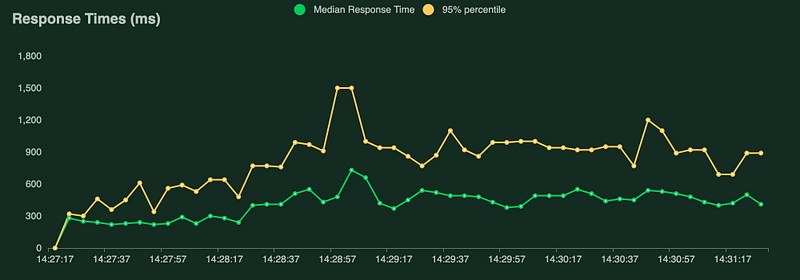
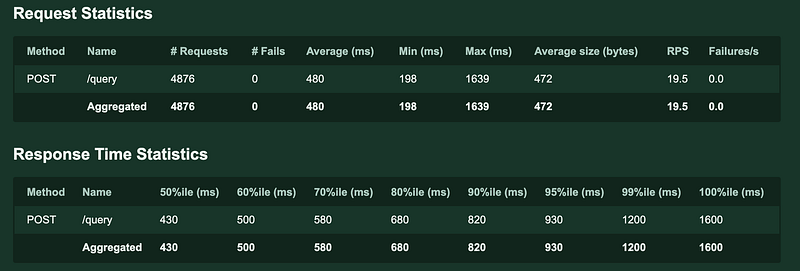
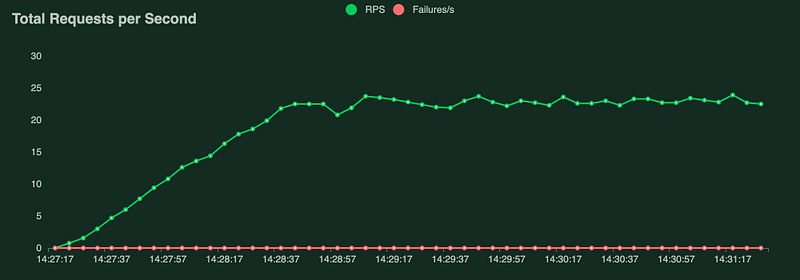
This exact architecture with the model in use was load tested with LOCUST.
The response latency directly correlates with the machine learning model. Anyway, the results are enough to give you some initial impression.
- 80 concurrent users
- Average response time 480ms
- 19.5 requests per second
This includes the communication from our Cloud Run API to the Vertex AI Endpoint to get the embedding and the search against the Matching Engine. Considering the number of services involved, it’s quite impressive.
The Vertex AI Endpoint uses an NVIDIA T4.
Since all components are serverless, they can scale up to practically any number of requests.
Monitoring
All the services provide out-of-the-box monitoring capabilities like latency, QPS, number of vectors, number of requesets and much more.
Model
The quality of the similarity matches directly correlates with the model used to generate the embeddings. I am using the all-mpnet-base-v model specifically built with clustering and semantic search in mind. It was trained on different datasets that fit particularly well for those use cases. For a full list, check the Model Card.
VPC Network
Vertex AI Matching Engine requires a VPC network for communication. Therefore the API for query and indexing is part of the same VPC network. This is done during deployment of the Cloud Run service by defining the VPC network --vpc-connector recommendation-engine. Communicating with the Matching Engine service without the VPC Network is impossible.
Finetune
You can fine-tune the model on your specific data to optimize your similarity-matching results.
Start by putting the existing similarity search into production using the pre-build model. And let your users provide you feedback 👍 and 👎. Consider a simple user interface that increases the interaction.
With that feedback loop, we collect pairs or triplets of positive (similar) and negative (not similar) sentences.
Follow me for an upcoming article that includes a serverless architecture to collect feedback and fine-tune the model.
Thanks for reading
Your feedback and questions are highly appreciated. You can find me on Twitter @HeyerSascha or connect with me via LinkedIn. Even better, subscribe to my YouTube channel ❤️.


