
Real Life Use Cases of a Middleware in ASP.NET Core
Interesting use cases for middleware that can simplify your architecture.

Middleware is one of the fundamental components of ASP.NET Core applications that can be used to implement various functionality. For example, middleware can be used to implement authorization, convert exceptions to responses, measure request execution time, decompress requests, compress responses, and more. But in addition to these common scenarios, there are other interesting ones that we are going to review next.
Multitenancy Middleware
One way to implement multitenancy in web applications is to keep the data of each customer in a separate database instance.
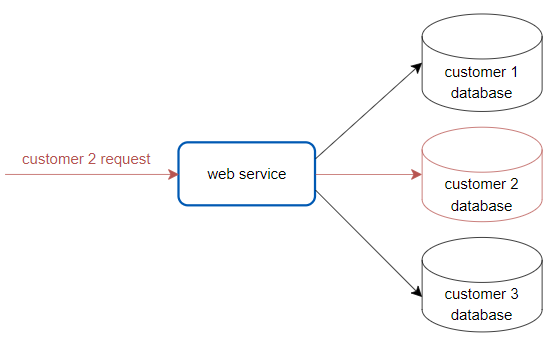
To implement this architecture, a middleware might be a good choice to dynamically resolve the connection string to the appropriate database instance based on the customer identifier or other information provided in the request.
public class MultitenancyMiddleware
{
    private readonly RequestDelegate _next;

    public MultitenancyMiddleware(RequestDelegate next)
    {
        _next = next;
    }

    public async Task InvokeAsync(HttpContext context)
    {
        /*
            1. Extract customer Id from the request/JWT token claim.

            2. Resolve the database name based on the customer info.

            3. Build the connection string to the specific database.

            4. Save the connection string to a scoped object to be used
               by the data access layer later.
        */

        await _next(context);
    }
}
The final implementation will depend on many choices, such as the authorization mechanism, your data access framework, and so on.
Audit Trail Middleware
Every action a user performs in the ASP.NET Core application (such as changing a password, creating an order, etc.) goes through a middleware before it reaches the controller. Since the middleware has access to the request data, the user identity, and can easily determine the current date and time, in some cases the middleware may be considered a candidate when developing an audit trail feature for your system.
public class AuditTrailMiddleware
{
    private readonly RequestDelegate _next;

    public AuditTrailMiddleware(RequestDelegate next)
    {
        _next = next;
    }

    public async Task InvokeAsync(HttpContext context)
    {
        /*
            1. Get the necessary information about the action
               from the request, such as action name, input data, etc.

            2. Get the user identity information from the request.

            3. Get the current date and time.

            4. Write all of this information to the audit trail storage
               if the request was successful.
        */

        await _next(context);
    }
}
Relying only on AuditTrailMiddleware to capture and store audit events is not always sufficient. For example, in complex systems, a single business action might be represented by a series of HTTP calls, or handled by Service Bus handlers for which middleware would not run. While for other architectures, AuditTrailMiddleware can be a good choice for centralized implementation of audit trail functionality.
Per Request Cache Middleware
Often it may be necessary to initialize some scoped object only once with some data at the beginning of a web request and use this data throughout the application until the end of the request. For example, to improve performance, a middleware might load some data from a database and store it in a scoped object for later frequent use during a web request:
public class PerRequestCacheMiddleware
{
    private readonly RequestDelegate _next;

    public PerRequestCacheMiddleware(RequestDelegate next)
    {
        _next = next;
    }

    public async Task InvokeAsync(
        HttpContext context,
        IOrderRepository orderRepository,
        IOrderStorage orderStorage)
    {
        var orderId = context.Request.Query["orderId"]

        var info = orderRepository.GetOrderInformation(orderId);

        orderStorage.Initialize(info);

        await _next(context);
    }
}
Caching data at the beginning of a query makes sense when the dataset being loaded depends on query parameters.
Also, it is extremely important to ensure that the data in the object cannot be changed after it has been initialized to avoid possible side effects.
Correlation Id Middleware
The web service typically writes various logs during the execution of web requests. Quite often there is a need to distinguish between logs generated by different web requests. To do this, some request identifier (correlation id) can be added to each log message.
Adding a request identifier to every log message you write with LogError or LogInformation is a fairly repetitive and error-prone activity. However, there is a much better way to do this using the BeginScope method in combination with middleware.
public class CorrelationIdMiddleware
{
    private readonly RequestDelegate _next;
    private readonly ILogger<CorrelationIdMiddleware> _logger;

    public CorrelationIdMiddleware(
        RequestDelegate next,
        ILogger<CorrelationIdMiddleware> logger)
    {
        _next = next;
        _logger = logger;
    }

    public async Task InvokeAsync(HttpContext context)
    {
        var correlationId = Guid.NewGuid(); /* or existing correlation id can
                                               be retrieved from the request */

        using var correlationIdScope = _logger.BeginScope("CorrelationId:{@CorrelationId}", correlationId);
        {
            await _next(context);
        }
    }
}
Now, each log message written to the log sink through the ILogger<T> interface during the web request will be automatically extended with the correlation ID provided in the BeginScope method.
Conclusion
Middleware, like any other tool, should be carefully considered during the design phase of your functionality, as it won’t always be the right fit. But in many cases, using middleware can centralize your code and improve your system’s maintainability.
Thanks for reading. If you liked what you read, check out this story below:
☕☕ Also, consider supporting me on Buy Me a Coffee.


