avatarAlkesh Jethava

Free AI web copilot to create summaries, insights and extended knowledge, download it at here

5275

Abstract

randomColor</span>(), }, { <span class="hljs-attr">id</span>: <span class="hljs-number">5</span>, <span class="hljs-attr">title</span>: ‘fifth’, <span class="hljs-attr">value</span>: <span class="hljs-number">10</span>, <span class="hljs-attr">color</span>: <span class="hljs-title function_">randomColor</span>(), } ];</pre></div><div id="ec50"><pre><span class="hljs-comment">// now convert above data for pie chart</span>

<span class="hljs-keyword">const</span> pieGenerator = d3.<span class="hljs-property">pie</span><<span class="hljs-built_in">any</span>, <span class="hljs-title class_">DataItem</span>>().<span class="hljs-title function_">value</span>(<span class="hljs-function"><span class="hljs-params">d</span> =></span> d.<span class="hljs-property">value</span>);</pre></div><p id="4817">Now, we can create new array from it as we want</p><div id="ad0c"><pre> <span class="hljs-keyword">const</span> arcPathGenerator = d3.<span class="hljs-title function_">arc</span>();

  <span class="hljs-keyword">const</span> pieD = pie?.<span class="hljs-property">map</span>?.(<span class="hljs-function">(<span class="hljs-params">item, index</span>) =&gt;</span> {
    <span class="hljs-keyword">return</span> {
      ...item?.<span class="hljs-property">data</span>,
      <span class="hljs-attr">arc</span>: <span class="hljs-title function_">arcPathGenerator</span>({
        <span class="hljs-attr">innerRadius</span>: size / <span class="hljs-number">2.2</span>,
        <span class="hljs-attr">outerRadius</span>: radius,
        <span class="hljs-attr">startAngle</span>: item.<span class="hljs-property">startAngle</span>,
        <span class="hljs-attr">endAngle</span>: item.<span class="hljs-property">endAngle</span>,
      }),
    };
  });

  <span class="hljs-keyword">return</span> pieD;</pre></div><p id="5ed5">Here, we have created arc from the pie data along with other donut data (title, value etc), and conditioned inner and outer radius according to selected arc</p><div id="cdb4"><pre><span class="hljs-keyword">return</span> (
<span class="language-xml"><span class="hljs-tag">&lt;<span class="hljs-name">View</span> <span class="hljs-attr">style</span>=<span class="hljs-string">{styles.wrapper}</span>&gt;</span>
  <span class="hljs-tag">&lt;<span class="hljs-name">Svg</span> <span class="hljs-attr">width</span>=<span class="hljs-string">{size}</span> <span class="hljs-attr">height</span>=<span class="hljs-string">{size}</span> <span class="hljs-attr">viewBox</span>=<span class="hljs-string">{</span>`<span class="hljs-attr">0</span> <span class="hljs-attr">0</span> ${<span class="hljs-attr">size</span>} ${<span class="hljs-attr">size</span>}`}&gt;</span>
    <span class="hljs-tag">&lt;<span class="hljs-name">G</span> <span class="hljs-attr">transform</span>=<span class="hljs-string">{</span>`<span class="hljs-attr">translate</span>(${<span class="hljs-attr">size</span> / <span class="hljs-attr">2</span>}, ${<span class="hljs-attr">size</span> / <span class="hljs-attr">2</span>})`}&gt;</span>
      {arcs.map((item, index) =&gt; {
        return (
          <span class="hljs-tag">&lt;<span class="hljs-name">Path</span>
            <span class="hljs-attr">key</span>=<span class="hljs-string">{index}</span>
            <span class="hljs-attr">d</span>=<span class="hljs-string">{item?.arc}</span>
            <span class="hljs-attr">fill</span>=<span class="hljs-string">{item?.color}</span>
            <span class="hljs-attr">onPress</span>=<span class="hljs-string">{()</span> =&gt;</span> clickHandler(item, index)}
          /&gt;
        );
      })}
    <span class="hljs-tag">&lt;/<span class="hljs-name">G</span>&gt;</span>
  <span class="hljs-tag">&lt;/<span class="hljs-name">Svg</span>&gt;</span>
<span class="hljs-tag">&lt;/<span class="hljs-name">View</span>&gt;</span></span>

);</pre></div><p id="5085">Map arcs data with Path with size props as above 👆🏻</p><p id="fdfd">Our simple donut chart is Ready 😎🍩</p><figure id="a680"><img src="https://cdn-images-1.readmedium.com/v2/resize:fit:800/1*[email protected]"><figcaption></figcaption></figure><p id="d8f4">Further more we can add, arc selection to highlight specific arc of donut chart and show the percentage of that arc,</p><p id="301e">Create state for selected arc</p><div id="53b0"><pre><span class="hljs-keyword">const</span> [selectedArc, setSelectedArc] = useState<<span class="hljs-built_in">object</span> | <span class="hljs-literal">undefined</span>>(<span class="hljs-literal">undefined</span>);</pre></div><p id="6f40">Modify pieD variable’s logic as below</p><div id="2844"><pre><span class="hljs-keyword">const</span> arcPathGenerator = d3.arc();

  <span class="hljs-keyword">const</span> pieD = pie?.map?.((item, index) =&gt; {
    <span class="hljs-keyword">return</span> {
      ...item?.<span class="hljs-keyword">data</span>,
      arc: arcPathGenerator({
        innerRadius:
          selectedArc?.id === item?.<span class="hljs-keyword">data</span>?.id
            ? size / <span class="hljs-number">2.2</span> + diffGap
         

Options

: size / <span class="hljs-number">2.2</span>, outerRadius: selectedArc?.id === item?.<span class="hljs-keyword">data</span>?.id ? radius + diffGap : radius, startAngle: item.startAngle, endAngle: item.endAngle, }), }; });

  <span class="hljs-keyword">return</span> pieD;</pre></div><p id="c094">And add onPress to Path and pass item to it</p><div id="511a"><pre><span class="hljs-keyword">return</span> (

<span class="language-xml"><span class="hljs-tag"><<span class="hljs-name">Path</span> <span class="hljs-attr">key</span>=<span class="hljs-string">{index}</span> <span class="hljs-attr">d</span>=<span class="hljs-string">{item?.arc}</span> <span class="hljs-attr">fill</span>=<span class="hljs-string">{item?.color}</span> <span class="hljs-attr">onPress</span>=<span class="hljs-string">{()</span> =></span> clickHandler(item, index)} /></span> );</pre></div><p id="39ba">And set item to selectedArc state</p><div id="da33"><pre><span class="hljs-keyword">const</span> <span class="hljs-title function_">clickHandler</span> = (<span class="hljs-params">arc, i</span>) => { setSelectedArc && <span class="hljs-title function_">setSelectedArc</span>(<span class="hljs-function"><span class="hljs-params">prev</span> =></span> (prev?.<span class="hljs-property">id</span> === arc?.<span class="hljs-property">id</span> ? <span class="hljs-literal">undefined</span> : arc)); };</pre></div><p id="bbe7">When we click on any arc we display it as selected and display its percentage center</p><figure id="e536"><img src="https://cdn-images-1.readmedium.com/v2/resize:fit:800/1*[email protected]"><figcaption></figcaption></figure><p id="eab0">Here’s the full source code of donut.tsx</p><div id="ffb6"><pre><span class="hljs-keyword">import</span> <span class="hljs-title class_">React</span>, { useMemo, memo } <span class="hljs-keyword">from</span> “react”; <span class="hljs-keyword">import</span> { <span class="hljs-title class_">View</span>, <span class="hljs-title class_">StyleSheet</span> } <span class="hljs-keyword">from</span> “react-native”; <span class="hljs-keyword">import</span> { useTheme } <span class="hljs-keyword">from</span><span class="hljs-meta">@react</span>-navigation/native’;

<span class="hljs-keyword">import</span> { G, <span class="hljs-title class_">Path</span>, <span class="hljs-title class_">Svg</span> } <span class="hljs-keyword">from</span> ‘react-native-svg’; <span class="hljs-keyword">import</span> * <span class="hljs-keyword">as</span> d3 <span class="hljs-keyword">from</span> ‘d3<span class="hljs-string">';

import { AppText } from ‘@components’; import { modarateHeight } from ‘@utils/responsive’; import { colors } from ‘@theme’

type DonutProps = { size: number; data: object[]; };

const diffGap = modarateHeight(0.3);

const Donut = ({ size, data }: DonutProps) => {

const radius = Math.min(size, size) / 4

const pie = useMemo(() => { if (data?.length > 0) { const pieGenerator = d3.pie<any, DataItem>().value(d => { return d.value; }); return pieGenerator(data); } }, [data]);

const arcs = useMemo(() => { if (pie?.length > 0) { const arcPathGenerator = d3.arc();

  const pieD = pie?.map?.((item, index) =&gt; {
    return {
      ...item?.data,
      arc: arcPathGenerator({
        innerRadius:
          selectedArc?.id === item?.data?.id
            ? size / 2.2 + diffGap
            : size / 2.2,
        outerRadius:
          selectedArc?.id === item?.data?.id ? radius + diffGap : radius,
        startAngle: item.startAngle,
        endAngle: item.endAngle,
      }),
    };
  });

  return pieD;
}

}, [radius, pie, selectedArc]);

const clickHandler = (arc, i) => { setSelectedArc(prev => (prev?.id === arc?.id ? undefined : arc)); };

const component = () => ( <View style={styles.wrapper}> <Svg width={size} height={size} viewBox={0 0 ${size} ${size}}> <G transform={translate(${size / 2}, ${size / 2})}> {arcs.map((item, index) => { return ( <Path key={index} d={item?.arc} fill={colors?.[index]} onPress={() => clickHandler(item, index)} /> ); })} </G> </Svg> {selectedArc && ( <AppText label={${Math.abs(selectedArc?.value).toFixed(1)}%} style={styles.label} medium /> )} </View> );

if (!arcs || arcs?.length <= 0) return null; return useMemo(component, dependancies) }

export default memo(Donut);

const styles = StyleSheet.create({ wrapper: { flex: 1, justifyContent: '</span>center<span class="hljs-string">', alignItems: '</span>center<span class="hljs-string">', }, label: { position: '</span>absolute<span class="hljs-string">', color: colors.text, }, })</span></pre></div><p id="d009">Happy coding 😊</p></article></body>

React Native Donut Chart | SVG | D3

Create Donut chart using Svg and D3 in React Native

What is Donut Chart?

A donut chart is a type of data visualization that is similar to a pie chart but with a hole in the center. It’s essentially a ring divided into sections, where each section represents a proportion of the whole data set. Donut charts are useful for displaying categorical data and comparing the sizes of different categories.

Lets create a simple donut chart in React Native:

First create a component called donut

How I prefer to create components

– components

– – charts

– – – donut

– – – – index.tsx

– – – – donut.test.ts

We will make another story for the best folder structure for most type of the type of projects

First of all create component for Donut chart:

import React, { useMemo, memo } from “react”;
import { View, StyleSheet } from “react-native”;

const Donut = () => {

  const component = () => (
    <View style={styles.wrapper}>

    </View>
  );

  return useMemo(component, dependancies)
}

export default memo(Donut);

const styles = StyleSheet.create({
   wrapper: {}
})

Then, import Donut component in the App.js

import React from “react”;
import { Donut } from@componnets/charts”;
import donutData from@data/donut.jsonconst App = () => <Donut data={donutData} />;

export default App;

Now install svg and d3 packages

  • yarn add react-native-svg d3

Then run,

  • yarn pod

Now we are ready to create Donut chart 😃

  • Prepare json data for the chart and convert that data into pie data using d3 for arc
const donutData = [
  {
    id: 1,
    title: ‘first’,
    value: 7,
    color: randomColor(),
  },
  {
    id: 2,
    title: ‘second’,
    value: 50,
    color: randomColor(),
  },
  {
    id: 3,
    title: ‘third’,
    value: 13,
    color: randomColor(),
  },
  {
    id: 4,
    title: ‘fourth’,
    value: 20,
    color: randomColor(),
  },
  {
    id: 5,
    title: ‘fifth’,
    value: 10,
    color: randomColor(),
  }
];
// now convert above data for pie chart

const pieGenerator = d3.pie<any, DataItem>().value(d => d.value);

Now, we can create new array from it as we want

      const arcPathGenerator = d3.arc();

      const pieD = pie?.map?.((item, index) => {
        return {
          ...item?.data,
          arc: arcPathGenerator({
            innerRadius: size / 2.2,
            outerRadius: radius,
            startAngle: item.startAngle,
            endAngle: item.endAngle,
          }),
        };
      });

      return pieD;

Here, we have created arc from the pie data along with other donut data (title, value etc), and conditioned inner and outer radius according to selected arc

return (
    <View style={styles.wrapper}>
      <Svg width={size} height={size} viewBox={`0 0 ${size} ${size}`}>
        <G transform={`translate(${size / 2}, ${size / 2})`}>
          {arcs.map((item, index) => {
            return (
              <Path
                key={index}
                d={item?.arc}
                fill={item?.color}
                onPress={() => clickHandler(item, index)}
              />
            );
          })}
        </G>
      </Svg>
    </View>
  );

Map arcs data with Path with size props as above 👆🏻

Our simple donut chart is Ready 😎🍩
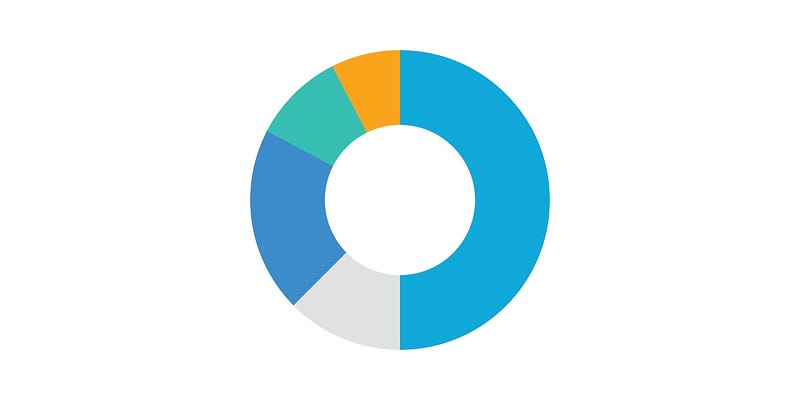
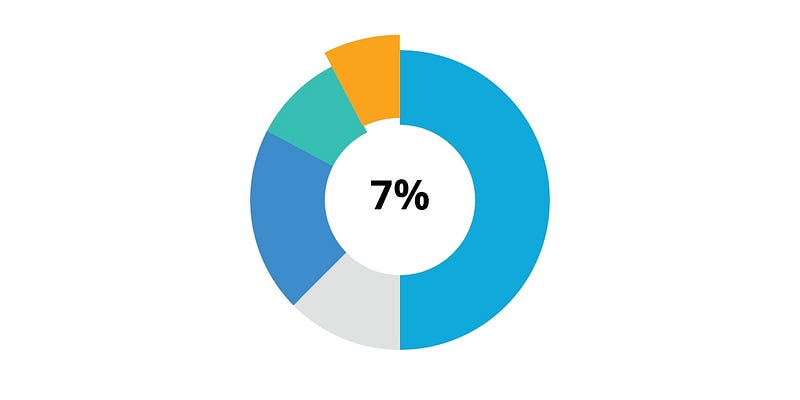
Further more we can add, arc selection to highlight specific arc of donut chart and show the percentage of that arc,

Create state for selected arc

const [selectedArc, setSelectedArc] = useState<object | undefined>(undefined);

Modify pieD variable’s logic as below

const arcPathGenerator = d3.arc();

      const pieD = pie?.map?.((item, index) => {
        return {
          ...item?.data,
          arc: arcPathGenerator({
            innerRadius:
              selectedArc?.id === item?.data?.id
                ? size / 2.2 + diffGap
                : size / 2.2,
            outerRadius:
              selectedArc?.id === item?.data?.id ? radius + diffGap : radius,
            startAngle: item.startAngle,
            endAngle: item.endAngle,
          }),
        };
      });

      return pieD;

And add onPress to Path and pass item to it

return (
   <Path
     key={index}
     d={item?.arc}
     fill={item?.color}
     onPress={() => clickHandler(item, index)}
   />
 );

And set item to selectedArc state

const clickHandler = (arc, i) => {
  setSelectedArc && setSelectedArc(prev => (prev?.id === arc?.id ? undefined : arc));
};

When we click on any arc we display it as selected and display its percentage center
Here’s the full source code of donut.tsx

import React, { useMemo, memo } from “react”;
import { View, StyleSheet } from “react-native”;
import { useTheme } from@react-navigation/native’;

import { G, Path, Svg } from ‘react-native-svg’;
import * as d3 from ‘d3';

import { AppText } from ‘@components’;
import { modarateHeight } from ‘@utils/responsive’;
import { colors } from ‘@theme’

type DonutProps = {
  size: number;
  data: object[];
};

const diffGap = modarateHeight(0.3);

const Donut = ({ size, data }: DonutProps) => {

  const radius = Math.min(size, size) / 4

  const pie = useMemo(() => {
    if (data?.length > 0) {
      const pieGenerator = d3.pie<any, DataItem>().value(d => {
        return d.value;
      });
      return pieGenerator(data);
    }
  }, [data]);

  const arcs = useMemo(() => {
    if (pie?.length > 0) {
      const arcPathGenerator = d3.arc();

      const pieD = pie?.map?.((item, index) => {
        return {
          ...item?.data,
          arc: arcPathGenerator({
            innerRadius:
              selectedArc?.id === item?.data?.id
                ? size / 2.2 + diffGap
                : size / 2.2,
            outerRadius:
              selectedArc?.id === item?.data?.id ? radius + diffGap : radius,
            startAngle: item.startAngle,
            endAngle: item.endAngle,
          }),
        };
      });

      return pieD;
    }
  }, [radius, pie, selectedArc]);

  const clickHandler = (arc, i) => {
    setSelectedArc(prev => (prev?.id === arc?.id ? undefined : arc));
  };

  const component = () => (
    <View style={styles.wrapper}>
      <Svg width={size} height={size} viewBox={`0 0 ${size} ${size}`}>
        <G transform={`translate(${size / 2}, ${size / 2})`}>
          {arcs.map((item, index) => {
            return (
              <Path
                key={index}
                d={item?.arc}
                fill={colors?.[index]}
                onPress={() => clickHandler(item, index)}
              />
            );
          })}
        </G>
      </Svg>
      {selectedArc && (
        <AppText
          label={`${Math.abs(selectedArc?.value).toFixed(1)}%`}
          style={styles.label}
          medium
        />
      )}
    </View>
  );

  if (!arcs || arcs?.length <= 0) return null;
  return useMemo(component, dependancies)
}

export default memo(Donut);

const styles = StyleSheet.create({
    wrapper: {
      flex: 1,
      justifyContent: 'center',
      alignItems: 'center',
    },
    label: {
      position: 'absolute',
      color: colors.text,
    },
})

Happy coding 😊

D3js
Charts
React Native
React Native Development
App Development
Recommended from ReadMedium