avatarJoanna Marie

Free AI web copilot to create summaries, insights and extended knowledge, download it at here

2470

Abstract

rval</span>(intervalId); });

<span class="hljs-keyword">return</span> ( <span class="language-xml"><span class="hljs-tag"><<span class="hljs-name">div</span> <span class="hljs-attr">className</span>=<span class="hljs-string">"App"</span>></span> <span class="hljs-tag"><<span class="hljs-name">p</span>></span>Counter 1: {count1}<span class="hljs-tag"></<span class="hljs-name">p</span>></span> <span class="hljs-tag"><<span class="hljs-name">p</span>></span>Counter 2: {count2}<span class="hljs-tag"></<span class="hljs-name">p</span>></span> <span class="hljs-tag"></<span class="hljs-name">div</span>></span></span> ); }</pre></div><h2 id="35aa">Expected result</h2><p id="65dd">In this functional component I’m creating two counters, each one increments at different intervals.</p><ul><li>It initializes two more state variables <code>count1</code> and <code>count2</code>. Both are initially set to 0. These variables will store the values of the two counters.</li><li>It uses two <code>useEffect</code> hooks. They set up intervals to update the counters at specified intervals.</li><li>The first <code>useEffect</code> sets up an interval for <code>count1</code> to increment <b>every 1 second </b>(1000 milliseconds). It also returns a cleanup function that clears the interval when this <code>useEffect</code> is unmounted or when the component is re-rendered.</li><li>The second <code>useEffect</code> does the same for <code>count2</code>, but it increments it <b>every 3 seconds</b> (3000 milliseconds).</li><li>The <code>return</code> statement defines the JSX that will be rendered on the web page. It displays the current values of <code>count1</code> and <code>count2</code>.</li></ul><p id="b5c9">So expected result is to see something like this:</p><figure id="5bf8"><img src="https://cdn-images-1.readmedium.com/v2/resize:fit:800/1*4CS2KkM_Uw-nKj-YRErhjw.gif"><figcaption></figcaption></figure><p id="61b7">However, it’s working in this way:</p><figure id="7a55"><img src="https://cdn-images-1.readmedium.com/v2/resize:fit:800/1*CZqOW-8ouapxCcXjr-HP6A.gif"><figcaption></figcaption></figure><h2 id="b6c4">Why it is not working?</h2><p id="75f5">The issue with the second counter not updating as expected is due to the <b>lack of specifying a dependency array</b> in the <code>useEffect</code> hooks.</p><ul><li>During the initial render, the component is displayed with both <code>count1</

Options

code> and <code>count2</code> set to 0.</li><li>After the initial render, the <code>useEffect</code> hooks are executed.</li><li>The first counter (<code>count1</code>) has a shorter interval and updates every 1 second, calling <code>setCount1</code>. This causes the component to re-render with the new value of <code>count1</code> (which is 1) after 1 second.</li><li>As a result of the re-render, the cleanup functions of both <code>useEffect</code> hooks are called, clearing both intervals.</li><li>In the next render, <code>count1</code> has a value of 1, but <code>count2</code> is still at 0.</li><li>The <code>useEffect</code> hooks run again.</li><li>The first counter once again calls <code>setCount1</code> after 1 second to increment <code>count1</code>. This re-renders the component with <code>count1</code> value of 2.</li><li>However, the cleanup functions are called again for both <code>useEffect</code> hooks, preventing the second counter from updating <code>count2</code>.</li></ul><h2 id="8414">Conclusion</h2><p id="7500">In React’s <code>useEffect</code> hook, specifying a dependency array is not always required, but it can be crucial for controlling when the effect runs and ensuring that your component behaves as expected or if it is running infinite loop.</p><div id="3aca" class="link-block"> <a href="https://readmedium.com/react-anti-patterns-props-in-initial-state-ad8e1060cd87"> <div> <div> <h2>React Anti-Patterns: Props In Initial State</h2> <div><h3>undefined</h3></div> <div><p>undefined</p></div> </div> <div> <div style="background-image: url(https://miro.readmedium.com/v2/resize:fit:320/0*jsHSV5wa8QYJQH3k)"></div> </div> </div> </a> </div><div id="8431" class="link-block"> <a href="https://readmedium.com/10-interview-questions-npm-modules-packages-dependencies-79e625ef2cb8"> <div> <div> <h2>10 Interview Questions — npm, modules, packages, dependencies</h2> <div><h3>undefined</h3></div> <div><p>undefined</p></div> </div> <div> <div style="background-image: url(https://miro.readmedium.com/v2/resize:fit:320/0*UTn7eKeBH-uA4_98)"></div> </div> </div> </a> </div></article></body>

React Interview: Why those useEffect hooks are not working as expected?

Photo by Caspar Camille Rubin on Unsplash

Interview: Why those useEffect hooks are not working as expected?

import { useState, useEffect } from "react";

export default function App() {

  const [count1, setCount1] = useState(0);
  const [count2, setCount2] = useState(0);

  useEffect(() => {
    const intervalId = setInterval(() => {
      setCount1(count1 => count1 + 1);
    }, 1000);

    return () => clearInterval(intervalId);
  });

  useEffect(() => {
    const intervalId = setInterval(() => {
      setCount2(count2 => count2 + 1);
    }, 3000);

    return () => clearInterval(intervalId);
  });

  return (
    <div className="App">
      <p>Counter 1: {count1}</p>
      <p>Counter 2: {count2}</p>
    </div>
  );
}

Expected result

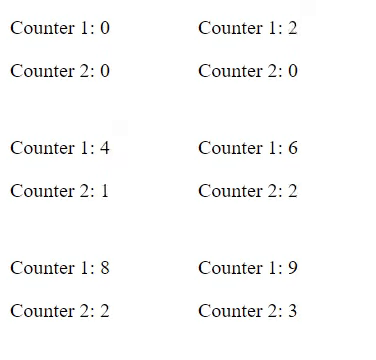
In this functional component I’m creating two counters, each one increments at different intervals.

  • It initializes two more state variables count1 and count2. Both are initially set to 0. These variables will store the values of the two counters.
  • It uses two useEffect hooks. They set up intervals to update the counters at specified intervals.
  • The first useEffect sets up an interval for count1 to increment every 1 second (1000 milliseconds). It also returns a cleanup function that clears the interval when this useEffect is unmounted or when the component is re-rendered.
  • The second useEffect does the same for count2, but it increments it every 3 seconds (3000 milliseconds).
  • The return statement defines the JSX that will be rendered on the web page. It displays the current values of count1 and count2.

So expected result is to see something like this:
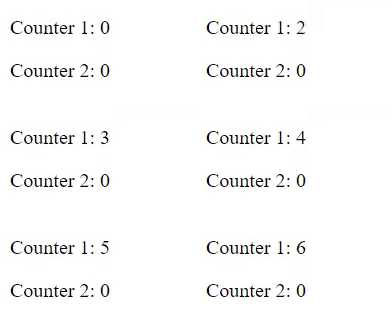
However, it’s working in this way:
Why it is not working?

The issue with the second counter not updating as expected is due to the lack of specifying a dependency array in the useEffect hooks.

  • During the initial render, the component is displayed with both count1 and count2 set to 0.
  • After the initial render, the useEffect hooks are executed.
  • The first counter (count1) has a shorter interval and updates every 1 second, calling setCount1. This causes the component to re-render with the new value of count1 (which is 1) after 1 second.
  • As a result of the re-render, the cleanup functions of both useEffect hooks are called, clearing both intervals.
  • In the next render, count1 has a value of 1, but count2 is still at 0.
  • The useEffect hooks run again.
  • The first counter once again calls setCount1 after 1 second to increment count1. This re-renders the component with count1 value of 2.
  • However, the cleanup functions are called again for both useEffect hooks, preventing the second counter from updating count2.

Conclusion

In React’s useEffect hook, specifying a dependency array is not always required, but it can be crucial for controlling when the effect runs and ensuring that your component behaves as expected or if it is running infinite loop.

React
React Hook
JavaScript
Interview
Front End Development
Recommended from ReadMedium