
Random Seeds and Reproducibility
Setting up your experiments in Python, Numpy, and PyTorch

Motivation
"What is a programmer's worst nightmare?"
On my part, I can safely say that my worst nightmare, as a programmer, is a piece of code that behaves as if it were random, spewing out different results every time I run it, even if I give it the very same inputs!
There's actually a famously quoted definition of insanity:
"Insanity is doing the same thing over and over again and expecting different results."
Though it's often attributed to Albert Einstein, research suggests this isn't the case. But, authorship of the quote aside, the truth remains: feeding the same inputs to a piece of code over and over again, and getting different results every time, will drive you insane :-)
This post contains a partial reproduction of content from my book: “Deep Learning with PyTorch Step-by-Step: A Beginner’s Guide”.
(Pseudo-) Random Numbers
“How can one possibly debug and fix such a thing?”
Luckily for us, programmers, we don't have to deal with true randomness, but pseudo-randomness instead.
"What do you mean?"
Well, you know, random numbers are not quite random… They are really pseudo-random, which means a number generator spits out a sequence of numbers that looks like it’s random. But it is not, really.
The good thing about this behavior is that we can tell the generator to start a particular sequence of pseudo-random numbers. To some extent, it works as if we tell the generator: “please generate sequence #42,” and it will spill out a sequence of numbers.
That number, 42, which works like the index of the sequence, is called a seed. Every time we give it the same seed, it generates the same numbers.
"Same old seed, same old numbers."
This means we have the best of both worlds: On the one hand, we do generate a sequence of numbers that, for all intents and purposes, is considered to be random; on the other hand, we have the power to reproduce any given sequence. I am certain you can appreciate how convenient that is for debugging purposes and avoiding insanity :-)
Moreover, you can guarantee that other people will be able to reproduce your results. Imagine how annoying it would be to run the code you got from a blog post or book, and get different outputs every time, having to wonder if there is anything wrong with it.
The last thing you need while learning a new topic is to be thrown off-balance because you get different results every time you run some code (the code may very well be completely correct, apart from having a seed set). But, with a random seed properly set, you and I, and everyone else running the code, can achieve the very same outputs, even if it involves generating random data!
Generating Random Numbers
Although the seed is called random, its choice certainly is not! Often, you'll see that the chosen random seed is 42, the (second) least random of all random seeds one could possibly choose.
So, we're honoring the long-lived tradition of setting seeds as 42 in this post as well. In pure Python, you use
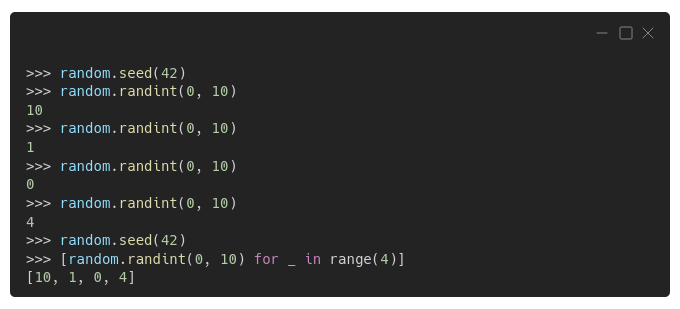
See? Completely deterministic! Once you set the random seed to 42 (obviously!), the first four generated integers are 10, 1, 0, and 4, in that order, regardless if you're generating them one by one, or inside a list comprehension.
In case you’re curious about the generation itself, Python’s random module uses the Mersenne Twister random number generator, which is a completely deterministic algorithm. This means the algorithm is great for addressing reproducibility issues but totally unsuitable for cryptographic purposes.
The number generator has an internal state, which keeps track of the last element drawn from a particular sequence (each sequence being identified by its corresponding seed), so it knows where to pick the next element from.
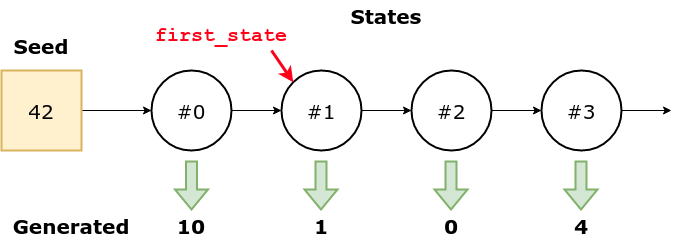
You can retrieve (and set) that state if you wish, using
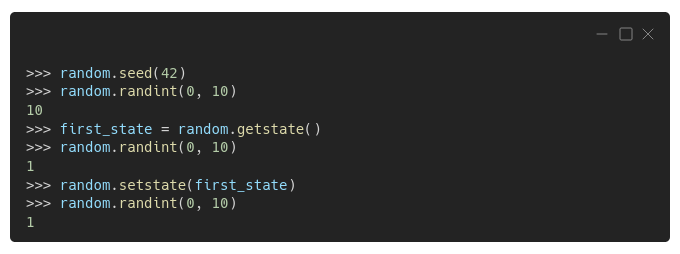
As expected, the first number was, once again, 10 (since we used the same seed). The generator's internal state, at this point, records that only one number was drawn from the sequence. We save this state as first_state.
So we draw another one, and we get, as expected, the number 1. The internal state is updated accordingly, but then we set it back to what it was before the second number was drawn.
Now, if we draw yet another number, we'll get the number 1 one more time because we forced the generator to "forget" the last drawn by updating its internal state.
The numbers do not look so random anymore, uh?
"Yeah, but I gotta ask… what's in that state?"
Glad you asked. It's just a tuple! The first element is version (3), the second element is a long list of 625 integers (the internal state), and the last element is usually None(you can safely ignore it for now).
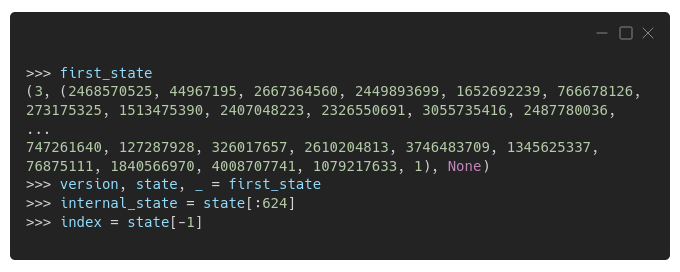
See that "1" at the very end? That's the 625th element of the list, and it works as an index to the other elements — the actual internal state is represented by the first 624 elements. Keep that in mind, we'll get back to it soon!
"OK, so we're good, and everything is perfectly reproducible now?"
We're not quite there yet… if you check Python's "Notes on Reproducibility", you will see this:
"By re-using a seed value, the same sequence should be reproducible from run to run as long as multiple threads are not running."
So, if you're multi-threading, reproducibility goes bye-bye! On the bright side, Python's (pseudo-)random number generator (let's call it RNG from now on) comes with two guarantees (transcribed from the "Notes"):
- If a new seeding method is added, then a backward compatible seeder will be offered.
- The generator’s
random()method will continue to produce the same sequence when the compatible seeder is given the same seed.
"OK, NOW we're good?"
Sorry, but no! Python's own RNG is not the only one you will likely need to set a seed for.
Numpy
If you're using Numpy as well, you'll need to set a seed for its own RNG. You can use
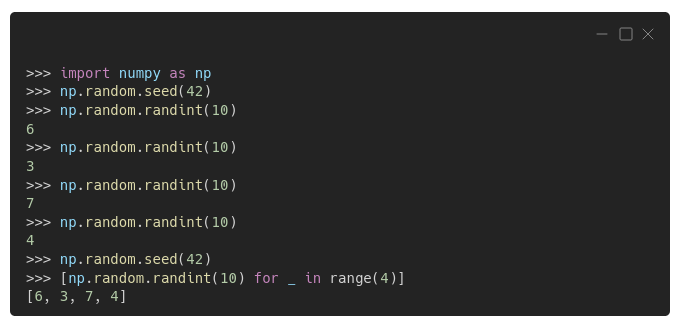
You can see from the example above that Numpy's RNG behaves the same way as Python's RNG: once a seed is set, the generator outputs the very same sequence of numbers, 6, 3, 7, and 4.
Although the code above is the most commonly found "in the wild", and many people keep using it like that (myself included, guilty as charged), it's considered legacy code already.
More recent Numpy versions, starting on 1.17, use a different way to generate (pseudo-)random numbers: creating a generator first, and then drawing numbers from it. One can create the default generator using
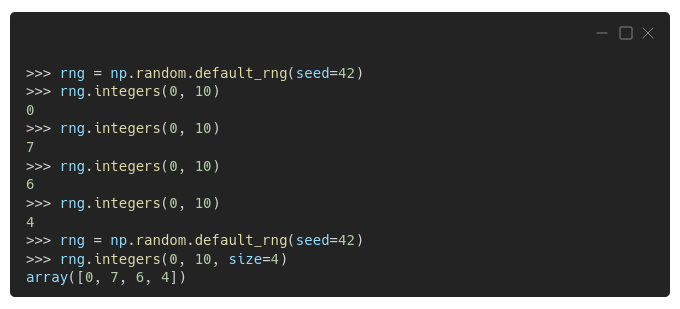
"Wait, are the numbers different now?"
Yes, they are different, even though we're using the same seed, 42.
"Why is that?"
The numbers are different because the generator is different, that is, it uses a different algorithm. Numpy's legacy code uses the Mersenne Twister (MT) algorithm, just like Python's random module, while Numpy's new default generator uses the Permute Congruential Generator (PCG) algorithm.
But, it turns out, even though Numpy's legacy code and Python's random module use the same algorithm, and we're using the same seed in both of them, the generated numbers are still different!
"You gotta be kidding me! Why?!"
I understand you may be frustrated, and the difference boils down to the way Python's random module and Numpy handle that pesky "index" in the generator's internal state. In case you're interested in a little bit more detail about that, check the aside below — otherwise, feel free to skip it.
Matching the Internal States
If we use that same list of 624 numbers to update the states of both generators while setting that "index" to 624 (as Numpy does by default), that's what we get: matching sequences!
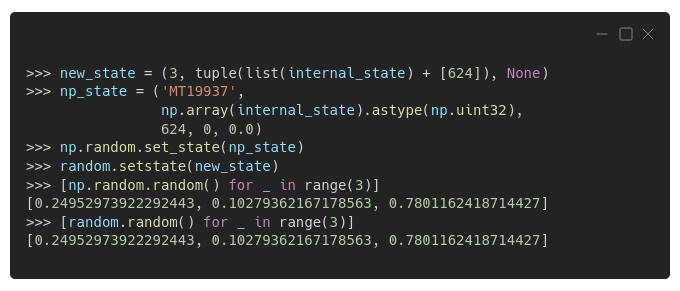
As you can see in the code above, it's also possible to retrieve or set the internal state of a Numpy's Generator using
There's one more thing to point out, transcribed from Numpy's
Generatordoes not provide a version compatibility guarantee. In particular, as better algorithms evolve the bit stream may change.
Who said ensuring reproducibility was easy? Not me!
Keep in mind: for real reproducibility, you need to use the same random seeds, the same modules/packages, and the same versions!
Time to move on to a different package!
PyTorch
Just like Numpy, PyTorch also has its own method for setting a seed,
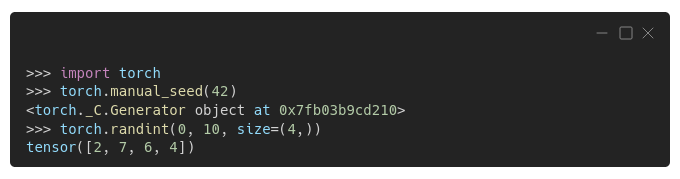
As you're probably already expecting, the generated sequence is, once again, different. New package, new sequence.
But there's more! If you generate a sequence in a different device, like your GPU ('cuda'), you get yet another sequence!
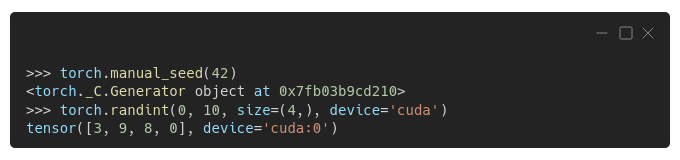
At this point, this shouldn't be a surprise to you, right? Besides, PyTorch's documentation on reproducibility is quite straightforward about it:
"Completely reproducible results are not guaranteed across PyTorch releases, individual commits, or different platforms. Furthermore, results may not be reproducible between CPU and GPU executions, even when using identical seeds."
So, I update my advice from the previous section accordingly:
Keep in mind: for real reproducibility, you need to use the same random seeds, the same modules/packages, the same versions, the same platforms, the same devices, and maybe the same drivers (CUDA version for your GPU, for example)!
Perhaps you noticed a Generator in the outputs above… unsurprisingly, PyTorch also uses generators, just like Numpy, and that generator is PyTorch's default generator. We can retrieve it using
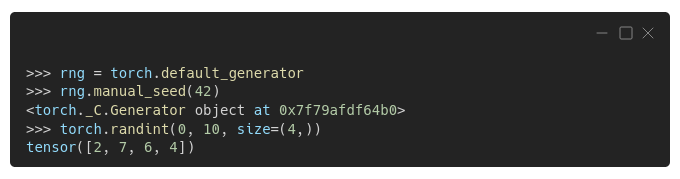
You can also create another generator, and use it as an argument for other functions or objects:
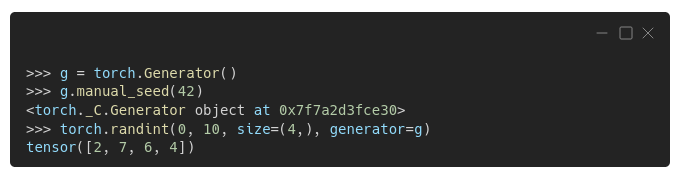
There's one case where using your own generator is particularly useful: sampling in data loaders.
Data Loaders
When creating a data loader for the training set, we usually set its argument shuffle to True (since shuffling data points, in most cases, improves the performance of gradient descent). This is a very convenient way of shuffling the data that is implemented using a
Even when there is no shuffling involved, as is typical in data loaders used for the validation set, a
Since PyTorch 1.7, in order to ensure reproducibility, we need to assign a generator to the
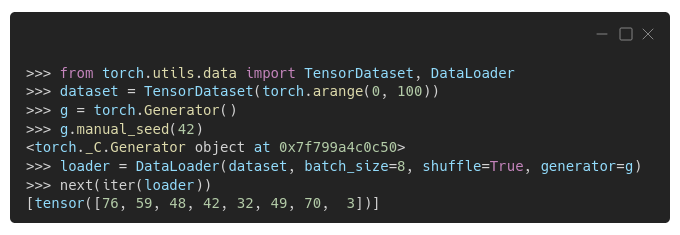
We can actually retrieve the sampler from the loader, inspect its initial seed, and manually set a different seed if we want:
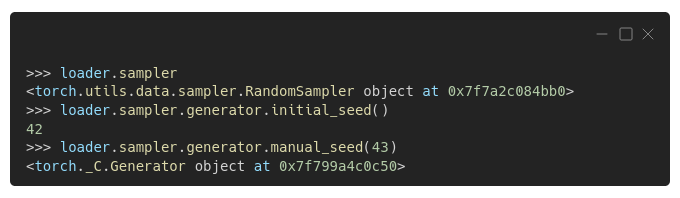
We'll be doing exactly that in a couple of sections while writing a function to use "one seed to rule them all" :-)
Assigning a generator to the data loader will get you covered, but only as long as you load the data in the main process (num_workers=0, the default). If you want to use multi-processing for loading the data, that is, specifying a higher number of workers, you'll also need to assign a worker_init_fn()to your data loader in order to avoid all your workers drawing the very same sequence of numbers. Let's see why this may happen!
PyTorch can actually take care of itself in the above situation — it seeds each worker with a different number, that is, base_seed + worker_id, but it cannot take care of other packages (e.g. Numpy or Python's random module).
We can take a peek at what's happening using some print statements inside the seed_worker()function passed as an argument to the data loader:
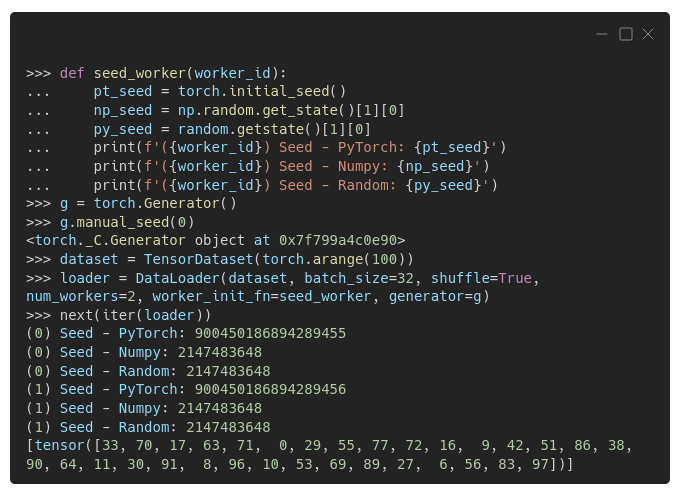
There are two workers, (0) and (1), and each time a worker is called to perform its duties, the seed_worker() function prints the seeds used by PyTorch, Numpy, and Python's random module.
You can see that the seeds used by PyTorch are just fine — the first worker uses a number ending in 55; the second worker's, a number ending in 56, as expected.
But the seeds used by Numpy and Python's random module are the same across workers, and that's what we want to avoid. It's OK for the seed to be the same across modules, though.
Luckily, there's an easy fix: instead of printing statements, we include some seed-setting statements in the seed_worker() function, using PyTorch's initial seed (and adjusting it to make it a 32-bit integer):
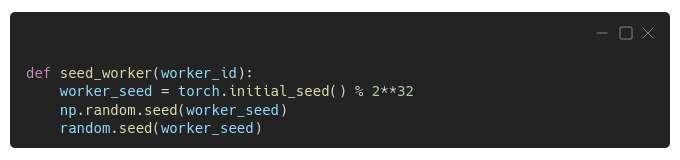
Now every worker will use a different seed for PyTorch, Numpy, and Python's random module.
"OK, I understand that, but why do I need to seed the other packages if I'm using only PyTorch?"
Seeding PyTorch Is Not Enough!
You may think that, if you're not explicitly using Numpy or Python's random module in your code, you don't need to care about setting seeds for them, right?
Maybe you don't, but it's better to play safe and set seeds for everything: PyTorch, Numpy, and even Python's random module, and that's what we did in the previous section.
"Why is that?"
It turns out, PyTorch may be using a generator that's not its own! Honestly, this came to me as a surprise too when I found out about it! As weird as it may sound, in Torchvision versions prior to 0.8, there was still some code that depended upon Python’s random module, instead of PyTorch’s own random generators. The problem happened when some of the random transformations for data augmentation were used, like RandomRotation(), RandomAffine(), and others.
CUDA
Manually setting PyTorch's seed works for both CPU and CUDA/GPU, as we've seen a couple of sections ago. But the cuDNN library, used by CUDA convolution operations, can still be a source of non-deterministic behavior.
It turns out, that the library tries to use the fastest possible algorithm, depending on the supplied parameters, and the underlying hardware and environment. But we can force to deterministically choose an algorithm by disabling this so-called benchmarking feature, setting torch.backends.cudnn.benchmark to False.
Although the choice of the algorithm can be made deterministic using the configuration above, the algorithm itself may not be!
"Oh, c'mon!"
I hear you. To fix that, there's yet another configuration we need to make: setting torch.backends.cudnn.deterministic to True.

There are other implications for the reproducibility of using CUDA: RNN and LSTM layers may also exhibit non-deterministic behavior due to a change introduced in CUDA version 10.2 (see the documentation for details).
PyTorch's documentation suggests setting the environment variable
CUBLAS_WORKSPACE_CONFIGto either:16:8or:4096:2to enforce deterministic behavior.
Sing-Along: Old McTorch Had A Model
"Old McTorch had a model, E-I-E-I-O
And on its model, it had some seeds, E-I-E-I-O
With a seed seed here, And seed seed there
Here a seed, there a seed, Everywhere a seed seed
Old McTorch had a model, E-I-E-I-O"
How do you like the song above, from "Nursery Rhymes for Programmers"? By the way, I'm kidding, that's not a real book, I made it up! Maybe I should write such a book… but I digress!
Back to our main topic, it may feel exactly like the song — seeds and more seeds — seeds everywhere!
If only there was…
"One seed to rule them all!"
There is no such thing, but we can try the next best thing: our own function to set as many seeds as possible! The code below sets seeds for PyTorch, Numpy, Python's random module, and the sampler's generator; besides configuring PyTorch's backend to make CUDA convolution operations deterministic.
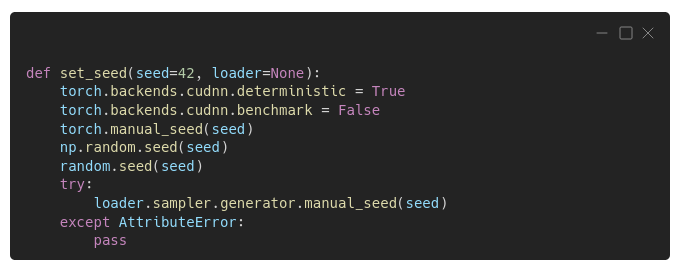
"Is this enough?"
Not necessarily, no. Some operations may still be nondeterministic, thus making your results not fully reproducible. It is possible, though, to force PyTorch to use ONLY deterministic algorithms setting
"I knew it!"
It may be that some of the operations you're performing ONLY have non-deterministic algorithms available, and then your code will throw a RuntimeError when called. For this reason, I haven't included this in the set_seed function above — we're stopping short of breaking the code to ensure its reproducibility.
Moreover, if you're using CUDA (version 10.2 or higher), besides setting
torch.use_deterministic_algorithms(True), you would also need to set the environment variableCUBLAS_WORKSPACE_CONFIG, as pointed out in the previous section.
Those nondeterministic algorithms may come from the most unexpected places. For example, in PyTorch’s documentation there is a note warning about possible reproducibility issues while using padding in images:
"When using the CUDA backend, this operation may induce non-deterministic behaviour in its backward pass that is not easily switched off. Please see the notes on reproducibility for background."
It strikes me as a bit odd that such a straightforward operation, of all things, would jeopardize reproducibility. Go figure!
Random Seed Tuning
"The (right) random seed is all you need!"
It looks like a joke, but the choice of random seed may have an impact on model training. Some seeds are "luckier" than others, in the sense that they allow the model to train faster, or to achieve a lower loss. Of course, there's no way to tell it beforehand, and no, 42 is NOT the answer to the "what's the right random seed" question :-)
If you're curious about this topic, you can check David Picard's paper: "Torch.manual_seed(3407) is all you need: On the influence of random seeds in deep learning architectures for computer vision". Here's the abstract:
"In this paper I investigate the effect of random seed selection on the accuracy when using popular deep learning architectures for computer vision. I scan a large amount of seeds (up to 104) on CIFAR 10 and I also scan fewer seeds on Imagenet using pre-trained models to investigate large scale datasets. The conclusions are that even if the variance is not very large, it is surprisingly easy to find an outlier that performs much better or much worse than the average."
Final Thoughts
Reproducibility is hard!
And we're not even talking about more fundamental issues, such as making sure you're using the data correctly to avoid embarrassments many years later when someone else tries to reproduce your published results (see Reinhart and Rogoff's Excel Blunder, also dubbed "how NOT to Excel at Economics")!
We're just focusing on (pseudo-)random number generators, and even so, one needs to take into account many different sources of (pseudo-) randomness to ensure reproducibility. That's a lot of work, but it's worth the trouble.
Make sure to always initialize your random seeds at the very start of your code to ensure (or try to!) the reproducibility of your results.
May your future experiments be fully reproducible!
If you have any thoughts, comments, or questions, please leave a comment below or reach out through my bio.link page.
If you like my posts, please consider directly supporting my work by signing up for a Medium membership using my referral page. For every new user, I get a small commission from Medium :-)


