avatarDamien Pierlot

Free AI web copilot to create summaries, insights and extended knowledge, download it at here

4677

Abstract

span class="hljs-literal">True</span> start_time = time.time() <span class="hljs-keyword">else</span>: flag = <span class="hljs-literal">False</span></pre></div><figure id="7b05"><img src="https://cdn-images-1.readmedium.com/v2/resize:fit:800/1*859cedJEy3rsR0rYCRDSPw.png"><figcaption>I conducted a test with the <code>Candles_timeframe</code> set to 10 seconds, and there was no latency in runtime.</figcaption></figure><p id="a208"><b>Sub-Chapter 3.1: Ticker Data Simulation</b></p><p id="0ef9">The <code>get_my_ticker()</code> function simulates retrieving ticker data, giving you the flexibility to customize this step according to your needs. <code><b>time.sleep()</b></code> has been added to simulate runtime execution of the function.</p><div id="57d9"><pre>flag = <span class="hljs-literal">True</span> start_time = time.time()

<span class="hljs-keyword">def</span> <span class="hljs-title function_">get_my_ticker</span>(): <span class="hljs-string">"""Simulate fetching ticker data."""</span> start_time = time.time() time.sleep(<span class="hljs-number">5</span>) <span class="hljs-built_in">print</span>(Fore.GREEN + <span class="hljs-string">"##################################################################"</span>) <span class="hljs-built_in">print</span>(Fore.GREEN + <span class="hljs-string">"The function ends in {} secs"</span>.<span class="hljs-built_in">format</span>(time.time() - start_time)) <span class="hljs-keyword">return</span> <span class="hljs-string">"I am running now on {} secondes timeframe"</span>.<span class="hljs-built_in">format</span>(Candles_timeframe)</pre></div><p id="db40"><b>Chapter 4: Simplicity and Latency with <code>time.sleep()</code></b></p><p id="1367">The alternative, <code>sleep_run()</code>, uses the <code>time.sleep()</code> function to introduce delays between executions. However, this approach can lead to unnecessary delays.</p><div id="f1f1"><pre><span class="hljs-keyword">def</span> <span class="hljs-title function_">sleep_run</span>(): <span class="hljs-string">"""Run a loop with fixed sleep interval."""</span> <span class="hljs-keyword">while</span> <span class="hljs-literal">True</span>: current_time = datetime.now().strftime(<span class="hljs-string">'%H:%M:%S'</span>) <span class="hljs-built_in">print</span>(Fore.BLUE + <span class="hljs-string">"##################################################################"</span>) <span class="hljs-built_in">print</span>(Fore.BLUE + <span class="hljs-string">'Current Time is: {}'</span>.<span class="hljs-built_in">format</span>(current_time)) <span class="hljs-built_in">print</span>(Fore.BLUE + get_my_ticker()) time.sleep(Candles_timeframe)</pre></div><figure id="2460"><img src="https://cdn-images-1.readmedium.com/v2/resize:fit:800/1*kXvrMuBs70z0z4k3c6CZyA.png"><figcaption>I conducted a test with the <code>Candles_timeframe</code> set to 10 seconds, and there was latency in runtime.</figcaption></figure><p id="7e61"><b>Conclusion</b>:</p><p id="98da">Time precision is the key to successful algorithmic trading. Our Python script empowers you to conquer the challenge of latency by executing your transactions with clockwork precision. By leveraging these sophisticated techniques, you can seize trading opportunities the moment they arise. Take control of your trading and eliminate needless delays to maximize your gains.</p><figure id="531d"><img src="https://cdn-images-1.readmedium.com/v2/resize:fit:800/1*1LWLUDm533JDTh1hkK4sbA.png"><figcaption>The red line displays the accumulating time latency during each iteration, while the blue line represents the precise timing function. x axis = seconds, y axis = iternations</figcaption></figure><p id="5159"><i>Affiliate Note: If you’re interested in learning Python programming or want to deepen your Python skills, I recommend checking out the courses offered by <a href="https://learnpython.com/?ref=ztrlzmm">LearnPython.com</a>. Please note that the provided link is an affiliate link. By using this link, you support my work as an author. You can access high-quality Python courses suitable for all skill levels. Whether you’re a beginner or looking to refine your Python programming skills, these courses can help you achieve your learning goals. Thank you for your ongoing support.</i></p><p id="13b6"><b>Co</b>de:</p><div id="3fc4"><pre><span class="hljs-keyword">import</span> time <span class="hljs-keyword">from</span> datetime <span class="hljs-keyword">import</span> datetime, timedelta <span class="hljs-keyword">from</span> colorama <span class="hljs-keyword">import</sp

Options

an> Fore, Back, Style

<span class="hljs-comment"># Set the candles timeframe in seconds</span> Candles_timeframe = <span class="hljs-number">60</span> <span class="hljs-comment"># 1 minutes in seconds</span>

<span class="hljs-keyword">def</span> <span class="hljs-title function_">ceil_datetime</span>(<span class="hljs-params">dt, delta</span>): <span class="hljs-string">"""Round up a datetime object to the nearest time delta."""</span> <span class="hljs-keyword">return</span> dt + (datetime.<span class="hljs-built_in">min</span> - dt) % delta

<span class="hljs-keyword">def</span> <span class="hljs-title function_">waiting_to_start</span>(<span class="hljs-params">minutes: <span class="hljs-built_in">float</span></span>): <span class="hljs-string">"""Wait until the next rounded time window to start."""</span> rounded = ceil_datetime(datetime.now(), timedelta(minutes=minutes)) time_go = <span class="hljs-literal">True</span> <span class="hljs-keyword">while</span> time_go: unix_rounded_time = time.mktime(rounded.timetuple()) unix_time_now = time.mktime(datetime.now().timetuple()) <span class="hljs-keyword">if</span> unix_rounded_time - unix_time_now > <span class="hljs-number">0</span>: time_go = <span class="hljs-literal">True</span> <span class="hljs-keyword">else</span>: time_go = <span class="hljs-literal">False</span> time.sleep(<span class="hljs-number">0.1</span>)

waiting_to_start(Candles_timeframe / <span class="hljs-number">60</span>)

flag = <span class="hljs-literal">True</span> start_time = time.time()

<span class="hljs-keyword">def</span> <span class="hljs-title function_">get_my_ticker</span>(): <span class="hljs-string">"""Simulate fetching ticker data."""</span> start_time = time.time() time.sleep(<span class="hljs-number">5</span>) <span class="hljs-built_in">print</span>(Fore.GREEN + <span class="hljs-string">"##################################################################"</span>) <span class="hljs-built_in">print</span>(Fore.GREEN + <span class="hljs-string">"The function ends in {} secs"</span>.<span class="hljs-built_in">format</span>(time.time() - start_time)) <span class="hljs-keyword">return</span> <span class="hljs-string">"I am running now on {} secondes timeframe"</span>.<span class="hljs-built_in">format</span>(Candles_timeframe)

<span class="hljs-keyword">def</span> <span class="hljs-title function_">accurate_run</span>(): <span class="hljs-string">"""Run a loop with accurate timing based on start time and timeframe."""</span> <span class="hljs-keyword">global</span> flag, start_time <span class="hljs-keyword">while</span> <span class="hljs-literal">True</span>: <span class="hljs-keyword">if</span> flag: current_time = datetime.now().strftime(<span class="hljs-string">'%H:%M:%S'</span>) <span class="hljs-built_in">print</span>(Fore.BLUE + <span class="hljs-string">"##################################################################"</span>) <span class="hljs-built_in">print</span>(Fore.BLUE + <span class="hljs-string">'Current Time is: {}'</span>.<span class="hljs-built_in">format</span>(current_time)) <span class="hljs-built_in">print</span>(Fore.BLUE + get_my_ticker())

    <span class="hljs-keyword">if</span> time.time() - start_time &gt;= Candles_timeframe:
        flag = <span class="hljs-literal">True</span>
        start_time = time.time()
    <span class="hljs-keyword">else</span>:
        flag = <span class="hljs-literal">False</span>

<span class="hljs-keyword">def</span> <span class="hljs-title function_">sleep_run</span>(): <span class="hljs-string">"""Run a loop with fixed sleep interval."""</span> <span class="hljs-keyword">while</span> <span class="hljs-literal">True</span>: current_time = datetime.now().strftime(<span class="hljs-string">'%H:%M:%S'</span>) <span class="hljs-built_in">print</span>(Fore.BLUE + <span class="hljs-string">"##################################################################"</span>) <span class="hljs-built_in">print</span>(Fore.BLUE + <span class="hljs-string">'Current Time is: {}'</span>.<span class="hljs-built_in">format</span>(current_time)) <span class="hljs-built_in">print</span>(Fore.BLUE + get_my_ticker()) time.sleep(Candles_timeframe)

<span class="hljs-comment"># Uncomment one of the following lines to choose the mode to run</span> <span class="hljs-comment"># accurate_run()</span> <span class="hljs-comment"># sleep_run()</span></pre></div></article></body>

Python’s Tactical Time Advantage: A Trading Strategy Breakthrough
Introduction:

In the world of trading, every millisecond matters. The decisions made and transactions executed within these fleeting moments can have a significant impact on outcomes. That’s why we introduce a powerful tool to help you triumph over latency: a Python script engineered for precise execution of your algorithmic trading strategies. Discover how to achieve the precision of a clock-maker using this smart tool.

Chapter 1: Latency — The Foe of Algorithmic Trading

Latency, or the delay between action and response, can undermine the efforts of algorithmic trading. Our script tackles this issue by introducing methods of time precision to your transactions. The Candles_timeframe variable determines the temporal cadence of your candles, allowing you to structure your transactions at pivotal moments.

# Temporal cadence in seconds
Candles_timeframe = 60  # 1 minute in seconds/ set it to 10 for this Storie graphs

Chapter 2: Overcoming Latency with Precise Execution

The use of the time.sleep() function can introduce unnecessary delays between transactions. However, we've developed a smarter solution to initiate precise execution. The waiting_to_start() function launches the execution of your script and strategy at a precise time based on Candles_timeframe. This function is only used at the beginning to synchronize execution.

def ceil_datetime(dt, delta):
    """Round up a datetime object to the nearest time delta."""
    return dt + (datetime.min - dt) % delta

def waiting_to_start(minutes: float):
    """Wait until the next rounded time window to start."""
    rounded = ceil_datetime(datetime.now(), timedelta(minutes=minutes))
    time_go = True
    while time_go:
        unix_rounded_time = time.mktime(rounded.timetuple())
        unix_time_now = time.mktime(datetime.now().timetuple())
        if unix_rounded_time - unix_time_now > 0:
            time_go = True
        else:
            time_go = False
        time.sleep(0.1)

waiting_to_start(Candles_timeframe / 60)

Chapter 3: Clockwork Precision with Python

To demonstrate time precision, our script offers two approaches: accurate_run() and sleep_run(). The first, accurate_run(), relies on the start time and time interval to execute your orders with unparalleled precision.

def accurate_run():
    """Run a loop with accurate timing based on start time and timeframe."""
    global flag, start_time
    while True:
        if flag:
            current_time = datetime.now().strftime('%H:%M:%S')
            print(Fore.BLUE + "##################################################################")
            print(Fore.BLUE + 'Current Time is: {}'.format(current_time))
            print(Fore.BLUE + get_my_ticker())

        if time.time() - start_time >= Candles_timeframe:
            flag = True
            start_time = time.time()
        else:
            flag = False
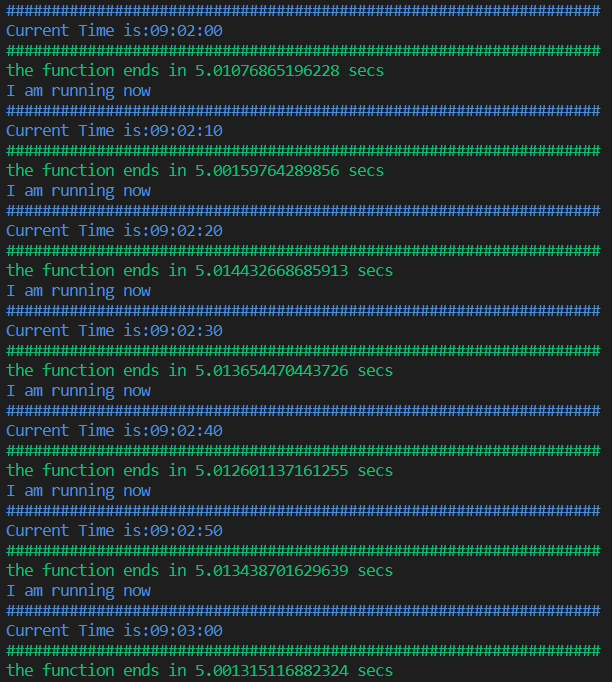
I conducted a test with the Candles_timeframe set to 10 seconds, and there was no latency in runtime.

Sub-Chapter 3.1: Ticker Data Simulation

The get_my_ticker() function simulates retrieving ticker data, giving you the flexibility to customize this step according to your needs. time.sleep() has been added to simulate runtime execution of the function.

flag = True
start_time = time.time()

def get_my_ticker():
    """Simulate fetching ticker data."""
    start_time = time.time()
    time.sleep(5)
    print(Fore.GREEN + "##################################################################")
    print(Fore.GREEN + "The function ends in {} secs".format(time.time() - start_time))
    return "I am running now on {} secondes timeframe".format(Candles_timeframe)

Chapter 4: Simplicity and Latency with time.sleep()

The alternative, sleep_run(), uses the time.sleep() function to introduce delays between executions. However, this approach can lead to unnecessary delays.

def sleep_run():
    """Run a loop with fixed sleep interval."""
    while True:
        current_time = datetime.now().strftime('%H:%M:%S')
        print(Fore.BLUE + "##################################################################")
        print(Fore.BLUE + 'Current Time is: {}'.format(current_time))
        print(Fore.BLUE + get_my_ticker())
        time.sleep(Candles_timeframe)
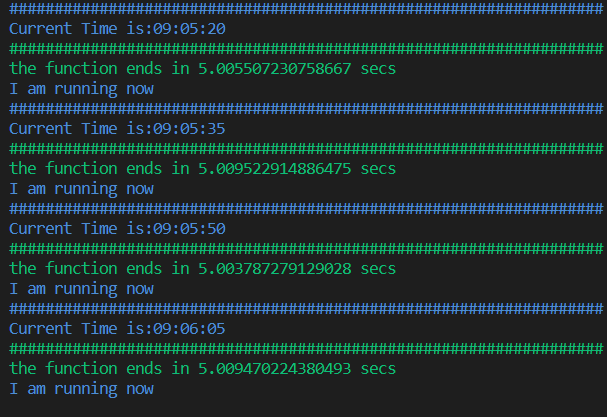
I conducted a test with the Candles_timeframe set to 10 seconds, and there was latency in runtime.

Conclusion:

Time precision is the key to successful algorithmic trading. Our Python script empowers you to conquer the challenge of latency by executing your transactions with clockwork precision. By leveraging these sophisticated techniques, you can seize trading opportunities the moment they arise. Take control of your trading and eliminate needless delays to maximize your gains.
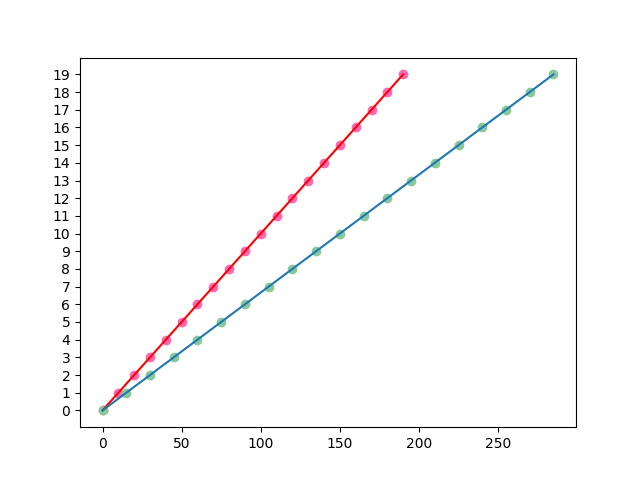
The red line displays the accumulating time latency during each iteration, while the blue line represents the precise timing function. x axis = seconds, y axis = iternations

Affiliate Note: If you’re interested in learning Python programming or want to deepen your Python skills, I recommend checking out the courses offered by LearnPython.com. Please note that the provided link is an affiliate link. By using this link, you support my work as an author. You can access high-quality Python courses suitable for all skill levels. Whether you’re a beginner or looking to refine your Python programming skills, these courses can help you achieve your learning goals. Thank you for your ongoing support.

Code:

import time
from datetime import datetime, timedelta
from colorama import Fore, Back, Style

# Set the candles timeframe in seconds
Candles_timeframe = 60  # 1 minutes in seconds

def ceil_datetime(dt, delta):
    """Round up a datetime object to the nearest time delta."""
    return dt + (datetime.min - dt) % delta

def waiting_to_start(minutes: float):
    """Wait until the next rounded time window to start."""
    rounded = ceil_datetime(datetime.now(), timedelta(minutes=minutes))
    time_go = True
    while time_go:
        unix_rounded_time = time.mktime(rounded.timetuple())
        unix_time_now = time.mktime(datetime.now().timetuple())
        if unix_rounded_time - unix_time_now > 0:
            time_go = True
        else:
            time_go = False
        time.sleep(0.1)

waiting_to_start(Candles_timeframe / 60)

flag = True
start_time = time.time()

def get_my_ticker():
    """Simulate fetching ticker data."""
    start_time = time.time()
    time.sleep(5)
    print(Fore.GREEN + "##################################################################")
    print(Fore.GREEN + "The function ends in {} secs".format(time.time() - start_time))
    return "I am running now on {} secondes timeframe".format(Candles_timeframe)

def accurate_run():
    """Run a loop with accurate timing based on start time and timeframe."""
    global flag, start_time
    while True:
        if flag:
            current_time = datetime.now().strftime('%H:%M:%S')
            print(Fore.BLUE + "##################################################################")
            print(Fore.BLUE + 'Current Time is: {}'.format(current_time))
            print(Fore.BLUE + get_my_ticker())

        if time.time() - start_time >= Candles_timeframe:
            flag = True
            start_time = time.time()
        else:
            flag = False

def sleep_run():
    """Run a loop with fixed sleep interval."""
    while True:
        current_time = datetime.now().strftime('%H:%M:%S')
        print(Fore.BLUE + "##################################################################")
        print(Fore.BLUE + 'Current Time is: {}'.format(current_time))
        print(Fore.BLUE + get_my_ticker())
        time.sleep(Candles_timeframe)

# Uncomment one of the following lines to choose the mode to run
# accurate_run()
# sleep_run()
Algorithmic Trading
Python
Bots
Finance
Money
Recommended from ReadMedium