
Python’s Poetry vs Requirements.txt

In the evolving landscape of software development, the tools and methodologies employed by developers are as varied and nuanced as the projects they bring to life. Among these tools, Python’s Poetry package and the conventional requirements.txt file stand out for their distinct approaches to managing project dependencies. This article aims to embark on a comparative exploration of these two methodologies, delving into the intricacies of dependency management in Python projects. Through this exploration, we will dissect the functionalities, efficiencies, and idiosyncrasies of Poetry, a tool that epitomizes the modern shift towards more integrated and intuitive programming environments, against the traditional, yet ubiquitously employed requirements.txt file. In doing so, our objective is to provide a comprehensive understanding of how each method serves the Python community, thereby enabling developers to make more informed decisions in their workflow. With a focus on professional and informative discourse, this introduction sets the stage for a deeper dive into the comparative analysis of Poetry and requirements.txt, highlighting the significance of each in the broader context of Python programming and software development at large.
Understanding Python’s Poetry Package
Poetry is a tool for dependency management and packaging in Python, designed to address some of the pain points associated with managing dependencies and setting up Python projects. It is an all-in-one tool that integrates the functionalities that are usually split between pip, linter configs, setuptools, setup.py, setup.cfg, pytest config, venv, requirements.txt, MANIFEST.in, Pipfile, and other tools into a single, cohesive workflow. Poetry aims to simplify project management by handling dependency resolution, virtual environment creation, and package building and publishing.
Features of Poetry
Dependency Management
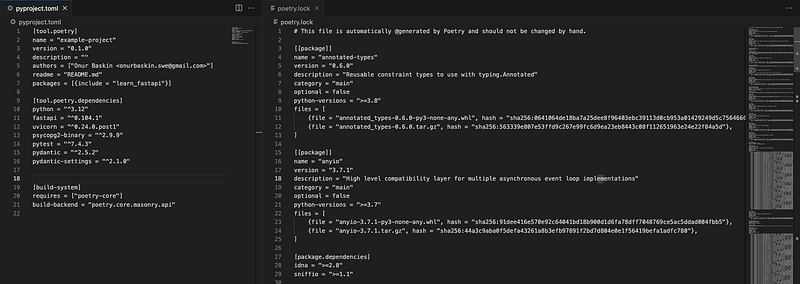
Poetry uses a more deterministic approach to dependency resolution. It generates a pyproject.toml file to declare project dependencies, development dependencies, and the Python version required including dependencies of other dependencies, in poetry.lock files. This file is akin to a more modern and versatile version of requirements.txt, providing a clearer, more organized declaration of dependencies. Thus, aid repeatable builds to be easier to manage.
In the image above, the pyproject.toml files demonstrates the simplest use of Poetry module without using groups or any other feature to organize the file even further.
Virtual Environments
Poetry automatically creates and manages virtual environments for your projects. This ensures that each project has its isolated environment, preventing conflicts between project dependencies. Also, it can manage external virtual environments too.
By initializing a Poetry instance, the module’s default behaviour is to create a virtual environment and displaying the relative path of this virtual environment in the active terminal. This is important because virtual environment creation, management, and activate/deactivate actions are simplified to a default behaviour.
Package Building and Publishing
Poetry simplifies the process of building and distributing packages. It can generate all the necessary files for a package, build it, and even publish it to a package index like PyPI, all with simple commands.
Integrated Tooling
Poetry comes with integrated tools for version management, package installation, and script running. This integrated approach eliminates the need for multiple tools and commands, streamlining the development process.
Understanding requirements.txt
The requirements.txt file is a fundamental component of many Python environments, serving as a simple yet effective way to specify the packages needed for a project. This text file holds a list of items to be installed using pip install, making it a cornerstone for managing dependencies in Python projects. It’s traditionally used in combination with virtual environments to ensure a project’s dependencies are isolated and consistent across different development and production setups.
Simplicity
The file format is straightforward, listing one package per line along with optional version specifiers. Each time the user runs the below command,
pip freeze > requirements.txt
all the modules in the currently activated environment going to be listed in the file.
Compatibility: Nearly all Python environments and developers are familiar with this method, making it a universal tool for dependency management. From local development to integrating with your favourite cloud provider’s deployment pipeline, requirements.txt has a track record of proven success. It’s safe to say it is the traditional approach when comes to keeping at least a list of modules.
Ease of Use: Creating a requirements.txt is as simple as writing a list of needed packages. It can also be generated using the following command, capturing the exact state of a virtual environment.
pip freeze > requirements.txt
Benefits and Limitations of Poetry and Requirements.txt
Both methods come with their pros and cons. Let’s list them to compare them easily.
Benefits of Poetry
- Simplicity and Efficiency: Poetry consolidates various aspects of project management into a single tool, making it simpler and more efficient to manage complex projects.
- Reproducible Builds: By locking dependency versions in a
poetry.lockfile, Poetry ensures that builds are reproducible, and environments are consistent across different setups. - Intuitive Syntax: The
pyproject.tomlfile used by Poetry is designed to be human-readable and editable, making it easier for developers to declare and manage dependencies. - Community and Support: As an increasingly popular tool among Python developers, Poetry has a growing community and a robust ecosystem of support, ensuring that it stays up-to-date with the evolving needs of developers.
Benefits of requirements.txt
- Universality: It’s a widely recognized and used format across the Python community, making it easy for anyone to understand and use.
- Clarity: The file clearly lists all the dependencies in one place, making it easy to view and manage the external packages a project needs.
- Control: Developers can specify exact versions of packages to avoid unexpected changes in dependencies leading to compatibility issues.
Unfortunately, limitations of requirements.txt
- Lack of Dependency Resolution: Unlike Poetry,
requirements.txtdoes not resolve dependencies or handle sub-dependencies. If two packages have conflicting dependencies,requirements.txtwon't provide a solution. - No Locking Mechanism: There’s no built-in way to “lock” versions like Poetry’s lock file, potentially leading to inconsistencies between environments.
- Manual Updates: Maintaining and updating the
requirements.txtcan become cumbersome, especially as the number of dependencies grows.
Conclusion
The requirements.txt file is a testament to the simplicity and effectiveness of Python's ecosystem, providing a straightforward approach to dependency management. Despite its limitations in handling complex dependency trees and lack of a locking mechanism, requirements.txt remains a popular choice due to its ease of use, universality, and the precise control it offers developers. Understanding its role and functionality is crucial for any Python developer, particularly when evaluating the best tools and practices for managing project dependencies. As projects grow and needs evolve, developers might find themselves considering more robust solutions like Poetry, but requirements.txt continues to be a reliable and familiar starting point for many.
Python’s Poetry package represents a significant leap forward in Python project management. By addressing common issues associated with dependency management, virtual environments, and package distribution, Poetry provides a comprehensive and user-friendly solution for modern Python developers. Its design philosophy emphasizes clarity, control, and convenience, making it an attractive choice for both new and experienced Python programmers. As the Python ecosystem continues to evolve, tools like Poetry play a pivotal role in shaping a more efficient and effective landscape for Python development.
How to use Poetry?

Installation and Setup
The below command installs Poetry (traditional method).
curl -sSL https://raw.githubusercontent.com/python-poetry/poetry/master/get-poetry.py | python
After the installation is complete, running the following command initiates the project setup sequence.
poetry init
Initializes a new project with Poetry, creating the necessary pyproject.toml file.
Managing Dependencies
poetry add [package]- Adds a new package to your project's dependencies and installs it.poetry add [package] --dev- Adds a package to the list of development dependencies.poetry remove [package]- Removes a package from your project's dependencies.poetry update- Updates the specified dependencies (or all if none specified).
Virtual Environments
poetry shell- Spawns a shell within the virtual environment. If the environment doesn't exist, Poetry will create it.poetry install- Installs all the dependencies listed inpyproject.toml.
Building and Packaging
poetry build- Builds the current package, typically creating a wheel and source distribution.poetry publish --repository [repository-name]- Publishes the package to the specified repository, with PyPI as default.
Version Management
poetry version [bump rule or exact version]- Bumps the version of the project, following semantic versioning.
Configuration
poetry config --list- Lists the current configuration of Poetry.poetry config [key] [value]- Sets configuration options for Poetry.
Checking and Exporting
poetry check- Checks the validity of thepyproject.tomlfile and the compatibility of dependencies.poetry export -f requirements.txt --output requirements.txt- Exports the locked dependencies to arequirements.txtformat.
Running Scripts and Commands
poetry run [command]- Runs a command in the virtual environment managed by Poetry.
Use Poetry with Docker
To conclude this article, I’ll implement a quick implementation of Poetry in Docker for a FastAPI project.
# Use the official Python image from the Docker Hub
FROM python:3.12

# Set environment varibles
ENV PYTHONDONTWRITEBYTECODE 1
ENV PYTHONUNBUFFERED 1

# Set work directory
WORKDIR /usr/src/app

# Install Poetry
RUN pip install poetry

# Copy the pyproject.toml file and install dependencies
COPY pyproject.toml .
RUN poetry config virtualenvs.create false \
    && poetry install --no-interaction --no-ansi

# Copy your application code to the container
COPY . .

# Command to run your application
CMD ["uvicorn", "main:app", "--host", "0.0.0.0", "--port", "80"]
This Dockerfile does the following:
- Starts from a base Python image.
- Sets some environment variables to ensure Python runs smoothly in the container.
- Sets a working directory.
- Installs Poetry.
- Copies your
pyproject.tomland possiblypoetry.lockto the container and installs the dependencies without creating a virtual environment (as it's not necessary inside the Docker container). - Copies the rest of your application code to the container.
- Specifies the command to run your FastAPI application using Uvicorn.
To run the Dockerfile to create the image and start the container:
docker build -t my-fastapi-app .
docker run -p 80:80 my-fastapi-app


