
Python Wavelet Transform Library: PyWavelets and Built-in Wavelet Families
PyWavelets library is the most powerful Open Source library for wavelet transforms in Python
In the previous two posts, we have talked about some essential basic concepts on Wavelet transform (WT) and classifications of WT. In this tutorial post, we will dig deeper in wavelet transform with foucing on PyWavelets, which is the most powerful open source WT library in Python.
Table of Content
- PyWavelets
- Install PyWavelets and Other Required Packages
- Built-in Wavelet Families
- Built-in Wavelet Family Members
1. PyWavelets
PyWavelets is a free Open Source library for wavelet transforms in Python, which is released under the MIT license.
Based on its documentation, the main features of PyWavelets are:
- 1D, 2D and nD Forward and Inverse Discrete Wavelet Transform (DWT and IDWT)
- 1D, 2D and nD Multilevel DWT and IDWT
- 1D and 2D Stationary Wavelet Transform (Undecimated Wavelet Transform)
- 1D and 2D Wavelet Packet decomposition and reconstruction
- 1D Continuous Wavelet Transform
- Computing Approximations of wavelet and scaling functions
- Over 100 built-in wavelet filters and support for custom wavelets
- Single and double precision calculations
- Real and complex calculations
- Results compatible with Matlab Wavelet Toolbox (TM)
2. Install PyWavelets and Other Packages
For Wavelet Transform (WT) in Python, we need to install PyWavelets. Besides, Jupyter notebook, Pandas and Matplotlib are also required in my future tutorial posts.
All these packages are preinstalled in the Anaconda Python, so you need not install anything if you are an Anaconda user. Otherwise, you can install it using pip to install one or more as follows:
pip install numpy scipy pandas matplotlib notebook PyWavelets
3. Built-in Wavelet Families
Let’s check what wavelet families are built in PyWavelets.
We can easily use pywt.families( ) to display a list of available built-in wavelet families of PyWavelets.
First, we import PyWavelets.
import pywtThen, we can display the built-in wavelet families using the following command:
pywt.families()
It returns a list of the full names of the built-in wavelet families.

So there are 14 built-in wavelet families in the PyWavelet. We can obtain their short name by:
pywt.families(short=True)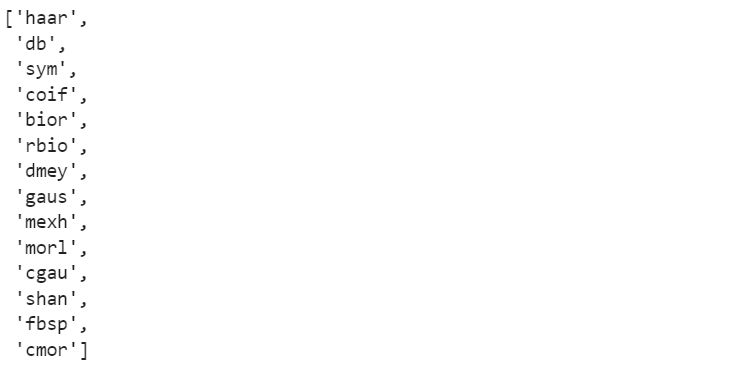
In Wavelet transform, we usually use these abbreviated names instead of their full names.
4. Built-in Wavelet Family Members
Now, let’s see which built-in members in each wavelet family in PyWavelets.
We can use pywt.wavelist(family=None, kind='all')function to display a list of names of the built-in wavelets. There are two parameters in the function:
- family: Short family name. The default is
Non, means all the families. - kind : {‘all’, ‘continuous’, ‘discrete’}, optional. The default is ‘all’, including continuous and discrete wavelet families.
(1) Display all families and both kinds
pywt.wavelist()
Then we get all the continuous and discrete wavelet families in their short names. It is a long list, and we only take few of them as follows:

(2) Display one family
Let’s display only one family, say ‘db’ for example.
pywt.wavelist(‘db’)
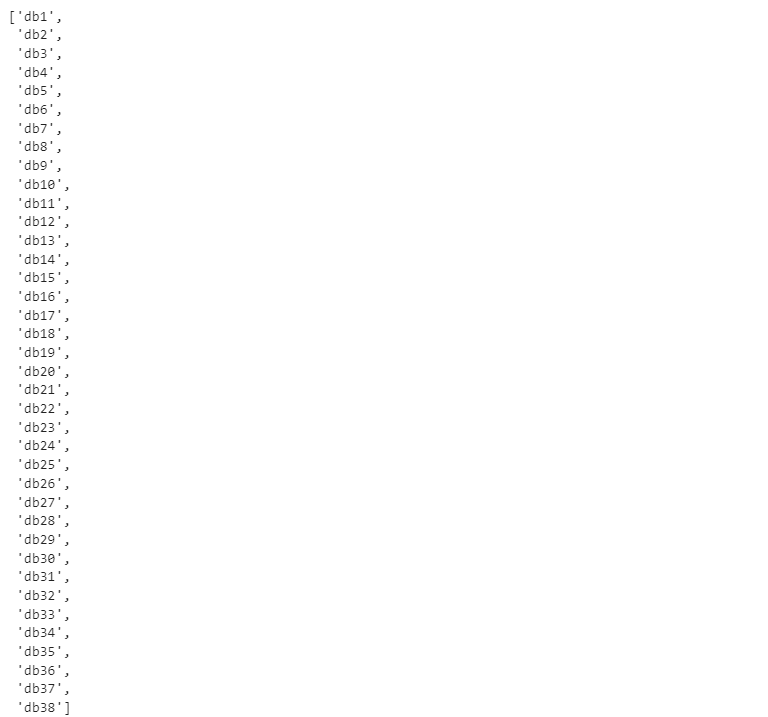
So the built-in ‘db’ family members include db1 to db38.
(3) Display wavelets of one kind
We can display built-in members of one kind of wavelet, for example, the continuous wavelet.
pywt.wavelist(kind='continuous') 
If you like this post or think it is helpful, please do not forget to give a clap to show your kind support. I appreciate it for your support! Your support is the best encouragement for me to produce more helpful products.
Online courses
If you are interested in learning how to apply wavelet transform to real-world cases with Python step by step, you are welcome to enroll my courses:


