
Python: Top Programming Language for Data Science — Intro and Implementation
Python: Language of Choice for Data Scientists

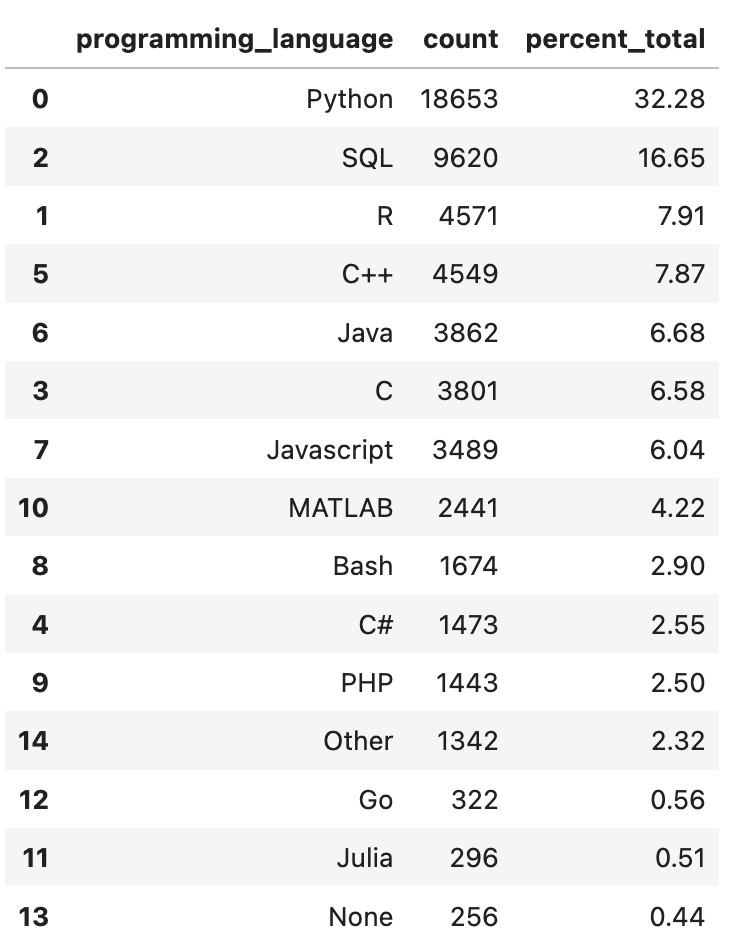
What are the top programming languages used by Data Scientists and Machine Learning practitioners? Kaggle performs an annual Machine Learning & Data Science survey (Paul Mooney, 2022)(CC BY 4.0), with some interesting questions, one of which is: “What programming languages do you use on a regular basis?” I summarized the results of this particular question in the table below, and it turns out that over 32% of submissions selected Python, followed by SQL, submitted by over 16% of responders. The next highest one is R, with around 8% of the total. As you see, Python is the leading programming language by a large margin. As a Scientist, these results do not surprise me. Most of the scientists I know use SQL for data retrieval and (preliminary) data manipulation and then use Python for their main analysis.
With the prevalence of Python in Data Science, I decided to create a foundational introduction for those interested in building a foundation of Pythonic knowledge that is tailored towards Data Science needs.
This post is broken down into two sections (both are accompanied by Jupyter notebooks):
- Section 1 includes basic but foundational concepts in Python, such as data types, methods, conditional statements, for and while loops, and user-defined functions, to build the necessary comfort in using Python.
- Section 2 will showcase two of the most common Python libraries used in Data Science, Pandas and NumPy, along with examples of Pandas data frames and NumPy arrays.
Let’s get started!
(All images, unless otherwise noted, are by the author.)
Section 1 — Python Basics
In this section, we will go over basic Python concepts that Data Scientists tend to use on a daily basis. I have used a question-and-answer format and have included the Jupyter notebook containing these 15 questions and answers. I strongly encourage you to download the notebooks and make an effort to answer the questions, and then review the answers to solidify your learning.
1.1. List of Topics
- Data Types, including (I) Float to store decimal numbers; (II) String to store single or a series of characters, such as words and sentences; (III) List, which is a collection of elements that are ordered and mutable/changeable; (IV) Tuple which is a collection of elements that is ordered and immutable/unchangeable; and (V) Dictionary which is a collection of elements that is unordered, mutable/changeable and indexed, in the format of
Key:Pair, with unique keys. There are examples and explanations in the notebook. - Methods such as returning strings in the lower/upper case or returning the absolute value of a number.
- Conditional Statements, For and While Loops enable us to add conditional logic to our code and use loops for iterative tasks.
- User-Defined Functions allow us to define custom functions based on our needs.
1.2. Questions
There are 15 questions listed below that cover the 4 topics above in the order listed. These questions are not meant to be difficult and are rather designed to increase familiarity with Pythonic code. Try to solve them yourself first and once you have an answer, compare your answer to the provided ones. This will provide you with time to think about how to frame your answers, and you can always learn from the provided answers.
1.2.1. Data Types
Question 1:
Multiply 123 by 17.23 and store the result as a float.
Answer:
a1 = 123 * 17.23
print(a1)
print(type(a1))
Results:

Question 2:
Convert the result of question 1 to an integer.
Answer:
a2 = int(a1)
print(a2)
print(type(a2))
Results:

Question 3:
Create a list with the following elements: “Medium”, 19.12, 22, [33, 49, “sam”]
Answer:
a3 = ["Medium", 19.12, 22, [33, 39, "sam"]]
a3
Results:

Question 4:
Return the last element of the list created in question 3.
Answer:
a4 = a3[-1]
a4
Results:

Question 5:
Delete the second last element of the list created in question 3.
Answer:
# note that we start by assigning a3 to a5 and then deleting the second to last element from a5 \
# to preserve the elements of a3
a5 = ["Medium", 19.12, 22, [33, 39, "sam"]]
del a5[-2]
a5
Results:

Question 6:
Create a tuple containing elements from 5 to 15 (inclusive of 5 and 15), then return only the first 5 elements.
Answer:
# Create the tuple
a6 = tuple(range(5, 16))

# Return the first five elements
a6[:5]
Results:

Question 7:
Create a dictionary that includes your name, age and location.
Answer:
a7 = {"name":"john", "age":35, "location":"seattle"}
a7
Results:

Question 8:
Change the age in the dictionary from question 7 to 29.
Answer:
a7["age"] = 29
a7
Results:

1.2.2. Methods
Question 9:
Return the following sentence where all letters are in lower case: John is 29 years old and lives in Seattle.
Answer:
a9 = 'John is 29 years old and lives in Seattle.'
a9.lower()
Results:

Question 10:
Return the same sentence but all in upper case.
Answer:
a9.upper()
Results:

Question 11:
Return the absolute value of -29.13.
Answer:
a11 = abs(-29.13)
a11
Results:

1.2.3. Conditional Statements, For and While Loops
Question 12:
Define two variables and assign a positive value to the first one and a negative value to the second one. Then write a conditional statement that adds True to an empty list named positive when the value is positive and adds Falsewhen the value is negative.
Answer:
variable_1 = 12
variable_2 = -9

positive = []

variables = [variable_1, variable_2]

for variable in variables:
    if variable > 0:
        positive.append("True")
    elif variable < 0:
        positive.append("False")
    else:
        print("variable was zero")

print(positive)
Results:

Question 13:
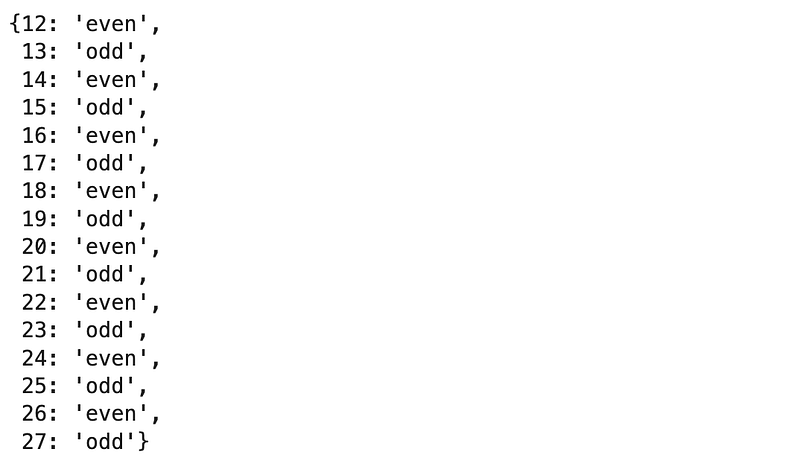
Create a list that includes values from 12 to 27 (inclusive). Then create a loop that goes through the list and returns a dictionary with the number and whether that number was odd or even, such as: {2:"even"}.
Answer:
numbers = list(range(12, 28))

a13 = {}

for number in numbers:
    if number % 2 == 0:
        a13[number] = "even"
    else:
        a13[number] = "odd"

a13
Results:
Question 14:
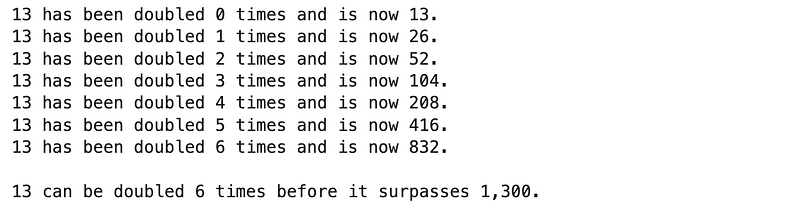
This is a fun one! How many times can we double 13 before it passes 1,300?
Answer:
x = 13
counter = 0

while x < 1300:
    print(f"13 has been doubled {counter} times and is now {x}.")
    x *= 2
    counter += 1


print("")
print(f"13 can be doubled {counter-1} times before it surpasses 1,300.")
Results:
1.2.4. User-Defined Functions
Question 15:
Define a function that determines whether a number is divisible by 3 or not and then test it on 6 and 8.
Answer:
def div_3(x):
    if (x % 3 == 0):
        print(f"{x} is divisible by 3.")
    else:
        print(f"{x} is indivible by 3.")

div_3(6)
div_3(8)
Results:

1.3. Notebook
Below is the notebook with both questions and answers for reference.
Section 2 — Most Common Data Science Libraries in Python
2.1. Intro to NumPy and Pandas
This section will focus on two of the most common Python libraries used in Data Science, which are NumPy and Pandas. If you have looked at any Data Scientist’s work, the odds are that you have seen the below two lines of code:
import numpy as np
import pandas as pd
These two lines are simply “importing” the two libraries into the environment where you run your Python script. Importing a library in this context allows us to use the functionalities that exist in each of these libraries, such as packages, etc. For now, let’s understand what makes these two libraries so popular among Data Scientists:
- NumPy, which stands for Numerical Python, is a Python library that helps us work on large and multi-dimensional arrays and matrices.
- Pandas, which stands for Python Data Analysis (or you may come across Panel Data), is another Python library that is very good for data cleaning, exploration, manipulation, and analysis, which is just what Data Scientists need.
Here are GitHub links for both NumPy and Pandas, in case you would like to look at the code.
Similar to Section 1, I have prepared a notebook containing 13 questions and answers. Before getting into the questions, let me introduce two powerful tools offered to us within these two packages, and then we will jump into the questions.
Trouble Shooting: Your Python environment should already have NumPy and Python libraries, so the import process above should work without any errors. But in case you receive an error such as below:
ModuleNotFoundError: No module named 'numpy'
ModuleNotFoundError: No module named 'pandas'
That means that you just need to go ahead and install those two libraries (or modules) as follows:
pip install numpy
pip install pandas
Then you may have to restart your notebook and then start from the importing part, which should go without a problem now.
Now that you have them installed and imported, you can see what versions you are using as follows:
print(np.__version__)
print(pd.__version__)
When I run the above command, below are the versions that my environment returns (for reference only):

2.2. NumPy Arrays and Pandas Data Frames
NumPy arrays look similar to Python lists, but they are much faster because of the different ways they are stored in memory. In fact, we can start with a list and then convert it to a Numpy array to take advantage of the benefits of arrays. We will do that in our examples.
Pandas data frames are two-dimensional data structures similar to two-dimensional arrays, matrices, or tables with rows and columns. They are very easy to use and manipulate, which we will further explore in the questions.
2.3. Topics
We will cover one and multi-dimensional arrays first and then will use data frames for some data filtering and manipulation.
2.4. Questions
There are 13 questions listed below that cover the topics above in the order listed. These questions are not meant to be difficult and are rather designed to increase familiarity with NumPy and Pandas. Try to solve them yourself first and once you have an answer, compare your answers to the provided ones. This will provide you with time to think about how to frame your answers, and you can always learn from the provided answers.
Question 1:
Import NumPy and Pandas and add np and pd as their alias, respectively.
Answer:
import numpy as np
import pandas as pd
2.4.1. NumPy Arrays — One-Dimensional
Question 2:
Create a list including [3, 56, -9, 12] and then store that as a NumPy array. Show the data types before and after the conversion.
Answer:
# Create the list
a2_list = [3, 56, -9, 12]
print(f"Data type of a2_list is: {type(a2_list)}.\n")

# Store as a NumPy array
a2_array = np.array(a2_list)
print(f"Data type of a2_array is: {type(a2_array)}")
Results:

Question 3:
Create a second list including [4, 7, 3, -4], convert it to an array and then divide the array from question 2 by the array created in this question.
Answer:
# Create the second list and convert to an array
a3_array = np.array([4, 7, 3, -4])

# Create the division as described
a3_div_array = a2_array / a3_array
a3_div_array
Results:

2.4.2. NumPy Arrays — Multi-Dimensional
Question 4:
Measurement list (measurement = [[25, 165], [45, 185], [38, 147], [39, 195]]) includes four participants’ age and weight. Create a two-dimensional NumPy array from that list and name it measurement_array.
Answer:
measurement = [[25, 165], [45, 185], [38, 147], [39, 195]]

measurement_array = np.array(measurement)
measurement_array
Results:

Question 5:
What is the shape of the array created in question 4? How do you interpret that?
Answer:
measurement_array.shape
Results:

There are two dimensions. The first dimension has 4 and the second dimension has 2 elements.
Question 6:
What do you expect the dimension of the following q6_array = [[[[1, 2, 3]]]] to be and why? Verify your response using numpy.shape.
Answer:
q6_array is an array with 4 dimensions. The first, second and third dimensions have 1 element, while the fourth dimension has 3 elements.
Let’s verify this response below:
q6_array = np.array([[[[1, 2, 3]]]])
q6_array.shape
Results:

This is how we can read the results. There are 4 values in the result of q6_array.shape, hence there are 4 dimensions. A number of elements within each dimension is the number shown in (1, 1, 1, 3), which matches what we expected.
Question 7:
Let’s revisit the measurement_array. What were the measurements of the third participant?
Answer:
a7 = measurement_array[2, :]
a7
Results:

Question 8:
What was the age of the first participant in the measurement_array?
Answer:
a8 = measurement_array[0, 0]
a8
Results:

2.4.3. Pandas DataFrames
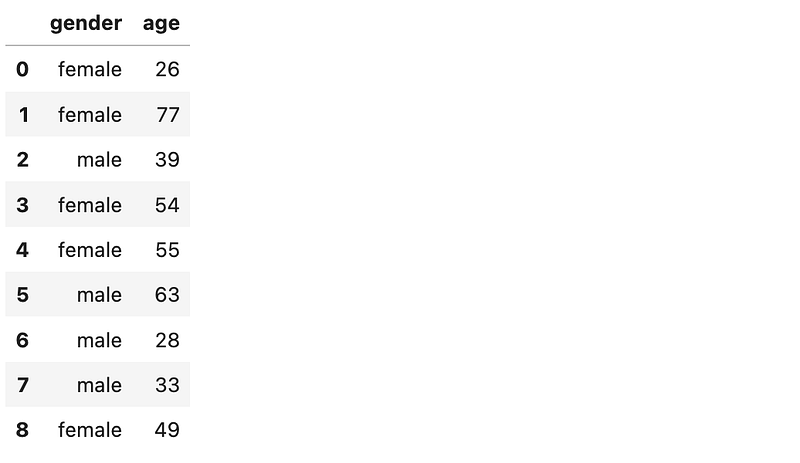
Let’s first create a dataframe that we can use for the following questions. For now, you can just copy, paste and run this block of code.
# Create the data to be included in the dataframe
participants = {
    'gender':['female', 'female', 'male', 'female', 'female', 'male', 'male', 'male', 'female'],
    'age': [26, 77, 39, 54, 55, 63, 28, 33, 49]
}

# Create the dataframe
df = pd.DataFrame(participants)
Question 9:
Show the data in the data frame that we just created.
Answer:
df
Results:
Question 10:
How many rows and columns are included in the dataframe?
Answer:
print(f"there are {df.shape[0]} rows and {df.shape[1]} columns in the dataframe.")Results:

Question 11:
What is the average age of the participants?
Answer:
We will use two approaches for learning purposes.
# Approach 1
df["age"].mean()
Results:

# Approach 2
np.mean(df["age"])
Question 12:
How many female participants are represented in the dataframe?
Answer:
df["gender"][df["gender"] == "female"].count()Results:

Question 13:
How many total male participants are there, and how many of them are older than 30 years old?
Answer:
total_male_participants = df["gender"][df["gender"] == "male"].count()
print(f"There are {total_male_participants} total male participants.\n")

male_participants_above_30 = df["gender"][(df["gender"] == "male") & (df["age"] > 30)].count()
print(f"There are {male_participants_above_30} male participants above the age of 30.")
2.5. Notebook
Below is the notebook with both questions and answers for reference.
Conclusion
In this post, we started learning about Python as the programming language of choice for Data Scientists and Machine Learning practitioners and, as a result, started building foundational Pythonic knowledge for a Data Scientist by covering (1) basics of Python concepts (e.g., data types, methods, conditional statements, for and while loops and user-defined functions), and (2) Pandas and NumPy as two of the most common Python libraries used in Data Science.
Thanks for Reading!
If you found this post helpful, please follow me on Medium and subscribe to receive my latest posts!


