
Python Project — Get WiFi Password using Python
A WiFi network is a wireless technology which uses radio frequency signals to connect the devices such as phones, laptops, televisions and printers to the internet or to connect with each other. For security purposes, any WiFi network is only accessible through a password, which is set by the admin. To access the secured WiFi network, you will need a password.
About Python Project:
In this Get WiFi Password using Python we are going to build the Wi-Fi Password Retrieval project in Python with the help of the subprocess module to retrieve Wi-Fi profiles and their passwords stored on a Windows system. To make this project you need a good understanding of Python.
The project requires administrative permission to access Wi-Fi profile information and retrieve passwords. Ensure that you have administrative access to the Windows system to run commands as an administrator.

Prerequisites For Python Project:
- We will first install the “subprocess” module in our system using the pip installer.
- Additionally, a basic understanding of Python programming is required to effectively develop this project.
pip install subprocess.runCode to Get Wifi Password- We will start with importing the subprocess module in our program. The subprocess module will allow you to spawn new processes, connect to their input and output pipes, and obtain their return codes.
import subprocess


wifi_data = (subprocess.check_output(["netsh", "wlan", "show", "profiles"]).decode("utf-8").split("\n"))


username = [i.split(":")[1][1:-1] for i in wifi_data if "All User" in i]


for i in username:
   show_pass = (subprocess.check_output(["netsh", "wlan", "show", "profile", i, "key=clear"]).decode("utf-8").split("\n"))
   show_pass = [b.split(":")[1][1:-1] for b in show_pass if "Key Content" in b]
   try:
       print("{:<30}|  {:<}".format(i, show_pass[0]))
   except IndexError:
       print("{:<30}|  {:<}".format(i, ""))
The code begins by defining a variable named ‘wifi_data’. This variable is used to retrieve WiFi profiles by executing the command (“netsh”, “wlan”, “show”, “profiles”). The command output is then converted into a string using the ‘utf-8’ encoding method. Subsequently, the usernames are extracted from the ‘wifi_data’ information.
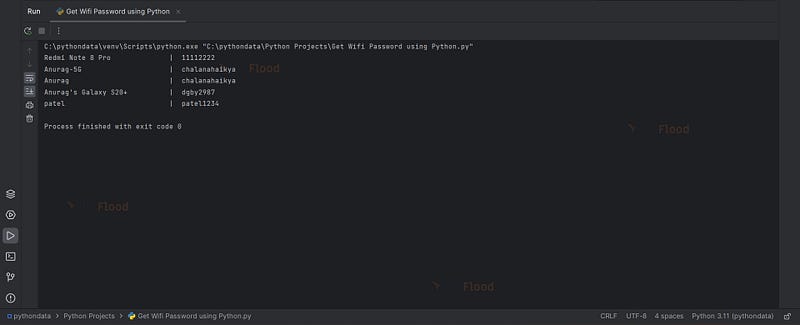
Following this, a ‘for’ loop is employed to iterate through each user name extracted from the WiFi profiles. To manage potential exceptions, a try and except block is implemented. Inside this block, the code prints both the username and the associated WiFi password.
subprocess.check_output(“netsh”, “wlan”, “show”, “profiles”)- This will retrieve all the wifi profiles stored in the machine.
decode(“utf-8”)- It will convert the string into human readable format.
split()- It will split the string into individual lines.
subprocess.check_output(“netsh”, “wlan”, “show”, “profiles)- This will retrieve the passwords saved in the machine for the specific wifi network.
Get WiFi Password using Python Output-
Conclusion
Certainly! Using this Python project, you’ve successfully explored how to retrieve and display the passwords of WiFi networks stored on a Windows system. This hands-on experience can provide valuable insights into network security and system administration. Feel free to further explore and apply this knowledge as needed.


