
Python OOP example: Car engine simulation for beginners
Strict Typing, DataClasses, Unit Tests, and everything else you need
In this article, I would like to show an example of a well-structured and tested Python project. This can be useful for those who start programming and for those who switch from another language to Python.
You will see why it is good to have strict typing in Python, how to test your code, how to use dataclasses, how to use override additions for your own classes, how to raise your own type of exceptions, and how to keep your code clean.
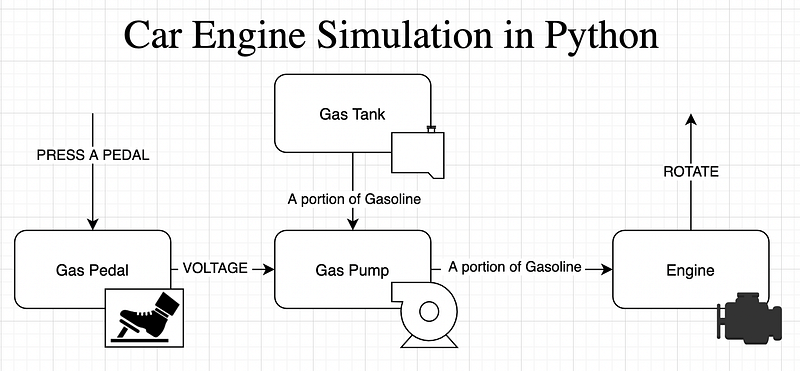
The main idea of the project is as follows (see the image above).
- We press a gas pedal, and it outputs some electrical current to the Gas Pump
- The Gas Pump is connected to a Gas Tank, inputs some portion of gas, and outputs it to the Engine
- The Engine should rotate
We want to be friendly to environmental-unfriendly diesel engines (though I really hate the weird sound of diesel engines), so we will be able to create any type of Gasoline, and any type of Engine (Benzin, Diesel, or whatever else). But if you supply some benzine to a diesel engine (or vice versa), it should raise an exception. Though it should be allowed to use different octane numbers of the same type of gasoline, and it should handle the mix and recalculate the octane number.
After writing each new class, we will be covering it with unit tests. In the end, we will write a scenario (integration) test, where all classes are orchestrated together.
Folders and files
At the end of the project, you should have this folders and files structure:
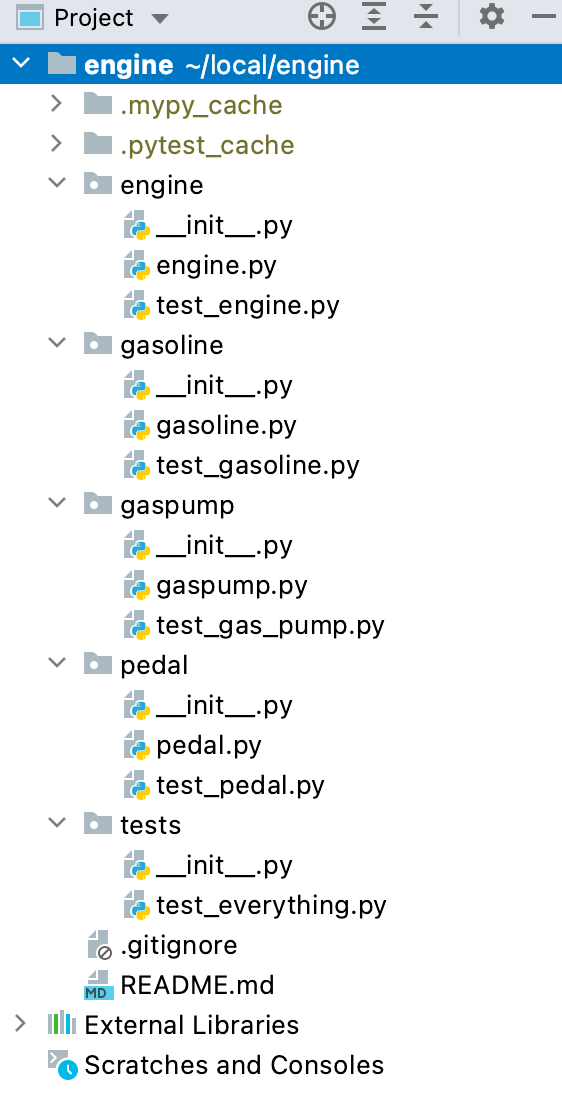
Please ignore the mypy and pytest caches and the External Libraries.
If you want to run the tests, install the pytest:
pip install pytestGasoline and GasPortion
We start with the Gasoline and GasPortion classes in one file (gasoline.py).
We will allow creating a new type of Gasoline based on this abstract class. So it is not allowed to instantiate the Gasoline itself, one can create a new class (like Benzine) based on it (inherit), and then instantiate.
Then we will create portions of gasoline. These portions are not only what we pass from one object to another (like from gas tank to gas pump, and then from the gas pump to the engine), but also a Gas Tank. So we don’t need to create a gas tank separately, because this is just a big portion of gas.
You may notice an __add__ function here. This function is called every time you want to sum up two objects of type GasPortion. Here we check if the types of gasoline are the same, and then we can calculate the octane number based on the volume in liters.
Also, we decorate our classes with @dataclass that simplify our life: we don’t need to write the __init__(self) function and it produces a nice output when printer to the console (it has the __str__(self) function, too). There are many more advantages of the dataclasses, but we will stop here.
Now, let us test these classes by creating a new file in the same directory (see the folders structure above):
Try to run this code by typing pytest in the console. Install this library if needed.
If you are not sure if the tests were actually executed, try to change some numbers in the test (for example, in line 41, type 96.76) and run again. The tests should not pass.
Btw., pytest is running all files that are starting with test and it is searching for all python packages (these are the folders with __init.py in them).
The Engine
Now, let’s move on to the Engine itself. The prerequisite for the Engine is Gasoline since we need some gasoline to make it rotate.
We will not be using dataclasses here to demonstrate two things:
- How to initialize with
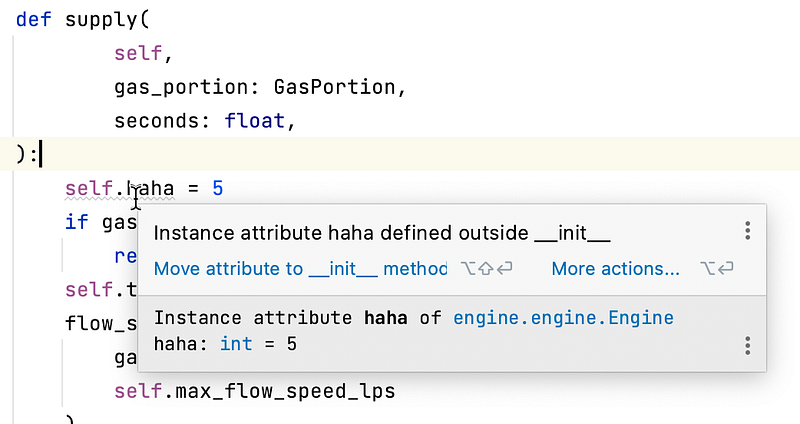
__init__function manually. Here, remember the golden rule: Always introduce the instance attributes in the__init__function by writingself.variablehere! Do not introduce the instance attributes in any other methods of the class! PyCharm will give you a hint about that if you do (see the image below). - How to create a factory for our class (we will have two there). They are decorated with
@classmethod
Otherwise, the logic in the class is trivial, try to digest it yourself.
And sure we need to test this class:
Gas Pump
Now, as we have an Engine and some Gasoline, we may introduce the Gas Pump class.
It will be based on the @dataclass , and will have one main method called apply. Our pump is electrical, so we need to provide some electrical current to it by specifying the Voltage. Depending on the voltage, the pump will run slower or faster. If you apply a voltage higher than 14V, it will burn.
The main property of the Gas Pump is the maximum flow measured in liters per second. This maximum flow is achieved by applying the maximum documented voltage: 12V. So, in theory, you may be having a higher flow by applying 14V.
The takeaway from this class is dataclasses.replace that creates a new object based on the previous:
gas_portion = dataclasses.replace(
        self.connected_gas_tank,
        volume_liters=volume
    )
So, here, for example, it copies the self.connected_gas_tank and replaces the volume_liters in it.
Let’s look at the code:
The tests are simple, but we still need them to make sure there are no errors in the code:
Gas Pedal
The user interface to any car is the steering wheel and the pedals.
It is as trivial as it can possibly be: we press the pedal with different strengths, and we have some electrical current as output depending on how hard we press it. The strength is measured by a float number varying from 0 (not pressed) to 1 (full gas).
The tests are also pretty simple, but one important test is missing here. Namely, what happens if we pass a negative how_hard ? It should raise an error. Try to write this test on your own, looking at the test of gasoline — there is this line:
with pytest.raises(UnwantedGasolineMix):
    portion1 + diesel
But since we reuse the ValueError, it would be good to check the message inside the exception. Google for it, it should be something like with pytest.raises(ValueError) as exc , and then checking the value of the exc .
Ok, here are the tests:
Test Everything Together
Now, let’s do the so-called integration (or scenario) tests.
The test involves every class we have created and checks if everything works perfectly fine.
The test is long but simple and straightforward. Try to add some unhappy tests, too. Try to see if the exceptions are raised when needed.
Why Strict Typing?
Strict typing in Python saves you when you make some simple mistakes:
- You applied the wrong variable for a function
- You forgot to return a value in your function
- You have a lot of “if” branches in your function, and one of them does not return anything
Also, there are some benefits if you use strict typing:
- PyCharm or VsCode will be assisting you better by giving you a lot of nice hints while you code.
- Anyone in your team who uses your functions will immediately see how to use them: what are the inputs and outputs.
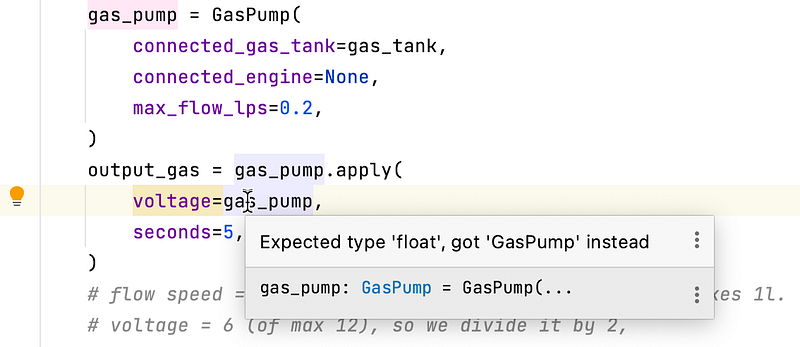
Here is one example of PyCharm behavior when you supply a wrong variable type:
I sometimes forget to use the return statement, and just write the value without return. Here is what happens then:
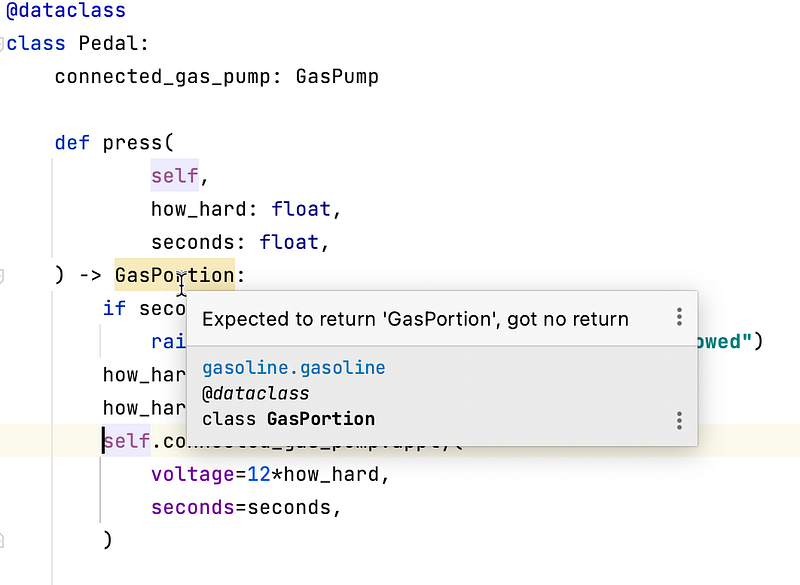
If you start using types in Python, you will be surprised about how often you make some simple mistakes that are not really errors from Python’s point of view. And your IDE will be able to help you with that.
So, here is the rule:
You help your IDE by saying what you expect, and your IDE will be able to help you avoid mistakes.
Of course, there is a Git repository for this project: https://github.com/timurbakibayev/engine
Feel free to clone it and play with it. Do not forget to see my other articles — you may learn a lot from them. Especially if you learn Django.
Thanks for reading!


