avatarSanjay Priyadarshi

Free AI web copilot to create summaries, insights and extended knowledge, download it at here

3823

Abstract

fun with the escape sequences to understand them better.</p><figure id="9171"><img src="https://cdn-images-1.readmedium.com/v2/resize:fit:800/1*ACgOPtR_te1kjsbcLbmKRQ.png"><figcaption></figcaption></figure><p id="7b0d">In string1, the newline character is present after “Hello”.</p><p id="90f5">The newline character (\n) represents the end of the line, and characters after the newline character will be printed on a new line.</p><p id="eb13">In string2, we’ve used a backslash before the newline character, so no newline appears when printing string2.</p><p id="a6ab">In string3, we have used two backslashes and it will print one backslash character.</p><p id="fee0">In string4, we have used three backslash characters and it will print two backslashes since the first one will be omitted.</p><h1 id="3001">New line character is present in print statements by default</h1><p id="89d7">If you take a look at any print statement in python, the newline character is added automatically.</p><p id="3f8c">If you write Python code like this:</p><div id="92c6"><pre><span class="hljs-function"><span class="hljs-title">print</span><span class="hljs-params">(<span class="hljs-string">"Hello User"</span>)</span></span></pre></div><p id="0f0f">This is what it looks like behind the scenes:</p><div id="f037"><pre><span class="hljs-string">"Hello User<span class="hljs-subst">\n</span>"</span></pre></div><p id="3ed9">The newline character is added to everything passed to the print function by default.</p><p id="e575">If you take a look at the <a href="https://docs.python.org/3/library/functions.html#print">Python documentation</a>.</p><p id="64af">The default value of the <code>end</code> parameter of the predefined print function is ‘\n’.</p><p id="53c2">That’s why a newline character is added to the end of the string in the print statement.</p><p id="93fa">Here is the definition of the print function:</p><figure id="ab7a"><img src="https://cdn-images-1.readmedium.com/v2/resize:fit:800/1*sBNWLoTDblJR49YM702gdw.png"><figcaption></figcaption></figure><p id="6dcc">When you write just a print statement, you won’t be able to see the effect of the newline character.</p><p id="3434">If you write like this:</p><div id="8f6f"><pre><span class="hljs-function"><span class="hljs-title">print</span><span class="hljs-params">(<span class="hljs-string">"Hello User"</span>)</span></span></pre></div><div id="ee64"><pre><span class="hljs-comment">//Output</span> Hello User</pre></div><p id="a250">But when you write multiple print statements at one time. You will be able to see the effect of the new line character.</p><div id="7083"><pre><span class="hljs-function"><span class="hljs-title">print</span><span class="hljs-params">(<span class="hljs-string">"Hello User"</span>)</span></span> <span class="hljs-function"><span class="hljs-title">print</span><span class="hljs-params">(<span class="hljs-string">"How are you"</span>)</span></span> <span class="hljs-function"><span class="hljs-title">print</span><span class="hljs-params">(<span class="hljs-string">"Subscribe to my newsletter"</span>)</span></span></pre></div><div id="7589"><pre>//Output Hello <span class="hljs-keyword">User</span> <span class="hljs-title">How</span> are you Subscribe to my newsletter</pre></div><p id="75bf">If there is no newline character after the string “Hello User”, how was the string “How are you” printed on the new line?</p><p id="4f26">This tells us about the presence of the newline character after each string present in the print statement.</p><h1 id="3e27">How to print without a newline in python</h1><p id="ca33">As we have seen before, the new line character (\n) is present by default in the <code>end</code> parameter of the built-in <code>print</code> function.</p><div id="56fe"><pre><span class="hljs-function"><s

Options

pan class="hljs-title">print</span><span class="hljs-params">(<span class="hljs-string">"Hello User"</span>)</span></span> <span class="hljs-function"><span class="hljs-title">print</span><span class="hljs-params">(<span class="hljs-string">"How are you"</span>)</span></span> <span class="hljs-function"><span class="hljs-title">print</span><span class="hljs-params">(<span class="hljs-string">"Subscribe to my newsletter"</span>)</span></span></pre></div><div id="79ff"><pre>//Output Hello <span class="hljs-keyword">User</span> <span class="hljs-title">How</span> are you Subscribe to my newsletter</pre></div><p id="c006">This is why each string present within the print statement is printed on a new line.</p><p id="5f7e">If you want to print without a new line, you must change the value of the <code>end</code> parameter.</p><p id="d36f">You need to change the value of the <code>end</code> parameter and set it to something else.</p><p id="ddb8">To do this, instead of using “\n”, you can use a blank “ ”.</p><p id="19a8">Let’s see it through an example:</p><div id="d689"><pre><span class="hljs-function"><span class="hljs-title">print</span><span class="hljs-params">(<span class="hljs-string">"Hello User"</span> , end = <span class="hljs-string">" "</span>)</span></span> <span class="hljs-function"><span class="hljs-title">print</span><span class="hljs-params">(<span class="hljs-string">"How are you"</span>, end = <span class="hljs-string">" "</span>)</span></span> <span class="hljs-function"><span class="hljs-title">print</span><span class="hljs-params">(<span class="hljs-string">"Subscribe to my newsletter"</span>)</span></span></pre></div><div id="f788"><pre><span class="hljs-comment">//Output</span></pre></div><div id="07f6"><pre>Hello <span class="hljs-keyword">User</span> <span class="hljs-title">How</span> are you Subscribe to my newsletter</pre></div><p id="56d9">In the example above, we have replaced the <code>end</code> parameter with a space character. Because of this, all three statements will print on the same line.</p><h1 id="28a1">Multiline strings</h1><p id="343a">With the help of a multi-line string, you can print text on a new line if you want.</p><p id="95df">The string is spread over multiple lines.</p><p id="4268">You must use either three double quotes or three single quotes to use this type of string.</p><p id="8346">When you use 3 double quotes or 3 single quotes, the Python language easily understands what you are trying to do.</p><p id="4757">This is an example of a multiline string.</p><figure id="ac84"><img src="https://cdn-images-1.readmedium.com/v2/resize:fit:800/1*aPP_2fXfsQ2xJLrja3BVRw.png"><figcaption></figcaption></figure><p id="20f1">In the example above, the string is printed similarly, just as the string is passed to string1.</p><p id="4dd4">No newline is present.</p><p id="d940">If you want, you can easily use multi-line strings.</p><h1 id="1881">Summary</h1><p id="93dd">The newline character is made up of two characters:</p><ol><li>Backslash</li><li>Letter n</li></ol><p id="0e60">You can use the newline character to print a new line in python.</p><p id="f8e9">Change the default value of the <code>end</code> parameter to print without a new line.</p><p id="e7cc">Multiline strings are a great alternative if you need them.</p><h1 id="bbdb">Do You Want to Fast Track Your Career as a Programmer</h1><p id="d56b">Join a group of people who love programming and technology.</p><p id="5ead"><a href="https://codertoentrepreneurs.substack.com/">You can join it here.</a></p><p id="92c0">With the help of our community, we will fix major problems in the life of programmers and discuss frontend as well as backend engineering.</p><p id="5eb3">We will help you reprogram your understanding of various things in technology.</p></article></body>

Python Newline: How to Add a New Line and Print Without Newline | Python Tutorial

Printing a new line in Python

Photo by Tai Bui on Unsplash

Python programmers sometimes need to print some “non-printable” characters.

Include things like a tab or a new line.

To do so, we need to use the backslash character (\) to escape characters. If you do it without the backslash character, it will have a different meaning.

An example

If you want to print a tab, you will use the backslash character just before the letter t, like this: \t.

If you don’t use the backslash character before the letter t, only the letter t will be printed. In this case, no tab will be printed.

print('HellotPython')
print('Hello\tPython')
//Output
HellotPython
Hello        Python

Python new line

When you break lines and print content on a new line, the readability of the output is greatly improved.

Whether you write code in Javascript, Python, C++, or Java, the readability of the output is important.

In the case of python, programmers frequently come across the newline character. That is why we need to understand how the newline character works in detail.

Here we will cover the newline character in detail.

New line character in Python

In python, the new line character is represented by “\n”.

It is used to print a new line in the case of the python programming language.

It consists of two characters:

  • Backslash
  • Letter n.

When you insert the newline character into a string, all characters that appear in the string after the newline characters will be displayed on a new line.

It means that the newline character “\n” tells the compiler that the current line ends here and all characters after me will be displayed on the new line.

Two examples of how you can use the python newline character

1st example

In the example above, you can see that when a newline character is inserted into the string, it breaks across multiple lines.

Most beginners are confused why the ‘\n’ is not printed in the output.

As we discussed earlier, the backslash in the newline character is called an escape sequence.

With the escape sequence character, anything that cannot be printed can be easily printed.

With the help of an escape sequence, the above Python code when executed tells the compiler to print some “unprintable” special characters.

2nd Example

Let’s have some fun with the escape sequences to understand them better.
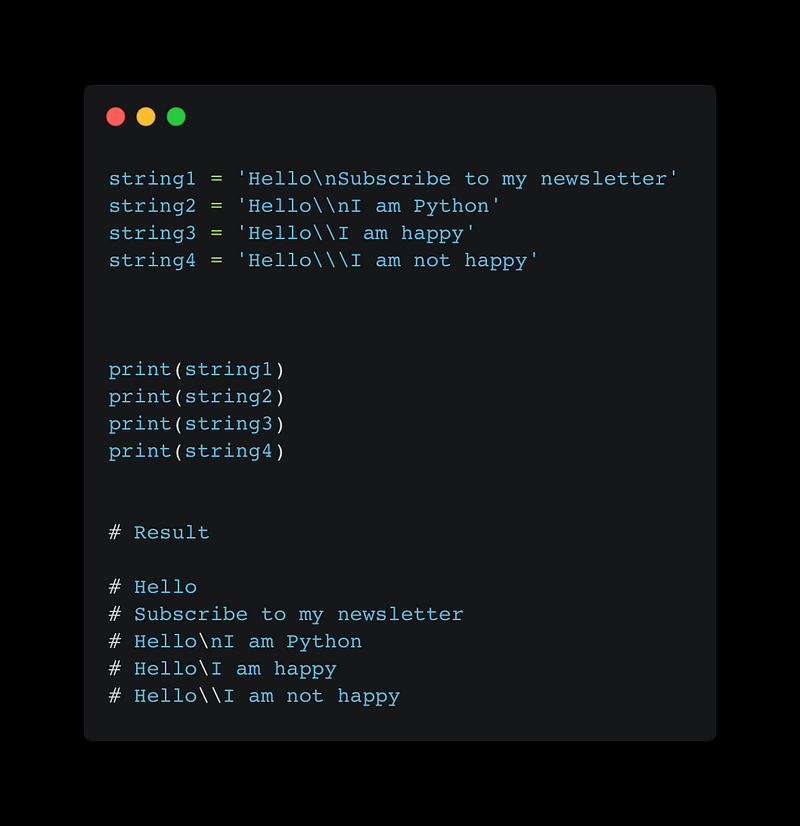
In string1, the newline character is present after “Hello”.

The newline character (\n) represents the end of the line, and characters after the newline character will be printed on a new line.

In string2, we’ve used a backslash before the newline character, so no newline appears when printing string2.

In string3, we have used two backslashes and it will print one backslash character.

In string4, we have used three backslash characters and it will print two backslashes since the first one will be omitted.

New line character is present in print statements by default

If you take a look at any print statement in python, the newline character is added automatically.

If you write Python code like this:

print("Hello User")

This is what it looks like behind the scenes:

"Hello User\n"

The newline character is added to everything passed to the print function by default.

If you take a look at the Python documentation.

The default value of the end parameter of the predefined print function is ‘\n’.

That’s why a newline character is added to the end of the string in the print statement.

Here is the definition of the print function:

When you write just a print statement, you won’t be able to see the effect of the newline character.

If you write like this:

print("Hello User")
//Output
Hello User

But when you write multiple print statements at one time. You will be able to see the effect of the new line character.

print("Hello User")
print("How are you")
print("Subscribe to my newsletter")
//Output
Hello User
How are you
Subscribe to my newsletter

If there is no newline character after the string “Hello User”, how was the string “How are you” printed on the new line?

This tells us about the presence of the newline character after each string present in the print statement.

How to print without a newline in python

As we have seen before, the new line character (\n) is present by default in the end parameter of the built-in print function.

print("Hello User")
print("How are you")
print("Subscribe to my newsletter")
//Output
Hello User
How are you
Subscribe to my newsletter

This is why each string present within the print statement is printed on a new line.

If you want to print without a new line, you must change the value of the end parameter.

You need to change the value of the end parameter and set it to something else.

To do this, instead of using “\n”, you can use a blank “ ”.

Let’s see it through an example:

print("Hello User" , end = " ")
print("How are you", end = " ")
print("Subscribe to my newsletter")
//Output
Hello User How are you Subscribe to my newsletter

In the example above, we have replaced the end parameter with a space character. Because of this, all three statements will print on the same line.

Multiline strings

With the help of a multi-line string, you can print text on a new line if you want.

The string is spread over multiple lines.

You must use either three double quotes or three single quotes to use this type of string.

When you use 3 double quotes or 3 single quotes, the Python language easily understands what you are trying to do.

This is an example of a multiline string.
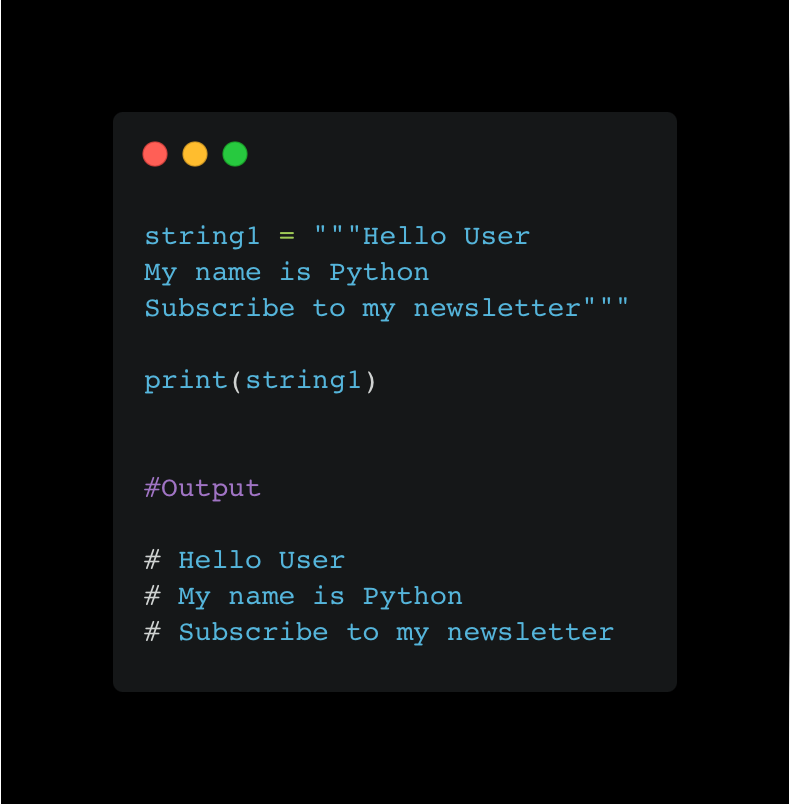
In the example above, the string is printed similarly, just as the string is passed to string1.

No newline is present.

If you want, you can easily use multi-line strings.

Summary

The newline character is made up of two characters:

  1. Backslash
  2. Letter n

You can use the newline character to print a new line in python.

Change the default value of the end parameter to print without a new line.

Multiline strings are a great alternative if you need them.

Do You Want to Fast Track Your Career as a Programmer

Join a group of people who love programming and technology.

You can join it here.

With the help of our community, we will fix major problems in the life of programmers and discuss frontend as well as backend engineering.

We will help you reprogram your understanding of various things in technology.

Python
Programming
Software Development
Data Science
Artificial Intelligence
Recommended from ReadMedium