Python Multiprocessing for 3D Data Processing
Today we’ll discuss how to process large amount of data using Python multiprocessing. I’ll tell some general information that might be found in manuals and share some little tricks that I’ve discovered such as using tqdm with multiprocessing imap and working with archives in parallel.
So why should we resort to parallel computing? Working with data sometimes arises problems related to the big data. Each time we have the data that doesn’t fit the RAM we need to process it piece by piece. Fortunately, modern programming languages allow us to spawn multiple processes (or even threads) that work perfectly on multi-core processors (NB: that doesn’t mean that single-core processors cannot handle multiprocessing, here’s the Stack Overflow thread on that topic)
Today we’ll try our hand at the frequent 3D computer vision task of computing distances between mesh and point cloud. You might face this problem for example when you need to find a mesh within all available meshes that defines the same 3D object as the given point cloud.
Our data consist of .obj files stored in .7z archive which is great in terms of storage efficiency. But when we need to access the exact portion of it we should make an effort. Here I define the class that wraps up the 7-zip archive and provides an interface to the underlying data.
This class hardly relies on py7zlib package that allow us to decompress data each time we call get method and give us number of files inside an archive. We also define __iter__ that will help us to start multiprocessing map on that object as on the iterable.
This definition provides us a possibility to iterate over the archive but does it allow us to do a random access to contents in parallel? It’s an interesting question on which I haven’t found an answer online but we can answer on it if dive into the source code of py7zlib.
Here I provide reduced snippets of the code from pylzma
I believe it is clear from the gist above that there’s no reason for the archive being blocked whenever it is read multiple times simultaneously.
Next, let’s quickly introduce what are the meshes and the point clouds. Firstly, meshes, they are the sets of vertices, edges and faces. Vertices are defined by (x,y,z) coordinates in space and assigned with unique numbers. Edges and faces are the groups of point pairs and triplets accordingly, and defined with mentioned unique point ids. Commonly, when we talk about “mesh” we mean “triangular mesh”, i.e. the surface consisting of triangles. Work with meshes in Python is much easier with trimesh library, for example it provides interface to load .obj files in memory. To display and interact with 3D objects in jupyter notebook one can use k3d library.
So, with the following code snippet I answer the question : “how to plot atrimeshobject in jupyter with k3d?”
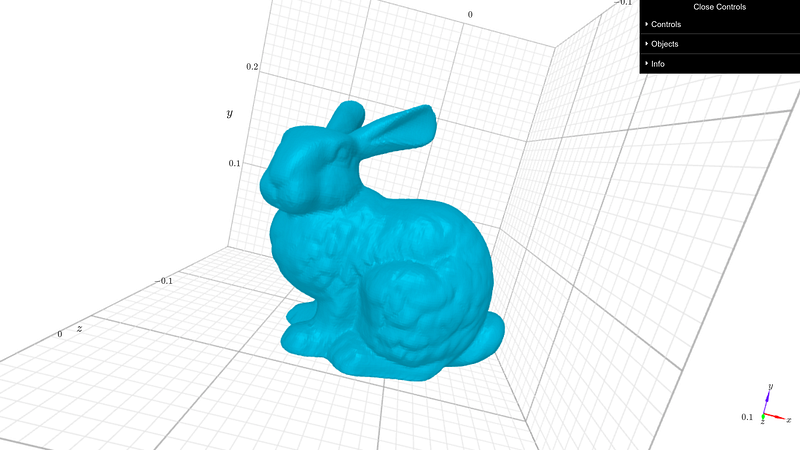
Secondly, point clouds, they are arrays of 3D points that represent objects in space. Many 3D scanners produce point clouds as a representation of scanned object. For the demonstration purpose we can read the same mesh and display its vertices as a point cloud.
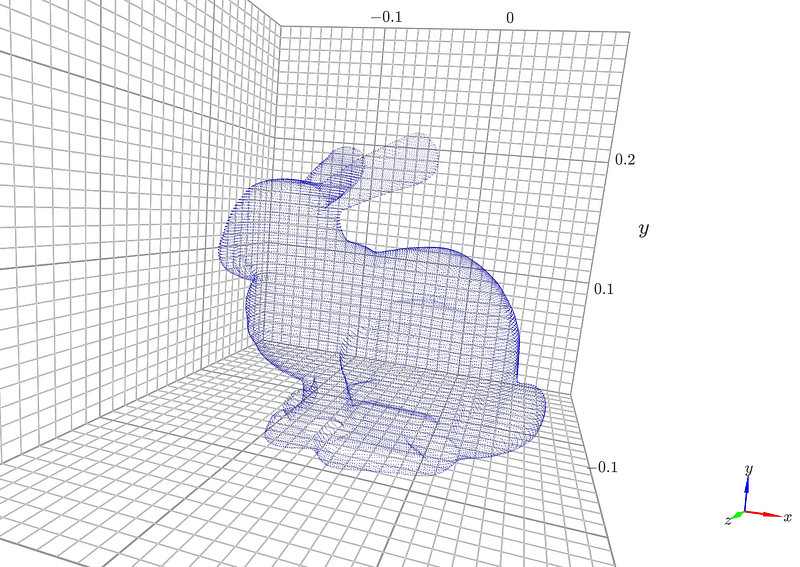
As it mentioned above 3D scanner provides us a point cloud. Let’s assume that we have a database of meshes and we want to find a mesh within our database which is aligned with the scanned object aka point cloud. To address this problem we can suggest a naïve approach. We’ll search for the largest distance between points of the given point cloud and each mesh from our archive. And if such distance will be less for 1e-4 for some mesh we’ll consider this mesh as aligned with point cloud.
And finally, we’ve come to the multiprocessing section. Remembering that our archive has plenty of files that might be not fit in memory together we prefer to process them in parallel. To achieve that we’ll use a multiprocessing Pool, it handle multiple calls of user defined function with map or imap/imap_unordered methods. The difference between map and imap that affects us is that map converts an iterable to a list before sending to worker processes. If an archive to big to be written in the RAM it shouldn’t be unpacked to a Python list. In the other case the execution speed of them both is similar.
[Loading meshes: pool.map w/o manager] Pool of 4 processes elapsed time: 37.213207403818764 sec
[Loading meshes: pool.imap_unordered w/o manager] Pool of 4 processes elapsed time: 37.219303369522095 sec
Above you see the results of simple reading from archive of meshes that fit in memory.
Moving further with imap. Let’s discuss how to accomplish our goal of finding a mesh close to the point cloud. Here is the data, there we have 5 different meshes from Stanford models. We’ll simulate 3D scanning by adding noise to vertices of Stanford bunny mesh.
Of course we previously normalize point cloud and the mesh vertices in the following to scale them in a 3D cube.
To compute distances between a point cloud and the mesh we’ll use igl. To finalize we need write a function that will called in each process and its dependencies. Let’s sum up with following snippet.
Here read_meshes_get_distances_pool_imap is a central function where the following is done:
MeshesArchiveandmultiprocessing.Poolinitializedtqdmis applied to watch the pool progress and profiling of the whole pool is done manually- output of results performed
Note how we pass arguments to imap creating a new itearable from archive and point_cloud using zip(archive, itertools.repeat(point_cloud)). That allow us to stick a point cloud array to each entry of the archive avoiding converting archive to a list.
The result of execution looks like this
100%|####################################################################| 5/5 [00:00<00:00,  5.14it/s]
100%|####################################################################| 5/5 [00:00<00:00,  5.08it/s]
100%|####################################################################| 5/5 [00:00<00:00,  5.18it/s]
[Process meshes: pool.imap w/o manager] Pool of 4 processes elapsed time: 1.0080536206563313 sec
armadillo.obj 0.16176825266293382
beast.obj 0.28608649819198073
cow.obj 0.41653845909820164
spot.obj 0.22739556571296735
stanford-bunny.obj 2.3699851136074263e-05
We can eyeball that Stanford bunny is the closest mesh to the given point cloud. It is also seen that we do not use a large amount of data but we’ve shown that this solution would work even if we have an extensive amount of meshes inside an archive.
Multiprocessing allows data scientist to achieve a great performance not only in 3D computer vision but also in the other fields of machine learning. It is very important to understand that parallel execution is much faster then execution within a loop. The difference become significant especially when an algorithm is written correctly. Large amounts of data reveal problems that won’t be addressed without creative approaches on how to use limited resources. And fortunately Python language and it’s extensive set of libraries help us data scientist to solve such problems.


