avatarRenu Khandelwal

Free AI web copilot to create summaries, insights and extended knowledge, download it at here

7594

Abstract

select California, which is row 2 and col 1. Remember in Python Index start at 0 so we want to extract row 1 and col 0.</p><div id="3c78"><pre>print(<span class="hljs-keyword">state</span>.iloc[<span class="hljs-number">1</span>,<span class="hljs-number">0</span>])</pre></div><div id="54b0"><pre>print(<span class="hljs-keyword">state</span>.loc['state2','State'])</pre></div><div id="a359"><pre><span class="hljs-attribute">California California</span></pre></div><p id="8852"><b>Selecting a range of values</b></p><p id="79c4">In the example below, we have selected rows 3 to row 5(remember index starts at 0 in python and the last index is always left out)</p><div id="b7ea"><pre><span class="hljs-keyword">state</span>.iloc[<span class="hljs-number">2</span>:<span class="hljs-number">5</span>]</pre></div><figure id="6294"><img src="https://cdn-images-1.readmedium.com/v2/resize:fit:800/1*ReBSzaSXWpNS4G6WrKScPA.png"><figcaption>selected range of rows from row 3 to row 5</figcaption></figure><p id="7fbf"><b>Selecting rows and columns in a DataFrame</b></p><div id="ddef"><pre><span class="hljs-keyword">state</span>.iloc[<span class="hljs-number">1</span>:<span class="hljs-number">3</span>, <span class="hljs-number">1</span>]</pre></div><figure id="546e"><img src="https://cdn-images-1.readmedium.com/v2/resize:fit:800/1*EE9D-hR0o8eVHiTljT5bMw.png"><figcaption>selecting row 2 to row 3 and column 2 which is capital</figcaption></figure><h1 id="b515">Adding a column to an existing DataFrame</h1><p id="17f7">we can create a list of values that match length of index else it will give a <b>ValueError.</b></p><p id="edac">Here we are adding a sales column to the existing dataframe productDeatils</p><div id="525c"><pre><span class="hljs-attribute">Sales_in_million</span> =[<span class="hljs-number">1</span>, <span class="hljs-number">1</span>.<span class="hljs-number">5</span>, <span class="hljs-number">2</span>,<span class="hljs-number">6</span>] <span class="hljs-attribute">productDeatils</span>['Sales'] = Sales_in_million <span class="hljs-attribute">productDeatils</span></pre></div><figure id="787c"><img src="https://cdn-images-1.readmedium.com/v2/resize:fit:800/1*LRgQl67ooHzu__aR6da99A.png"><figcaption>Column Sales added to productDetail DataFrame</figcaption></figure><h1 id="eeed">Adding a row to DataFrame</h1><p id="47b7">we will create a dataframe and then use append() to append the contents of one dataframe to another. No. of columns should match between the two dataframe</p><div id="2959"><pre>df_row = pd<span class="hljs-selector-class">.DataFrame</span>(<span class="hljs-selector-attr">[[<span class="hljs-string">'Disney'</span>,<span class="hljs-string">' Frozen Princess Alsa'</span>, 3]</span>, <span class="hljs-selector-attr">[<span class="hljs-string">'Apple'</span>, <span class="hljs-string">'Iphone7'</span>, 50]</span>], <span class="hljs-attribute">columns</span>=[<span class="hljs-string">'Brand'</span>,<span class="hljs-string">'Product'</span>,<span class="hljs-string">'Sales'</span>]) productDeatils = productDeatils<span class="hljs-selector-class">.append</span>(df_row) productDeatils</pre></div><figure id="8afa"><img src="https://cdn-images-1.readmedium.com/v2/resize:fit:800/1*CVc1YPMGrk67OaEr02XfcQ.png"><figcaption>Adding rows to a dataframe using append()</figcaption></figure><h1 id="c160">Deleting a column from a DataFrame</h1><p id="0ce0">To delete a column we can use del, drop or pop methods.</p><p id="4606">In <b>del</b>(), we specify the column name to be removed</p><p id="0050">In <b>drop</b>(), we specify the column name or the index name to be dropped, <b>axis=0 </b>refers to row and <b>axis=1</b> refers to column, inplace is set to false by default.</p><p id="66fa"><b>Inplace = True</b> drops the column from the DataFrame without re-assigning back to dataframe</p><p id="a7af"><b>pop()</b>, we specify the column name to be removed</p><div id="2656"><pre><span class="hljs-selector-tag">del</span> productDeatils<span class="hljs-selector-attr">[<span class="hljs-string">'Brand'</span>]</span> productDeatils<span class="hljs-selector-class">.drop</span>(<span class="hljs-string">'Sales'</span>,axis=<span class="hljs-number">1</span>, inplace =True) productDeatils<span class="hljs-selector-class">.pop</span>(<span class="hljs-string">'Product'</span>)</pre></div><p id="b50e">output will be empty as we have dropped all columns</p><h1 id="22bd">Deleting a row from a DataFrame</h1><p id="10f5">we will use drop() to delete a row from a DataFrame, This is similar to using drop on a column</p><div id="19fb"><pre>data_1 = {<span class="hljs-string">'Name'</span>:<span class="hljs-selector-attr">[<span class="hljs-string">'Amy'</span>, <span class="hljs-string">' Anu'</span>, <span class="hljs-string">' David'</span>, <span class="hljs-string">'Tom'</span>]</span>, <span class="hljs-string">'Reports'</span>:<span class="hljs-selector-attr">[12,3,14,12]</span>, <span class="hljs-string">'Hobby'</span>:<span class="hljs-selector-attr">[<span class="hljs-string">'Reading'</span>, <span class="hljs-string">'Singing'</span>, <span class="hljs-string">'Travelling'</span>, <span class="hljs-string">' Technology'</span>]</span>} hobby = pd<span class="hljs-selector-class">.DataFrame</span>(data_1, index =<span class="hljs-selector-attr">[<span class="hljs-string">'Person1'</span>, <span class="hljs-string">'Person2'</span>, <span class="hljs-string">'Person3'</span>, <span class="hljs-string">'Person4'</span>]</span>) hobby</pre></div><figure id="3e89"><img src="https://cdn-images-1.readmedium.com/v2/resize:fit:800/1*uEuIwQZ0rqzI2Xeeisb7Rw.png"><figcaption>Created hobby DataFrame from the dictionary data_1</figcaption></figure><p id="cfe6">Now we will delete Person2 row.</p><p id="80ff">If we don’t reassign and use inplace =False then the data would still remain the DataFrame</p><div id="0775"><pre>hobby.drop([<span class="hljs-string">"Person2"</span>], <span class="hljs-attribute">axis</span>=0, <span class="hljs-attribute">inplace</span>=<span class="hljs-literal">False</span>) hobby</pre></div><figure id="5613"><img src="https://cdn-images-1.readmedium.com/v2/resize:fit:800/1*uEuIwQZ0rqzI2Xeeisb7Rw.png"><figcaption>Dropped the row with inplace=False and no reassignment to a dataframe</figcaption></figure><p id="3bee">Here we will reassign the data back to hobby along with inplace = False.</p><div id="9f33"><pre>hobby = hobby.drop([<span class="hljs-string">"Person2"</span>], <span class="hljs-attribute">axis</span>=0, <span class="hljs-attribute">inplace</span>=<span class="hljs-literal">False</span>) hobby</pre></div><figure id="f4d2"><img src="https://cdn-images-1.readmedium.com/v2/resize:fit:800/1*ZAYEZ0aH3H6sfn6eYHWumA.png"><figcaption>Dropped the row with inplace=False along with reassignment to a dataframe</figcaption></figure><h1 id="9d71">Renaming a column in a DataFrame</h1><p id="848b">Here we are renaming columns 0 to Name and column 1 to Age. earlier we had the dataframe as shown below</p><figure id="25ad"><img src="https://cdn-images-1.readmedium.com/v2/resize:fit:800/1*kYCllgi58WuqgD2wY9kXAw.png"><figcaption>names_frame DataFrame created from names list</figcaption></figure><div id="3b97"><pre>names_frame.<span class="hljs-keyword">rename</span>(<span class="hljs-keyword">columns</span>={<span class="hljs-number">0</span>:<span class="hljs-string">'Name'</span>, <span class="hljs-number">1</span>:<span class="hljs-string">'Age'</span>}, inplace=<span class="hljs-keyword">Tr

Options

ue</span>) names_frame</pre></div><figure id="f0a1"><img src="https://cdn-images-1.readmedium.com/v2/resize:fit:800/1*Qqq6SH90rc-gldBg8gizSQ.png"><figcaption>Renaming the column 0 to Name and column 1 to Age</figcaption></figure><h1 id="f8e4">Renaming the Index in a DataFrame</h1><p id="4210">We have renamed the Index 0 to ‘Jack Details’</p><div id="07d8"><pre>names_frame.<span class="hljs-keyword">rename</span>(<span class="hljs-keyword">index</span>={<span class="hljs-number">0</span>:<span class="hljs-string">'Jack Details'</span>}, inplace=<span class="hljs-keyword">True</span>) names_frame</pre></div><figure id="1c0e"><img src="https://cdn-images-1.readmedium.com/v2/resize:fit:800/1*mespuZzCt2kvmj0ErUj5QA.png"><figcaption></figcaption></figure><figure id="600d"><img src="https://cdn-images-1.readmedium.com/v2/resize:fit:800/1*kvJmxNyCBGy0C5dZl92jhA.png"><figcaption></figcaption></figure><h1 id="a3bf">Grouping the DataFrame</h1><p id="0a89">when grouping data we can specify the column by which need to group the data and then use any of the aggregate functions</p><div id="71ba"><pre>grp_data = productDeatils.<span class="hljs-built_in">groupby</span>(<span class="hljs-string">'Brand'</span>).<span class="hljs-built_in">count</span>() grp_data</pre></div><figure id="18cb"><img src="https://cdn-images-1.readmedium.com/v2/resize:fit:800/1*7yunvTfsVqAcyfAtj_lDvA.png"><figcaption>grp_data — data is grouped by Brand and the total counts are displayed</figcaption></figure><div id="ffd2"><pre>grp_sales = productDeatils.<span class="hljs-built_in">groupby</span>(<span class="hljs-string">'Brand'</span>).<span class="hljs-built_in">sum</span>() grp_sales</pre></div><figure id="ba55"><img src="https://cdn-images-1.readmedium.com/v2/resize:fit:800/1*4Si4yYyK1fGh6pJ2Du_1WQ.png"><figcaption>grp_sales — data is grouped by Brand and summed on Sales</figcaption></figure><h1 id="ec5e">Sorting data in DataFrame</h1><p id="3a68">we use sort_values(0 to sort the data by specifying the column name and optionally we can specify the sort order. By default sort order is ascending</p><div id="1770"><pre>productDeatils<span class="hljs-selector-class">.sort_values</span>(<span class="hljs-string">'Product'</span>)</pre></div><figure id="e6a6"><img src="https://cdn-images-1.readmedium.com/v2/resize:fit:800/1*ZfBnLUQ8u_He6dr2Ofna0A.png"><figcaption>sorted by Brand</figcaption></figure><div id="c8fd"><pre>productDeatils.sort_values([<span class="hljs-string">'Sales'</span>,<span class="hljs-string">'Brand'</span>], <span class="hljs-attribute">ascending</span>=<span class="hljs-literal">False</span>)</pre></div><figure id="f636"><img src="https://cdn-images-1.readmedium.com/v2/resize:fit:800/1*hqkcMBiczVKL48058GPn2g.png"><figcaption>sorted by Sales and then Brand from highest sales to lowest sales</figcaption></figure><h1 id="e770">Conditional Search for data in a DataFrame</h1><div id="4bf8"><pre>sales_more_2M<span class="hljs-operator">=</span> productDeatils[productDeatils.Sales > <span class="hljs-number">2</span>] sales_more_2M</pre></div><figure id="2d38"><img src="https://cdn-images-1.readmedium.com/v2/resize:fit:800/1*XpKmvzd3djDH4XuofiCtTg.png"><figcaption>Displays data for sales > 2</figcaption></figure><p id="f6e7">we can search based on multiple conditions. For multiple conditions we can use “&” for and and “|” for or condition</p><div id="fb18"><pre>pepsi_sales_more_2M= productDeatils[(productDeatils.Sales > <span class="hljs-number">2</span>) <span class="hljs-meta">& </span> (productDeatils.Brand == 'Pepsi')] pepsi_sales_more_2M</pre></div><figure id="f52c"><img src="https://cdn-images-1.readmedium.com/v2/resize:fit:800/1*URzyIx_zUflWgxwHgsXbCw.png"><figcaption>Output for the multiple conditions</figcaption></figure><h1 id="c60b">Iterating through a DataFrame</h1><p id="79a9">To iterate through the DataFrame, we can use</p><p id="b88c"><b>iteritems()</b> : to iterate over row (key,value) pairs</p><p id="dfb1"><b>iterrows()</b>: iterate over rows as (index, series) pairs</p><p id="6219"><b>itertuples()</b> : iterate over rows as namedtuples</p><div id="e525"><pre>brand_product = productDeatils<span class="hljs-selector-class">.iloc</span><span class="hljs-selector-attr">[:,:2]</span> <span class="hljs-keyword">for</span> key,value <span class="hljs-keyword">in</span> brand_product<span class="hljs-selector-class">.iteritems</span>(): <span class="hljs-built_in">print</span>( key, value)</pre></div><p id="1a94">Below we use <b>iteritems</b>() where each column is iterated as a key value pair. First, we have Brands as key value pair and the Product as key value pair</p><figure id="426e"><img src="https://cdn-images-1.readmedium.com/v2/resize:fit:800/1*QYW70nysuU1hiSJojhZYnA.png"><figcaption>output of the iteritems()</figcaption></figure><div id="e214"><pre>for <span class="hljs-built_in">index</span>, <span class="hljs-built_in">row</span> in brand_product.iterrows()<span class="hljs-symbol">:</span> print(<span class="hljs-built_in">index</span>, <span class="hljs-built_in">row</span>)</pre></div><p id="97a2">In iterrows() returns a Series for each row and does not preserve the datatype across the rows</p><figure id="61c3"><img src="https://cdn-images-1.readmedium.com/v2/resize:fit:800/1*kCguKz5zY06X2BXt8C7qng.png"><figcaption>Iterrows() output</figcaption></figure><div id="31ea"><pre><span class="hljs-keyword">for</span> <span class="hljs-built_in">row</span> <span class="hljs-keyword">in</span> brand_product.itertuples(): <span class="hljs-built_in">print</span>(<span class="hljs-built_in">row</span>)</pre></div><p id="2c08">itertuples() iterate over dataframe as rows with Index as the first element of the tuple</p><figure id="e431"><img src="https://cdn-images-1.readmedium.com/v2/resize:fit:800/1*ppAkLfSX5wFentyGLiZtGg.png"><figcaption>Itertuples output as namedtuples</figcaption></figure><h1 id="6700">Pivoting data</h1><p id="cda1">This is just an introduction to pivoting data.</p><p id="abec">To pivot the data we need to provide index, columns, values. index and columns are mandatory arguments</p><div id="2d08"><pre>data={<span class="hljs-string">"Brand"</span>: [<span class="hljs-string">'Brand1'</span>, <span class="hljs-string">'Brand2'</span>, <span class="hljs-string">'Brand1'</span>, <span class="hljs-string">'Brand3'</span>], <span class="hljs-string">"cust_cat"</span>:[<span class="hljs-string">'Platinum'</span>, <span class="hljs-string">'Bronze'</span>, <span class="hljs-string">'Gold'</span>, <span class="hljs-string">'Gold'</span>], <span class="hljs-string">'USD'</span>: [<span class="hljs-number">100</span>, <span class="hljs-number">30</span>, <span class="hljs-number">70</span>, <span class="hljs-number">190</span>]}</pre></div><div id="c91e"><pre><span class="hljs-attribute">df1</span> <span class="hljs-operator">=</span> pd.DataFrame(data)</pre></div><figure id="9993"><img src="https://cdn-images-1.readmedium.com/v2/resize:fit:800/1*LXIPFrLXgBmJjFrGmyPGLQ.png"><figcaption>DataFrame df1</figcaption></figure><div id="01f1"><pre>df1.pivot(<span class="hljs-keyword">index</span> =<span class="hljs-string">'Brand'</span>, <span class="hljs-keyword">columns</span>="cust_cat")</pre></div><p id="d249">Here we have pivoted the Data on Brand by setting index to Brand and Columns are the distinct values for cust_cat</p><figure id="dca6"><img src="https://cdn-images-1.readmedium.com/v2/resize:fit:800/1*AdIOaVqCNFVeQ6AYIsXNJA.png"><figcaption></figcaption></figure></article></body>

Python Data Structures -DataFrame

Prerequisites: Basic knowledge of any programming language

we will explore Data Structure DataFrame and all its operations here.

Jupyter notebook on Dictionary available at :https://github.com/arshren/Data-Structures/blob/master/Python%20Data%20Structure-%20DataFrame.ipynb

For all operation on List read this post — https://readmedium.com/python-data-structures-list-9131e7386c8d

For all operation on Dictionary read this post — https://readmedium.com/python-data-structures-dictionary-9b746b94b421

For all operation on Tuples read this post -https://readmedium.com/python-data-structures-tuple-c84a3f822ab2

What is DataFrame?

A DataFrame is two-dimensional data structure with labelled axis- rows and columns

It is mutable

can store heterogeneous data type — numbers, characters, boolean etc.

so it can be compared to a table in databases
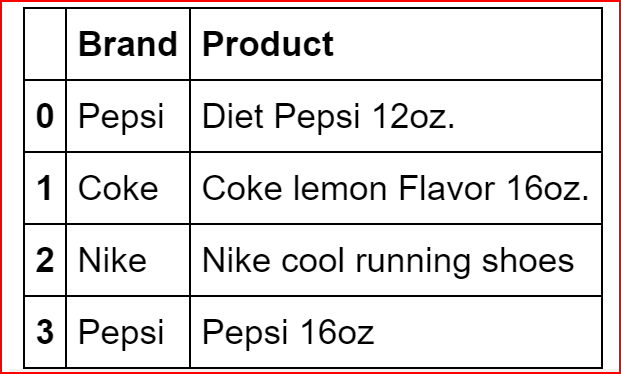
Components of a DataFrame

A DataFrame consists of Index, Columns and Data.

In the above example

Index is the first column with values 0,1, 2, 3. Index is same as row label

Columns are Brand and Product, just like columns in a table

What is use of DataFrame?

Helps with data analysis on small to large data sets as it can be used like a spreadsheet or a tables.

It’s a very powerful data structures that has built in operations that makes data manipulation, data analysis on small or large datasets very easy

Data can be loaded into a DataFrame using different files types — csv, excel, databases, clipboard etc.

In this post we will explore common ways to analyze and manipulate data in a DataFrame used for data analysis,

Creating a DataFrame from a Dictionary, List and ndarray

Selecting, adding, deleting, and renaming columns and rows

Manipulating a DataFrame — Group by, sorting, conditional data search

Iterating through a Data Frame

Pivoting data

Creating a DataFrame from Dictionary

First we need to import pandas library

import pandas as pd

Now let’s create a dictionary and then use the dictionary to create a DataFrame

dict1 ={'Brand':['Pepsi','Coke','Nike','Pepsi'], 
        'Product':['Diet Pepsi 12oz.', 'Coke lemon Flavor 16oz.', 'Nike cool running shoes', 'Pepsi 16oz']}
productDeatils =pd.DataFrame(dict1)
productDeatils
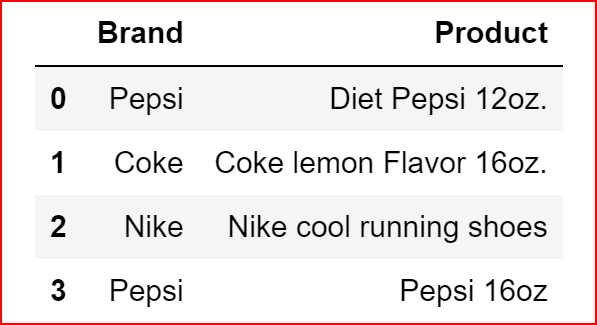
productDeatils DataFrame created from a dictionary

Creating a DataFrame from List

names =[['Jack',12],['John', 24],['Jill',30], ['Anny',5]]
names_frame = pd.DataFrame(names)
names_frame
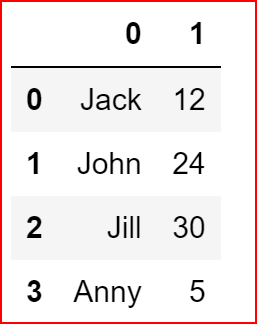
names_frame DataFrame created from names list

Creating a DataFrame from ndarray(n- dimensional) array.

In the example below, data for the dataframe starts from row 1 till end and col1 till end .

column for dataframe is row 0 of the ndarray and col 1 till end of the ndarray

index for the dataframe starts from row 1 till end and column 0 of the ndarray

import numpy as np
data = np.array([['', 'State', 'Capital'], 
                 ['state1', 'Iowa', 'Demoines'], 
                 ['state2', 'California', 'Sacramento'],
                 ['state3', 'Ohio','Columbus',],
                 ['state4', 'Alabama', 'Montgomery'],
                 ['state5', 'New York', 'Albany'],
                 ['state6','Florida', 'Tallahassee'],
                 ['state7','Kansas','Topeka']
                ])
state = pd.DataFrame(data= data[1:,1:], columns=data[0,1:], index= data[1:,0])
  
state
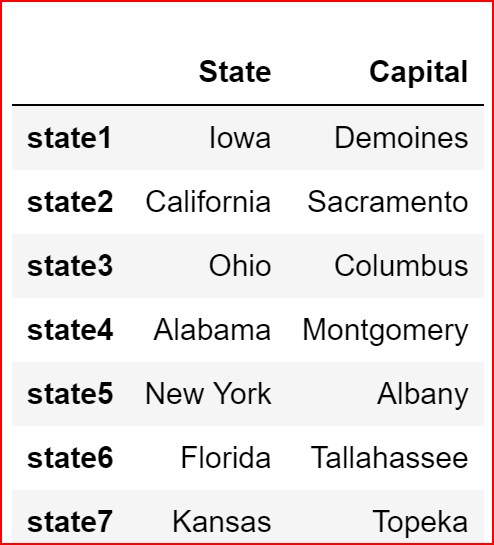
DataFrame state created from ndarray

Selecting columns and rows from a DataFrame

First we need to understand the difference between loc and iloc.

iloc is integer based selection — select rows and columns by number

loc method is based on index of the DataFrame(if any).

Let us understand this with an example where we will use state dataframe created earlier. we want to select California, which is row 2 and col 1. Remember in Python Index start at 0 so we want to extract row 1 and col 0.

print(state.iloc[1,0])
print(state.loc['state2','State'])
California
California

Selecting a range of values

In the example below, we have selected rows 3 to row 5(remember index starts at 0 in python and the last index is always left out)

state.iloc[2:5]
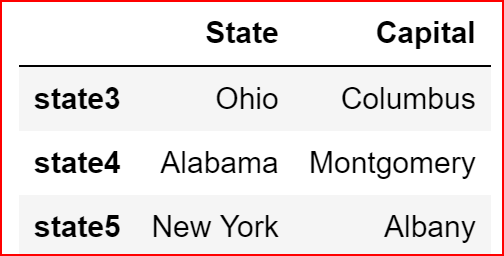
selected range of rows from row 3 to row 5

Selecting rows and columns in a DataFrame

state.iloc[1:3, 1]
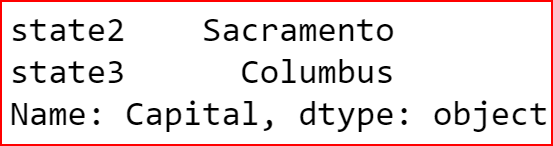
selecting row 2 to row 3 and column 2 which is capital

Adding a column to an existing DataFrame

we can create a list of values that match length of index else it will give a ValueError.

Here we are adding a sales column to the existing dataframe productDeatils

Sales_in_million =[1, 1.5, 2,6]
productDeatils['Sales'] = Sales_in_million
productDeatils
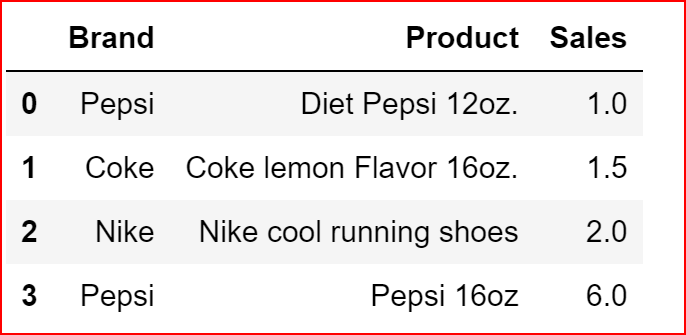
Column Sales added to productDetail DataFrame

Adding a row to DataFrame

we will create a dataframe and then use append() to append the contents of one dataframe to another. No. of columns should match between the two dataframe

df_row = pd.DataFrame([['Disney',' Frozen Princess Alsa', 3],
                       ['Apple', 'Iphone7', 50]], 
                      columns=['Brand','Product','Sales'])
productDeatils = productDeatils.append(df_row)
productDeatils
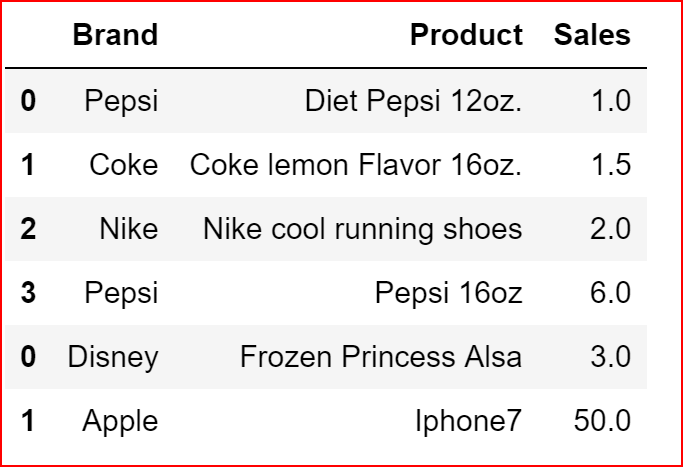
Adding rows to a dataframe using append()

Deleting a column from a DataFrame

To delete a column we can use del, drop or pop methods.

In del(), we specify the column name to be removed

In drop(), we specify the column name or the index name to be dropped, axis=0 refers to row and axis=1 refers to column, inplace is set to false by default.

Inplace = True drops the column from the DataFrame without re-assigning back to dataframe

pop(), we specify the column name to be removed

del productDeatils['Brand']
productDeatils.drop('Sales',axis=1, inplace =True)
productDeatils.pop('Product')

output will be empty as we have dropped all columns

Deleting a row from a DataFrame

we will use drop() to delete a row from a DataFrame, This is similar to using drop on a column

data_1 = {'Name':['Amy', ' Anu', ' David', 'Tom'],
         'Reports':[12,3,14,12],
         'Hobby':['Reading', 'Singing', 'Travelling', ' Technology']}
hobby = pd.DataFrame(data_1, index =['Person1', 'Person2', 'Person3', 'Person4'])
hobby
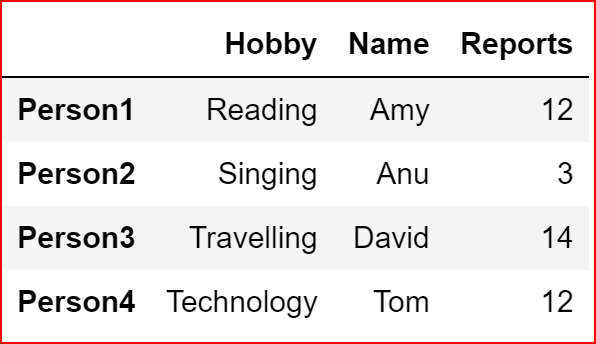
Created hobby DataFrame from the dictionary data_1

Now we will delete Person2 row.

If we don’t reassign and use inplace =False then the data would still remain the DataFrame

hobby.drop(["Person2"], axis=0, inplace=False)
hobby
Dropped the row with inplace=False and no reassignment to a dataframe

Here we will reassign the data back to hobby along with inplace = False.

hobby = hobby.drop(["Person2"], axis=0, inplace=False)
hobby
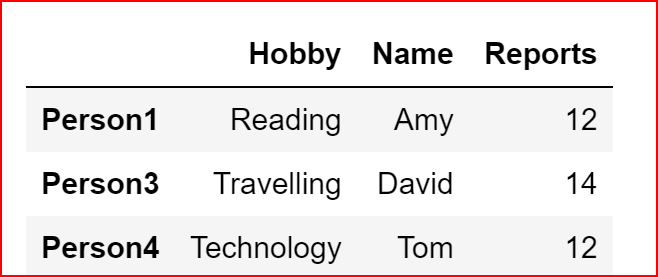
Dropped the row with inplace=False along with reassignment to a dataframe

Renaming a column in a DataFrame

Here we are renaming columns 0 to Name and column 1 to Age. earlier we had the dataframe as shown below

names_frame DataFrame created from names list
names_frame.rename(columns={0:'Name', 1:'Age'}, inplace=True)
names_frame
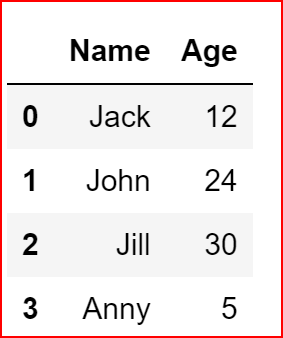
Renaming the column 0 to Name and column 1 to Age

Renaming the Index in a DataFrame

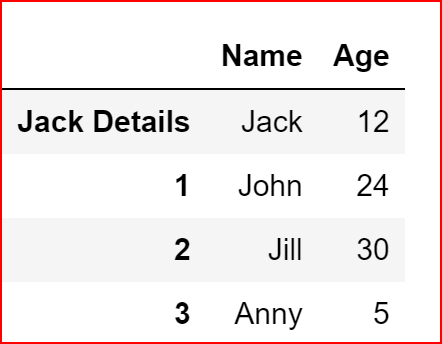
We have renamed the Index 0 to ‘Jack Details’

names_frame.rename(index={0:'Jack Details'}, inplace=True)
names_frame
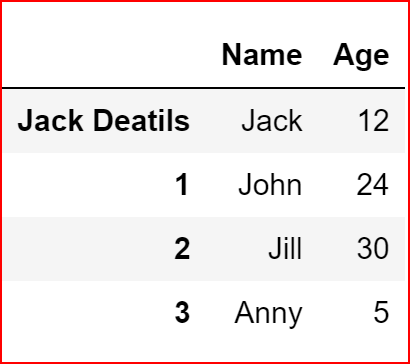
Grouping the DataFrame

when grouping data we can specify the column by which need to group the data and then use any of the aggregate functions

grp_data = productDeatils.groupby('Brand').count()
grp_data
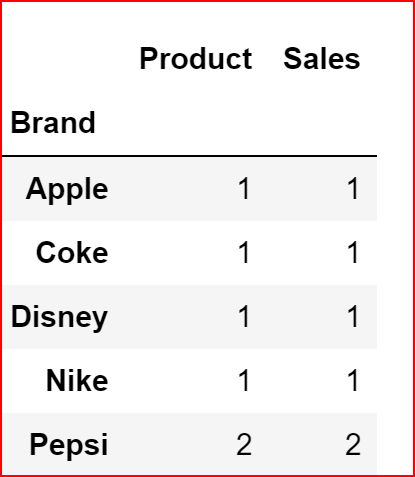
grp_data — data is grouped by Brand and the total counts are displayed
grp_sales = productDeatils.groupby('Brand').sum()
grp_sales
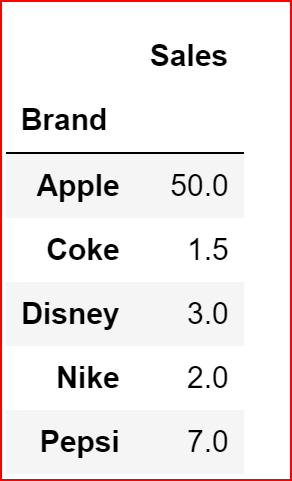
grp_sales — data is grouped by Brand and summed on Sales

Sorting data in DataFrame

we use sort_values(0 to sort the data by specifying the column name and optionally we can specify the sort order. By default sort order is ascending

productDeatils.sort_values('Product')
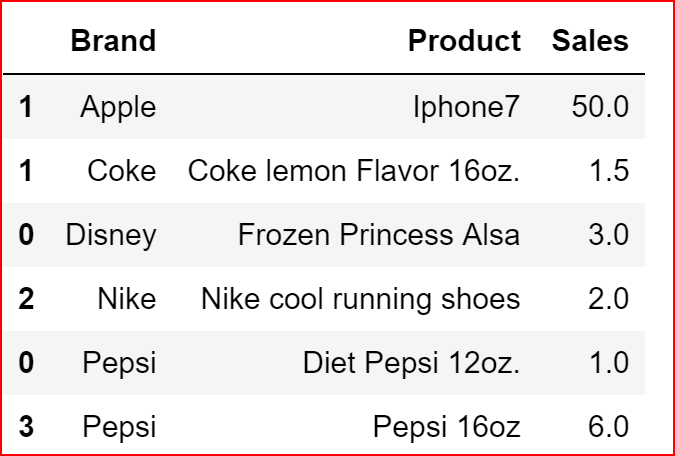
sorted by Brand
productDeatils.sort_values(['Sales','Brand'], ascending=False)
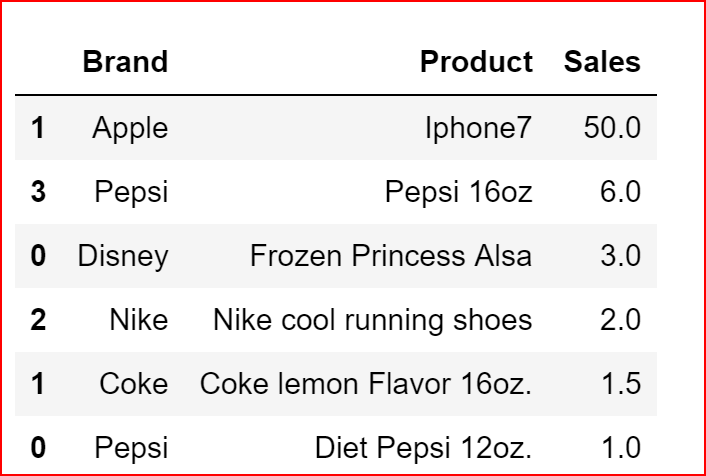
sorted by Sales and then Brand from highest sales to lowest sales

Conditional Search for data in a DataFrame

sales_more_2M= productDeatils[productDeatils.Sales > 2] 
sales_more_2M
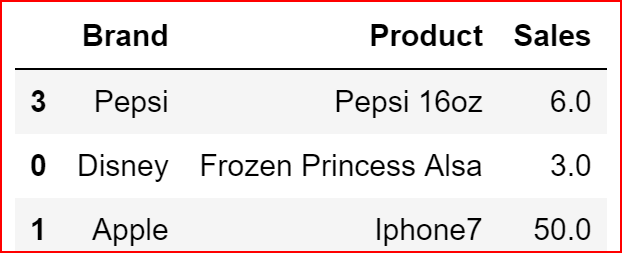
Displays data for sales > 2

we can search based on multiple conditions. For multiple conditions we can use “&” for and and “|” for or condition

pepsi_sales_more_2M= productDeatils[(productDeatils.Sales > 2) & 
                                    (productDeatils.Brand == 'Pepsi')] 
pepsi_sales_more_2M
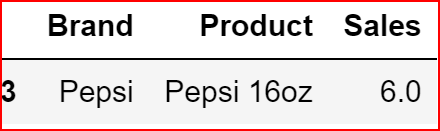
Output for the multiple conditions

Iterating through a DataFrame

To iterate through the DataFrame, we can use

iteritems() : to iterate over row (key,value) pairs

iterrows(): iterate over rows as (index, series) pairs

itertuples() : iterate over rows as namedtuples

brand_product = productDeatils.iloc[:,:2]
for key,value in brand_product.iteritems():
    print( key, value)

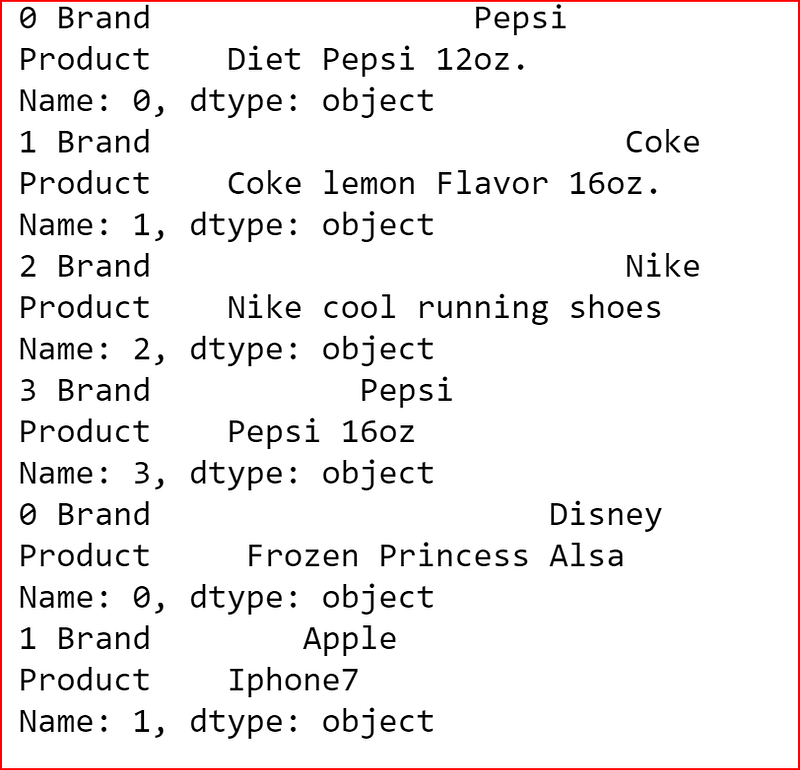
Below we use iteritems() where each column is iterated as a key value pair. First, we have Brands as key value pair and the Product as key value pair
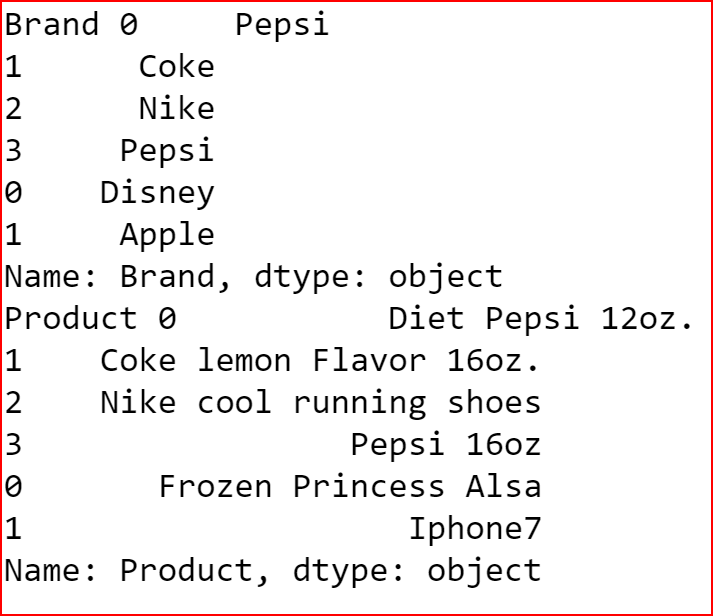
output of the iteritems()
for index, row in brand_product.iterrows():
 print(index, row)

In iterrows() returns a Series for each row and does not preserve the datatype across the rows
Iterrows() output
for row in brand_product.itertuples():
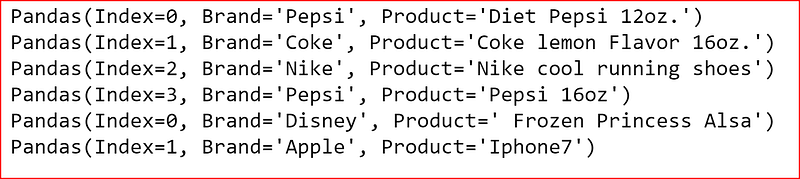
    print(row)

itertuples() iterate over dataframe as rows with Index as the first element of the tuple
Itertuples output as namedtuples

Pivoting data

This is just an introduction to pivoting data.

To pivot the data we need to provide index, columns, values. index and columns are mandatory arguments

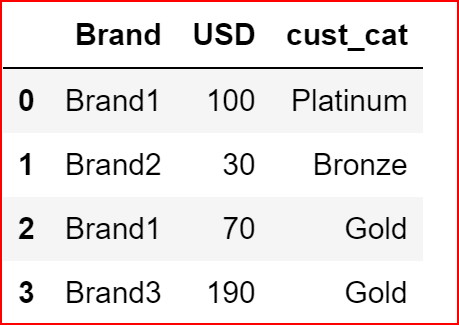
data={"Brand": ['Brand1', 'Brand2', 'Brand1', 'Brand3'],
     "cust_cat":['Platinum', 'Bronze', 'Gold', 'Gold'],
     'USD': [100, 30, 70, 190]}
df1 = pd.DataFrame(data)
DataFrame df1
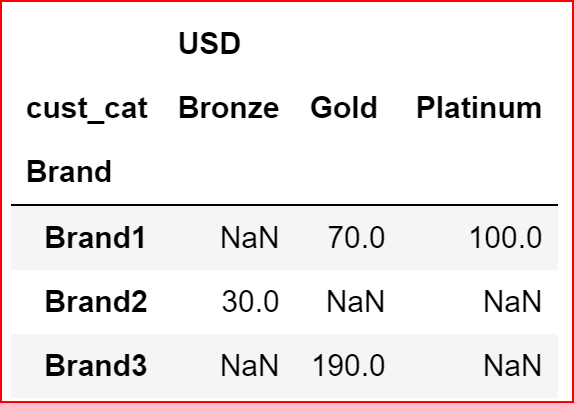
df1.pivot(index ='Brand', columns="cust_cat")

Here we have pivoted the Data on Brand by setting index to Brand and Columns are the distinct values for cust_cat
Python
Dataframes
Slicing Data
Iteration
Pivoting
Recommended from ReadMedium