Python Celery Tutorial — Distributed Task Queue explained for beginners to Professionals(Part-1)
Hello, I have used Celery extensively in my projects at my company. In this series, I’ll demystify everything about Python Celery, it’s applications, my experiences and experiments with Celery in detail.

What is Celery? (Let’s get it’s definition from Official website first.)
Celery is a simple, flexible, and reliable distributed system to process vast amounts of messages, while providing operations with the tools required to maintain such a system.
It’s a task queue with focus on real-time processing, while also supporting task scheduling.
Source : https://docs.celeryproject.org/en/stable/
Above definition sounds so complicated right? Don’t worry. I will simplify the definition with a real world example.
Assume you are at your favorite Restaurant for a dinner with your girlfriend.
- A waiter has come to you and has taken your order.
- Waiter went to Kitchen and informed your order to cooks.
- Cooks has so many orders in Queue. They were processing one by one from Queue.
- Your order has come from the Queue. A Cook prepared the dishes and confirmed the waiter.
- Waiter carried the dishes to your Table.
- You have enjoyed your dinner with your girlfriend.

Okay cool. Let’s relate above events with Celery now. In analogy with above example.
- Order is a message. A message is an information on what task to be executed and input parameters for the task.
- Cooking is a task to be executed in Celery. A task(in programming is a function) and contains the action/code which acts on an input and produces some output.
- Cook is a worker in Celery. A worker is a program which does these tasks i.e.; executes the tasks/functions. There can be one or more workers as similar one or more cooks in a restaurant.
- Order Queue is a task queue in Celery. A Task Queue is queue of tasks to be executed by workers.
NOTE : Celery uses a Message Broker and it’s Messaging Queue for it’s operations. You can read about this topic understand in depth. But here I’m trying to simplify things to make you understand clearly how Celery works.
In Celery, you can assume order or message as a Task to be executed, Waiter as message broker, order queue as task queue and cook as a Worker who executes the tasks.
When people in restaurant orders, Task Queue gets filled with Cooking Tasks say Task1, Task2, Task3,… and so on… Cooks/Workers take orders or messages or tasks from the queue in an order and process it.

In Celery, You can create tasks which can be executed by workers. Clients can call the tasks, tasks are executed by the workers but not Clients. There can be one or more Celery workers on one or more machines(that’s why it is mentioned as distributed in definition).
Okay, Enough of theory. Now Let’s get into technical and write a simple program with Celery.
You need (I am Windows 10 with following)
- Python 3
- You need one of Redis/RabbitMQ/Amazon SQS. I am using Redis here. I have already installed Redis and running on 6379 port.
on command prompt, install following libraries
pip install celery==4.4.3
pip install redis==3.5.3
Let’s create a folder Celery-Test
and create file tasks.py in the above folder(Celery-Test) and write below code in the file. Please read the code carefully.
- we have imported Celery class from celery package.
- We have created BROKER_URL using Redis.
- We have created celery_app instance using Celery class by passing module name as Restaurant and broker as Redis.
- We have decorated our cooking_task function with @celery_app.task decorator. Functions which are decorated with @celery_app.task decorator are considered as celery tasks.
Now to go to command prompt and in the same folder where your tasks.py resides, run below command to run our celery worker who can execute this task.
celery -A tasks worker --pool=solo --loglevel=info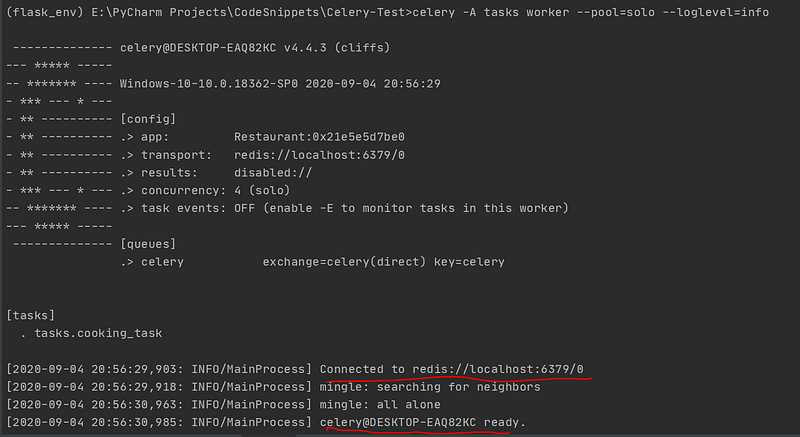
You should see above kind of output. Make sure you see the logs marked in red-lines to ensure our worker is running fine. Okay, now our worker is running which can execute the task cooking_task.
Now we will submit the tasks to our worker.
create file test.py in the above folder(Celery-Test) and write below code in the file.
and run the script.
python test.py
- we have imported cooking_task from tasks
- we are calling this task by cooking_task.delay(*args, **kwargs) function by passing respective inputs such as Table-No and dishes.
In test.py console, you will see task id printed.

Go to worker console and check.

Yayyy….!!!!! Our worker received the task and executed it.
Edit test.py and start giving more tasks to our worker.
In test.py console, we have 4 task ids printed.

Go back to worker console and check.
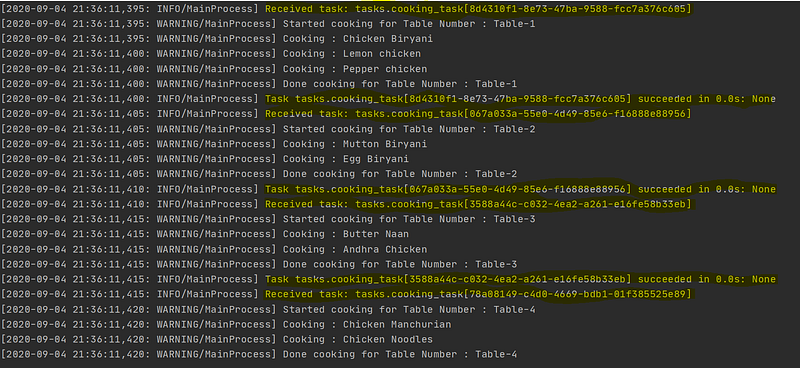
Four tasks are executed by the worker.
You have learned what is celery, how to write tasks in celery, how to run worker and how to call the celery tasks. We will get into more in our next story.
If you like the story, please follow me and provide suggestions.