Free AI web copilot to create summaries, insights and extended knowledge, download it at here
1723
Abstract
hljs-keyword">if</span> <span class="hljs-built_in">num</span> <span class="hljs-symbol">%</span> <span class="hljs-number">5</span> == <span class="hljs-number">0</span>:
<span class="hljs-built_in">string</span> = <span class="hljs-built_in">string</span> + <span class="hljs-string">"Buzz"</span>
<span class="hljs-keyword">if</span> <span class="hljs-built_in">num</span> <span class="hljs-symbol">%</span> <span class="hljs-number">5</span> != <span class="hljs-number">0</span> <span class="hljs-keyword">and</span> <span class="hljs-built_in">num</span> <span class="hljs-symbol">%</span> <span class="hljs-number">3</span> != <span class="hljs-number">0</span>:
<span class="hljs-built_in">string</span> = <span class="hljs-built_in">string</span> + str(<span class="hljs-built_in">num</span>)
<span class="hljs-built_in">print</span>(<span class="hljs-built_in">string</span>)</pre></div><p id="82d1"><b>Method 2: Use if, elif, and else</b></p><div id="cc52"><pre><span class="hljs-keyword">for</span> <span class="hljs-built_in">num</span> <span class="hljs-keyword">in</span> range(<span class="hljs-number">1</span>, <span class="hljs-number">21</span>):
<span class="hljs-keyword">if</span> <span class="hljs-built_in">num</span> % <span class="hljs-number">3</span> == <span class="hljs-number">0</span> and <span class="hljs-built_in">num</span> % <span class="hljs-number">5</span> == <span class="hljs-number">0</span>:
<span class="hljs-built_in">print</span>(<span class="hljs-string">'FizzBuzz'</span>)
elif <span class="hljs-built_in">num</span> % <span class="hljs-number">3</span> == <span class="hljs-number">0</span>:
<span class="hljs-built_in">print
Options
</span>(<span class="hljs-string">'Fizz'</span>)
elif <span class="hljs-built_in">num</span> % <span class="hljs-number">5</span> == <span class="hljs-number">0</span>:
<span class="hljs-built_in">print</span>(<span class="hljs-string">'Buzz'</span>)
<span class="hljs-keyword">else</span>:
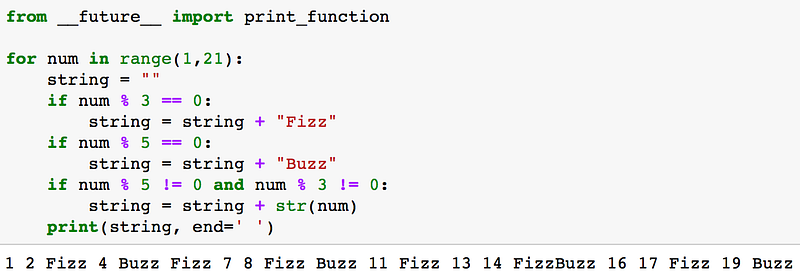
<span class="hljs-built_in">print</span>(<span class="hljs-built_in">num</span>)</pre></div><h2 id="f499">Concluding Remarks</h2><p id="84b2">There are so many different ways to solve the problem so feel free to post your own method!</p><figure id="a6b2"><img src="https://cdn-images-1.readmedium.com/v2/resize:fit:800/1*R2fnmU0IU_YB5J2bz4_3hQ.png"><figcaption>Python 2 specific FizzBuzz Method. For Python 3, simply take out first line (from future import print_function)</figcaption></figure><p id="0702">As always, the code used in this blog post and in the video above is available on my <a href="https://github.com/mGalarnyk/Python_Tutorials/blob/master/Python_Basics/Intro/PythonBasicsFizzBuzz.ipynb">github</a>. Please let me know if you have any questions either here, on <a href="https://www.youtube.com/watch?v=XR1QFrbPRnw">youtube</a>, or through <a href="https://twitter.com/GalarnykMichael">Twitter</a>. Next post goes over <a href="https://readmedium.com/prime-numbers-using-python-824ff4b3ea19">Prime Numbers using Python</a>. If you want to learn how to utilize the Pandas, Matplotlib, or Seaborn libraries, please consider taking my <a href="https://www.linkedin.com/learning/python-for-data-visualization/value-of-data-visualization">Python for Data Visualization LinkedIn Learning course</a>. Here is a <a href="https://youtu.be/BE8CVGJuftI">free preview video</a>.</p></article></body>