
Python — Address To Geolocation
Convert Addresses To Latitude & Longitude
In data science projects you often need to enrich existing datasets with further information. In today’s story, we will do exactly this. Welcome to Python Data Science December #3.
Today we have a given dataset with addresses of different restaurants in Berlin as shown below. We want to enrich this dataset with geolocation information — so the latitude & longitude values for the given addresses.
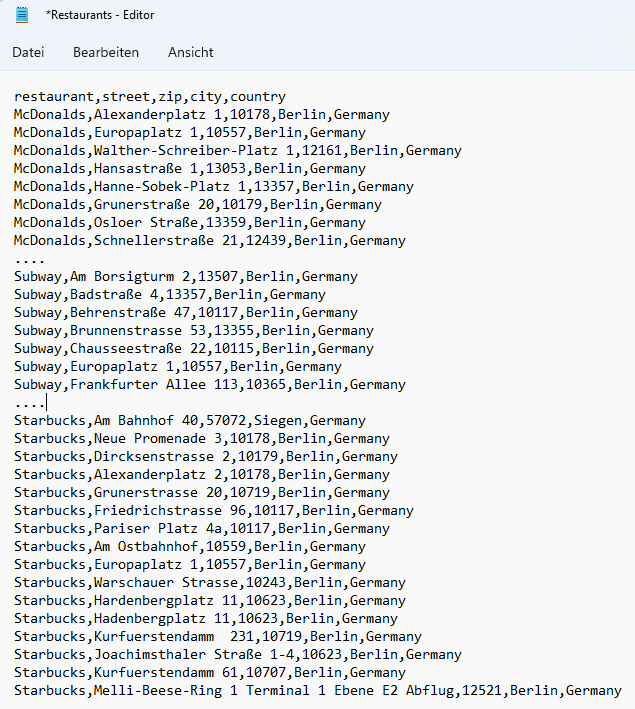
The story will be further continued as part of my Python - Data Science December series. All resources, datasets, required Python libraries & installations are listed at the end of the story, in the chapter Summary & Resources.
🔍Examine The Data
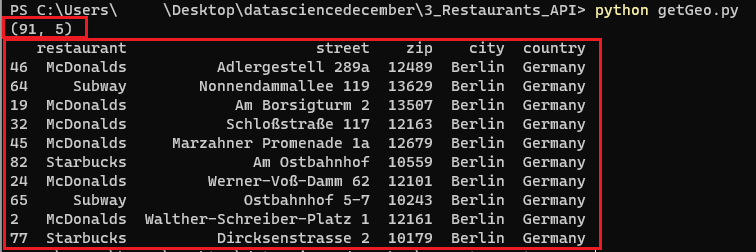
Let’s quickly try to understand the data. We import pandas (line 1) and read the Restaurant.csv dataset into a DataFrame (line 3). We then run
df.shapeto get a feeling about the number of rows & columnsdf.sample(n=10)to get 10 sample rows of the dataset
Alright, we have 91 rows structured in 5 columns. The content is restaurant address data of Mcdonald's, Subway & Starbucks restaurants in Berlin. We have information about the restaurant's name, street, zip code, city & country.
🌏Enrich The Data By Calling An API
We have a full list of restaurant addresses in Berlin. However, we want to enrich the dataset with the latitude and longitude information for the given addresses.
Fortunately, there is Mapquest. Mapquest offers a Geocoding API that translates an address to its latitude & longitude values with a free limit of 15000 calls/month.
Before we start, we introduce two new empty columns (‘lat’ and ‘long’) in our CSV file as placeholders for the latitude and longitude values and save it.

Next, let’s explore the Mapquest API a little bit. As per the documentation, we need to send a GET request to the below URL…
http://www.mapquestapi.com/geocoding/v1/address… with two request/query parameters key and location. The location is simply an address string, while the key can be generated in your profile section on Mapquest.
Ok, let’s try to call the Mapquest API for one example row (row 1, as row 0 is the header) of our dataset.
- we import pandas & requests (lines 1–2)
- we read the
Restaurants.csvinto a DataFrame (line 4) and maintain our Mapquest key (line 5) - we concatenate street, zip, city & country from row 1 of the DataFrame into a new variable
apiAddress(line 6) - we specify the parameters — key & location — for the API Call (lines 8–11)
- we fire the GET Request to the Mapquest API URL with the parameters (line 13) and print the response text (line 14)
In the response, we can see that we get a log of the input location (apiAddress) and further API response values including the latitude and longitude values. Nice 😃

So let’s loop through the whole dataset, fire the address of each row to the API, and store the resulting geolocation values.
First, we make some small adaptions. We import json (line 3) and remove the encoding from our DataFrame (line 5), as it made some trouble to the API for some rows. Then, we can finally loop through each row of the dataset (line 8) and execute the following steps:
- we create the input address
apiAddressfor the API call concatenating street, zip, city, and country (line 9). - we prepare the API call by specifying the necessary API parameters — the key and the location (
apiAddress) (lines 10–13) - we execute the API call, store the results in the
responsevariable (line 15) and transform it into JSON format (lines 16–17). - now we can easily access the latitude and longitude values (lines 18–19) and store them in the respective Dataframe columns (lines 21–22).
In the last step — after the loop — we save the file as Restaurants_Geo.csv (line 24).
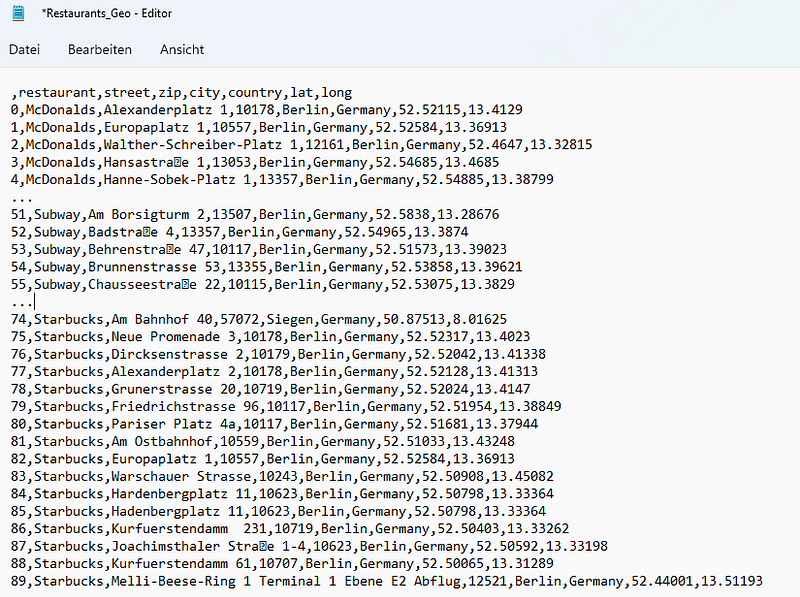
Once finished we have a new & enriched dataset Restaurants_Geo.csv containing latitude & longitude values for the given addresses.
📓Summary & Resources
This was story #3 of the Python Data Science December. We enriched a given dataset containing restaurant addresses with their geolocations (latitude & longitude values).
Compared to the previous stories, this one was rather short, but not less important.
If you want to follow along with all my stories & support me, you can register on Medium. If something is unclear or you need help, just drop a comment. I will answer it for sure.
You can find the whole Python code together with the full dataset for free on GitHub. Additionally, I created an advanced dataset that contains the addresses and their geolocations for ALL McDonald’s restaurants in Germany. I will share this advanced dataset exclusively on Patreon & Gumroad against a small donation.
- ✔️ GitHub (for free) — full code & full dataset (90 rows)
- ✔️ Gumroad (1$ one-time purchase) — an advanced dataset with all McDonald’s restaurants & their geolocation in Germany (1441 rows)
- ✔️ Patreon (3$ / month for regular & advanced content) — an advanced dataset with all McDonald’s restaurants & their geolocation in Germany (1441 rows)


