
PySpark Interview Questions for Data Engineers || Part 2
Welcome to the blog! This is the second part of PySpark interview questions for data engineers, I will be posting next parts of this blog soon! so follow me for more such blogs!
In this blog we will be discussing most frequently asked PySpark interview questions in Data Engineering Interviews.
1. You can visit the first part of this interview series below
Below are the questions we will be discussion about:
- Describe the PySpark architecture.
- How does PySpark differ from Apache Hadoop?
- How do you initialize a SparkSession?
- What is the significance of the SparkContext?
- Describe the types of transformations in PySpark.
- How do you read a CSV file into a PySpark DataFrame?
- What are actions in PySpark, and how do they differ from transformations?
- How can you filter rows in a DataFrame?
- What are UDFs (User Defined Functions), and how are they used?
- How can you handle missing or null values in PySpark?
- How do you repartition a DataFrame, and why?
- Describe how to cache a DataFrame. Why is it useful?
- How do you save a DataFrame to a file?
- What is the Catalyst Optimizer?
- Explain the concept of partitioning in PySpark.
1. Describe the PySpark Architecture.
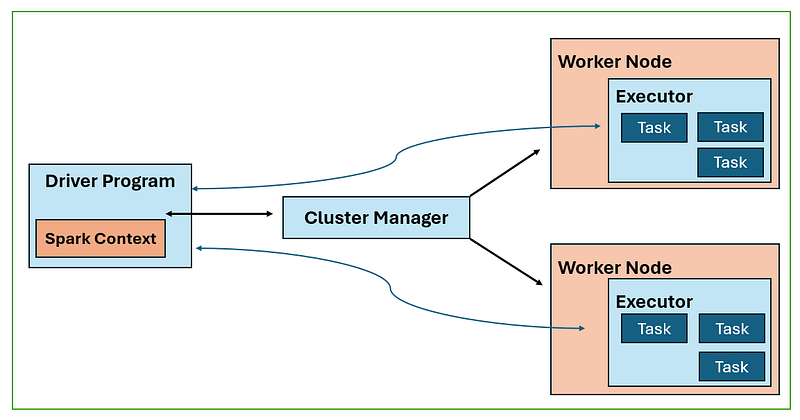
- Spark Driver: The Spark Driver Program is responsible for executing the main program of a Spark application and creating the SparkContext. It contains components such as the DAG Scheduler, Task Scheduler, Backend Scheduler, and Block Manager, which translate user code into executable jobs on the cluster.
- Cluster Manager: The Cluster Manager manages job execution on the cluster. It works with the Spark Driver to allocate resources for jobs and breaks down jobs into smaller tasks distributed to worker nodes.
- Worker Nodes: Worker nodes execute tasks assigned by the Spark Driver. Executors on worker nodes process RDDs created in the SparkContext and cache results. The number of worker nodes can be increased to improve system performance by dividing jobs into smaller, coherent parts.
- SparkContext: The SparkContext contains essential functions for interacting with the Spark cluster. It receives task information from the Cluster Manager and enqueues tasks on worker nodes for execution.
- Executor: Executors are responsible for executing tasks on worker nodes. They have the same lifespan as the Spark application and can be increased in number to enhance system performance.
Overall, this architecture enables efficient distributed computing in Apache Spark by managing job execution, resource allocation, task distribution, and task execution across the cluster.
2. How does PySpark differ from Apache Hadoop?
- Apache Hadoop is like a giant storage and processing system for Big Data, using a method called MapReduce, which breaks down tasks into smaller bits. It's good for handling huge amounts of data but can be complex and slow.
- PySpark, on the other hand, is built on top of Apache Spark and uses a smarter way of processing data, keeping things in memory instead of constantly reading from disk. It's faster, easier to use (especially for Python programmers), and has more features like streaming and machine learning tools.
So, while Hadoop is solid and reliable, PySpark is faster, easier, and more versatile, especially for tasks like data analysis and machine learning.
3. How do you initialize a SparkSession?
Initializing a SparkSession in PySpark involves a few steps, so let's break it down:
1. Importing SparkSession:
- The first step is to import the SparkSession class from the `pyspark.sql` module. This class is responsible for managing the SparkSession, which is the entry point to programming Spark with the DataFrame API.
from pyspark.sql import SparkSession2. Creating a SparkSession object using the Builder pattern:
- Once you've imported SparkSession, you can create a SparkSession object using the builder pattern. The builder provides methods for configuring the SparkSession before it's created.
spark = SparkSession.builder \
       .appName("YourAppName") \
       .config("spark.some.config.option", "some-value") \
.getOrCreate()- appName("YourAppName"): This method sets the application name for your Spark application. Replace `"YourAppName"` with the desired name for your application.
- config("spark.some.config.option", "value"): This method allows you to set configuration options for Spark. Replace "spark.some.config.option" with the specific configuration option you want to set, and "value" with the value for that option.
3. getOrCreate() method:
- Finally, the `getOrCreate()` method is called on the builder object to either get an existing SparkSession or create a new one if it doesn't exist. This ensures that only one SparkSession is created per JVM (Java Virtual Machine).
So, in summary, initializing a SparkSession involves importing the SparkSession class, using the builder pattern to configure the session, and calling `getOrCreate()` to create or retrieve the session.
4. What is the significance of the SparkContext?
SparkContext is a fundamental component of Apache Spark applications, serving as the entry point and coordinator for executing distributed data processing tasks on a Spark cluster. Its significance lies in several key areas:
1. Cluster Connection and Initialization:
- SparkContext establishes a connection with the Spark cluster by communicating with the cluster manager (e.g., standalone, YARN, Mesos). It initializes the necessary resources and services for executing Spark jobs.
2. Task Distribution and Execution:
- It partitions Spark jobs into smaller tasks and distributes them across worker nodes in the cluster. SparkContext optimizes task execution by leveraging parallelism and data locality, ensuring efficient utilization of cluster resources.
3. Fault Tolerance and Recovery:
- SparkContext implements fault tolerance mechanisms to ensure the reliability of Spark applications. It tracks the lineage of RDDs (Resilient Distributed Datasets) to reconstruct lost data partitions in case of node failures or data corruption.
4. Resource Management and Optimization:
- SparkContext manages cluster resources such as memory, CPU cores, and storage. It dynamically adjusts resource allocations based on the workload and cluster availability, optimizing performance and scalability.
5. Interaction with Driver Program:
- SparkContext enables the driver program to interact with the Spark cluster. It provides methods for submitting jobs, accessing data, and controlling the execution flow of Spark applications. Developers use SparkContext to create RDDs, perform transformations, and execute actions on distributed datasets.
6. Contextual Configuration:
- SparkContext allows developers to configure various aspects of Spark execution through its configuration options. This includes settings related to memory usage, parallelism, serialization, and other runtime parameters, enabling fine-tuning for specific application requirements.
Overall, SparkContext plays a critical role in coordinating the execution of Spark jobs, ensuring fault tolerance, optimizing resource utilization, and providing a unified interface for developers to interact with the Spark cluster. It serves as the foundation for building scalable and reliable data processing pipelines in Apache Spark.
5. Describe the types of transformations in PySpark.
In PySpark, transformations are categorized into two types based on their behavior with respect to data shuffling across partitions: narrow transformations and wide transformations.
1. Narrow Transformations:
- Narrow transformations are those where each input partition result into only one output partition.
- Narrow Transformations can be performed independently on individual partitions without the need to shuffle or exchange data across partitions.
- Examples of Narrow transformations are `map`, `filter`, `flatMap`, `mapPartitions`, etc.
- Narrow transformations are usually more efficient because they minimize data movement and communication across the cluster.
2. Wide Transformations:
- Wide transformations are those where each input partition may result into multiple output partitions.
- Wide Transformations require data shuffling or redistribution across partitions, such as aggregations or joins.
- Examples of wide transformations are `groupByKey`, `reduceByKey`, `join`, `sortByKey`, etc.
- Wide transformations typically require data exchange and coordination among partitions, which can result in network traffic and performance overhead.
Understanding the distinction between narrow and wide transformations is crucial for optimizing PySpark jobs, as minimizing wide transformations can significantly improve performance by reducing the amount of data shuffled across the cluster.
6. How do you read a CSV file into a PySpark DataFrame?
- In PySpark, to read a CSV file into a DataFrame, we use the `spark.read.csv()` method. This method allows us to load CSV data and convert it into a DataFrame, which is a structured representation of the data.
- First, we need to initialize a SparkSession, which is the entry point to programming Spark with the DataFrame and Dataset APIs. Then, we use the `spark.read.csv()` method and provide the path to the CSV file as an argument.
- Additionally, we can specify options like `header=True` if the CSV file has a header row, indicating column names, and `inferSchema=True` if we want Spark to automatically infer the data types of columns from the data itself.
Once the DataFrame is created, we can perform various operations on it, such as data transformations, aggregations, and analysis. This approach is scalable and efficient, making it suitable for processing large volumes of data in a distributed environment.
7. What are actions in PySpark, and how do they differ from transformations?
- In PySpark, transformations and actions are fundamental concepts in distributed data processing. Transformations are operations that transform one DataFrame into another by applying some function or operation to each element or row of the DataFrame.
- These transformations are lazy evaluated, meaning they are not executed immediately but rather build up a logical execution plan, describing how to compute the final result. Transformations are immutable, meaning they don't modify the original DataFrame but create a new one with the transformed data.
- On the other hand, actions are operations that trigger the execution of the logical execution plan built by transformations and return a result to the driver program or write data to an external storage system.
- Unlike transformations, actions are eager evaluated, meaning they cause the execution of all preceding transformations to produce a result. Actions are typically used to trigger computations and retrieve results, initiating the actual execution of the Spark job.
8. How can you filter rows in a DataFrame?
In PySpark, the ‘filter()’ and ‘where()’ functions are used to filter rows in a DataFrame based on a given condition. Here's a bit more detail:
1. filter() function:
- This function is used to filter rows based on a Boolean expression. It takes a lambda function or a column expression as its argument.
For example:
filtered_df = original_df.filter(lambda row: row['age'] > 25)2. where() function:
- This is an alias for the ‘filter()’ function, providing the same functionality. It's commonly used by those familiar with SQL, as it allows for SQL-like syntax.
For example:
filtered_df = original_df.where(original_df['age'] > 25)Both functions return a new DataFrame containing only the rows that satisfy the given condition, while leaving the original DataFrame unchanged. This makes it easy to perform data transformations without modifying the original dataset.
9. What are UDFs (User Defined Functions), and how are they used?
In PySpark, User-Defined Functions (UDFs) allow users to apply custom transformations to DataFrame columns. These functions are created using Python and can be applied to individual DataFrame columns or entire DataFrames. Let's break down how UDFs work with an example:
Suppose we have a DataFrame `df` with a column named `scores`, and we want to apply a custom function that doubles each score. We can define a UDF to achieve this:
from pyspark.sql.functions import udf
from pyspark.sql.types import IntegerType

# Define a Python function to double the score
def double_score(score):
    return score * 2

# Register the Python function as a UDF
double_score_udf = udf(double_score, IntegerType())

# Apply the UDF to the 'scores' column in the DataFrame
df = df.withColumn('doubled_scores', double_score_udf(df['scores']))
Let's break down the steps:
- Define the Python Function: First, we define a Python function `double_score(score)` that takes a score as input and returns its double.
- Register the UDF: Next, we use the `udf()` function from `pyspark.sql.functions` module to register our Python function as a UDF. We also specify the return type of the UDF, in this case, `IntegerType()`.
- Apply the UDF: Finally, we apply the UDF to the 'scores' column in the DataFrame using the `withColumn()` function. This creates a new column named 'doubled_scores', which contains the result of applying our custom transformation to each value in the 'scores' column.
After executing these steps, the DataFrame `df` will have a new column named 'doubled_scores', where each score is doubled according to our custom logic defined in the UDF.
UDFs provide flexibility in data processing, allowing users to define and apply their own custom transformations to DataFrame columns, which may not be achievable using built-in PySpark functions alone.
10. How can you handle missing or null values in PySpark?
Here's how we can handle missing or null values in PySpark along with examples:
1. Dropping Rows or Columns:
- This approach is useful when we can afford to discard rows or columns with missing values.
- For Example, to drop rows with any null values:
cleaned_df = df.dropna()
- This operation removes any row containing at least one null value from the DataFrame.
2. Imputation:
- Imputation is the process of replacing missing values with substitute values.
- For example, to replace missing values in a specific column ('column_name') with the mean of that column:
from pyspark.sql.functions import mean

mean_value = df.select(mean(col("column_name"))).collect()[0][0]
imputed_df = df.fillna(mean_value, subset=["column_name"])- Here, we compute the mean of the column and fill null values in 'column_name' with this mean value.
3. Using Coalesce:
- Coalesce function returns the first non-null value among its arguments.
- To replace null values in one column with values from another column:
from pyspark.sql.functions import coalesce

df = df.withColumn("new_column", coalesce(col("column_with_nulls"), col("replacement_column")))- In this example, if 'column_with_nulls' is null, 'new_column' will take the value from 'replacement_column'.
4. Using When and Otherwise:
- The `when()` and `otherwise()` functions allow for conditional replacement of null values.
- For example, to replace null values in 'column_with_nulls' with a default value:
from pyspark.sql.functions import when

df = df.withColumn("new_column", when(col("column_with_nulls").isNull(), "default_value").otherwise(col("column_with_nulls")))- Here, if 'column_with_nulls' is null, 'new_column' will be set to "default_value"; otherwise, it retains the original value.
These methods provide flexible strategies for handling missing or null values, allowing us to tailor our approach to the specific needs of our data analysis or machine learning tasks.
11. How do you repartition a DataFrame, and why?
- Repartitioning a DataFrame in PySpark involves redistributing the data across a different number of partitions. This operation is useful for optimizing performance, especially when dealing with skewed data or when performing operations that require shuffling, such as joins or aggregations. Repartitioning allows us to achieve better parallelism and more evenly distribute the data across executors, which can lead to improved performance.
Here's how we can repartition a DataFrame in PySpark, along with an example:
# Suppose we have a DataFrame named 'df'
# Repartitioning 'df' into 5 partitions
repartitioned_df = df.repartition(5)
In this example, we repartition the DataFrame 'df' into 5 partitions. By specifying the number of partitions, we can control the parallelism and distribution of the data. Repartitioning can be particularly beneficial when working with large datasets or when aiming to optimize the performance of distributed computations.
12. Describe how to cache a DataFrame. Why is it useful?
- Caching a DataFrame in PySpark means storing the DataFrame's contents in memory across the cluster nodes. This prevents PySpark from recomputing the DataFrame's contents each time it's used in subsequent operations. Instead, the data is kept in memory, making it readily available for quick access.
- To cache a DataFrame, you use either the `cache()` or `persist()` function. Here's a breakdown:
1. `cache()` function:
- This function caches the DataFrame in memory by default. It is a shorthand for persisting the DataFrame with the default storage level, which is usually MEMORY_ONLY.
# Caching 'df' in memory
   cached_df = df.cache()
2. `persist()` function:
- This function allows you to specify the storage level explicitly. For example, you can cache the DataFrame in memory only (`MEMORY_ONLY`), on disk (`DISK_ONLY`), or a combination of both.
from pyspark import StorageLevel
   # Caching 'df' in memory with MEMORY_ONLY storage level
   cached_df = df.persist(storageLevel=StorageLevel.MEMORY_ONLY)
Why is caching useful?
- Improved Performance: Caching avoids the need to recompute the DataFrame's content each time it's accessed, leading to faster processing.
- Efficient Reuse: If the same DataFrame is used multiple times in subsequent operations, caching prevents redundant computations by keeping the data readily available in memory.
- Optimized Iterative Algorithms: Caching is particularly beneficial for iterative algorithms, such as machine learning algorithms, where the same DataFrame is accessed repeatedly during iterations.
Overall, caching optimizes performance by minimizing computation overhead and improving data access speed, especially in scenarios where DataFrame reuse is common.
13. How do you save a DataFrame to a file?
To save a DataFrame to a file in PySpark, you can use the `write` method along with appropriate file formats and options. Here's an example:
# Suppose we have a DataFrame named 'df'
# Saving 'df' to a CSV file
df.write.csv("path/to/save/folder", mode="overwrite", header=True)
In this example, we use the `write.csv()` method to save the DataFrame 'df' to a CSV file. We specify the path where the file will be saved, the mode (overwrite or append), and whether to include the header in the output file.
Similarly, you can use other file formats such as Parquet, JSON, or ORC by replacing `write.csv()` with `write.parquet()`, `write.json()`, or `write.orc()`, respectively.
Saving a DataFrame to a file is useful for persisting the results of your data processing or analysis, allowing you to share or further process the data at a later time.
14. What is the Catalyst Optimizer?
The Catalyst optimizer is an advanced query optimizer framework in Apache Spark that optimizes and transforms DataFrame and SQL queries for improved performance. It operates in multiple phases, including analysis, logical optimization, physical planning, and code generation.
Here's a breakdown of its key components and functionalities:
- Analysis Phase: In this phase, the Catalyst optimizer analyzes the user's DataFrame or SQL query to build a logical query plan. It performs tasks such as parsing, type checking, and resolving references to columns or tables.
- Logical Optimization Phase: After building the logical query plan, the Catalyst optimizer applies various optimization rules and techniques to optimize the query. This includes predicate pushdown, constant folding, and Boolean simplification to reduce the amount of data processed and improve query performance.
- Physical Planning Phase: In this phase, the Catalyst optimizer generates multiple physical execution plans based on the optimized logical query plan. It considers factors such as data distribution, available resources, and supported operations to choose the most efficient physical execution plan.
- Code Generation Phase: Finally, the Catalyst optimizer generates optimized Java bytecode or machine code for executing the physical execution plan. This code generation approach provides significant performance benefits by leveraging the power of the JVM and native execution.
The Catalyst optimizer plays a crucial role in optimizing Spark applications, enabling faster query execution and better resource utilization. Its extensible architecture allows for the addition of custom optimization rules and strategies, making it a powerful tool for optimizing data processing workflows in Spark.
15. Explain the concept of partitioning in PySpark.
Partitioning in PySpark refers to the process of dividing a large dataset into smaller, more manageable chunks called partitions. Each partition contains a subset of the data and is processed independently across different nodes in a distributed computing environment.
Partitioning serves several purposes:
- Parallelism: By dividing the data into partitions, PySpark can process each partition concurrently on different executor nodes. This enables parallel processing and improves overall performance, especially for large datasets.
- Data Distribution: Partitioning helps distribute data evenly across the cluster nodes, ensuring that the workload is balanced and preventing any single node from becoming a bottleneck.
- Optimized Operations: Certain operations in PySpark, such as joins and aggregations, benefit from data being partitioned in a way that minimizes data shuffling and movement across the cluster. Well-partitioned data can optimize these operations and reduce computation time.
Partitioning can be controlled and customized in PySpark using various methods, such as specifying the number of partitions during data loading or explicitly repartitioning DataFrames using the `repartition()` or `partitionBy()` functions.
Overall, partitioning plays an important role in optimizing data processing in PySpark, which enables efficient parallel execution and improves overall performance in distributed computing environments.
Connect with me on LinkedIn:
References:
- Apache Spark Documentation: https://spark.apache.org/docs/latest/
- Spark Programming Guide: https://spark.apache.org/docs/latest/rdd-programming-guide.html
- Apache Spark Examples: https://spark.apache.org/examples.html
- Learning Spark: https://www.oreilly.com/library/view/learning-spark-2nd/9781492050032/
- Learn from YouTube Channels
- I used Google to research and resolve my doubts
- From my Experience
- I used Grammarly to check my grammar and use the right words.
if you enjoy reading my blogs, consider subscribing to my feeds. also, if you are not a medium member and you would like to gain unlimited access to the platform, consider using my referral link right here to sign up.


