PyScript vs Brython — What’s the Difference?
In the past few months PyScript has been the talk of the programmer town. PyScript allows developers to run Python in the browser — something primarily done via JavaScript. With the advent of Web Assembly, however, more and more programming languages are coming to the web.
But the concept of PyScript isn’t new. Brython is a similar library that runs Python in the browser, and it came out nearly 10 years ago.
But what’s the difference? Well, surprisingly, there’s a quite a few.
Getting Started with PyScript
To get started with PyScript, you’ll want to go to https://pyscript.net/, click on “Install”, and then have it laugh at you for trying install something.
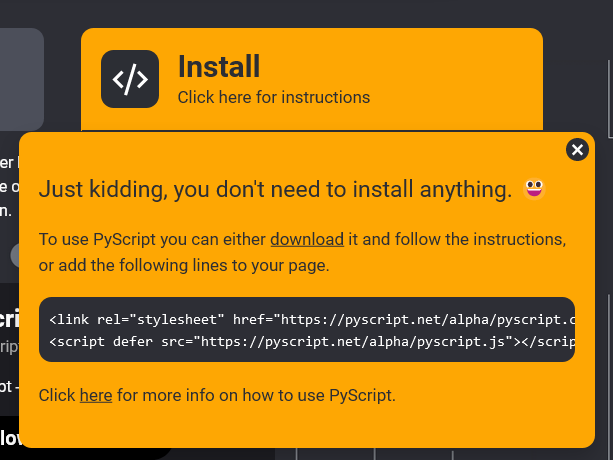
Then you’ll get the scripts to add to your site:
<link rel="stylesheet" href="https://pyscript.net/alpha/pyscript.css" />
<script defer src="https://pyscript.net/alpha/pyscript.js"></script>
Although typically you’d put CSS code in the header and JS code in the footer, you can put all this in the header thanks to the defer on the script tag.
Next, go to the <body> of your website and add the following:
<py-script></py-script>It’s within these elements that you can write your Python code.
Your final code (to this point) would look something like this:
<!DOCTYPE html>
  <head>
    <title>PyScript</title>
    <link rel="stylesheet" href="https://pyscript.net/alpha/pyscript.css" />
    <script defer src="https://pyscript.net/alpha/pyscript.js"></script>
  </head>

  <body>
    <py-script>
</py-script>
</body>
</html>Getting Started with Brython
Brython is pretty similar to PyScript to set up. Go to https://brython.info/ and then click on “Tutorial”. From here, you’ll get some JS code to copy.
<script type="text/javascript" src="https://cdn.jsdelivr.net/npm/[email protected]/brython.min.js"></script><script type="text/javascript" src="https://cdn.jsdelivr.net/npm/[email protected]/brython_stdlib.js"></script>You can omit the text/javascript if you want, since HTML5 just considers all untyped <script> tags to be JavaScript by default.
You then have to add onload="brython()" to the <body> tag, like so:
<body onload="brython()">Lastly, you script a script tag with the type text/python .
Your final code (to this point) would look something like this:
<!DOCTYPE html>
  <head>
    <title>Brython</title>
    <script type="text/javascript" src="https://cdn.jsdelivr.net/npm/[email protected]/brython.min.js"></script>
    <script type="text/javascript" src="https://cdn.jsdelivr.net/npm/[email protected]/brython_stdlib.js"></script>
  </head>

  <body onload="brython()">
     <script type="text/python">
</script>
</body>
</html>First Thoughts
The first big difference you’ll notice is how Brython contains much more JavaScript than PyScript. PyScript is pretty much plug-and-play while Brython requires some tinkering.
The reason for this is simple: Brython converts Python code into native JavaScript, while PyScript is native Python code that is executed via Web Assembly.
To help better understand this, if you were to run this simple command in Brython:
print('hello world')It would actually generate the following JS code behind the scenes:
// ast generated by parser
// Javascript code generated from ast
var $B = __BRYTHON__,
    _b_ = $B.builtins,
    locals_ = {},
    locals = locals_,
    $top_frame = ["undefined", locals, "undefined", locals]
locals.__file__ = '<string>'
locals.__name__ = 'undefined'
locals.__annotations__ = $B.empty_dict()
locals.$f_trace = $B.enter_frame($top_frame)
$B.set_lineno(locals, 1)
var stack_length = $B.frames_stack.length
try{
  $B.set_lineno(locals, 1);
  $B.$call(_b_.print)($B.String('hello world'))
  $B.leave_frame({locals, value: _b_.None})
}catch(err){
  $B.set_exc(err)
  if((! err.$in_trace_func) && locals.$f_trace !== _b_.None){
    locals.$f_trace = $B.trace_exception()
  }
  $B.leave_frame({locals, value: _b_.None})
  throw err
}
While PyScript just generates Python code.
Getting Interactive With Click Events
If you want to add a click event via PyScript, you’ll need to do it like so:
<button id="button">Click me</button><py-script>from pyodide import create_proxydef button_click(event):
print('I clicked a button')document.getElementById("button").addEventListener("click", create_proxy(button_click))</py-script>pyodide’s create_proxy package uses Web Assembly to have communication between Python and JavaScript possible. Upon click, this should print the I clicked a button into the browser console.
If you want to add a click event via Brython, you’ll need to do it like so:
<button id="button">Click me</button><script type="text/python">from browser import document, consoledef action(event):
print('I clicked a button')document.select('#button').bind("click", action)</script>As you can see, Brython looks a lot more “Pythonic” than PyScript does. However, PyScript uses native JavaScript syntax, which makes it easier to read and understand, and doesn’t require a different set of documentation to figure out.
Getting Dynamic Data With AJAX
For this example, we are going to use the Dog API, which lists a bunch of dog breeds. We don’t really care what the data says, so we are just going to call the data via the URL https://dog.ceo/api/breeds/list/all

PyScript:
<py-script>from pyodide.http import pyfetch
import asyncioresponse = await pyfetch(url="https://dog.ceo/api/breeds/list/all", method="GET")output = await response.json();print(output.get('message'))</py-script>The asyncio package was a recommendation by Alexandru-Ioan Plesoiu who said “The most important thing here is that you must import the asyncio package, otherwise you will get strange errors. This undocumented detail bothered me for hours.”
Thanks Alex!
Brython:
<script type="text/python">from browser import ajaxdef read(req):
print(req.text.get('message'))ajax.get("https://dog.ceo/api/breeds/list/all", mode="json", oncomplete=read)</script>The biggest differences to me was the multiple awaits in PyScript. The asyncio package is an odd addition, especially if it still is undocumented. Granted, PyScript is still in Beta so kinks like that will get ironed out over time. Brython has the advantage of being old, and this follows tried-and-true Javascript AJAX syntax.
External .py Files
If you want to reuse your code onto different web pages, it’s easier to put them inside a file and include that file on every page. It’s very similar to how you would do it with JavaScript.
In PyScript you would do this:
<py-script src="/path/to/script.py"></py-script>And in Brython you would do this:
<script type="text/python" src="/path/to/script.py"></script>Final Thoughts

In my opinion, PyScript is an evolved form of Brython. Although both can do the same thing very well, PyScript takes advantage of Web Assembly and modern practices. Brython was one of the first to attempt it, and had big obstacles to overcome. PyScript had the advantages of standing on the shoulders of giants.
Being said, PyScript has a lot yet to improve on. It’s a well developed concept, and it offers a great bridge between backend and frontend technologies. However, if it doesn’t improve its documentation, something else will come along and replace it. For example, I found the Real Python tutorial on it a lot more helpful than the actual documentation. While Brython’s documentation is also pretty sparse, there are more examples to learn from than PyScripts.
However, if I was to learn one or the other, I’d pick PyScript. It’s tricky enough to learn Python, plus some of the awful syntax of JavaScript. Brython’s own syntax muddles that even further. Plus, PyScript is using Web Assembly, and the more we can get Web Assembly used in the wild, the better the web becomes.
Have you ever heard of Brython or PyScript? Which one would you use? Let me know in the comments.
If you enjoyed this article, you might also enjoy my earlier article 9 Similarities Between JavaScript and Python


