
PyQt & Relational Databases: Ultra-Fast Development
You can code relational database applications in minutes

Developing database applications can be a slack and cumbersome process. However, development can be a breeze with the right tools in place.
With the Qt framework relational table model support, fast relational database application development is possible within minutes without writing any SQL queries.
With just a few lines of code, you can efficiently perform the basic CRUD operations on your data. In addition, the framework provides an easy way to construct complex SQL queries without having to write any SQL code.
This article is part of the PyQt & Relational Databases Series.
Since several readers have requested to focus on development speed during the last few months, I decided to detail the almost minimalistic code to achieve a functional relational database application.
MVC design pattern
Model-View-Controller (MVC) is a software design pattern usually used to develop user interfaces to separate the logic between internal information representations (model) and how they are presented (view).
The controller accepts inputs and translates them into the model or view instructions.
The Qt framework merges view and controller into one element, resulting in model-view design architecture. It consists of different model classes and respective view classes.
Why is the relational table model so important?
The relational table model is the heart of any relational database system. It allows developers to manipulate data and relationships between different tables easily.
The QSqlRelationalTableModel class provides an editable data model for a single database table with foreign key support. The columns with data from other tables are set as foreign keys. You simply call the appropriate methods on your models, and the framework will take care of the rest.
The relational database
For the purpose of this article, I use the SQLITE3 database.
Let’s have a simple database comprising three tables.
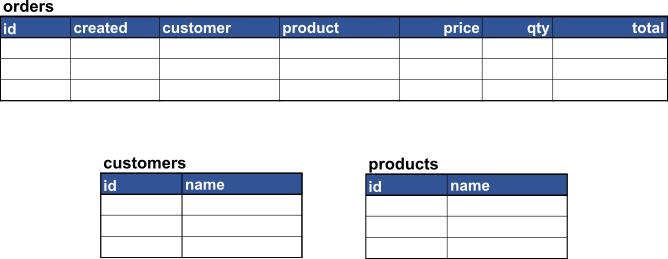
For your convenience, I have included the tables’ create SQL statements.
CREATE TABLE "orders" (
 "id" INTEGER NOT NULL UNIQUE,
 "created" TEXT NOT NULL,
 "customer" INTEGER NOT NULL,
 "product" INTEGER NOT NULL,
 "price" NUMERIC NOT NULL,
 "qty" NUMERIC NOT NULL,
 "total" NUMERIC,
 PRIMARY KEY("id")
)
CREATE TABLE "customers" (
"id" INTEGER NOT NULL,
"name" TEXT NOT NULL,
PRIMARY KEY("id")
)CREATE TABLE "products" (
"id" INTEGER NOT NULL,
"name" TEXT NOT NULL,
PRIMARY KEY("id")
)You’re right; I have promised no SQL queries. To complete coding this simple application, you don’t need to use them. However, if you are stuck with the code below, these statements can help.
Relational Table Model
Here we start creating the essential component.
Let’s name the QSqlRelationalTableModel class instance relational_model.
The setTable() method sets the database table orders as our main relational table.
We aim to have a minimalist application version, and we want to avoid other controls involved, as mentioned above, so we set the EditStrategy parameter to the OnFieldChange value.
We have two tables “related” to the main orders table — customers and products. So we create and define two relations for columns with ids 2 and 3. Please note that I mention column ids, which are zero seeded. These columns will be the third and fourth displayed in the widget.
Finally, the select() method will populate the table view widget.
The Model-View enabled table widget
A QTableView widget implements a table control that displays items from a model. This class provides standard tables using the more flexible approach provided by Qt’s model-view architecture.
The QTableView class is part of Qt’s model-view framework. The ability to display data provided by models is possible through its interfaces defined by the QAbstractItemView class implementation.
And that’s it!
For absolute PyQt newbies, there is a complete code included.
Rapid development
Except for creating the database connection or providing other data for your relational table model, you need just a few lines of code to develop a basic relational database application.
This application allows you to present relational data and instant data editing. However, adding or deleting rows requires a few extra lines of code.
Qt framework’s database support provides exceptional rapid development possibilities. Thus, developers can focus on their data science problem solving or finding solutions to complex problems.


