avatarDeepa Subramanian

Free AI web copilot to create summaries, insights and extended knowledge, download it at here

1912

Abstract

="dafc"><pre><span class="hljs-comment">// takes screenshots</span> await <span class="hljs-built_in">page</span>.screenshot({ <span class="hljs-built_in">path</span>: <span class="hljs-string">'google.png'</span> });</pre></div><div id="7ece"><pre><span class="hljs-comment">// closes the browser</span> await browser.close<span class="hljs-comment">()</span>; })<span class="hljs-comment">()</span>;</pre></div><h1 id="6e10">Pros:</h1><ol><li>Puppeteer requires zero setup. Comes with chromium version making it very easy to start with.</li><li>It has event-driven architecture which removes potential flakiness. So, there’s no need to add unnecessary wait and sleep times.</li><li>Puppeteer runs headless by default which makes it fast.</li><li>Puppeteer v1.5.0 also exposes browser contexts, making it possible to efficiently parallelize test execution.</li><li>Run in a Docker container or serverless environment.</li><li>Intercept network requests.</li><li>Dev tools can be used to capture performance info and run commands in the console.</li><li>Test a Chrome extension such as Lighthouse to generate performance reports.</li><li>Analyze JS bundle using the analyzer available.</li><li>Emulate mobile viewports.</li><li>Puppeteer works seamlessly with single-page applications.</li><li>It creates an up-to-date, automated testing environment by directly in the latest version of Chrome using the latest JavaScript and browser features.</li><li>Supports FireFox(beta). Check here for <a href="https://github.com/puppeteer/puppeteer/tree/main/experimental/puppeteer-firefox">project</a> details.</li><li>Supports parallel test execution and multiple tabs.</li><li>Crawl a Single-Page Application and generate pre-rendered content (i.e. Server-Side Rendering).</li><li>Supports applications that uses Node 6 to latest.</li><li>Capture a timeline trace of your site to help diagnose performance issues.</

Options

li><li><b>Speed: </b>Puppeteer has almost zero performance overhead over an automated page.</li><li><b>Security: </b>Puppeteer operates off-process with respect to Chromium, making it safe to automate potentially malicious pages.</li><li><b>Stability: </b>Puppeteer should not be flaky and should not leak memory.</li><li><b>Simplicity:</b> Puppeteer provides a high-level API that’s easy to use, understand, and debug.</li></ol><h1 id="7b21">Cons:</h1><ol><li>Cross browser compatibility testing</li><li>Does not support licensed formats such as AAC or H.264 media formats</li><li>Puppeteer does not support HTTP Live Streaming (HLS).</li><li>Does not support multiple languages, supports only JavaScript.</li></ol><p id="e327">Finally, using Puppeteer you can launch web pages, make UI navigations, take screenshots and generate pdf’s. Puppeteer can be used with testing framework such as Jest, Mocha or make your own test framework too! It works well with Chai assertion library.</p><p id="9f0f">This tool can be very useful for web automation in your team to begin with. Google continues to update this tool and has a good documentation so, go ahead and give it a spin and see if it works for your projects!</p><p id="f0c7"><i>Originally this article was posted <a href="https://dev.to/sdkdeepa/puppeteer-web-automation-198">here</a>.</i></p><p id="502c"><i>More content at <a href="https://plainenglish.io/"><b>PlainEnglish.io</b></a>.</i></p><p id="91ae"><i>Sign up for our <a href="http://newsletter.plainenglish.io/"><b>free weekly newsletter</b></a>. Follow us on <a href="https://twitter.com/inPlainEngHQ"><b>Twitter</b></a></i>, <a href="https://www.linkedin.com/company/inplainenglish/"><b><i>LinkedIn</i></b></a><i>, <a href="https://www.youtube.com/channel/UCtipWUghju290NWcn8jhyAw"><b>YouTube</b></a>, and <a href="https://discord.gg/GtDtUAvyhW"><b>Discord</b></a><b>.</b></i></p></article></body>

Puppeteer Basics

Google’s chrome team launched puppeteer in 2017. Puppeteer is a powerful node library which provides an API to control headless Chrome or Chromium over the DevTools Protocol.
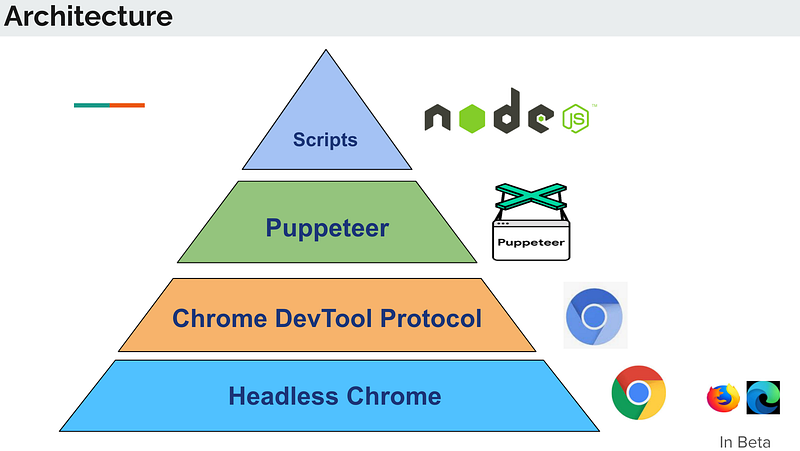
Architecture of Puppeteer

Puppeteer supports node application test scripts. It creates a chromium instance which contains latest JS and ES6 functions whenever you run your tests. It interacts directly with headless chrome.

Here is the GitHub link and Google I/O presentation video to understand more about this tool.

Installation:

npm i puppeteer
# or “yarn add puppeteer”

Code Snippet:

const puppeteer = require('puppeteer'); 

(async () => {
// creates a chromium instance
const browser = await puppeteer.launch(); 
// creates a new tab
  const page = await browser.newPage();
// visits the page
  await page.goto('https://google.com');
// takes screenshots
  await page.screenshot({ path: 'google.png' });
// closes the browser
  await browser.close();
})();

Pros:

  1. Puppeteer requires zero setup. Comes with chromium version making it very easy to start with.
  2. It has event-driven architecture which removes potential flakiness. So, there’s no need to add unnecessary wait and sleep times.
  3. Puppeteer runs headless by default which makes it fast.
  4. Puppeteer v1.5.0 also exposes browser contexts, making it possible to efficiently parallelize test execution.
  5. Run in a Docker container or serverless environment.
  6. Intercept network requests.
  7. Dev tools can be used to capture performance info and run commands in the console.
  8. Test a Chrome extension such as Lighthouse to generate performance reports.
  9. Analyze JS bundle using the analyzer available.
  10. Emulate mobile viewports.
  11. Puppeteer works seamlessly with single-page applications.
  12. It creates an up-to-date, automated testing environment by directly in the latest version of Chrome using the latest JavaScript and browser features.
  13. Supports FireFox(beta). Check here for project details.
  14. Supports parallel test execution and multiple tabs.
  15. Crawl a Single-Page Application and generate pre-rendered content (i.e. Server-Side Rendering).
  16. Supports applications that uses Node 6 to latest.
  17. Capture a timeline trace of your site to help diagnose performance issues.
  18. Speed: Puppeteer has almost zero performance overhead over an automated page.
  19. Security: Puppeteer operates off-process with respect to Chromium, making it safe to automate potentially malicious pages.
  20. Stability: Puppeteer should not be flaky and should not leak memory.
  21. Simplicity: Puppeteer provides a high-level API that’s easy to use, understand, and debug.

Cons:

  1. Cross browser compatibility testing
  2. Does not support licensed formats such as AAC or H.264 media formats
  3. Puppeteer does not support HTTP Live Streaming (HLS).
  4. Does not support multiple languages, supports only JavaScript.

Finally, using Puppeteer you can launch web pages, make UI navigations, take screenshots and generate pdf’s. Puppeteer can be used with testing framework such as Jest, Mocha or make your own test framework too! It works well with Chai assertion library.

This tool can be very useful for web automation in your team to begin with. Google continues to update this tool and has a good documentation so, go ahead and give it a spin and see if it works for your projects!

Originally this article was posted here.

More content at PlainEnglish.io.

Sign up for our free weekly newsletter. Follow us on Twitter, LinkedIn, YouTube, and Discord.

Puppeteer
Chrome
Basics
Recommended from ReadMedium