
Pump Up Your Profile with Emojis
When every character counts, take advantage of these super characters

Your bio in your Medium profile is limited to 160 characters. If you include the title of a book you’ve written or a link to a website, you are left with very few characters to express who you are and what you write about.
This is where emojis (such as 😃 or 🎧) can be useful. They can graphically represent a concept in a single character. That leaves you more characters to express the important details.
For example, my initial profile bio read something like this: Author of ROAR: Overcome Obstacles in 3 Simple Steps. For productivity and self-improvement visit medium.com/getting-ready-for-the-new-day.
That’s 140 characters. 140 extremely boring characters.
The fix is in
There were two things I did to fix my profile bio. First, I replaced the long and rather clunky sentence directing people to a publication with a pinned index of my best writing in a number of topics.
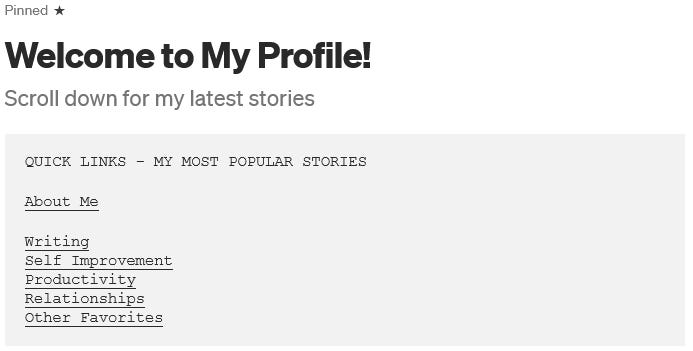
If a visitor to my profile wants to read my productivity articles, they can click “productivity” in the index and see what I’ve written. Regardless of where it’s been published. And without having to type anything. They can also look at the other categories I routinely write in.
The second thing I did was to revise my bio using emojis. This is what it now looks like.
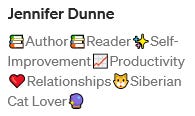
I replaced spaces between words with emojis that highlighted what I was talking about. As a result, the bio is now colorful and easily understood.
“📚Author” is much shorter than saying how many books I wrote, or giving the title of one specific book. I’m the author of a lot of books.
“📚Reader” is also a shorter way of saying I read…a lot.
I give a symbol followed by a topic for the three biggest topics I write in (aside from “writing”, which is kind of a given).
And then I add in a little personal color, mentioning my cats by breed. They may look like Maine Coons, but Siberians have an entirely different personality and temperament. They’re also hypoallergenic, which is important, since my husband is allergic to cats. (As you can tell, I am happy to go on at length about them, and anyone else who is owned by one would be a kindred spirit.) I include a picture of a crystal ball, which makes sense if you read my “About Me” article, and needs no additional explanation.
All that in under 80 characters. I still have room for a link to my website once I’ve finished the redesign. Or to send people to an offer page. Or anything else I want to add.
Including symbols and emojis
Symbols are half-way between letters and emojis. Symbols are things like ✭, ➤, or ♫. They are part of the expanded unicode character set, in black and white. The easiest way to include them is to copy them from a reference document that lists them all.
Emojis can also be copied from a reference document. However, there is an easier way to use them.
Type a colon, then immediately begin typing the name of the emoji. For example, my profile bio begins with the :books: emoji.
As soon as you type the first character after the colon, you’ll see a popup menu of the 8 emojis Medium thinks are most likely the one you want. Typing :bo for example yields a list of emojis that start with “bo”, such as boy 👦 or boot 👢, but also ones that have “bo” anywhere in them, such as family_man_woman_boy 👪 and mortar_board 🎓.
If the one you want isn’t on the list, keep typing. The list updates with each new character you type.
This also helps you to find emojis if you aren’t sure what their official name is. If you know you want a heart emoji, but aren’t sure what’s available, you can start typing :heart and get 4 different colors of hearts, as well as 😍, 😘, 😻, and 💑.
Conclusion
Give your profile some color and pop, and conserve characters, by using emojis.
One way of styling a short profile bio is to combine a list of your favorite topics with a pinned index of your best articles. Emojis help to do this visually.
Symbols and emojis can be copied from reference documents. Emojis can also be added by typing a colon followed by the name of the emoji.
Ready to have a better tomorrow?
I’ve created a cheat sheet to help you increase your confidence and get control of your life. If you follow this daily, you will level up your life very quickly!


