
CODEX
Pulling Stock Data from IEX Cloud with Python
An easy way to access market data in few lines of code

Downloading stock market data from the internet on every occasion is not a pleasant job. Also, it is not possible to get live prices when manually downloading data from the internet. This is when Cloud and APIs come into action.
Before diving into the coding part, let’s understand the mechanism of pulling stock data from a Cloud using an API. Assume that there is a company called IEX Cloud that owns or buys live stock market data directly from the exchanges. This company stores the data on its own database and hosts it via a cloud hosting platform i.e., making the data decentralized. Now, the data is made public but still, it can’t be extracted just like that. Here is when API becomes helpful. Even though the users don't own the cloud, using an API, they can interact and pull data from the cloud.
This is what we are going to do. One thing to remember is in order to access data with an API, the user must have an API key (like a password and should not be revealed). Without an API key, the user request to access data will be denied revealing a 400 response (error or negative response).
In this article, we will be:
- Creating an IEX Cloud account- Importing packages into the python environment- Getting the latest updates of stocks- Extracting historical prices of a stock- Pulling intraday prices of a stockCreating an IEX Cloud Account
It is essential to have an IEX Cloud account because only then we will be able to have our own secret API key and access data. To create an account, first head to the IEX Cloud website. Hover to the ‘sign in’ button on the top-right corner and find the ‘create an account’ option. Enter the required details and create an account of your own. After creating an account, navigate to the Console page (iexcloud.io/console). You will see a page like this (I hid the personal information):
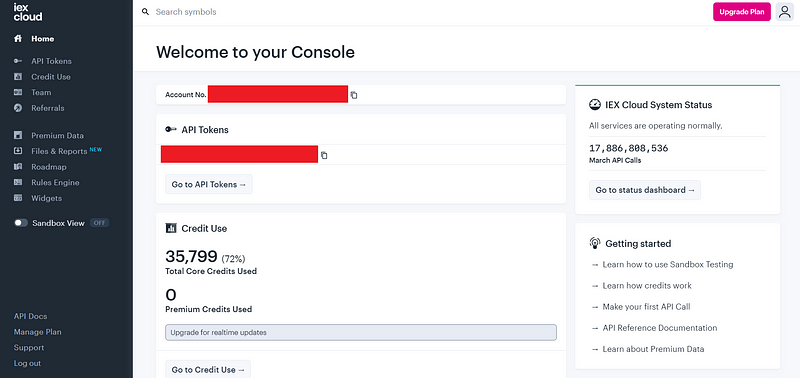
Under the API token section, select the ‘Go to API tokens’ button. After pressing the button you will be directed to a page that looks like this:
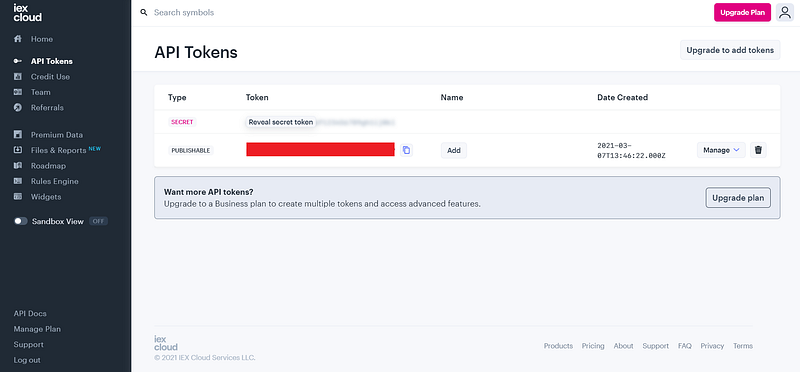
As you can see, there are two types of API tokens they are secret and publishable tokens. You can use both the API tokens but while you are presenting your code to the public, you should not reveal your secret token. Throughout this article, I’ll be using only the publishable token in my code. Hope you all have created an account on IEX Cloud and got familiar with the API environment. Let’s code!
Importing packages
Every python program starts with importing the required packages. In this article, We’ll be using Pandas, Requests, and Matplotlib as the primary packages. Let’s import the packages into our python environment.
Python Implementation:
Along with importing the primary packages, we have also imported the Termcolor package to customize fonts and changed some settings on Matplotlib.
Getting the latest updates of stocks
Let’s now define a function to get the latest updates of stocks in python.
Python Implementation:
Output:
Latest Updates of FB
--------------
symbol : FB
latestPrice : 268.4
marketCap : 766013634355
peRatio : 26.6
--------------

Latest Updates of AAPL
--------------
symbol : AAPL
latestPrice : 121.03
marketCap : 2031863258880
peRatio : 32.89
--------------

Latest Updates of AMZN
--------------
symbol : AMZN
latestPrice : 3089.49
marketCap : 1555758237851
peRatio : 73.86
--------------

Latest Updates of NFLX
--------------
symbol : NFLX
latestPrice : 518.02
marketCap : 228858650044
peRatio : 85.2
--------------

Latest Updates of GOOGL
--------------
symbol : GOOGL
latestPrice : 2050
marketCap : 1392148604815
peRatio : 34.98
--------------
Code Explanation: First we are defining a function named ‘get_latest_updates’. We are defining this function in such a way that takes as many stocks’ tickers as possible as parameters. Inside the function, we are passing on a for-loop to iterate through the list of tickers that are passed on as parameters. When digging deep into the for-loop, we are storing the API key (publishable key) into the ‘iex_api_key’ variable, and the URL of the API into the ‘api_url’ variable.
Before further exploring the code, there is one thing to remember in mind. There are four main methods of interacting with an API which are the GET, POST, PUT, and DELETE methods. The GET method is used to pull or extract data from a database and the POST method is used to add data to a database. The PUT method is used to add or overwrite data and the DELETE method is used to delete data from a database. Keeping that in mind, let’s move ahead!
After storing the API key and the URL into their respective variables, we using a GET request provided by the Requests package to pull data. We are storing this data into the ‘df’ variable as a JSON format. Next, we are doing some data manipulations to show the result more clearly. Finally, we are calling the function with FAANG (Facebook, Apple, Amazon, Netflix, Google) stocks’ tickers as parameters, and voila! It’s cool, right?!
Remember that, many attributes come along with the data but in our code, we have used only four attributes to be shown as the result (symbol, latestPrice, marketCap, peRatio).
Extracting historical prices of a stock
Now let’s define a function to extract market data of stock right from the time it has gone public.
Python Implementation:
Output:
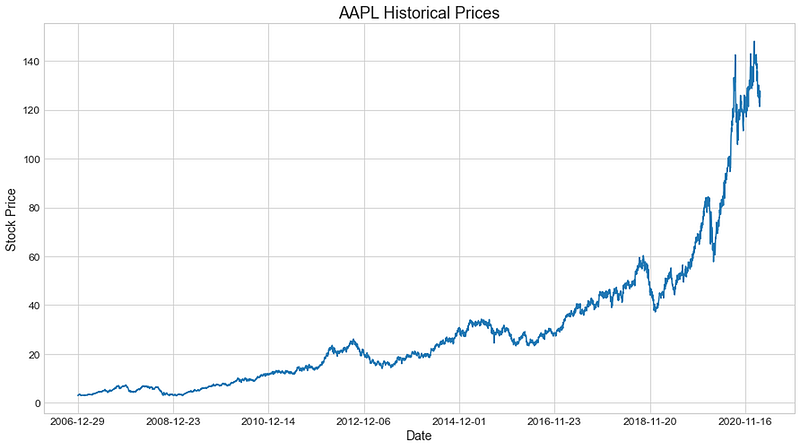
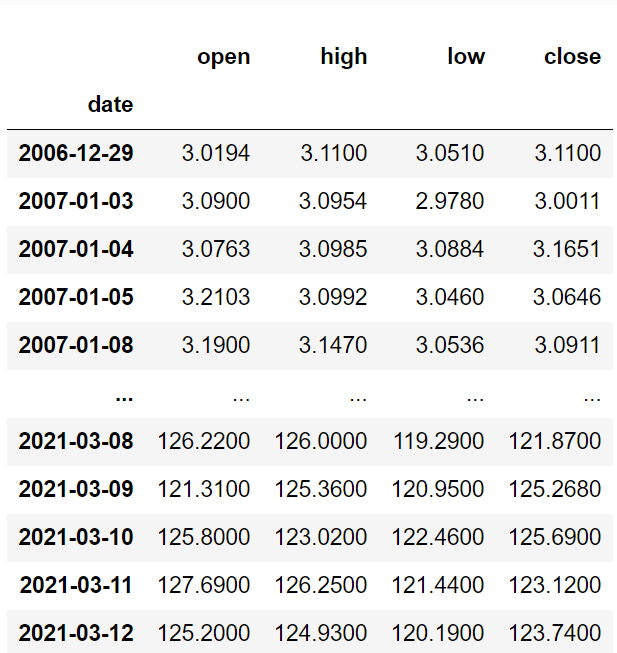
Code Explanation: First, we are defining a function named ‘get_historic_data’ that takes a stock’s ticker as the parameter. Inside the function, it is almost similar to what we did in our previous one but the URL of the API varies. After storing the publishable API key and the URL into their respective variables, we are calling the GET request method to extract data and store it in the ‘df’ variable as a JSON format. After that comes a long process of data manipulation to show the end dataframe more precisely. Following that, we are using Matplotlib to produce a plot to make the data being represented in a more meaningful way. Finally, we are calling the function with ‘AAPL’ as the parameter to see how it’s is working.
Pulling intraday prices of a stock
Let’s define a function that enables us to obtain live intraday prices of a given stock.
Python Implementation:
Output:
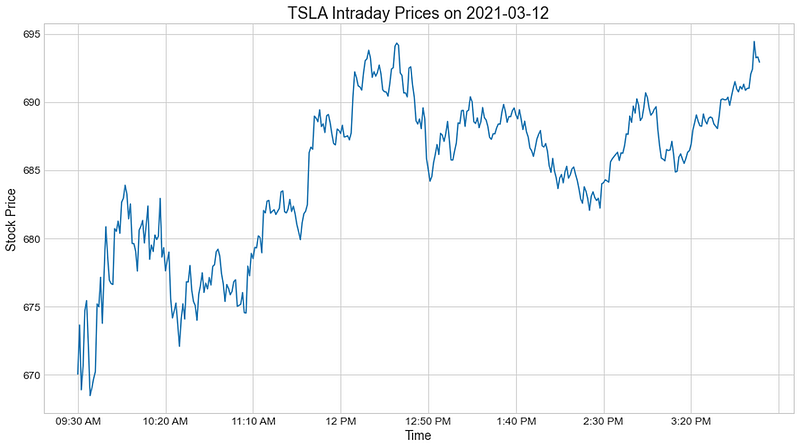
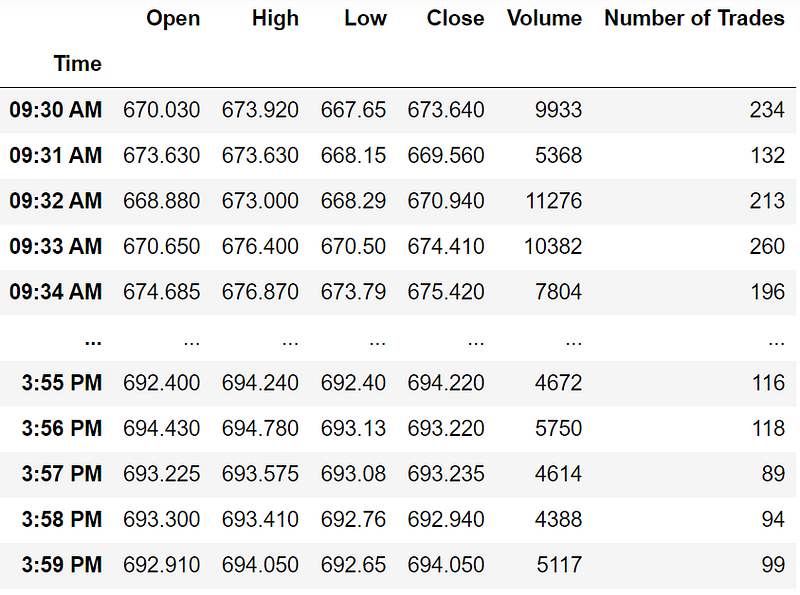
Code Explanation: First, we are defining a function named ‘get_intraday_prices’ that takes a stock’s ticker as the parameter. As I said before, the structure of the function is almost similar to the previous one but the URL of the API varies. After pulling and storing the data in a JSON format, we are doing some data manipulations to clean and represent the data more clearly. At the end of the function, we are using Matplotlib to produce a line chart of the intraday prices. Finally, we are returning and calling the function to test it.
Conclusion
In this article, we pulled different kinds of data from a cloud server using an API and did some data manipulations to show the result more clearly. Extracting data from a cloud using an API is a very useful and important task to perform as a data scientist. As the amount of data flourishes day by day, companies are expecting data scientists to use cloud storage rather than traditional databases for easy workflow and efficiency. In this article, we have covered just the fundamentals of using an API to pull data but there is a lot to be explored. With that, we arrived at the end of the article. Hope you found some good stuff!


