
Publishing Coverage Report/HTML Report on GitHub Pages

In this article, we will be publishing a HTML coverage report using GitHub Pages.
For the GitHub users, especially those who are migrating from Jenkins, there aren’t may options in the documentation for reporting whereas Jenkins has some readily available plugins for it. GitHub provides an feature called GitHub Pages, which can be leveraged here for publishing the HTML report.
GitHub Pages:
GitHub Pages is designed to host your personal, organization or project pages directly from your GitHub repository. Refer this page for detailed information about the GitHub pages. In this story we will utilize this feature to publish the code coverage artifacts as a static webpage.
The only pre-requisite for this usecase is to have a code coverage ran for the application using GitHub actions workflow. For this demonstration purpose, I have added a small python code snippet to run the coverage using the workflow .github/workflows/coverage.yaml in the repo. Follow the below steps to publish the coverage report.
Step 1: Configure GitHub Actions Publishing Source
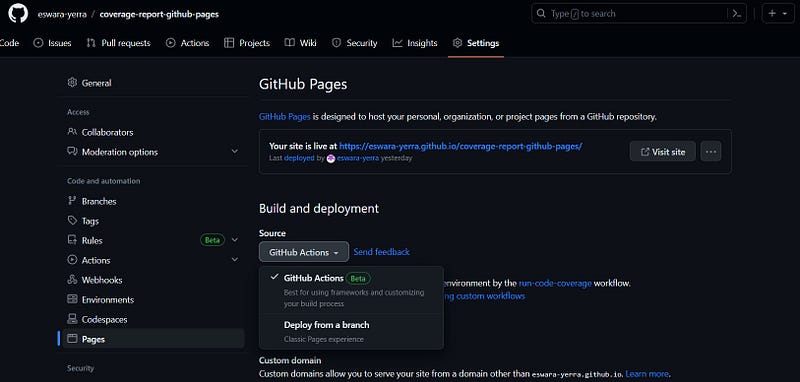
Navigate to your GitHub repository, click on Settings tab and select the Pages option from the left side column. In the GitHub Actions page, under “Build and Deployment”, select “GitHub Actions” from the source drop down.
Step 2: Update the GitHub Actions workflow to publish artifact
In the GitHub actions workflow file mentioned in the pre-requisite, add actions/upload-pages-artifact action to upload the coverage output folder as an artifact.
      - name: upload artifact
        uses: actions/upload-pages-artifact@v1
        with:
          path: './htmlcov/'
Following that add actions/deploy-pages action to deploy and publish the artifact on pages.
      - name: deploy to Github Pages
        uses: actions/deploy-pages@v2
        id: deployment
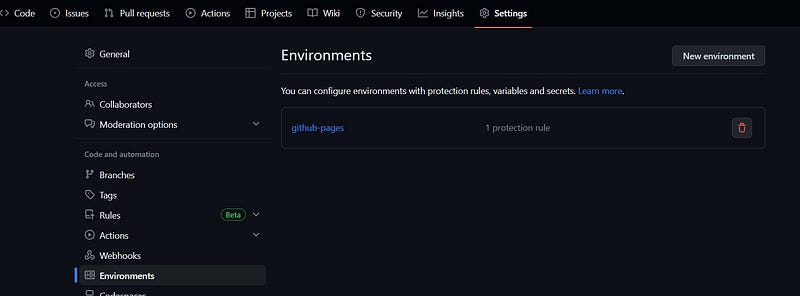
Couple of points to be noted here. One, this workflows automatically creates and uses a deployment environment called github-pages. Navigate to Settings -> Environments in the GitHub repo, you can find the environment.
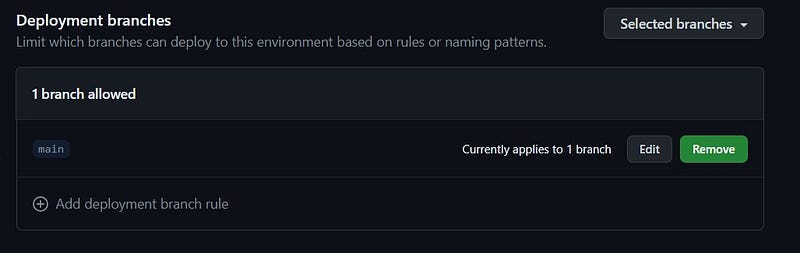
Two, by default it adds a deployment protection rule to restrict the workflow run only when code is pushed to default branch (in this case main), which can be changed as per the need.
Step 3: Execute the workflow and access the report
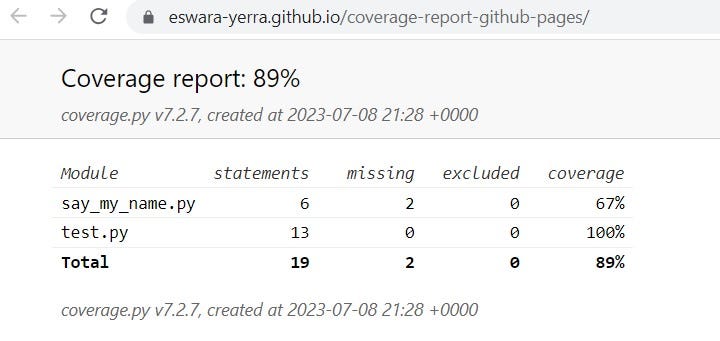
At this stage we should have a complete workflow to run the code coverage, upload the artifact and publish and we should be ready to execute the workflow. Lets commit and push the changes to default branch (main here), which should execute the pipeline automatically and we should see the end-point to the published URL in the Actions job.

The url for the GitHub pages is https://
Access all the source code from here.
Cheers !!!
References: https://devguide.python.org/testing/coverage/ https://docs.github.com/en/pages/getting-started-with-github-pages/configuring-a-publishing-source-for-your-github-pages-site#publishing-with-a-custom-github-actions-workflow


