
PTPL 38: Should I Use Obsidian, Raindrop, or Arc to Manage Bookmarks?
Plus—how to create a permanent note, new plain text directions, and visual PDF annotation on the iPad
This week —
- How and why you might want to use a text-based app like Obsidian to manage your bookmarks
- Dr Andy Roddick shares how he teaches his students to create permanent Zettel notes
- 5 new directions I’m gazing at, including using the Spaced Repetition plugin to help me learn French, and the Ledger-CLI format for plain text accounting
- Sketchnoting my way to a smarter brain: PDF annotation on the iPad
Productivity Tips and Inspiration
Obsidian as a bookmark manager?
Here are two approaches for using Obsidian to manage your web bookmarks:
- Use Obsidian as a Bookmark Manager with Raindrop by Esteban Thilliez
- Obsidian Is the Bookmark Manager I Never Knew I Needed by Matt Lee
I’ve been looking at my burgeoning collection of bookmarks in Arc, and now I’m wondering it it’s a good idea to continue to keep them there, and nowhere else. It’s incredibly handy to have everything organised into collections (Arc calls them Spaces), and in folders and subfolders within each area, but there doesn’t seem to be any way to export them as text. And I really, really don’t want to lose them!
That’s why I’m seriously considering recreating my Arc setup on an Obsidian page, whether manually or through an app like Raindrop.
PKM goodies, and how to create a permanent Zettel note
Curtis McHale’s PKM Weekly (Issue 055) is packed full of great links this week.
Of note are this discussion on avoiding PKM paralysis by just starting to take notes, and this Google Doc a professor (Dr. Andy Roddick) is using to introduce his class to Obsidian. Here’s something that stood out to me from the latter on how to create a permanent Zettel note (emphasis mine):
The first sentence should be a description of content.
In filling your note out, ask “What does it mean? How does it connect to … ? What is the difference between … ? What is it similar to?”
Only write a note if it helps with our own thinking on a class theme, a research paper, or something else you are working on.
Think about the single idea that prompted the creation of this note file. Consider this as a rough draft of something being written.
Treat it as if space were limited. Each note should fit onto the screen: no scrolling. About a paragraph. — if you have more than 300 words or so, you likely more than one note. That’s ok! Split them up, link them, and carry on!
I really like the last point. When we write as if space is limited, the content will be much more concise, and therefore more truly useful.
Adventures in Plain Text (and a little paper)
Wobbly Obsidian mobile apps aren’t getting in the way of these new directions
If you’ve been following my journey for a while, you’ll know I’ve been having issues with the Obsidian mobile apps for a very long time. These problems are the reason I turned to iA Writer in the first place — a good example of frustration birthing something good!
Since removing the entire Bible from my vault the mobile apps have gone from non-functioning to mostly usable, but still not without the occasional freeze up. I’ve stopped trying to solve the problem, setting it on the backburner while I get on with things. And “things” are currently —
- Rethinking the way my vault is structured
- Linking existing notes in a more Zettelkasten way
- Using the Spaced Repetition plugin to back up and supplement my Brainscape flashcards (language learning)
- Trying to shrug off the Collector’s Fallacy mindset that has unwittingly been a fairly constant companion
- Exploring the Ledger-CLI format for keeping track of finances in plain text
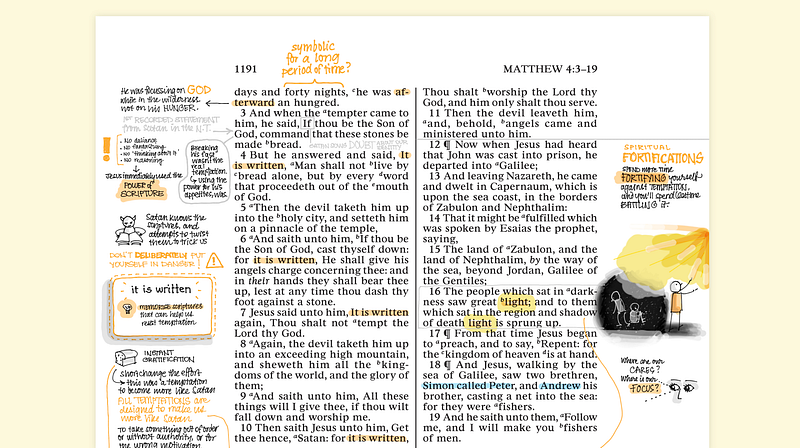
Digital paper — PDF annotation on the iPad
This year I’ve moved my Bible study to my iPad, in the form of a wide margin PDF.
There’s room in my life for plain text study as well, as of course that’s the only effective way to fully utilize the notes I make by hand. OCR is nice, but the best ideas are always going to be more useful as Markdown notes rather than almost-accurate, searchable but not easily linkable text scattered throughout the pages of a PDF document.
The awesome part of studying this way is that I get to practice my new sketchnoting skills! Coming up with a way to turn key concepts into simple graphics is a great way to internalise the concepts.
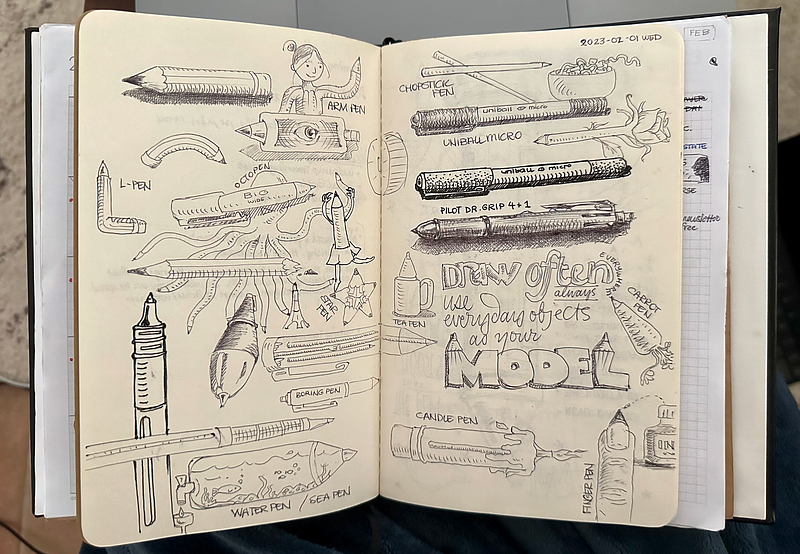
Back to a paper sketchbook after all these years!
When I started studying sketchnoting and other drawing courses on Domestika at the beginning of this year, I 100% thought I wouldn’t need anything other than my iPad and Apple Pencil. Listening to Mattias Adolfsson and Laura Pérez has convinced me otherwise.
And so I’ve added a Moleskine cahier (blank) to the middle of my Paper Saver notebook. It’s true; there’s something very nice about making real marks on real paper, and in having to deal with analog issues like what to do when you get close to the edge of the page, and how to disguise pen blobs and rogue lines.
I’d been far too used to erasing, moving, redoing. Now I’m relearning how to adjust on the fly, and it’s accessing dormant parts of my brain that are happy to be waking up!
The Plain Text, Paper-Less Productivity Digest explores productivity through a future-proof, plain text mindset, with a soft spot for the paper that counts. Past episodes live in my PTPL List.
Click here for other things I’ve written about Obsidian.
Download some free productivity goodies (including an Obsidian Planner demo vault) here.


