
Prompt Engineering Guide for Open LLM: Take Your Open LLM Application to the Next Level
Introduction: Why do we need another guide?
Numerous prompt engineering guides have already been written. However, the majority of them focus on closed-source models characterized by their immense capacity, robust reasoning capabilities, and comprehensive language understanding.
The purpose of this blog is to address Prompt Engineering for open-source Language Model Models (Open LLMs), specifically within the parameter range of 3 to 70 billion. Despite prevailing notions in various posts, these Open LLMs are incomparable to their closed-source counterparts.
You may have read misleading articles such as “ChatGPT Clone for Just $300”, “An Open-Source Chatbot Impressing GPT-4 with 90%*ChatGPT Quality”, but the truth is, when you are building an application, the differences in the quality of responses in open-source LLM compared to closed-source models become very obvious, especially when better reasoning capabilities are necessary for the task. The capability to follow general instructions, as well as closed-source models, is definitely not as good.
For example, Retrieval Augmented Generation (RAG) LLM applications encompass many demanding tasks that require enhanced reasoning abilities. The team at LlamaIndex has done a commendable job scoping out various tasks needed in an RAG application. However, their prompt engineering efforts have primarily focused on closed-source models, such as OpenAI GPT-4 and GPT-3.5.
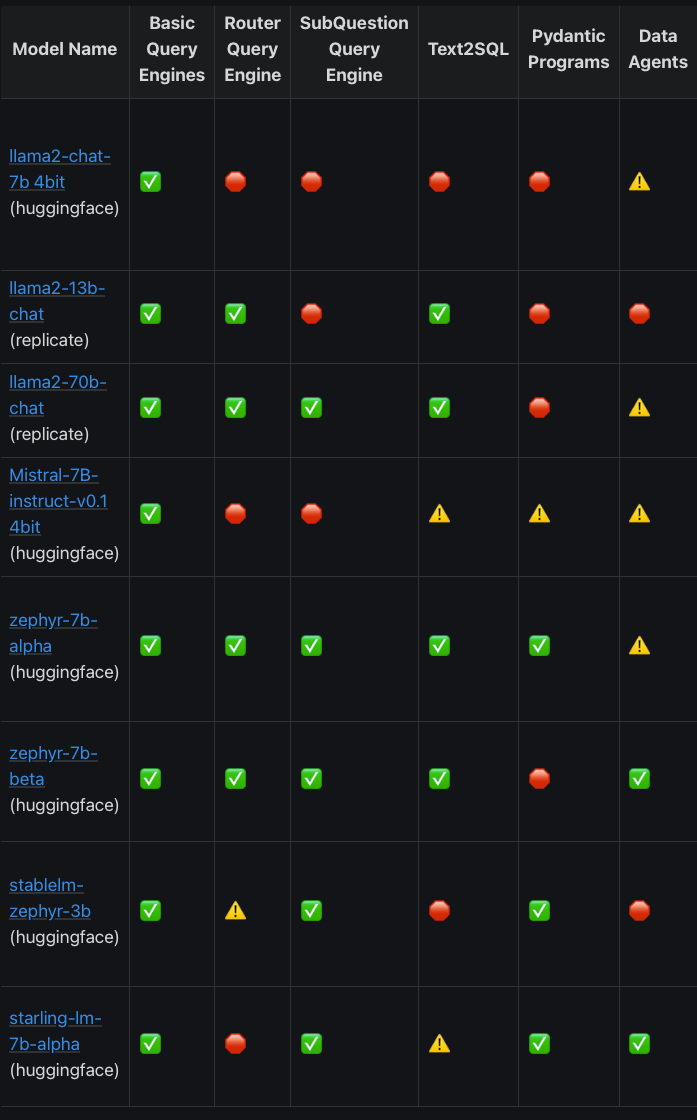
The LlamaIndex team was generous enough to perform some of the required RAG tasks (as defined by them) on open-source models to assess their capability to successfully complete the tasks. (LlamaIndex Documentation):
Compared to closed-source models:
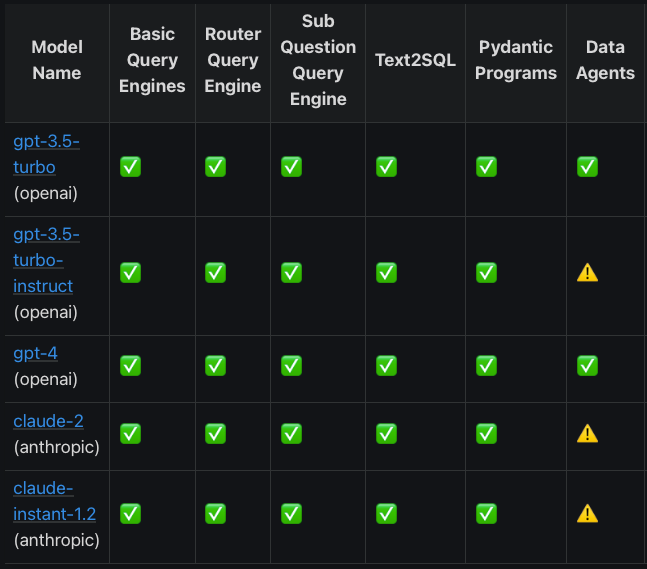
The observation that can be made here is that open-source models cannot compete with closed-source models on the same prompt. In my personal experience, the results for the open-source models are worse than what the LlamaIndex team has shown here.
For example, the LlamaIndex team stated that the zephyr-7b-beta model is actually able to complete most of the tasks given, but in reality, its performance is very bad relative to closed-source models when you try out more examples of the task with diverse data. The tasks shown above were evaluated for a single data-point in respective tasks.
Why is this the case with open-source models?
The reason is that the majority of LLM based application repositories such as LlamaIndex, Langchain, AutoGPT establish their base prompts targeting closed-source LLMs. Consequently, the setup of prompts is basic and does not transfer well when an open-source-based LLM is swapped in, as many developers would attest.
Let’s get started with this guide targeting specifically Open LLM. These pointers are based on my personal experience developing around open LLMs ranging in size from 3 to 30 billion for more than a year. I hope that they will help bring your LLM application, relying on Open LLM, to a reliable level. Here are the following pointers that I will be elaborating on:
- Provide diverse input-output examples.
- Provide at least a few input-output examples.
- Keep language simple; do not use uncommon words.
- Structure the example prompt.
- Provide clear instructions.
- Split into simpler sub-tasks.
- Repeat yourself differently.
- Iterate according to the behavior of the LLM.
Point 1: Provide diverse input-output examples
Many LLM developers are already familiar with the concept of in-context learning but I will argue that many still fall into the trap of not making the examples provided diverse. I have seen experienced developers make the mistake of providing examples without ensuring their diversity. While this approach may work for closed-source LLM, it will fail tragically when using Open LLM.
We need to ensure that examples provided in the prompt are diverse. This is where I believe a lot of performance is lost in Open LLM when developers basically give the same type of examples without taking into account the full range of their problem.
For example, let’s say we are building a simple, fun sentiment analysis app with three possible outcomes (positive, neutral, negative) to show our users. We can give an example prompt as follows:
"""
Input: dejected
Output: Negative
Input: elated
Output: Positive
Input: adequate
Output: Neutral
Input: {user_query}
Output:
"""
With this prompt, we have developed an app and are pleased that all the outcomes are covered in the example prompts. However, the problem that the LLM will face when deployed is that users may provide unforeseen inputs, such as articles, sentences, emojis, or anything else that the developer has not taken into account to ensure diversity in the input examples. Examples:
## When we check our logs:

1. 🤩😍🙃
2. The stock market is in a very bullish stage right now
3. The stock market is in a very bullish stage right now. However, I still managed to lose half of my net worth.
4. One of the most alarming aspects of modern social media is its insidious impact on mental health.
Countless studies have pointed to the detrimental effects of excessive social media use, linking it to increased rates of anxiety, depression, and feelings of inadequacy.
The constant barrage of carefully curated images showcasing seemingly perfect lives can lead individuals to compare themselves unfavorably, fostering a toxic environment that erodes self-esteem.
Moreover, the addictive nature of social media platforms is a cause for concern. The endless scrolling, notifications, and instant gratification mechanisms embedded in these platforms are intentionally designed to keep users hooked. This addiction not only hampers productivity but also contributes to a sense of isolation as real-world interactions take a back seat to the digital realm.
By not taking into account the range of possible ways users will use our app, Open LLM may not perform well and could fail in many examples, especially as the required task becomes slightly more difficult. Thus, it is highly advisable to:
- Take note of the range of potential input-output pairs.
- Insert a diverse set of examples, each covering a specific case you can think of.
- Keep the number of examples low, as LLMs are limited by context limit and speed.
The LLM is usually smart enough to generalize between examples, so you can be creative with your examples to embed a few types of examples into one, for example:
Input: The current stock market is making me feel 😓😵💫😭. I cannot believe that this is happening.
I do wish that I had consulted a financial planner earlier.
Output: Negative
Input: elated, dejected, happy, successful, growth
Output: Positive
Input: depressed, brilliant, saddening, fantastic
Output: Neutral
Here, we have “addressed many aspects with each example prompt.” As we proceed with setting up our examples, we need to start thinking about being creative with prompts to ensure diversity while reducing the context length.
While this sentiment analysis app example is a relatively easy-to-solve task, I am using it to illustrate the importance of setting up diverse example prompts and thoroughly considering potential incoming input prompts.
For many developers using Open LLM to build applications, it is common that the actual requirements involve the steps or pipeline of the application itself, sequentially chaining the output of the LLM as the input to the next step. Thus, it is crucial to remember the points conveyed here. Crafting the prompt carefully by understanding the chained LLM input-output requirements is essential. Examining open-source RAG LLM efforts, it is evident that a lot of prompts are lacking in terms of diversity.
Point 2: Provide at least a few input-output examples
I recommend ensuring a minimum of three examples in your prompt, especially for Open LLM. In LLM jargon, this is referred to as few-shot learning. Providing three examples is termed as 3-shot. You can view papers such as GPT-3 comparing results over different “shots” of examples. Open LLM results closely resemble closed-source models, where an increase in the number of shots typically leads to an improvement in performance up to a certain extent.
You can test this for yourself on Academic Dataset such as MMLU. Based on my findings, 5-shot MMLU results for Open LLM indicate peak performance, meaning that providing five examples will already yield the best results. However, the current best performance comes from a closed-source model using 32-shot examples, based on the concept of chain-of-thought (as of 21/01/2024, Gemini-Ultra, I have not personally verified this via an own run). Do take note to not exceed the training context length of the model that you are using!
An alternative to manually picking out examples will be to do it automatically via prompt optimization techniques such as DSPs.
Point 3: Keep language simple, do not use uncommon words
Make an effort to use simple language whenever possible and substitute “harder” words when you can. Here are some examples:
- Comprehensive -> Complete
- Eradicate -> Get rid of
- Adequate -> Enough
- Anticipate -> Expect
- Approximately -> About
- Quintessential -> Typical
- Incorporate -> Include
While maintaining the simplicity of the entire sentence. I haven’t conducted many experiments to rigorously test whether using simpler language works better. Still, I’m offering this advice based on personal experience, where I noticed the model responding better qualitatively as I simplified my prompts.
Regardless, using common words instead of showcasing an extensive vocabulary to the LLM might also have the additional benefit of reducing the number of input tokens. So, let’s keep it simple, stupid (KISS)!
Point 4: Structure the example prompt
Keep the same style and structure choice for the examples with your output. As a mere suggestion, an example of pseudocode to ensure consistent structure will look something like this for a common QA task:
.
.
.
shot_prompt_base = """### Example {num}
Context {num}: {text}
Question {num}: {q}
Answer {num}: {a}
"""
example_prompt = ""
for number, (context, query, answer) in enumerate(example_data):
      example_prompt += shot_prompt_base.format(num=number,text=context, q= query, a = answer)

user_q = ....
user_context = .....
user_prompt = shot_prompt_base.format(num=number+1,text=user_context, q=user_query, a="")
# now we can combine the prompt together
final_user_prompt = example_prompt + user_prompt
# remember that we also need to append instruction to this example prompt
# before finally passing the input into the LLM.
Point 5: Provide clear instructions
Explain precisely what you want the model to do; let’s not leave it up to the model to guess what you mean. I found that this advice has also been emphasized by the official OpenAI Prompt Engineering Guide.
It holds too for Open LLM, I will not elaborate too much here as it is well written by the folks over at OpenAI.
Point 6: Split into simpler sub-task
If you find the instruction prompt to be very lengthy, consider the possibility of splitting your task into smaller sub-tasks and chaining them together. This approach is advisable for Open LLM but not for closed-source LLM.
For closed-source LLM, you can often set up one lengthy prompt that encompasses multiple tasks together. I recommend doing so, despite some closed-source prompt engineering guides suggesting otherwise. My reasoning is twofold:
- Closed-source LLM tends to generate higher-quality responses with more information.
- Closed-source LLM incurs costs for every request, and unnecessarily breaking up tasks into multiple requests can result in wasted money most of the time.
One example from a personal experiment, let’s say you want to test the performance of GPT-4 on an extractive QA Dataset (such as SQuAD 2.0 again). You may set up your prompt as such:
Given the question below, please provide an answer that is extracted from the context.

.........xxx add your instructions here to improve prompt xxxx......

### Context
{context}

### Question
{question}

### Answer
Now, for every QA pair with context, you need to send a request to GPT-4. If the validation set has a total of 1000 context examples, each averaging 7 questions, you would have to make a total of 7000 requests.
Instead, what we can do here is something along the lines of:
Given all the questions below, please provide all the answers that is extracted from the context.
Ensure that respective answers to each question are in the same order of number.

..........xxxxx elaborate instructions more.......xxxxx..........

### Context
{context}

### Questions
{questions}

### Answers


----------

In code, you form the questions with numbers, pseudocode:

question_prompt = "\n".join([f"{idx}. {q}" for idx, q in enumerate(questions)])
Now, instead of 7000 requests, you are only making 1000 requests. The overall number of tokens will be much lower since you are not repeating unnecessarily for the context token. This approach holds true for many tasks, for we use GPT-4. My suggestion is not to break it down if possible. Your mindset should be to accumulate instead and be precise in your instructions. This advice contrasts with the official guide; it’s a personal opinion.
However, think in the opposite way for Open LLM. If the task can be broken down into sub-tasks, try breaking it down first. There is also less reason for you to try to save on the number of requests, given that you can run the model locally. My primary concern is more about the model’s capability to successfully complete the task.
Point 7: Repeat yourself differently
I found that if you repeat important points in your instruction, many Open LLMs perform better.
For example, if you are tackling an academic QA dataset such as SQuAD 2.0, where one of the tasks required from the model is to be great in not answering the queries when the context provided has insufficient information; you can set up the instruction prompt as such:
Answer the questions only using the given information in the context provided.
If there's no clear answer in the context, reply 'No Answer Found' and nothing else.
However, I found that this kind of instruction prompt that repeats the same idea performs better:
Answer the questions only using the given information in the context provided.
If there's no clear answer in the context, reply 'No Answer Found' and nothing else.
In cases of uncertainty due to insufficient information, always mark it as 'No Answer Found' and nothing else
Avoid assuming or guessing information not explicitly stated in the context provided.
Your aim is to find accurate answers solely from the context, without making assumptions or speculations.
Evaluate the information carefully and respond accordingly, remember to say 'No Answer Found' if no answer can be found in context.
This has been true for me when I am developing for many other tasks used requiring Open LLM, I found that repeating the instructions differently does help to get the point across.
Point 8: Iterate according to the behavior of the LLM
When tasked with running through an Open LLM, I typically begin by setting up instructions to the best of my ability. Following that, I create some examples of the task. Subsequently, I prepare at least 10 input prompts to observe the LLM output behavior. I take note of what the model gets wrong and then adjust the instructions or examples to potentially address these issues.
This crucial step is often overlooked in many posts discussing LLM application building. The reality is that spending a little time understanding the LLM’s behavior, given your task, is essential. Focus on understanding:
- What it typically gets right.
- What it typically gets wrong.
- When the response is incorrect, identify what it gets wrong.
Once you have grasped these three points, you can proceed to tweak the instructions and example prompts to address the LLM’s issues based on the observed behavior. Iterate through this process a few times until the response is satisfactory.
However, you may discover that some behaviors cannot be “prompted” away. In such cases, you can develop safeguards and parsers based on observed habits.
From a toy RAG example, if the task is to output a list of alternative questions to ask given a single question (Used by RAG apps), no matter how much I tried prompting zephyr-7b-beta, I cannot get it to output triple curly braces covering a list of sub-questions consistently.
After conducting multiple rounds of testing, I have observed that the model consistently outputs according to my instructions approximately 85% of the time. However, in the remaining 15%, the model throws an exception error on my parser.
expected_output -> {{{ ["What is....?", "Why is...?"] }}}This is one of the problems with Open LLM: the output is too inconsistent to deploy. What can we do? Well, to reiterate, observe the behavior!
I found that during the 15% of instances when the model throws an error, the issue lies in its output, specifically, it consistently generates only two curly braces at the end.
error output -> expected_output -> {{{ ["What is....?", "Why is...?"] }}Thus, the parser based on regex is not able to catch it because I never took this behavior into account. Once I added that logic to the regex pattern, all is fixed!
This is just one example. Trust me, it is useful to understand your LLM, run it over a sizeable number of prompts, and observe the outputs manually.
Conclusion
I hope that this post proves valuable in the journey of constructing LLM applications based on Open LLM. Given the widespread use of open-source LLM in the community, I believe that we can collectively compile best practices and collaborate to develop robust open-source applications.

Aside from prompt engineering our way through to build LLM application, the future direction that gets me excited is:
- Automatic Prompt Engineering (Prompt Optimisation)
- Structuring LLM Output (Ex: Format Enforcer, JSONFormer, etc)
- Finetuning LLM for multiple specific tasks while remaining generalisability instead of prompt engineering
- Potentially developing stronger base pretrained LLM via high-quality, low-data continual pre-training and/or smaller models
- [Not feasible due to cost] Developing strong base pretrained LLM from scratch
Thank you for spending your time reading this post.


