Prompt Engineering Best Practices: Text Transforming & Translation
Prompt Engineering for Instruction-Tuned LLM
Large language models excel at translation and text transformation, effortlessly converting input from one language to another or aiding in spelling and grammar corrections.
They are adept at taking imperfectly structured text and refining it, while also capable of converting between various formats, like translating HTML input into JSON output.
Previously, such tasks were arduous and intricate. However, with the advent of large language models, the process has become remarkably simpler. In this article, we will delve into the expressions and prompts that are now far more accessible to implement, thanks to these advanced language models.
Table of Contents:
- Text Translation
- Tone & Text Transformation
- Spell & Grammar Check
Most insights I share in Medium have previously been shared in my weekly newsletter, To Data & Beyond.
If you want to be up-to-date with the frenetic world of AI while also feeling inspired to take action or, at the very least, to be well-prepared for the future ahead of us, this is for you.
🏝Subscribe below🏝 to become an AI leader among your peers and receive content not present in any other platform, including Medium:
1. Text Translation
Let's start with importing OpenAI and also define the get_completion helper function that will take the prompt and return the response.
import openai
import os

from dotenv import load_dotenv, find_dotenv
_ = load_dotenv(find_dotenv()) # read local .env file

openai.api_key  = os.getenv('OPENAI_API_KEY')


def get_completion(prompt, model="gpt-3.5-turbo"):
    messages = [{"role": "user", "content": prompt}]
    response = client.chat.completions.create(
        model=model,
        messages=messages,
        temperature=0
    )
    return response.choices[0].message.content
Large language models are trained on a lot of text from many sources, a lot of which is in many different languages. Therefore this kind of model can do translation. These models know kind of hundreds of languages to varying degrees of proficiency. And so we’ll go through some examples of how to use this capability.
In this first example, the prompt is to translate the following English text into Arabic. “Hi, I would like to order a new book”. Here is the response:
prompt = f"""
Translate the following English text to Arabic: \
```Hi, I would like to order a new book```
"""
response = get_completion(prompt)
print(response)
مرحبًا ، أود أن أطلب كتابًا جديدًا
Let’s try another example. So in this example, the prompt is “Tell me what language this is”. And then this is in French, “Combien coûte le lampadaire”.
prompt = f"""
Tell me which language this is:
```Combien coûte le lampadaire?```
"""
response = get_completion(prompt)
print(response)
This language is French.
The model has identified that “This language is French”. The model can also do multiple translations at once. So in this example, we will ask the model to translate the text into French, Spanish, and Arabic.
The text is “I want to order a book and get it delivered to my home and make sure that the book is packaged in a good way so it will arrive in a good form”. Let's run it and see how it performs:
prompt = f"""
Translate the following  text to French and Spanish
and Arabic: \
```I want to order a book and get it delivered to my home and make sure that the book is packaged in a good way so it will arrive in a good form```
"""
response = get_completion(prompt)
print(response)
French: Je veux commander un livre et le faire livrer chez moi en m’assurant que le livre est bien emballé afin qu’il arrive en bon état.
Spanish: Quiero pedir un libro y que me lo entreguen en mi casa, asegurándome de que el libro esté bien embalado para que llegue en buen estado.
Arabic: أرغب في طلب كتاب وتوصيله إلى منزلي والتأكد من أن الكتاب معبأ بشكل جيد حتى يصل بحالة جيدة.
In some languages, the translation can change depending on the speaker’s relationship to the listener. You can also explain this to the language model. So it will be able to kind of translate accordingly.
In this example, we ask the LLM to “Translate the following text to Arabic in both the formal and informal forms”. “Would you like to order a pillow?”
prompt = f"""
Translate the following text to Arabic in both the \
formal and informal forms:
'Would you like to order a pillow?'
"""
response = get_completion(prompt)
print(response)
Formal: هل ترغب في طلب وسادة؟ Informal: تبغى تطلب وسادة؟
So here we have the formal and informal. So formal is when you’re speaking to someone who’s maybe senior to you or you’re in a professional situation. That’s when you use a formal tone and then informal is when you’re speaking to maybe a group of friends.
So for the last example in this section, we’re going to pretend that we’re in charge of a multinational IT company and so the user messages are going to be in all different languages and so users are going to be telling us about their IT issues in a wide variety of languages.
So we need a universal translator. First, we will define a list of user messages in a variety of different languages. Then we will loop through each of these user messages. So the first thing we’ll do is ask the model to tell us what language the issue is in. Then we’ll print out the original message’s language and the issue. Then we’ll ask the model to translate it into English and Arabic.
user_messages = [
  "La performance du système est plus lente que d'habitude.",  # System performance is slower than normal
  "Mi monitor tiene píxeles que no se iluminan.",              # My monitor has pixels that are not lighting
  "Il mio mouse non funziona",                                 # My mouse is not working
  "Mój klawisz Ctrl jest zepsuty",                             # My keyboard has a broken control key
  "我的屏幕在闪烁"                                               # My screen is flashing
]


for issue in user_messages:
    prompt = f"Tell me what language this is: ```{issue}```"
    lang = get_completion(prompt)
    print(f"Original message ({lang}): {issue}")

    prompt = f"""
    Translate the following  text to English \
    and Arabic: ```{issue}```
    """
    response = get_completion(prompt)
    print(response, "\n")
Original message (The language is French.): La performance du système est plus lente que d’habitude. The performance of the system is slower than usual.
أداء النظام أبطأ من المعتاد.
Original message (The language is Spanish.): Mi monitor tiene píxeles que no se iluminan. English translation: “My monitor has pixels that do not light up.”
Arabic translation: “شاشتي تحتوي على بكسلات لا تضيء.”
Original message (The language is Italian.): Il mio mouse non funziona English: “My mouse is not working.” Arabic: “فأرتي لا تعمل.”
Original message (The language is Polish.): Mój klawisz Ctrl jest zepsuty English translation: “My Ctrl key is broken”
Arabic translation: “مفتاح Ctrl الخاص بي معطل”
Original message (The language is Chinese.): 我的屏幕在闪烁 English translation: “My screen is flickering.”
Arabic translation: “شاشتي تومض.”
2. Tone & Text Transformation
Writing can vary based on an intended audience the way that you would write an email to a colleague or a professor is going to be quite different from the you will text an old friend or a younger brother. ChatGPT can also help produce text with different tones as you define in the input prompt. Let’s look at some examples.
In this first example, we will ask the LLM to transform the email from slang language to a business letter:
prompt = f"""
Transform the following from slang to a business letter:
'Dude, This is Joe, check out this spec on this standing lamp.'
"""
response = get_completion(prompt)
print(response)
Dear Sir/Madam,
I hope this letter finds you well. My name is Joe, and I am writing to bring your attention to a specification document regarding a standing lamp.
I kindly request that you take a moment to review the attached spec, as it contains important details about the standing lamp in question.
Thank you for your time and consideration. I look forward to hearing from you soon.
Sincerely, Joe
Next, we will convert between different text formats. ChatGPT is very good at translating between different formats such as JSON to HTML and XML, or Markdown.
So, in the prompt, we’ll describe both the input and the output formats. So, in this example, we have this JSON that contains a list of restaurant employees with their names and email. We are going to ask the model to transfer this from JSON to HTML.
The prompt is “Translate the following Python dictionary from JSON to an HTML table with column headers and title”. Then we’ll get the response from the model and print it.
data_json = { "resturant employees" :[
    {"name":"Shyam", "email":"[email protected]"},
    {"name":"Bob", "email":"[email protected]"},
    {"name":"Jai", "email":"[email protected]"}
]}

prompt = f"""
Translate the following python dictionary from JSON to an HTML \
table with column headers and title: {data_json}
"""
response = get_completion(prompt)
print(response)
<!DOCTYPE html>
<html>
<head>
<style>
table {
font-family: arial, sans-serif;
border-collapse: collapse;
width: 100%;
}
td, th {
border: 1px solid #dddddd;
text-align: left;
padding: 8px;
}
tr:nth-child(even) {
background-color: #dddddd;
}
</style>
</head>
<body>
<h2>Restaurant Employees</h2>
<table>
<tr>
<th>Name</th>
<th>Email</th>
</tr>
<tr>
<td>Shyam</td>
<td>[email protected]</td>
</tr>
<tr>
<td>Bob</td>
<td>[email protected]</td>
</tr>
<tr>
<td>Jai</td>
<td>[email protected]</td>
</tr>
</table>
</body>
</html>
So, here we have some HTML displaying all of the employee names and emails. And so, now let’s see if we can view this HTML. We are going to use this display function from this Python library, “display (HTML(response))”.
from IPython.display import display, Markdown, Latex, HTML, JSON
display(HTML(response))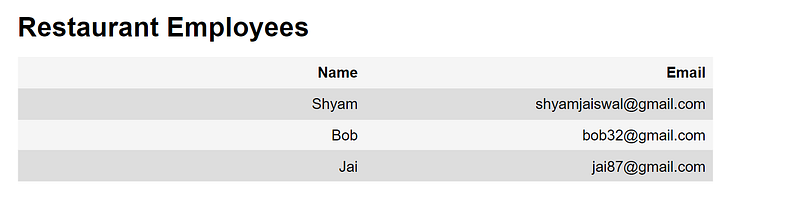
3. Spell & Grammar Check
The next transformation task we’re going to do is spell check and grammar checking. This is one of the popular uses for ChatGPT. It’s especially useful when you’re working in a non-native language.
Let's have a look at some examples of common grammar and spelling problems and how the language model can help address these. I’m going to define a list of sentences that have some grammatical or spelling errors. And then we’re going to loop through each of these sentences and ask the model to proofread these.
text = [
  "The girl with the black and white puppies have a ball.",  # The girl has a ball.
  "Yolanda has her notebook.", # ok
  "Its going to be a long day. Does the car need it’s oil changed?",  # Homonyms
  "Their goes my freedom. There going to bring they’re suitcases.",  # Homonyms
  "Your going to need you’re notebook.",  # Homonyms
  "That medicine effects my ability to sleep. Have you heard of the butterfly affect?", # Homonyms
  "This phrase is to cherck chatGPT for speling abilitty"  # spelling
]
for t in text:
    prompt = f"""Proofread and correct the following text
    and rewrite the corrected version. If you don't find
    and errors, just say "No errors found". Don't use
    any punctuation around the text:
    ```{t}```"""
    response = get_completion(prompt)
    print(response)
The girl with the black and white puppies has a ball. No errors found. It’s going to be a long day. Does the car need its oil changed? There goes my freedom. They’re going to bring their suitcases. You’re going to need your notebook. That medicine affects my ability to sleep. Have you heard of the butterfly effect? This phrase is to check chatGPT for spelling ability.
We can see that the model can correct all of these grammatical errors. We could use some of the techniques that we’ve discussed before.
So we’ll go through an example of checking a review. And so here is a review about a stuffed panda. And so we’re going to ask the model to proofread and correct the review.
text = f"""
Got this for my daughter for her birthday cuz she keeps taking \
mine from my room.  Yes, adults also like pandas too.  She takes \
it everywhere with her, and it's super soft and cute.  One of the \
ears is a bit lower than the other, and I don't think that was \
designed to be asymmetrical. It's a bit small for what I paid for it \
though. I think there might be other options that are bigger for \
the same price.  It arrived a day earlier than expected, so I got \
to play with it myself before I gave it to my daughter.
"""
prompt = f"proofread and correct this review: ```{text}```"
response = get_completion(prompt)
print(response)
Got this for my daughter for her birthday because she keeps taking mine from my room. Yes, adults also like pandas too. She takes it everywhere with her, and it’s super soft and cute. However, one of the ears is a bit lower than the other, and I don’t think that was designed to be asymmetrical. Additionally, it’s a bit small for what I paid for it. I believe there might be other options that are bigger for the same price. On the positive side, it arrived a day earlier than expected, so I got to play with it myself before I gave it to my daughter.
We can also print the differences between our original review and the model’s output using the Python redlines package. And we’re going to get the diff between the original text of our review and the model output and then display this.
from redlines import Redlines

diff = Redlines(text,response)
display(Markdown(diff.output_markdown))
So, the prompt that we used was, “Proofread and correct this review”. But you can also make kind of more dramatic changes, changes to tone, and that kind of thing.
So, let’s try one more thing. In this prompt, we’re going to ask the model to proofread and correct this same review, but also make it more compelling and ensure that it follows APA style and targets an advanced reader. We are also going to ask for the output in markdown format.
prompt = f"""
proofread and correct this review. Make it more compelling.
Ensure it follows APA style guide and targets an advanced reader.
Output in markdown format.
Text: ```{text}```
"""
response = get_completion(prompt)
display(Markdown(response))
Review of a Panda Plush Toy: A Perfect Gift for All Ages
I purchased this delightful panda plush toy as a birthday gift for my daughter, who has a penchant for “borrowing” my belongings from my room. It is worth noting that pandas are not only adored by children but also by adults, and this toy certainly did not disappoint.
The first thing that struck me about this plush toy is its exceptional softness and undeniable cuteness. Its irresistibly cuddly texture makes it the perfect companion for my daughter, who takes it everywhere she goes. However, I did notice a slight asymmetry in the ears, which I believe was not intentionally designed that way. While this does not detract from its overall appeal, it is worth mentioning for the sake of accuracy.
In terms of size, I must admit that I expected a slightly larger toy considering its price. It is worth exploring other options that offer a more substantial size for the same price point. However, this minor setback did not overshadow the joy it brought to my daughter.
Furthermore, I was pleasantly surprised when the package arrived a day earlier than expected. This unexpected early delivery allowed me to indulge in some quality playtime with the panda plush toy before presenting it to my daughter. The anticipation and excitement it generated were truly priceless.
In conclusion, this panda plush toy is a delightful gift that transcends age boundaries. Its exceptional softness, undeniable cuteness, and portability make it a perfect companion for anyone, young or old. While there may be other options available in terms of size, the overall quality and joy it brings are undeniable. I highly recommend this panda plush toy as a gift that will undoubtedly bring smiles and warmth to the heart of its recipient.
If you like the article and would like to support me, make sure to:
- 👏 Clap for the story (50 claps) to help this article be featured
- Subscribe to To Data & Beyond Newsletter
- Follow me on Medium
- 📰 View more content on my medium profile
- 🔔 Follow Me: LinkedIn |Youtube | GitHub | Twitter
Subscribe to my newsletter To Data & Beyond to get full and early access to my articles:
Are you looking to start a career in data science and AI and do not know how? I offer data science mentoring sessions and long-term career mentoring:
- Mentoring sessions: https://lnkd.in/dXeg3KPW
- Long-term mentoring: https://lnkd.in/dtdUYBrM