Project | Movie Recommendation System
A Movie Recommendation System is a powerful tool that helps users discover movies they may enjoy based on their previous ratings or preferences. In this project, we will build a recommendation system that can suggest movies to users based on collaborative filtering. We will also visualize the recommendations using bar graphs, word clouds, and network graphs to enhance the insights provided by the system.

Understanding the Dataset
Before we dive into coding, let’s first understand the data we are working with.
Data Sources:
We are using two datasets from the MovieLens 100k dataset:
- Movies Data: This contains information about various movies, such as their title, genre, and release date.
- Ratings Data: This records the ratings given by users to different movies.
We begin by loading the datasets using pandas:
import pandas as pd

# Load dataset directly from a URL (MovieLens 100k Dataset)
movies_url = 'https://raw.githubusercontent.com/justmarkham/DAT8/master/data/u.item'
ratings_url = 'https://raw.githubusercontent.com/justmarkham/DAT8/master/data/u.data'

# Define the column names for both datasets
movie_cols = ['movie_id', 'movie_title', 'release_date', 'video_release_date', 'IMDb_URL', 'unknown',
              'Action', 'Adventure', 'Animation', 'Children', 'Comedy', 'Crime', 'Documentary', 'Drama',
              'Fantasy', 'Film-Noir', 'Horror', 'Musical', 'Mystery', 'Romance', 'Sci-Fi', 'Thriller',
              'War', 'Western']

# Loading the movies data
movies = pd.read_csv(movies_url, sep='|', names=movie_cols, encoding='latin-1')

# Loading the ratings data
ratings_cols = ['user_id', 'movie_id', 'rating', 'timestamp']
ratings = pd.read_csv(ratings_url, sep='\t', names=ratings_cols)

# Preview the datasets
print(movies.head())
print(ratings.head())
Step 1: Data Preprocessing
We will preprocess the data to create a user-movie matrix, where rows represent users and columns represent movies. The values in the matrix are the ratings each user gives to the movies. This matrix will help us calculate correlations between movies.
# Merging both datasets (movies + ratings)
movie_data = pd.merge(ratings, movies[['movie_id', 'movie_title']], on='movie_id')

# Dropping unnecessary columns
movie_data = movie_data.drop(columns=['timestamp'])

# Preview the merged dataset
print(movie_data.head())

# Create a pivot table where rows represent users and columns represent movie ratings
user_movie_matrix = movie_data.pivot_table(index='user_id', columns='movie_title', values='rating')

# Showing a sample of the user-item matrix
print(user_movie_matrix.head())
Why do we create this matrix? This matrix allows us to compute correlations between movies. If two movies are rated similarly by users, they are likely to have a higher correlation, which will help us recommend similar movies to the user.
Step 2: Finding Popular Movies
To make meaningful recommendations, we first analyze the most popular movies by calculating their average ratings and the number of times they have been rated.
import matplotlib.pyplot as plt
import seaborn as sns

# Grouping the movie data by movie title
movie_ratings = movie_data.groupby('movie_title').agg({'rating': ['mean', 'count']})
movie_ratings.columns = ['average_rating', 'num_ratings']

# Filtering movies with at least 50 ratings for better accuracy
popular_movies = movie_ratings[movie_ratings['num_ratings'] >= 50]

# Plotting a bar graph for the top 10 most popular movies by average rating
top_10_movies = popular_movies.sort_values('average_rating', ascending=False).head(10)

plt.figure(figsize=(10, 6))
sns.barplot(x=top_10_movies['average_rating'], y=top_10_movies.index, palette='coolwarm')
plt.title('Top 10 Movies by Average Rating')
plt.xlabel('Average Rating')
plt.ylabel('Movie Title')
plt.show()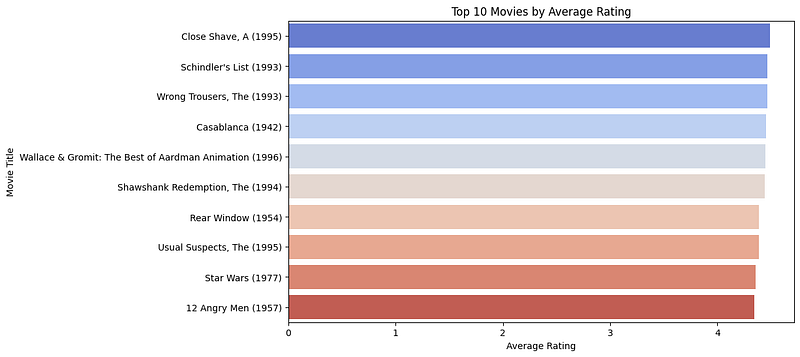
Explanation:
- Why this step? To highlight the highest-rated movies with significant ratings, ensuring the recommendations are relevant.
- Outcome: A bar graph showcasing the top 10 most popular movies by average rating.
Step 3: Visualizing Movie Genres with a Word Cloud
Next, we visualize the movie genres using a Word Cloud. The Word Cloud will help us identify the most popular genres based on their frequency.
from wordcloud import WordCloud

# Joining all genres from the movies dataset to create a genre word cloud
genres = movies[['Action', 'Adventure', 'Animation', 'Children', 'Comedy', 'Crime', 'Documentary', 'Drama',
                 'Fantasy', 'Film-Noir', 'Horror', 'Musical', 'Mystery', 'Romance', 'Sci-Fi', 'Thriller',
                 'War', 'Western']]

genre_list = genres.columns[genres.any()].tolist()

# Create a string of genres for word cloud
genre_string = " ".join(genre_list * 100)

# Create the word cloud
wordcloud = WordCloud(background_color='white', width=800, height=400).generate(genre_string)

# Display the word cloud
plt.figure(figsize=(10, 6))
plt.imshow(wordcloud, interpolation='bilinear')
plt.axis('off')
plt.show()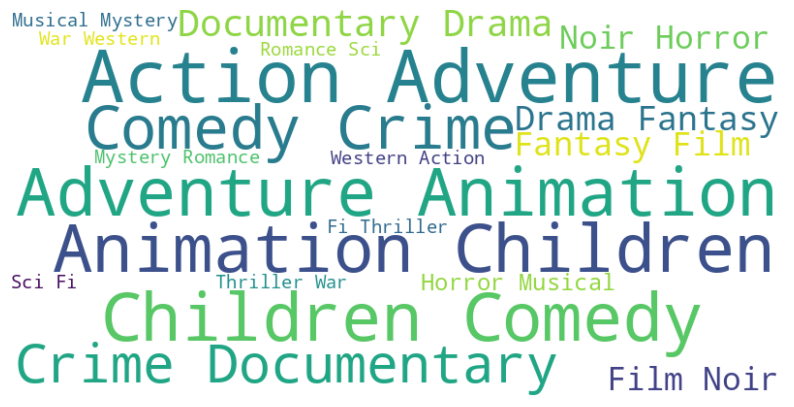
Why Word Cloud? It provides a visual representation of the genres based on their occurrence in the dataset. Larger text indicates more frequent genres, helping us understand genre popularity.
Step 4: Building the Recommendation System
To recommend movies, we compute the correlation between movies based on users’ ratings.
# Function to recommend movies based on correlation
def recommend_movies(movie_name, min_ratings=50):
    with warnings.catch_warnings():  # Suppress warnings in this block
        warnings.simplefilter("ignore")
        movie_ratings = user_movie_matrix[movie_name]
        similar_movies = user_movie_matrix.corrwith(movie_ratings)
        corr_movies = pd.DataFrame(similar_movies, columns=['correlation'])
        movie_ratings_count = movie_data.groupby('movie_title').size()
        corr_movies = corr_movies.join(movie_ratings_count.rename('num_ratings'))
        recommendations = corr_movies[corr_movies['num_ratings'] >= min_ratings].sort_values('correlation', ascending=False)
        return recommendations.head(10)
Explanation:
- Why? The correlation between movies allows us to recommend films that have similar ratings by the same users.
- Outcome: A list of 10 movies that are most similar to the selected movie.
Step 5: Visualizing Recommendations
We now visualize the recommended movies using a bar graph to display the correlation values of the top recommendations.
# Function to display the visuals (Bar plot and Word Cloud)
def display_visuals(recommended_movies):
    with warnings.catch_warnings():  # Suppress warnings related to visuals
        warnings.simplefilter("ignore")

        # Word Cloud
        genres = movies[['Action', 'Adventure', 'Animation', 'Children', 'Comedy', 'Crime', 'Documentary', 'Drama',
                         'Fantasy', 'Film-Noir', 'Horror', 'Musical', 'Mystery', 'Romance', 'Sci-Fi', 'Thriller',
                         'War', 'Western']]
        genre_list = genres.columns[genres.any()].tolist()

        wordcloud = WordCloud(background_color='black', width=300, height=350, colormap='coolwarm').generate(" ".join(genre_list))
        plt.figure(figsize=(4, 5))
        plt.imshow(wordcloud, interpolation='bilinear')
        plt.axis('off')
        plt.tight_layout()
        wordcloud_output.clear_output()
        with wordcloud_output:
            plt.show()

        # Bar Plot (This will go in the second row)
    plt.figure(figsize=(12, 5))
    sns.barplot(x=recommended_movies['correlation'], y=recommended_movies.index, palette='coolwarm')
    plt.title('Recommended Movies by Correlation', fontsize=16, fontweight='bold')
    plt.xlabel('Correlation', fontsize=14 )
    plt.ylabel('Movie Title', fontsize=14 )
    plt.xticks(fontsize=12 )
    plt.yticks(fontsize=12)
    plt.gca().set_facecolor('#2c2c2c')
    plt.tight_layout()
    barplot_output.clear_output()
    with barplot_output:
        plt.show()
Explanation:
- Why a Bar Graph? It visually shows the strength of correlation between the recommended movies and the selected movie, making it easier for users to interpret.
- Outcome: A bar graph showing the correlation scores of the recommended movies.
Step 6: Enhancing User Experience with an Interactive Dashboard
To make our recommendation system more interactive and user-friendly, we will build a dashboard using ipywidgets. The dashboard allows users to select a movie and get personalized recommendations.
import pandas as pd
import requests
import warnings  # Importing warnings to suppress them
from IPython.display import Image, display, HTML, clear_output
import matplotlib.pyplot as plt
import seaborn as sns
import wordcloud
import ipywidgets as widgets
from wordcloud import WordCloud


# Path to your local fallback image
fallback_image_path = '/content/Designer (3).png'  # Replace with the actual path to your image

# Function to fetch movie poster from OMDb API
def get_movie_poster(movie_name):
    OMDB_API_KEY = 'your_api_key_here'  # Replace with your OMDb API key
    url = f"http://www.omdbapi.com/?t={movie_name.replace(' ', '+')}&apikey={OMDB_API_KEY}"

    response = requests.get(url)
    data = response.json()

    if data['Response'] == 'True' and 'Poster' in data and data['Poster'] != 'N/A':
        poster_url = data['Poster']
        display(Image(poster_url, width=250, height=350))
    else:
        display(Image(fallback_image_path, width=250, height=350))


# Function to handle button click event
def on_button_clicked(b):
    with output:
        clear_output()  # Clear previous output

        try:
            selected_movie = movie_selector.value
            recommended_movies = recommend_movies(selected_movie, num_recommendations_slider.value)

            # Determine font size based on number of recommendations
            num_movies = len(recommended_movies)
            base_font_size = 18  # Starting font size
            adjusted_font_size = max(12, base_font_size - (num_movies - 5))  # Decrease font size for more movies

            # Create HTML content with dynamically adjusted font size
            recommendations_html = f"<h3 style='color: white;'>Recommended Movies for '{selected_movie}'</h3><ul style='font-size: {adjusted_font_size}px;'>"
            for movie_title in recommended_movies.index:
                recommendations_html += f"<li>{movie_title}</li>"
            recommendations_html += "</ul>"

            # Display recommendations and poster in first row
            recommendations_output.clear_output()
            with recommendations_output:
                display(HTML(recommendations_html))

            display_visuals(recommended_movies)
            poster_output.clear_output()
            with poster_output:
                get_movie_poster(selected_movie)

        except Exception as e:
            display(HTML(f"<p style='color: red;'>An error occurred: {e}</p>"))


# Movie selector dropdown
movie_selector = widgets.Dropdown(
    options=movie_data['movie_title'].unique(),
    description='Movie:',
    layout=widgets.Layout(width='100%'),
    style={'description_width': 'initial'}
)

# Slider for number of recommendations
num_recommendations_slider = widgets.IntSlider(
    value=5,
    min=1,
    max=20,
    step=1,
    description='Top N:',
    layout=widgets.Layout(width='100%'),
    style={'description_width': 'initial'}
)

# Button for generating recommendations
recommend_button = widgets.Button(
    description="Get Recommendations",
    button_style='success',
    layout=widgets.Layout(width='100%', margin='10px 0 10px 0'),
    style={'font_weight': 'bold'}
)

# Output areas
output = widgets.Output()
poster_output = widgets.Output(layout=widgets.Layout(height='auto', width='auto'))
recommendations_output = widgets.Output(layout=widgets.Layout(height='auto', width='300px'))
wordcloud_output = widgets.Output(layout=widgets.Layout(height='auto', width='300px'))
barplot_output = widgets.Output()

# Bind the button click event to the function
recommend_button.on_click(on_button_clicked)

# UI Header and Signature (HTML styling for a better look)
header = widgets.HTML(
    """
    <h1 style='
        color: #FFFFFF;
        font-family: "Trebuchet MS", Arial, sans-serif;
        text-align: center;
        font-size: 3em;
        background: linear-gradient(90deg, rgba(229,9,20,1) 0%, rgba(144,12,63,1) 50%, rgba(0,212,255,1) 100%);
        padding: 10px;
        border-radius: 10px;
        box-shadow: 0px 0px 15px rgba(229,9,20,0.8);
        '>🎥 Movie Recommendation Dashboard 🎥</h1>
    """
)
description = widgets.HTML(
    """
    <h2 style='
        text-align: center;
        font-family: "Verdana", sans-serif;
        color: #000000;
        font-size: 1.2em;
        padding: 5px;'>Select a movie and get personalized recommendations based on similar movies.</h2>
    """
)
signature = widgets.HTML(
    """
    <p style='
        color: #000000;
        font-family: Arial;
        text-align: center;
        margin-top: 20px;
        font-size: 1.6em;
        border-top: 1px solid #555;
        padding-top: 10px;
        background: linear-gradient(90deg, rgba(0,212,255,1) 0%, rgba(144,12,63,1) 100%);
        '>© 2024 Created by AI Innovators</p>
    """
)

# Layout for the first row (Word Cloud, Poster, Recommendations)
first_row = widgets.HBox([
    wordcloud_output,  # Word cloud on the left
    poster_output,     # Poster in the middle
    recommendations_output  # Recommendations on the right
], layout=widgets.Layout(justify_content='space-around', margin='5px', align_items='stretch'))

# Full UI layout with glowing border
ui = widgets.VBox([
    header,
    description,
    movie_selector,
    num_recommendations_slider,
    recommend_button,
    first_row,        # First row with Word Cloud, Poster, and Recommendations
    barplot_output,
    signature# Second row with Bar Plot (Full width)
], layout=widgets.Layout(
    width='Auto',
    margin='0 auto',
    background_color='#000000',
    padding='20px',
    border_radius='20px',
    box_shadow='0px 0px 20px 5px rgba(255, 99, 71, 0.7), 0px 0px 20px 5px rgba(0, 255, 255, 0.5)',  # Glowing border
    border='2px solid #E50914'
))

# Display the full UI
display(ui)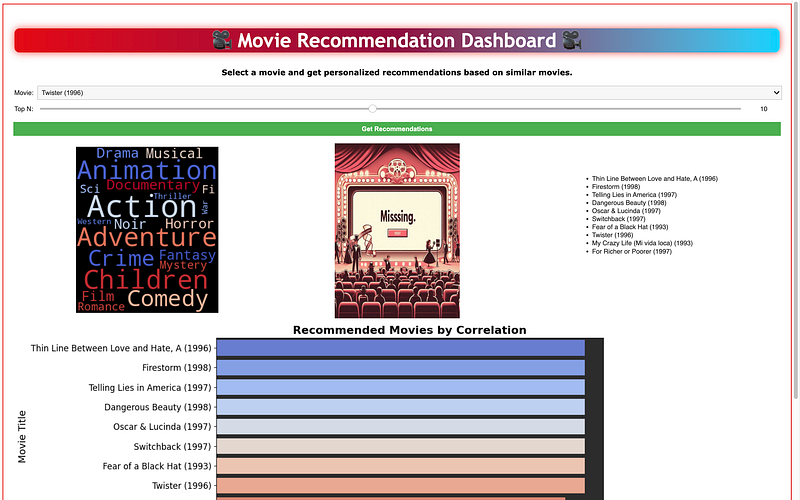
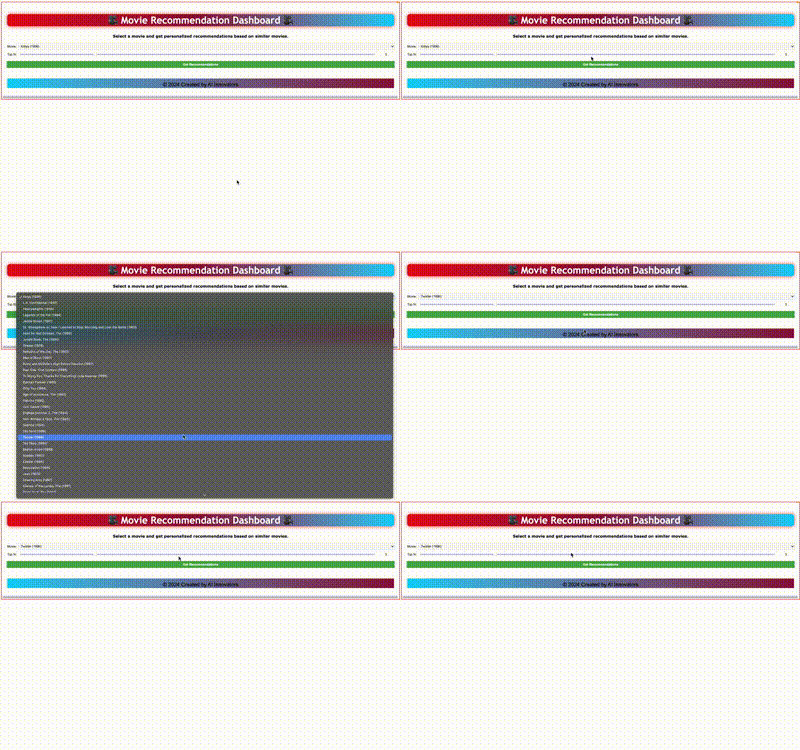
This part integrates interactive elements, making it easier for users to navigate and receive recommendations dynamically.
Github Code: Movie_Recommendation_System
Conclusion
In this project, we explored how to build a Movie Recommendation System from scratch, focusing on:
- Preprocessing data to create a user-movie matrix.
- Finding and visualizing popular movies.
- Building a recommendation algorithm using correlation.
- Enhancing the system with visualizations like bar graphs and word clouds.
- Creating an interactive dashboard for users to select movies and receive recommendations.
By combining data analysis, visualization, and interactivity, we created a comprehensive recommendation system that offers both functionality and ease of use!
Bonus !!!
To improve the recommendation system’s accuracy, you can implement a machine learning model to replace the simple correlation-based recommendation approach. Collaborative filtering, particularly Matrix Factorization (SVD), is a popular and effective algorithm for recommendation systems like this one.
We’ll use Surprise, a library specifically built for building and evaluating recommendation systems. It provides several algorithms, including SVD (Singular Value Decomposition), which is a matrix factorization technique.
Here’s the updated plan:
- SVD-based collaborative filtering: Instead of using correlation between movie ratings, we’ll predict ratings using the SVD algorithm.
- Train the model: We’ll train the SVD model on the MovieLens dataset and use it to predict movie ratings for users.
Here’s how we can implement it:
- Train a matrix factorization model (SVD) on the user-item ratings matrix using
Surpriselibrary. - Predict ratings for unseen movies for a user, and recommend the top movies with the highest predicted ratings.
- Use the trained model for generating personalized movie recommendations instead of just relying on correlation.
!pip install scikit-surpriseimport pandas as pd
import matplotlib.pyplot as plt
import seaborn as sns
import warnings
from surprise import Dataset, Reader, SVD
from surprise.model_selection import train_test_split
from surprise import accuracy
from surprise.model_selection import cross_validate
import ipywidgets as widgets
from IPython.display import display, HTML, clear_output
# Load dataset from URLs (MovieLens 100k)
movies_url = 'https://raw.githubusercontent.com/justmarkham/DAT8/master/data/u.item'
ratings_url = 'https://raw.githubusercontent.com/justmarkham/DAT8/master/data/u.data'
# Columns for the movies data
movie_cols = ['movie_id', 'movie_title', 'release_date', 'video_release_date', 'IMDb_URL', 'unknown',
'Action', 'Adventure', 'Animation', 'Children', 'Comedy', 'Crime', 'Documentary', 'Drama',
'Fantasy', 'Film-Noir', 'Horror', 'Musical', 'Mystery', 'Romance', 'Sci-Fi', 'Thriller',
'War', 'Western']
# Load movies and ratings data
movies = pd.read_csv(movies_url, sep='|', names=movie_cols, encoding='latin-1')
ratings_cols = ['user_id', 'movie_id', 'rating', 'timestamp']
ratings = pd.read_csv(ratings_url, sep='\t', names=ratings_cols)
# Convert the dataset into the format required by the Surprise library
reader = Reader(rating_scale=(1, 5))
data = Dataset.load_from_df(ratings[['user_id', 'movie_id', 'rating']], reader)
# Train-test split
trainset, testset = train_test_split(data, test_size=0.25)
# Train SVD model
svd_model = SVD()
svd_model.fit(trainset)
# Predict on the test set
predictions = svd_model.test(testset)
# Evaluate accuracy of the model
accuracy.rmse(predictions)
# Function to recommend movies based on SVD model
def recommend_movies(user_id, num_recommendations=5):
# Get a list of all movie IDs
all_movie_ids = movies['movie_id'].unique()
# Get a list of movies already rated by the user
rated_movies = ratings[ratings['user_id'] == user_id]['movie_id'].tolist()
# Predict ratings for all movies that the user hasn't rated yet
movie_predictions = []
for movie_id in all_movie_ids:
if movie_id not in rated_movies:
pred = svd_model.predict(user_id, movie_id)
movie_predictions.append((movie_id, pred.est))
# Sort the predictions by predicted rating in descending order
movie_predictions.sort(key=lambda x: x[1], reverse=True)
# Get the top N movie recommendations
top_movie_ids = [movie_id for movie_id, _ in movie_predictions[:num_recommendations]]
# Return the movie titles of the recommended movies
recommended_movies = movies[movies['movie_id'].isin(top_movie_ids)]
return recommended_movies['movie_title'].tolist()
# Function to handle button click event
def on_button_clicked(b):
with output:
clear_output() # Clear previous output
try:
selected_user_id = user_id_slider.value
recommended_movies = recommend_movies(selected_user_id, num_recommendations_slider.value)
# Display recommended movies
recommendations_html = f"<h3>Recommended Movies for User ID '{selected_user_id}'</h3><ul>"
for movie_title in recommended_movies:
recommendations_html += f"<li>{movie_title}</li>"
recommendations_html += "</ul>"
recommendations_output.clear_output()
with recommendations_output:
display(HTML(recommendations_html))
except Exception as e:
display(HTML(f"<p style='color: red;'>An error occurred: {e}</p>"))
# User ID slider
user_id_slider = widgets.IntSlider(value=1, min=1, max=ratings['user_id'].nunique(), description='User ID:')
# Slider for number of recommendations
num_recommendations_slider = widgets.IntSlider(value=5, min=1, max=20, step=1, description='Top N:')
# Button for generating recommendations
recommend_button = widgets.Button(description="Get Recommendations", button_style='success')
# Output areas
output = widgets.Output()
recommendations_output = widgets.Output()
# Bind the button click event to the function
recommend_button.on_click(on_button_clicked)
# Display UI
display(widgets.VBox([user_id_slider, num_recommendations_slider, recommend_button, recommendations_output]))Benefits of SVD:
- Captures latent features: SVD captures underlying patterns in user preferences and movie characteristics.
- Improves recommendation accuracy: It’s generally much more accurate than the simple correlation-based approach, especially for large datasets like MovieLens.
Now, the recommendation system is powered by a trained ML model, offering more accurate and relevant recommendations.
HAPPY MODELING!


