Project | Customer Segmentation for E-Commerce
Customer segmentation is a powerful tool for e-commerce businesses to understand their customers’ behavior and tailor marketing strategies accordingly. This project leverages K-Means Clustering to segment customers based on RFM (Recency, Frequency, Monetary) analysis. The process involves data cleaning, feature extraction, normalization, clustering, and visualization.
1. Importing Libraries
import pandas as pd
import numpy as np
import matplotlib.pyplot as plt
import seaborn as sns
from sklearn.preprocessing import StandardScaler
from sklearn.cluster import KMeans
import ipywidgets as widgets
from IPython.display import display, Markdown
from matplotlib import gridspec
The essential libraries are imported:
pandas,numpy: Data manipulation and analysis.matplotlib,seaborn: Visualization.StandardScaler,KMeans: Preprocessing and clustering.ipywidgets,IPython.display: Create interactive widgets and display HTML elements for dashboards.
2. Loading the Dataset
url = 'https://archive.ics.uci.edu/ml/machine-learning-databases/00352/Online%20Retail.xlsx'
data = pd.read_excel(url)
The dataset is loaded directly from the UCI repository using pandas. It contains records of online transactions made by UK-based customers between 2010-2011.
3. Data Cleaning
data = data.dropna(subset=['CustomerID'])
data = data[(data['Quantity'] > 0) & (data['UnitPrice'] > 0)]
data['TotalPrice'] = data['Quantity'] * data['UnitPrice']- Missing Values: Rows without a
CustomerIDare dropped because they don't contribute to customer segmentation. - Negative Values: Transactions where
QuantityorUnitPriceis negative or zero are filtered out. - Feature Engineering: A new column
TotalPriceis created by multiplyingQuantityandUnitPriceto represent the total amount spent per transaction.
4. RFM Feature Creation
data['InvoiceDate'] = pd.to_datetime(data['InvoiceDate'])
current_date = data['InvoiceDate'].max() + pd.DateOffset(days=1)

rfm = data.groupby('CustomerID').agg({
    'InvoiceDate': lambda x: (current_date - x.max()).days,  # Recency
    'InvoiceNo': 'count',  # Frequency
    'TotalPrice': 'sum'  # Monetary
}).reset_index()

rfm.columns = ['CustomerID', 'Recency', 'Frequency', 'Monetary']
Here, the RFM (Recency, Frequency, Monetary) model is created:
- Recency: The number of days since the last transaction.
- Frequency: The total number of transactions.
- Monetary: The total amount spent by the customer.
This step uses groupby to aggregate the data for each customer.
5. Data Normalization
scaler = StandardScaler()
rfm_scaled = scaler.fit_transform(rfm[['Recency', 'Frequency', 'Monetary']])
The StandardScaler is applied to normalize the RFM features to ensure that they are on the same scale before applying clustering algorithms. This helps improve the performance of K-Means by making all features comparable.
6. K-Means Clustering
kmeans = KMeans(n_clusters=4, random_state=42)
rfm['Cluster'] = kmeans.fit_predict(rfm_scaled)
K-Means clustering is applied with 4 clusters. Each customer is assigned to one of these clusters based on their RFM values. The fit_predict method trains the model and assigns cluster labels.
7. Visualizing Clusters with Pairplot
plt.style.use('dark_background')
sns.pairplot(rfm, hue='Cluster', palette='tab10')
plt.show()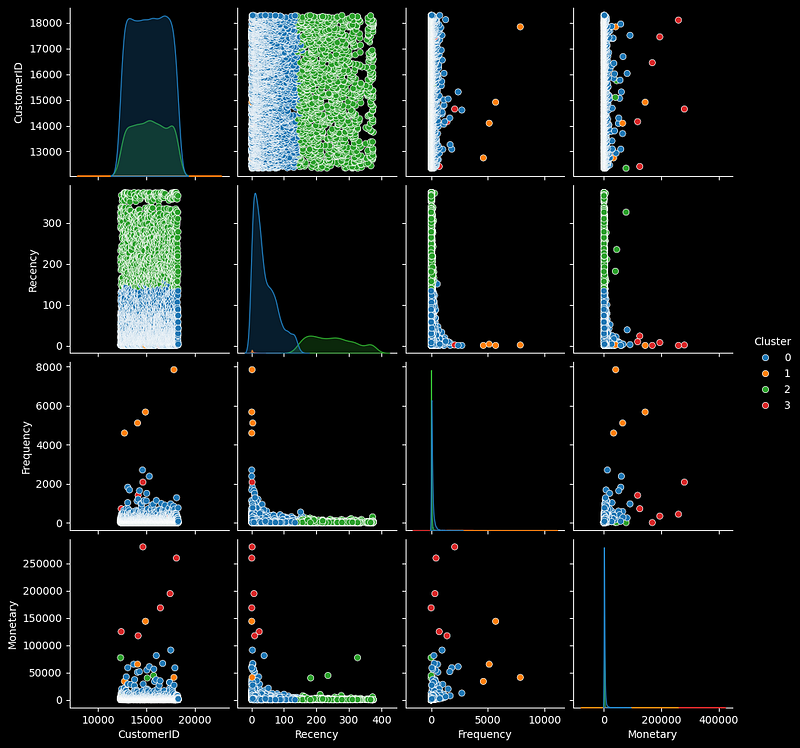
A pairplot is used to visualize the clusters across the Recency, Frequency, and Monetary dimensions, with different clusters distinguished by color. This allows us to visually assess how well the K-Means clustering performed.
8. K-Means Clustering with Adjustable Number of Clusters
def apply_kmeans(k):
    kmeans = KMeans(n_clusters=k, random_state=42)
    rfm['Cluster'] = kmeans.fit_predict(rfm_scaled)
    return rfm
This function allows for dynamic adjustment of the number of clusters (k). It enables reapplying K-Means with different k values, which is useful for fine-tuning the number of clusters.
9. Custom Visualization: Neon Scatter Plot and Radar Chart
- Neon Scatter Plot: The function
plot_clusters_neon()creates a visually appealing scatter plot with a neon color theme, plotting Recency vs. Frequency with clusters shown in different colors.
# Dark theme for plots
plt.style.use('dark_background')

# Scatter plot function
def plot_clusters_neon(ax1, rfm):
    sns.scatterplot(x='Recency', y='Frequency', hue='Cluster', palette='cool', data=rfm, s=100, edgecolor='white', linewidth=1, ax=ax1)
    ax1.set_title('Customer Segments by Recency and Frequency', fontsize=14, color='cyan', weight='bold')
    ax1.set_xlabel('Recency', fontsize=12, color='lime')
    ax1.set_ylabel('Frequency', fontsize=12, color='lime')
ax1.grid(True, linestyle='--', alpha=0.3, color='lightblue')- Radar Chart: The function
plot_radar_neon()visualizes the average RFM values for each cluster in a radar chart. This chart gives a holistic view of how clusters differ across all three dimensions.
# Radar chart function
def plot_radar_neon(ax2, rfm, k):
    radar_data = rfm.groupby('Cluster').mean()[['Recency', 'Frequency', 'Monetary']].reset_index()
    categories = ['Recency', 'Frequency', 'Monetary']

    for i in range(k):
        values = radar_data.iloc[i][['Recency', 'Frequency', 'Monetary']].values.flatten().tolist()
        values += values[:1]  # Repeat the first value to close the circle
        angles = [n / float(len(categories)) * 2 * np.pi for n in range(len(categories))]
        angles += angles[:1]

        color = np.random.rand(3,)
        ax2.fill(angles, values, color=color, alpha=0.2, linewidth=2)
        ax2.plot(angles, values, color=color, linewidth=2, label=f'Cluster {i+1}')

    ax2.set_yticklabels([])
    ax2.set_xticks(angles[:-1])
    ax2.set_xticklabels(categories, color='cyan')
    ax2.legend(loc='upper right', fontsize=10, facecolor='black', edgecolor='white')
    ax2.set_title("Radar Chart of Customer Segments", fontsize=14, color='cyan', weight='bold')
10. Combined Visualization
# Create a function to display both charts side by side
def plot_both(rfm, k):
    fig = plt.figure(figsize=(14, 6))
    gs = gridspec.GridSpec(1, 2, width_ratios=[1.5, 1])

    ax1 = plt.subplot(gs[0])
    ax2 = plt.subplot(gs[1], polar=True)

    plot_clusters_neon(ax1, rfm)
    plot_radar_neon(ax2, rfm, k)

    plt.tight_layout()
    plt.show()
This function combines both the scatter plot and radar chart into a single layout using GridSpec. It allows the user to view both visualizations side-by-side.
11. Interactive Widgets for Cluster Control
# Create interactive slider for number of clusters
cluster_slider = widgets.IntSlider(value=4, min=2, max=10, step=1, description='Clusters:',
                                   style={'description_width': 'initial'},
                                   layout=widgets.Layout(width='100%', height='80px'),
                                   continuous_update=False)
A slider widget is created to dynamically control the number of clusters in the K-Means algorithm. The slider allows users to interactively change the number of clusters between 2 and 10.
12. Update Function for Interactive Plots
# Update function for the plots
def update_plots(k):
    rfm_with_clusters = apply_kmeans(k)
    plot_both(rfm_with_clusters, k)
This function updates both the scatter plot and radar chart in real time as the user adjusts the number of clusters using the slider.
13. Dashboard Layout with Markdown
# Display project header
header = Markdown("""
# **Customer Segmentation Dashboard**
## K-Means Clustering for E-Commerce
""")

# Display project footer
footer = Markdown("""
---
**Created by AI Innovators**
""")

# Bordered box layout for GUI
border_box = widgets.HTML(
    value="""
    <style>
        .custom-box {
            border: 3px solid #00ff00;
            padding: 15px;
            border-radius: 10px;
            background-color: #333;
        }
        .custom-header {
            font-size: 24px;
            color: cyan;
            text-align: center;
            margin-bottom: 10px;
        }
        .custom-footer {
            font-size: 14px;
            color: lime;
            text-align: center;
            margin-top: 10px;
        }
        .custom-slider {
            margin-top: 20px;
        }
    </style>
    <div class="custom-box">
        <div class="custom-header">
            Customer Segmentation Dashboard <br> K-Means Clustering for E-Commerce
        </div>
        <div class="custom-slider">
            <!-- Widgets will be inserted here dynamically -->
        </div>
        <div class="custom-footer">
            Created by AI Innovators
        </div>
    </div>
    """
)
Markdown elements are used to display a project header and footer, creating a more professional appearance for the dashboard.
14. Displaying the Interactive Dashboard
# Remove the unnecessary code label
from IPython.core.display import Javascript
display(Javascript('IPython.notebook.kernel.execute("remove_output=True")'))

# Display the border box and attach interactive widgets
display(border_box)
widgets.interact(update_plots, k=cluster_slider)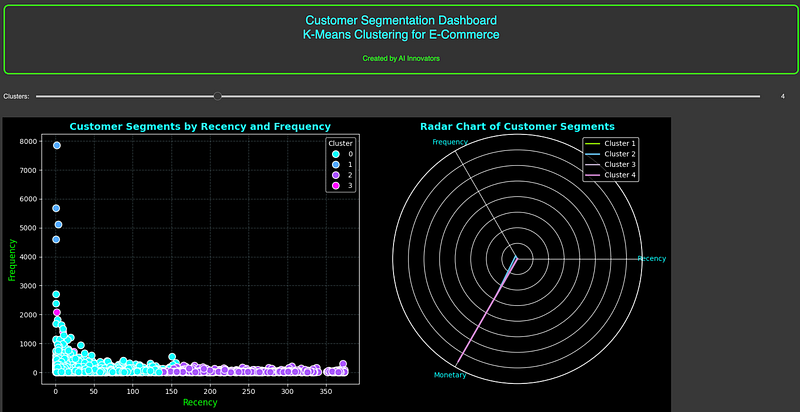
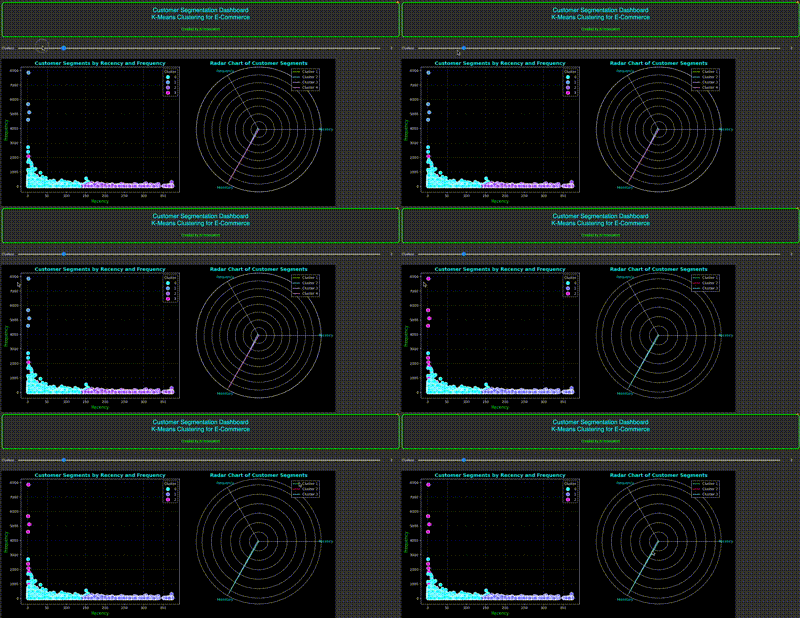
Finally, the dashboard layout is displayed, including the interactive slider and plots, allowing users to experiment with different clustering configurations and observe the results.
This project effectively segments customers for e-commerce platforms using the RFM model and K-Means Clustering, providing valuable insights into customer behavior through interactive visualizations.
GitHub Code: Customer_Segmentation_for_E_Commerce
Conclusion
In this project, we implemented a Customer Segmentation system for an e-commerce platform using RFM (Recency, Frequency, Monetary) analysis and K-Means Clustering. By following a structured approach, we:
- Cleaned the data and engineered relevant features.
- Extracted meaningful customer insights using the RFM model.
- Applied K-Means Clustering to segment customers into distinct groups based on their purchase behavior.
- Visualized the clusters using interactive scatter plots and radar charts, making the insights easy to understand.
The dashboard’s interactive design, with adjustable cluster numbers, allows experimentation to identify the optimal number of customer segments. Businesses can use this segmentation to tailor marketing strategies to different customer groups — such as targeting high-value customers with loyalty programs or re-engaging inactive ones. This process ultimately aids in improving customer satisfaction, increasing retention, and boosting revenue.
Combining data analysis, clustering algorithms, and interactive visualization makes this project a powerful tool for enhancing decision-making in e-commerce customer management. Happy Coding!


