
Programmatically Trade Fractional Shares with the Alpaca API
Commission Free, Fractional Shares, all through an API. Learn how to get started with Python, applicable examples, and new tools like Postman.

Introduction
The retail investor market has increasingly changed over the last five years and many of those changes have been focused on removing barriers to entry. Zero commission fees being the largest of these changes, which began with the Robinhood app and then was solidified when Charles Schawb followed suit in 2019. However, fractional shares have recently been advertised by many as a way for anyone to invest in the stock market and are becoming very popular.
Some of the main benefits of fractional share investing is the fact that it unlocks equities and ETF’s that otherwise, without having large amounts of capital, you wouldn’t be able to purchase, you can reduce risk by diversifying your portfolio with smaller amounts of capital. From the lens of algorithmic trading, there are many strategies that are dependent on certain sectors or equities and oftentimes, the price of the equity and not having enough capital can throw a wrench in a great trading strategy.
The purpose of this article is to highlight how to purchase fractional shares algorithmically by leveraging the Alpaca API. We will be referencing already existing documentation, as well as, breaking things down a little more visually and exploring some exciting ideas of how to use this in your next trading strategy.
Toolkit
- Python
- Alpaca Account
- Postman
- Alpaca Documentation on Fractional Share Orders
Step 1: Understand the Difference between an API Raw Request and Python SDK
If you are familiar with the Alpaca API, it is very easy to use and their documentation is very good compared to other alternatives. With any API it is important to understand the foundation and how to use it. Typically, with API’s there are two ways to call the API, direct API Raw Request or through an SDK or “wrapper”. If you are interested in learning more there is a great article by Sasha Andrieiev— What’s the Difference Between an API vs an SDK? | by Sasha Andrieiev | Medium
The reason why I highlight this is because there is only one way to currently make a fractional share order with the Alpaca API and that is by directly making a raw request to the API. This capability has yet to be added to the SDK. I do believe it is on Alpaca’s roadmap to add this into the wrapper, so keep your eyes out for this.
If this is your first time sending a raw request to an API, get excited and ready to learn because this is a great thing to learn.
Step 2: Understand the Constraints of the Fractional Shares API
Before we start making fractional share orders it’s important to understand the limitations and constraints. There are three pretty important ones:
- Not all equities can be traded with fractional shares
- Only market orders are accepted
- Time in force must be day
Not all equities can be traded with fractional shares
Imagine you have a portfolio that you would like to programmatically rebalance and you would like to leverage fractional shares to do so. Based on this constraint, it would be very important to identify whether or not all the equities in your portfolio can be traded with fractional shares. Alpaca has made this relatively easy to do. The get_asset object within the SDK outputs a boolean that tells whether or not an asset can be traded fractionally.
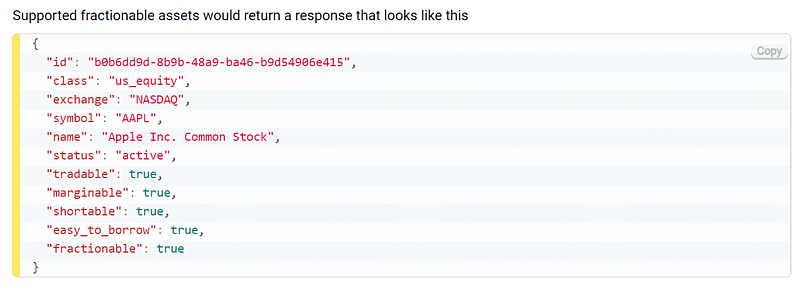
Only Market Orders are Accepted
Yes, it stinks. There are a variety of different order types that can be placed through the Alpaca API. See list here. Only market orders are accepted for fractional share orders.
Time in Force Must be Day
This is also a bummer, because any buy or sell order would be cancelled at the end of the day and would have to be placed again the next day. I also believe Alpaca has this on their backlog for the future.
Below is an acceptable fractional share order of AAPL. This meets the three requirements. This will purchase 150 dollars worth of AAPL.
{
“symbol”: “AAPL”,
“notional”: “150”,
“side”: “buy”,
“type”: “market”,
“time_in_force”: “day”
}
If you would like to purchase a fraction quantity, like 1.5 shares of AAPL. You would replace notional with qty. See below.
{
“symbol”: “AAPL”,
“qty”: “1.5”,
“side”: “buy”,
“type”: “market”,
“time_in_force”: “day”
}
Step 3: Use Postman to test API Raw Request
If you find yourself working with API’s often, you can skip this section. We will be using Postman to test our authentication and hitting the API with a raw request. Postman really helps visualize the process and is great for testing purposes.
To get started, download Postman here.
Go ahead and create a new collection and a new GET request.
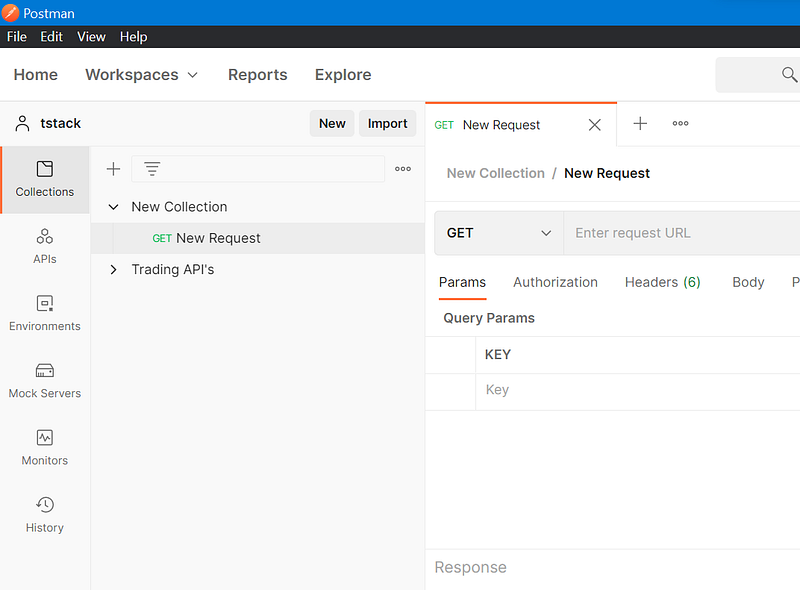
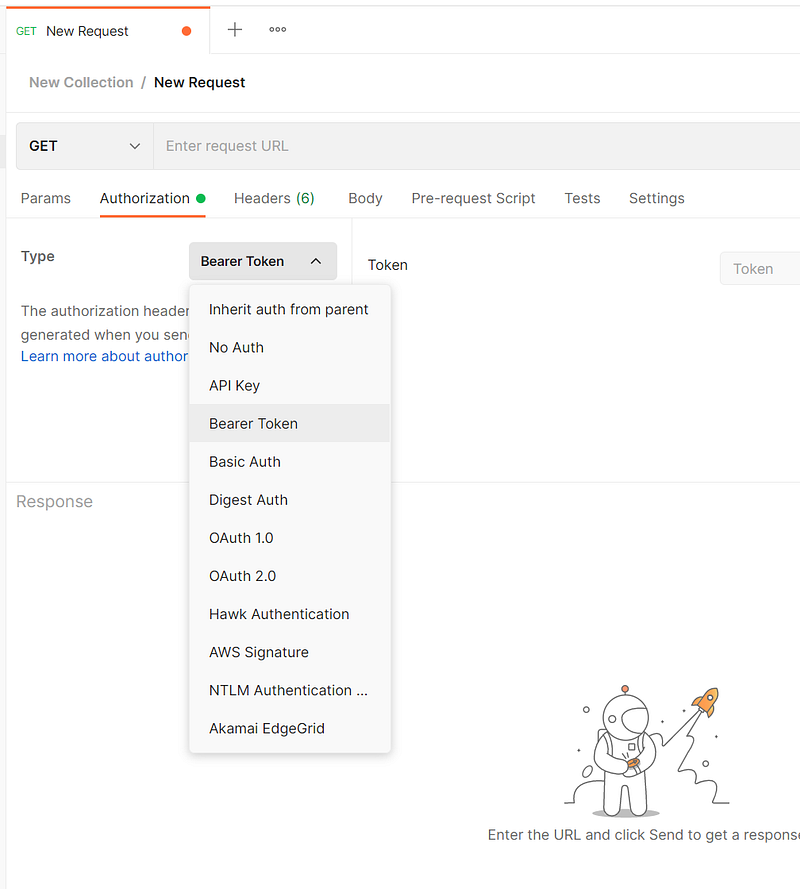
Next, click on Authorization and select Bearer
Next, select Headers and enter your Alpaca API Key and Secret
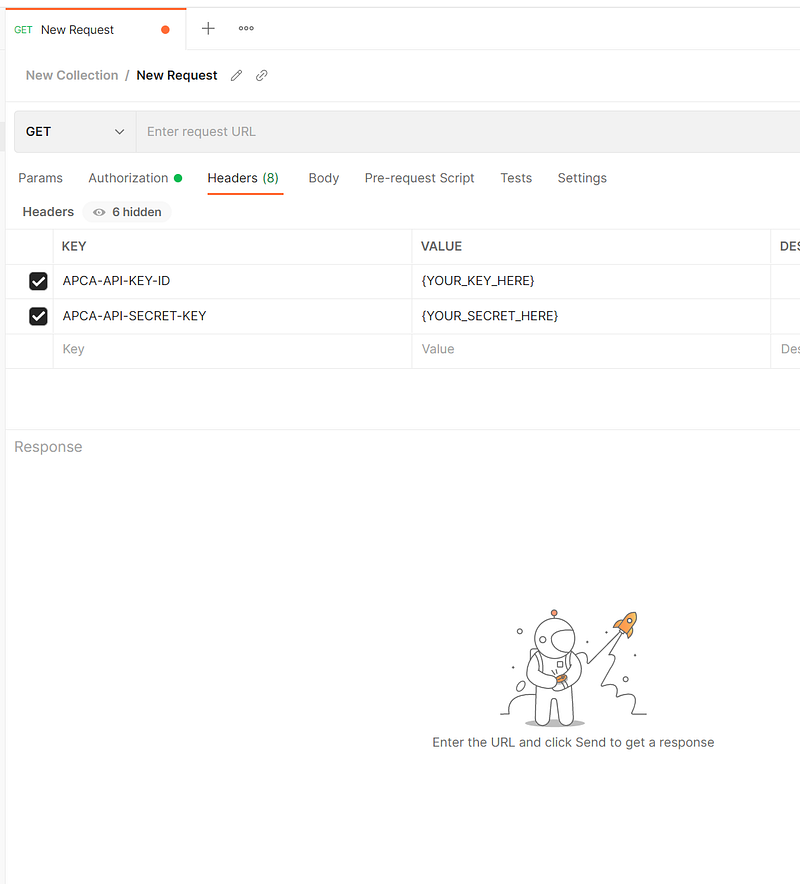
Now, add the API URL to test our authentication. The example below uses the account API. https://paper-api.alpaca.markets/v2/account
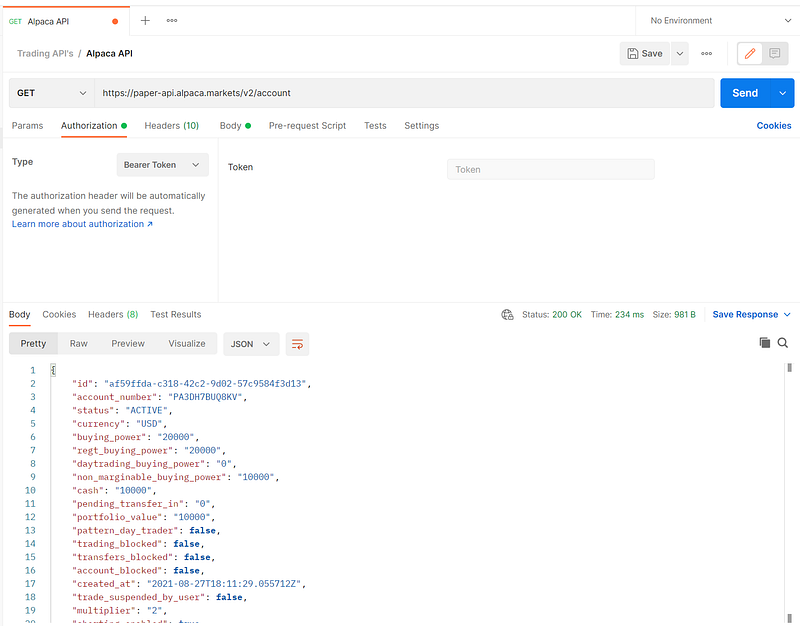
Sweet! It works! Now, let’s go ahead and try placing a fractional share order. Lets buy $10,000 of the SPY. First, change the request to POST, and then add a body to the request.
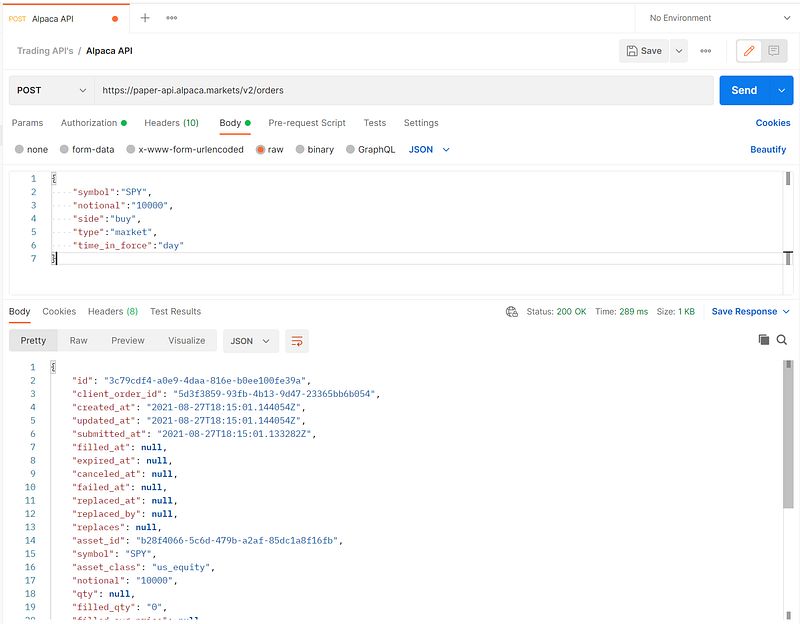
Now, go check in Alpaca to see if the order was placed.
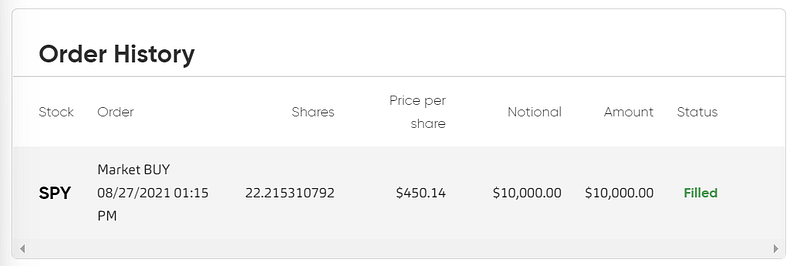
Awesome. Now, let’s go write this in python.
Step 4: Write Python to Place Fractional Shares Order
The process for submitting a raw request in python is fairly simple. First, begin by importing requests. This is how we can tell the api whether we are trying to GET or POST data. Some API’s don’t require authentication, but most do. We will be using headers and passing those to the API with requests. So, essentially we pass three variables to the API.
- Endpoint: this is the API URL, in this case we are using the paper API.
- Data: Some call this data or body, but we are passing a json object which contains the order instructions.
- Headers: this is how we authenticate. We pass the API Key and API Secret
This will return a json chunk with information about our order.
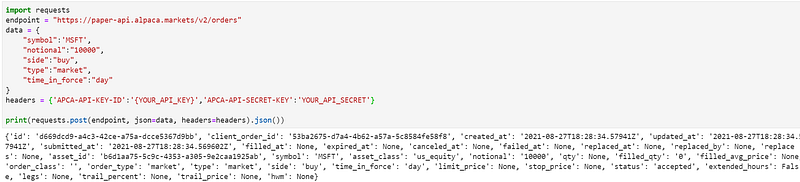
Now go check the Alpaca frontend and see how things are looking.

Great! Now, we can move towards leveraging this with countless algorithmic strategies. What would be helpful is if we wrote our own wrapper or function for fractional shares.
Step 5: Write Python Function for Fractional Shares API
This last step is if you would like to more easily apply the fractional share API capability in some strategies you have already written or future ones you will write. To make this a little easier, let’s write a function or our own wrapper. The function calls for the following parameters.
- symbol : str, required
- side: str, ‘buy’ or “sell”
- notional: boolean, if True = notional, if False = fractional of a qty
- amount: str, If notional is true, a dollar amount. If notional is false, a fraction of a qty
- api_key: str, alpaca_api_key
- api_secret: str, alpaca_api_secret
- endpoint: str, alpaca_endpoint_url, paper vs. live url
Now, let’s look at an application of where we could use this function. Let’s say we would like to programmatically purchase $20 dollars of each FAANG stock.
We need to first create a list of symbols that we can loop through. Then, before we place our fractional share orders, we need to first verify that the stocks we are intending to purchase can be purchased with fractional shares. This is done by using the Alpaca API wrapper and the get_asset object. Once that check is complete, we can feed it into our fractional shares function and place our market day orders with a notional amount of $20.
Look at that.
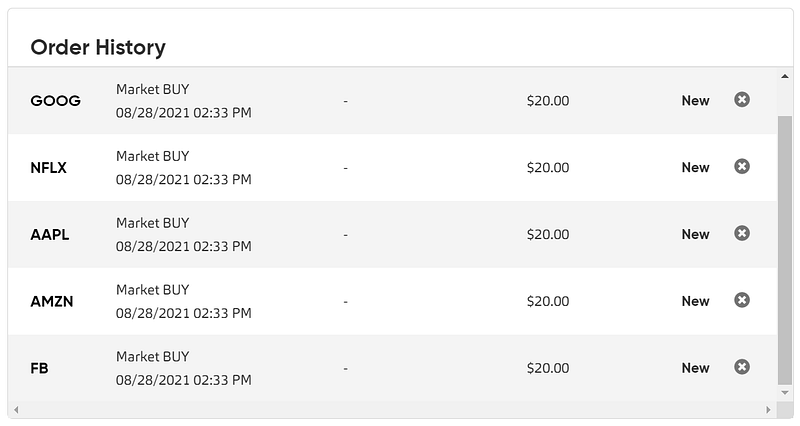
Now, you can pair this with any type of programmatic or algorithmic strategy.
Conclusion
The world of retail investing has been changing at a rapid pace these past few years. Fractional shares are allowing everyone to invest in companies whose share prices are high. Combining that with zero commission trading, you can literally get started with a few dollars. Neat companies like Alpaca Markets are making it easy for programmers and developers who are interested in finance to write programs or algorithms to trade. Having the ability to purchase fractional shares with a raw API request and then being able to customize a function can be very powerful and exciting.
I hope that this article helps you get started on your next project and empowers you with news tools and ideas.
As always, happy building!
*If you like this type of content, don’t forget to subscribe to my profile and you will be notified the moment a new article is published! :)


