Productivity Tools for Large-scale Data Science Projects
Analyzing different productivity tools used for real-world industrial type projects
Basic productivity tools for data science such as Jupyter notebook and R Studio are good tools for small-scale data science and machine learning projects. In these types of projects, the dataset is often very simple such that model building, testing, and evaluation can even be performed within a reasonable amount of time on a laptop computer. Here are two examples of small-scale projects using Jupyter notebook and R Studio:
- The machine learning model for predicting cruise ship crew size: The dataset and Jupyter notebook can be found here: ML model for predicting ship’s crew size.
- The machine learning model for simulating loan status: The dataset, R script, and sample outputs can be found here: Monte-carlo simulation for predicting loan status.
In real-world data science projects, the datasets could be quite complex, and the task to be performed may involve computationally intensive problems such as image processing, speech analysis, or building a deep learning model using a complex dataset with hundreds of features and thousands of observations. These types of problems require advanced productivity tools for tackling problems. This article will discuss productivity tools for large-scale data science projects.
Productivity tools for large scale data science projects
1. High-performance computing
High intensive data science projects can be executed using high-performance computing (HPC) facilities. HPC is a cluster of computers containing several nodes. HPC can perform calculations either serially or in parallel mode. In order to use HPC resources, a data scientist has to master the following skills:
a) Command-line or UNIX-like interface (Linux): This is needed for interacting with a computer server. There are several UNIX-based operating systems that can be used for HPC. My favorite is Ubuntu. Find out more about Ubuntu from the link below:
Ubuntu provides a windows-like UNIX system that is very easy to use, especially for individuals who are not familiar with the command line.
Some basic UNIX commands essential for HPC are given below:
# make a new director
$ mkdir
# what is my current directory
$ pwd# change director
$ cd# lists your files in current working directory
$ ls# copy file1 and save as file2
$ cp file1 file2# delete a file1
$ rm file1# search the string "r2 score" in file1
$ grep "r2 score" file1# launch an editor that lets you create and edit a file
$ emacs file1More information about basic UNIX commands can be found here: http://mally.stanford.edu/~sr/computing/basic-unix.html
b) Knowledge about batch scheduler: This is needed for running jobs non-interactively on an HPC cluster. Assume we would like to run a machine learning model on an HPC computer that allows MPI (communication between nodes) for message passing. Suppose the python code for our model is stored in a file named“my_script.py.” To run it on the HPC cluster, we could create the following batch script in the same directory as our Python script, that we call “myjob.sh” as follows:
#!/bin/bash#SBATCH --nodes = 3#SBATCH --tasks-per-node = 32#SBATCH --time = 02:00:00#SBATCH --job-name = my_script.pymodule load pythonsrun -n 96 python my_script.pyTo run “my_script.py” in batch mode on the HPC, we submit the batch script from the command line using the sbatch command, and wait for it to run to completion:
% sbatch myjob.shWhen the job is executed, an output file is created in the current working directory on the server. The output file can then be used for post processing and analysis. Some servers are equipped with software that enables post analysis and visualization of results via a graphical user interface. If this is not available, then the output file can be transferred to a local desktop for post-analysis. There are so many software applications that can be used for transferring files between the local directory and the directory on a server. An example is PuTTY, which is a free and open-source terminal emulator, serial console, and network file transfer application. It supports several network protocols, including the secure copy (SCP) and secure shell (SSH): https://www.putty.org/.
Building an HPC computing platform can be very expensive for small companies. It also requires a team of HPC technicians to operate and maintain the facility, as well as provide technical support and training to data scientists. Because most companies can’t maintain these facilities, they are leaning more to cloud services as productivity tools for their data science and machine learning project needs.
2. Cloud services
In cloud computing, the 3 main providers are Amazon, Microsoft, and IBM. The figure below shows the comparison of different cloud machine learning services, their capabilities, and their differences.
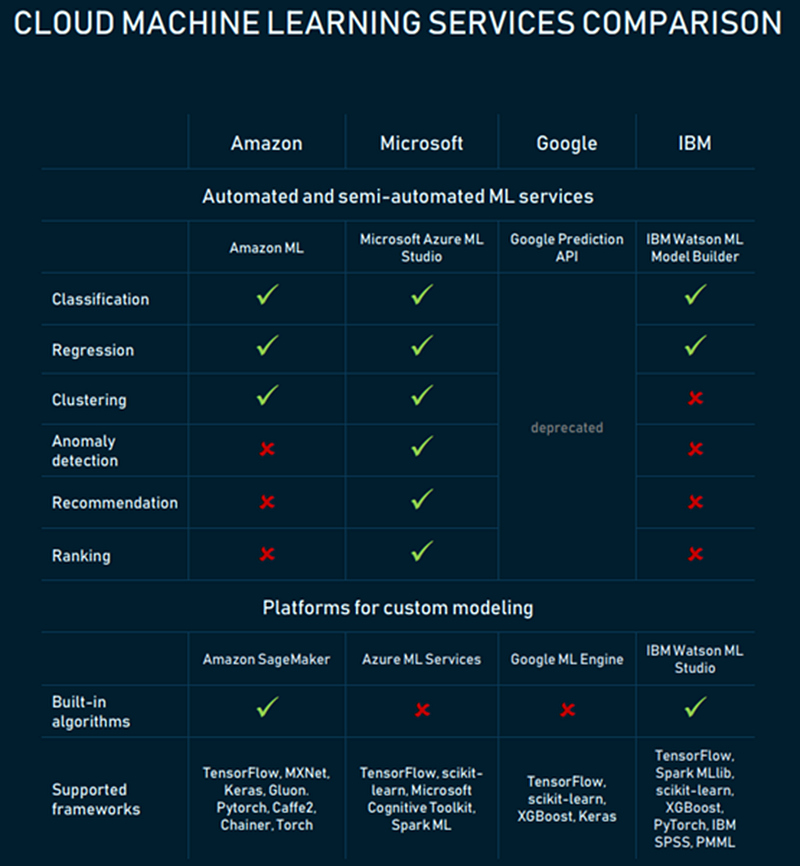
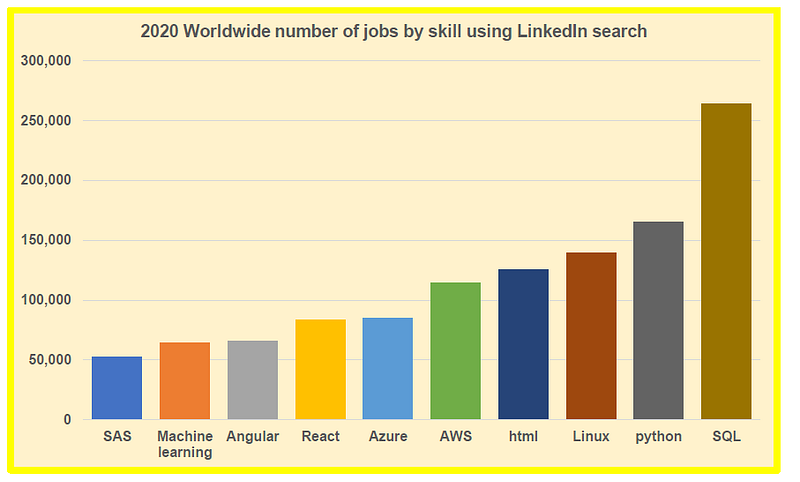
As shown on the chart above, could platforms provide in-built algorithms that allow you to build, test, and deploy machine learning models. AWS and Azure are the most popular cloud platforms for building and deploying machine learning models. A data scientist should try to learn how to use cloud services. The figure below shows that AWS, Azure, and Linux (UNIX) are among the top in-demand skills in 2020. These are all productivity tools for high intensive data science and machine learning projects.
In summary, we’ve discussed essential productivity tools for large-scale data science projects. As more and more companies are using advanced productivity tools for their data science and machine learning needs, it is important for anyone interested in a career in data science to learn the basics of advanced productivity tools such as HPC and cloud services such as AWS or Azure.