avatarAnshul Kummar

Free AI web copilot to create summaries, insights and extended knowledge, download it at here

3553

Abstract

">Craft mobile app has been built with immense thought and Craft :) It's easy to use and user-friendly, and its UI is fantastic. Way better than what Evernote offers.</p><p id="cd6b"><b>Craft Pricing.</b></p><p id="d2c0">Craft price is reasonable and attractive.</p><p id="4c91">The free version can do most of what I'm talking about, but I'm on a 'personal pro' account, which works for me well. So I opted for the annual plan and paid $5 per month.</p><figure id="d544"><img src="https://cdn-images-1.readmedium.com/v2/resize:fit:800/1*JMdzkLPxqy5ko5VXDDFd1w.png"><figcaption>Screenshot by author</figcaption></figure><h2 id="346c">What are the Pros and Cons of Notion?</h2><p id="8824">A strong productivity program, Notion provides various features to help users maintain concentration and order in their work. The ability to adapt to changing circumstances is one of its main selling points.</p><p id="a0f3">It's easy to make a variety of templates and databases with Notion, and each one may be modified to fit the user's specific demands. Users with unique workflow requirements or project management processes may find this feature particularly useful.</p><p id="1ce0">Notion also has a robust database system, which is a huge plus. Tables, lists, and calendars are just some database types that may be made with Notion. Users who need to maintain various records may benefit from this.</p><blockquote id="2f58"><p>Using Notion’s user-friendly drag-and-drop interface, you can easily rearrange your projects and tasks.</p></blockquote><p id="a98c">However, it has its <b>drawbacks</b>. The great difficulty level of getting started is one of the significant drawbacks. In addition, some users, particularly those not tech aware, may find Notion's flexibility and customization possibilities overpowering.</p><p id="ac82">It may take some time to become familiar with all of Notion's capabilities. A further drawback of Notion is its poor performance. Users with massive databases or a lot of data have complained that Notion can load and browse slowly.</p><h1 id="630d">Differences between Craft and Notion</h1><p id="0c43">Craft and Notion are powerful productivity tools but have some key differences. Here is a table outlining the main differences between the two apps:</p><figure id="b832"><img src="https://cdn-images-1.readmedium.com/v2/resize:fit:800/1*pSCXgVoooRXE0pOlF5yDpQ.png"><figcaption>Screenshot by author</figcaption></figure><p id="7800">As you can see, Craft offers a more user-friendly UI, real-time collaboration, kanban boards, and project scheduling. On the other hand, Notion is more flexible and customizable, less priced, and comes with mobile apps.</p><h2 id="b666">The winner in the end — let's find out.</h2><p id="2583">So which app is the better choice?</p><p id="414e">The answer, as with most inquiries, is that it depends on your own needs and preferences.</p><ul><li>Craft might be better if you require a user-friendly system that offers real-time collaboration.</li><li>If you need a more flexible and configurable solution that allows you to create a range of unique databases and templates, <b>Notion </b>might be a better choice.</li></ul><p id="37a5">The objective is to choose the tool that best suits your requirements and work procedures. Both apps have advantages and disadvantages, including various features designed to help users stay organized and productive.</p><p id="328d">So, which app do you favor? Craft or Notion? Bring on the heated discussion :)</p><div id="f040" class="link-block">

Options

  <a href="https://readmedium.com/revolutionizing-note-taking-how-craft-is-changing-the-game-over-evernote-and-notion-838649138d39">
        <div>
          <div>
            <h2>Revolutionizing Note-Taking — How 'Craft' i' Chan'ing the Game Over Evernote and Notion</h2>
            <div><h3>Impact of Craft on the note-taking industry and it's future state.</h3></div>
            <div><p>medium.com</p></div>
          </div>
          <div>
            <div style="background-image: url(https://miro.readmedium.com/v2/resize:fit:320/1*6XEfZGFghfWetFc7s3t20A.png)"></div>
          </div>
        </div>
      </a>
    </div><div id="a3cd" class="link-block">
      <a href="https://readmedium.com/a-tale-of-two-task-management-tools-my-experience-with-things-3-and-todoist-ad099dc4bb8f">
        <div>
          <div>
            <h2>A Tale of Two Task Management Tools — My Experience with Things 3 and Todoist</h2>
            <div><h3>Finding the RIGHT fit.</h3></div>
            <div><p>medium.com</p></div>
          </div>
          <div>
            <div style="background-image: url(https://miro.readmedium.com/v2/resize:fit:320/0*Y9V9gH4kNOQIrlkU.jpeg)"></div>
          </div>
        </div>
      </a>
    </div><div id="528e" class="link-block">
      <a href="https://readmedium.com/is-it-time-to-ditch-gmail-why-i-decided-to-make-the-switch-1650c4f46f9b">
        <div>
          <div>
            <h2>Is It Time to Ditch Gmail? Why I Decided to Make the Switch</h2>
            <div><h3>Why I made the switch and why you should too.</h3></div>
            <div><p>medium.com</p></div>
          </div>
          <div>
            <div style="background-image: url(https://miro.readmedium.com/v2/resize:fit:320/0*6fzPowiHmklzGCAO.jpeg)"></div>
          </div>
        </div>
      </a>
    </div><h2 id="a0ab">Please signup to get all my upcoming stories in your inbox.</h2><div id="6ccd" class="link-block">
      <a href="https://medium.com/subscribe/@wordsmithwriter">
        <div>
          <div>
            <h2>Get an email whenever wordsmithwriter publishes.</h2>
            <div><h3>Get an email whenever wordsmithwriter publishes. By signing up, you will create a Medium account if you don't already…</h3></div>
            <div><p>medium.com</p></div>
          </div>
          <div>
            <div style="background-image: url(https://miro.readmedium.com/v2/resize:fit:320/0*MEm8X72aClC3mDdb)"></div>
          </div>
        </div>
      </a>
    </div><h2 id="e3a2">Feel free to become a member for full access to my content — and the entire Medium library! In addition, I'll earn a small commission if you sign up through my link.</h2><div id="e2e4" class="link-block">
      <a href="https://medium.com/@wordsmithwriter/membership">
        <div>
          <div>
            <h2>Join Medium with my referral link - wordsmithwriter</h2>
            <div><h3>Read every story from wordsmithwriter (and thousands of other writers on Medium). Your membership fee directly supports…</h3></div>
            <div><p>medium.com</p></div>
          </div>
          <div>
            <div style="background-image: url(https://miro.readmedium.com/v2/resize:fit:320/0*Dm67oJBxCPGRzwmp)"></div>
          </div>
        </div>
      </a>
    </div></article></body>

Productivity Face-Off: Craft vs. Notion — You Won't Believe Who Wins!

The battle to be the king of note-taking apps.
Photo by Markus Spiske on Unsplash

The streets were filled with the sound of shattering windows and the chill of the wind. Emma was crouched over her laptop in her studio apartment, racing against time.

She stretched and rubbed her eyes, then glanced at the time in the top right corner of her computer screen.

As midnight loomed, she realized she still had a lot of work to complete. Seeing her enthusiasm wane, Emma sighed and sipped some coffee.

But then she recalled Craft and Notion, two productivity applications she'd heard much about. Both claimed to help her stay on top of her work and get more done, but she needed to know which was best.

Both claimed to help her stay on top of her work and get more done, but she needed to know which was best.

About Craft and Notion.

Both Craft and Notion have seen significant growth in user base and popularity in recent years.

Founded by Balint Orosz in 2019 in Budapest, Craft is a notetaking, collaboration, and productivity tool. They won the Mac App of the Year at Apple’s App Store Best of 2021 Awards.

On the other hand, Ivan Zhao, Simon Last, and Akshay Kothari created Notion in 2016 as a basic note-taking software that would later develop into a robust productivity system.

To that end, both applications provide various tools for managing one's workload and coordinating with others.

  • Notion offers a robust database system, multiple templates, and a versatile drag-and-drop interface, whereas
  • Craft focuses on real-time collaboration, elegant note-taking, high-quality image uploads, exporting features, templates, and much more.

How do Craft and Notion stack up against one another?

First, let's compare their features, benefits, and drawbacks.

What are the Pros and Cons of Craft?

Craft is a web-based application with several features to aid user organization and productivity. Lately, Craft has a Mac and windows app too.

The fact that it’s so simple to learn and utilize is one of its greatest strengths.

It's also fantastic for groups working on projects together, thanks to its real-time collaboration features.

The kanban boards in Craft are another perk because they allow users to see their work in progress and rearrange cards as necessary. Those who thrive with everything they need to complete a task in plain sight would appreciate this feature.

Project timelines are another feature available in Craft that can assist with organization and keeping to-do lists.

Craft mobile app.

Craft mobile app has been built with immense thought and Craft :) It's easy to use and user-friendly, and its UI is fantastic. Way better than what Evernote offers.

Craft Pricing.

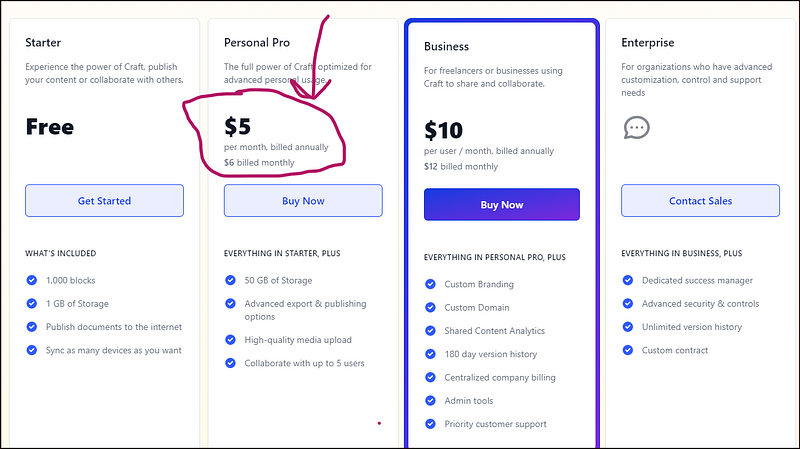
Craft price is reasonable and attractive.

The free version can do most of what I'm talking about, but I'm on a 'personal pro' account, which works for me well. So I opted for the annual plan and paid $5 per month.
Screenshot by author

What are the Pros and Cons of Notion?

A strong productivity program, Notion provides various features to help users maintain concentration and order in their work. The ability to adapt to changing circumstances is one of its main selling points.

It's easy to make a variety of templates and databases with Notion, and each one may be modified to fit the user's specific demands. Users with unique workflow requirements or project management processes may find this feature particularly useful.

Notion also has a robust database system, which is a huge plus. Tables, lists, and calendars are just some database types that may be made with Notion. Users who need to maintain various records may benefit from this.

Using Notion’s user-friendly drag-and-drop interface, you can easily rearrange your projects and tasks.

However, it has its drawbacks. The great difficulty level of getting started is one of the significant drawbacks. In addition, some users, particularly those not tech aware, may find Notion's flexibility and customization possibilities overpowering.

It may take some time to become familiar with all of Notion's capabilities. A further drawback of Notion is its poor performance. Users with massive databases or a lot of data have complained that Notion can load and browse slowly.

Differences between Craft and Notion

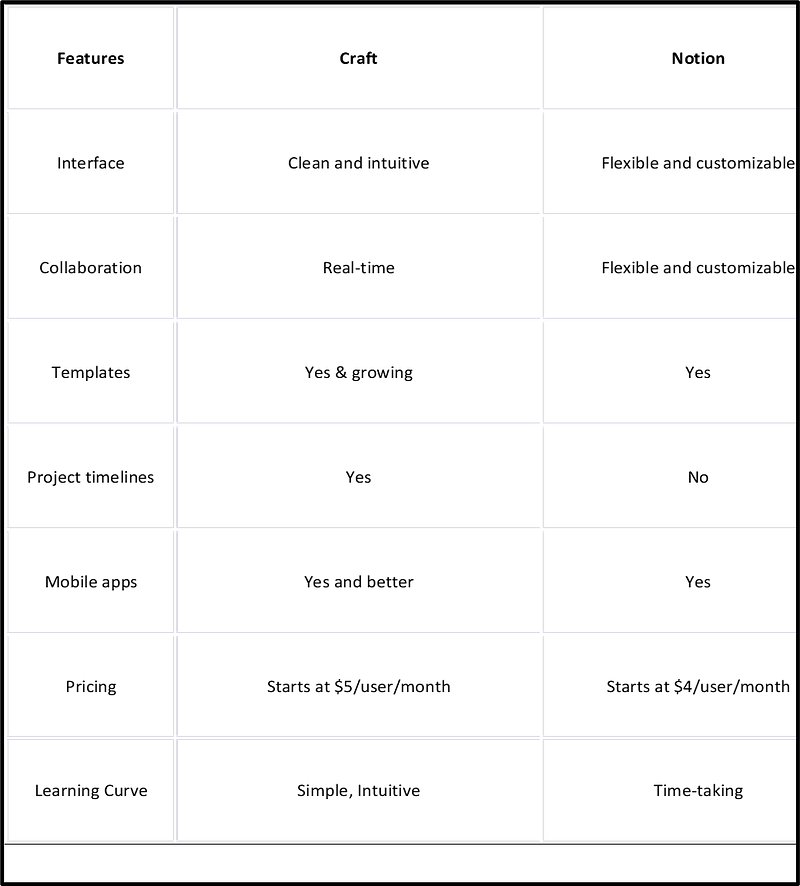
Craft and Notion are powerful productivity tools but have some key differences. Here is a table outlining the main differences between the two apps:
Screenshot by author

As you can see, Craft offers a more user-friendly UI, real-time collaboration, kanban boards, and project scheduling. On the other hand, Notion is more flexible and customizable, less priced, and comes with mobile apps.

The winner in the end — let's find out.

So which app is the better choice?

The answer, as with most inquiries, is that it depends on your own needs and preferences.

  • Craft might be better if you require a user-friendly system that offers real-time collaboration.
  • If you need a more flexible and configurable solution that allows you to create a range of unique databases and templates, Notion might be a better choice.

The objective is to choose the tool that best suits your requirements and work procedures. Both apps have advantages and disadvantages, including various features designed to help users stay organized and productive.

So, which app do you favor? Craft or Notion? Bring on the heated discussion :)

Please signup to get all my upcoming stories in your inbox.

Feel free to become a member for full access to my content — and the entire Medium library! In addition, I'll earn a small commission if you sign up through my link.

Productivity
Notion
Notetaking
Startup
Creativity
Recommended from ReadMedium