
Productivity Boost: 5 Obsidian Plugins You Need to Know

The Obsidian Community has built hundreds of plugins, but it can be difficult to cut through the noise to determine which are actually useful. I won’t pretend that some of the plugins in this list might cater to specific people with specific usecases, but I can at least vouch for their overall usefulness. Note that I’ve included only plugins that I haven’t referenced before, since you can read about those in my other articles.
🎨 Natural Language Syntax Highlighting
This is a new one!
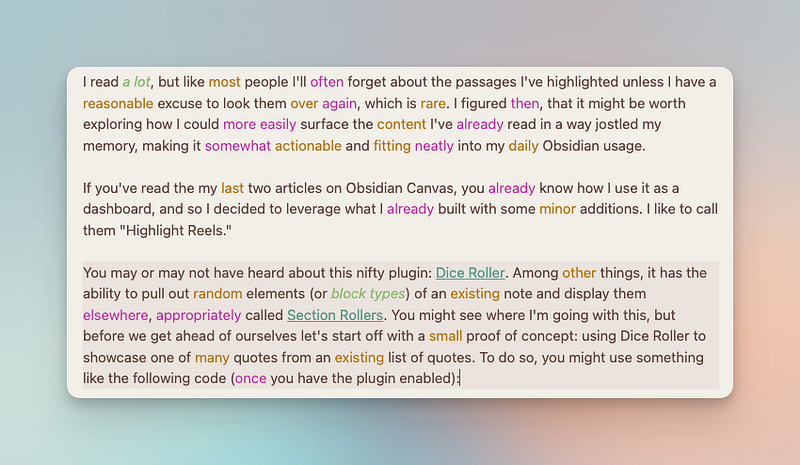
If you’re familiar with iA Writer, you might have heard of its syntax highlighting feature that color codes what you’ve wrote while you write it something you might find useful if you do any kind of long form writing. The Obsidian equivalent is appropriately called Natural Language Syntax Highlighting. This one is a fantastic addition to my arsenal as I just abuse adjectives and adverbs (a reminder of my English Literature past), and this helps me cut down on their use significantly by highlighting them in different colors.
Its one shortcoming is not being able to quickly toggle the feature on or off with the Command Palette but since it was just recently launched, I just begrudgingly disable the plugin when not writing anything too lengthy.
🌟 Highlightr
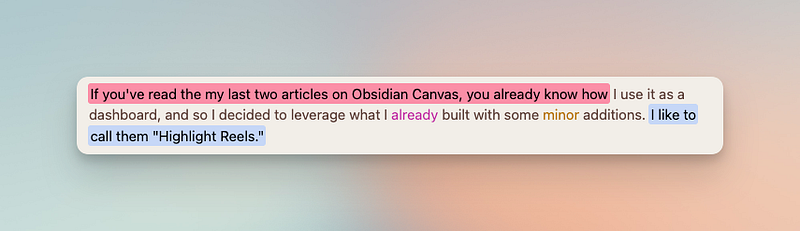
In keeping with the highlighting theme, Highlightr makes it quick and easy to markup your text in different colors. It gives you the option of not only picking from four different highlighting styles, but you can also create your own colors to choose from.
🔎 Omnisearch with Text Extractor
Omnisearch is a better search. It also has the ability to index PDFs and Images and can also be used in conjunction with Text Extractor to pull that content. The latter isn’t perfect, but I would still recommend Omnisearch on its own simply due to its speed.
👉🏻 Paste URL Into Selection
A lightweight quality-of-life plugin that allows you to highlight text and paste a URL (from your clipboard) into it, making it markdown ready. Otherwise, that process is a little clunky (and annoying). Simple.
📖 Better Word Count
Another lightweight plugin that I recommend for anyone who does any kind of writing whatsoever (and definitely for bloggers). This plugin simply lets you see word counts for selected text, which for some reason is not included in the official Word Count included by default (and I’d recommend disabling that if you have this installed)
If you have other recommendations, send them my way and they might make it into the next round-up!
Originally published at https://www.productnook.com on April 12, 2023.


