
Prevent OutOfMemoryError in Spring Boot
There are many business instances where we cannot afford failures (for example, long-running batch jobs, crucial computations, and applications dealing with massive amounts of data). Such intensive memory operations frequently result in heap memory errors, and we may need to reprocess them after restarting the program. Such huge operation failures not only cause problems, but they are also more difficult to recover from and take longer to complete after re-attempts.
This article will look at a custom approach to detect and prevent OutOfMemoryError in a Spring Boot application. This approach can help us detect probable memory issues in advance.
Background:
The Java heap is the area of memory used to store objects instantiated by applications running on the JVM. The memory management of Heap is handled by the Garbage Collector in Java. Java objects and JRE classes are allocated heap memory by the Java Runtime. When the heap memory space is exhausted, the program will throw java.lang.OutOfMemoryError
java.lang.OutOfMemoryError: Java heap spacePrerequisites:
Basic knowledge of JVM, Garbage Collector, Spring AOP, Spring Boot
Also, I am assuming that one would know which operations in the application are memory-heavy and might run out of memory when there is a memory crunch. Such methods should become our target method.
Java Runtime:
Every Java application has a single instance of class Runtime that allows the application to interface with the environment in which the application is running. The current runtime can be obtained from the Runtime.getRuntime() method.
Generally, memory configuration for Java Virtual Machine is done via JVM options like -Xmx and -Xms. JVM will start initially from the memory defined with -Xms and can obtain memory for heap up to the value defined against -Xmx
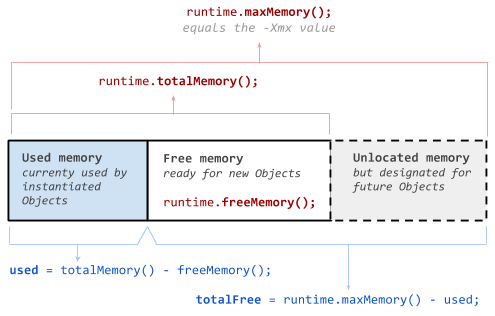
Runtime.getRuntime().maxMemory() returns the maximum amount of memory that the Java virtual machine will attempt to use
Runtime.getRuntime().freeMemory() returns the currently occupied memory by JVM
Runtime.getRuntime().totalMemory() returns the total amount of memory currently occupied by JVM. It can grow up to the defined maximum memory.
Here is how we can calculate the maximum free memory for JVM
Used Memory = Runtime.getRuntime().totalMemory() — Runtime.getRuntime().freeMemory()
Maximum Free Memory = Runtime.getRuntime().maxMemory() — Used Memory
Our Solution:
- Create an Annotation named CheckMemory. It can take two parameters, minRequiredMemory, and JVM Memory Unit.
- Create an Aspect class that checks the max free heap memory and throws an exception if it's lower than the defined minRequiredMemory.
- Identify memory-heavy method and annotate it with CheckMemory
- Handle exception with ExceptionHandler in ControllerAdvice class
Let’s check out the code references. We will first create an annotation with the name of CheckMemory.
@Target(ElementType.METHOD)
@Retention(RetentionPolicy.RUNTIME)
public @interface CheckMemory {

  long minRequiredMemory() default 0;

  MemoryUnit jvmMemoryUnit() default MemoryUnit.MB;

  enum MemoryUnit {
    KB, MB
  }
}
Now we’ll create the Aspect class and create a method with @Before advice that works for CheckMemory annotation.
This method first obtains the maximum available memory to JVM by deducting used memory from the total max JVM memory. Later, it checks if the maximum available memory is lower than the minimum required memory passed via annotation. If that is the case, then it will throw LowMemoryException.
@Aspect
@Component
public class CheckMemoryAspect {

  static final Logger logger = LoggerFactory.getLogger(CheckMemoryAspect.class);

  @Before("@annotation(checkMemory)")
  public void executionTimeLogger(JoinPoint joinPoint, CheckMemory checkMemory) {
    long maxAvailableMemory = getMaxAvailableMemory(checkMemory.jvmMemoryUnit());
    long minRequiredMemory = checkMemory.minRequiredMemory();
    if (minRequiredMemory != 0 && minRequiredMemory > maxAvailableMemory) {
      logger.warn("Checking JVM memory before calling method: {}", joinPoint.getSignature());
      logger.warn(
          "Max free memory in JVM is {}{} and it is lower than defined threshold memory: {}{} ",
          maxAvailableMemory, checkMemory.jvmMemoryUnit(), minRequiredMemory,
          checkMemory.jvmMemoryUnit());
      // Raise Email Alert
      // Trigger GC and Re-attemp after some delay
      // Raise Exception
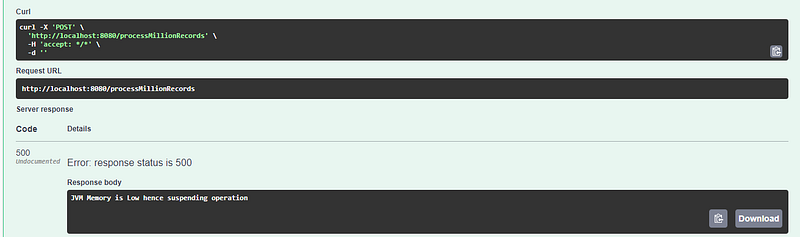
      throw new LowMemoryException("JVM Memory is Low hence suspending operation");
    }
  }
}
Below are the methods that convert memory in bytes to defined memory units. The getMaxAvailableMemory method calculates the maximum free memory JVM can obtain at runtime.
  private long getMaxAvailableMemory(MemoryUnit memoryUnit) {
    long maxFreeMemory = getMemory(Runtime.getRuntime().maxMemory(), memoryUnit);
    long usedMemory = getMemory(Runtime.getRuntime().totalMemory() - Runtime.getRuntime().freeMemory(), memoryUnit);
    logger.info("Max JVM Memory: {} and Current Used JVM Memory: {}", maxFreeMemory, usedMemory);
    return (maxFreeMemory - usedMemory);
  }

  private long getMemory(long memorySize, MemoryUnit memoryUnit) {
    int byteToMb = 1024 * 1024;
    int byteToKb = 1024;

    switch (memoryUnit) {
      case KB:
        return memorySize / byteToKb;
      case MB:
        return memorySize / byteToMb;
      default:
        return memorySize;
    }
  }
Assuming that the processMillionRecords method in our service class is the one that performs heavy memory operations. Hence, it is crucial to check if this method will not run out of heap space.
To achieve this, we’ll annotate this method with CheckMemory annotation and define that minRequiredMemory to allow the running of this method should be 512 MB.
@Service
public class HeavyMemoryOperationServiceImpl implements HeavyMemoryOperationService {

  @Override
  @CheckMemory(jvmMemoryUnit = MemoryUnit.MB, minRequiredMemory = 512)
  public void processMillionRecords() {
    // Big Memory Operations
  }
}
This is the code snippet of our custom exception class
public class LowMemoryException extends RuntimeException {

  private static final long serialVersionUID = 285565931479778831L;

  public LowMemoryException(String message) {
    super(message);
  }
}
We’ll handle this exception via the ExceptionHandler method and return the error
@ControllerAdvice
public class GlobalExceptionHandler {

  @ExceptionHandler(LowMemoryException.class)
  ResponseEntity<String> handleException(LowMemoryException ex) {
    return new ResponseEntity<String>(ex.getMessage(), HttpStatus.INTERNAL_SERVER_ERROR);
  }
}
Let’s see how the controller looks.
@RestController
public class HeavyMemoryOperationController {

  HeavyMemoryOperationService service;

  @Autowired
  public HeavyMemoryOperationController(HeavyMemoryOperationService service) {
    this.service = service;
  }

  @PostMapping("processMillionRecords")
  public void processtMillionRecords() {
    // triggering a method to occupy some memory
    List<String> dummyData = IntStream.range(0, 1000000).boxed()
        .map(num -> RandomStringUtils.random(50)).collect(Collectors.toList());
    service.processMillionRecords();
  }
}
Output:
As we can see, the logger prints the Maximum Memory allocated to JVM and currently used memory. It also shows the maximum memory available to claim, and it is lower than the minimum required memory by our method.
We can also see the exception thrown as our REST response.

Other Alternatives:
We took a fail-fast approach in our solution, where we failed the request in case of low memory detection. However, we can handle this in many other ways. Let's check out some of them.
- Trigger GC manually. Though this is not recommended, and it doesn't guarantee that GC will be triggered, however, it expedites the efforts of JVM to reclaim some space from memory.
- Try changing JVM and MetaSpace memory allocations
- Try re-try logic. We can put a recursive logic to make re-attempts instead of failing the requests
- Delay the retries. Write up a logic to retry after some delay, it can give JVM time to reclaim space.
A lot depends on what type of application it is and what scenarios lead to heap space issues. My purpose was simply to offer you an idea of how we may deal with them in a proactive manner. I hope this was useful and that it will assist you with your commercial applications.
Thanks for reading
- 👉 Check out the GitHub code reference of this article
- 👏 Please clap for the story and subscribe 👉(you can give up to 50 likes)
- 📰 Read more content on my Medium
- 🔔 Follow me: LinkedIn | Twitter | GitHub
I keep all my content free for readers so that everyone can make most of it. 🧡You can support my work on BuyMeACoffee 🧡