
Theciva // Email Tracking
Are Your Emails Being Ignored?
Who’s lying to you that he didn’t see your email?

Are you like me in suspecting people to intentionally ignore emails when you’re waiting anxiously for a response?
Most People are like sleeping when you email them for the first time. You need to wake them up by sending another email telling them to respond to the previous one.
Alan Mulally, the former CEO of Ford, had a busy life but he is known for answering nearly every email he receives the same day, even when he was the CEO.
But when people really don’t see your email, you can’t blame it on them. It’s not their fault that your email didn’t make it to their notice among a ton of others they’ve to deal with every day. In that case, a humble reminder is apt.
But some people tend to ignore emails (and messages), intentionally. And then, reply to them a week later with “Hey, I just came across your email” when they had read the email earlier. And these are the people undoubtedly guilty for ignoring your emails.
The question is how do you figure out who is guilty and who isn’t?
For that, you need to see if your email was opened. If your email was opened by the recipient then he can’t for sure unintentionally ignore it.
How Do You Monitor An Email?
Read receipts (like the ones on WhatsApp) are those timestamps on messages that tell you which of your message was read and when. But emails don’t have read receipts natively. So, how are we gonna track emails?
When someone opens your emails, his phone sends a request to get the content of the email from a server located miles away. The server follows the request and chunks of text and images trace their path back to his phone.
Years ago, some genius figured out that those requests can be used as read-receipts to track if your email was opened and if opened, when and where.
You can put a tiny 1×1 pixel image in your emails. So, when the recipient opens your email, you get notified. Plus, you can know how many times the email was opened and where.
Those tiny images that serve this purpose are called Tracking Pixel. And they’re tracking you everywhere you go on the internet. Even outside emails.
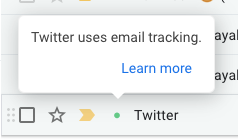
This may seem new to you but almost every brand that has a mailing list has been using it for over decades to see which email headlines get you to click.
But you can’t just put any image on your email and expect it’d track your recipient. That’s a bit technical. But we have easier ways to do this.
Using MailTrack For Tracking Emails
Here’s how to do it:
- Install the Mailtrack Chrome extension from the Chrome Web Store.
- You’ll have to connect your Google account.
- Install Mailtrack for GSuite from the GSuite Marketplace.
- Open Gmail. Compose an email.
You’ll see a message saying, “Sender notified by Mailtrack.” This means the receiver will get be notified that you’ve embedded a tracking pixel in this email.
But you can remove that message by buying Mailtrack Pro subscription which starts at $2.50 a month.
After you send that email, open the ‘sent’ tab, click on the email and you tap on the Mailtrack icon on the right-hand side of the screen to see all the details. Mailtrack will also email you if your email is read.
This extension also shows you which emails that you receive have a tracking pixel embedded.
Now you’re all set to catch people red-handed when they try to ignore you.
But in case you'd like to protect yourself from getting caught ignoring:


