
Presentation Design For Beginners On Medium.
Image Presentation And The First 4 Lines Of Text Are Paramount!
Medium Non-Members Can Read The Full Story HERE!
What you will learn from this article.
Implementing design and presentation strategies.
Image design for every beginner’s presentation.
Image alt attributes and captions on Medium.
Why images are a great idea to use on Medium.
Implementing design and presentation strategies.
If I have to describe the purpose, it comes down to first impressions and the opportunity to create curiosity. That is why your image design and presentation are so important.
But your first 2 to 4 lines or sentences and Medium story title are equally important. Along with your image designs, all of this forms part of the first impression.
And the first few lines of text with the title (H1 Header) is where many articles “get to die”. If your first few lines, Medium story header, and presentation image does not create curiosity.
Then readers will be less likely to pay it much mind. Your presentation and design must be interesting enough to have a visitor stop scrolling to have a look. Because they are curious!
Basically, you need to focus on 3 elements. Because these 3 are also showing in home page feeds, and on profile home pages in Medium. This is where you turn a scroll into a click, a click into a visitor, and often the visitor into a buyer.
Presentation Image.
Header Headline (H1).
First 2 To 4 Sentences.
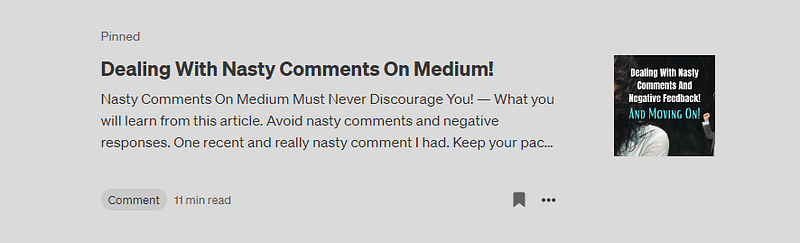
But these 3 also show on search engine search result pages on mobile devices, kind of like a “snippet”. As illustrated below, where all 3 of these elements are included. Remember that your Medium stories get indexed in search engines too.
But we will also look at a few image design tips next. You can use a free image and video design and editing software called Canva. Personally, I like using the “Presentation” template inside Canva (1920 x 1080).
Just a tip I learned with Medium because I thought long titles gave us an opportunity to target more keywords. To my surprise, I learned that shorter titles (H1 headers) attract a lot more attention!
Remember that your Medium story title becomes a slug to the primary Medium domain. Therefore when it is shorter and targets specific keywords, it’s a lot more noticeable.
Not only by your readers but also by search engines. All of this plays a part in SEO, but more importantly, it adds to user experience (UX). User experience and load speed are two of the top-ranking factors with SEO.
Image design for every beginner’s presentation.
In the illustration above, you will notice that the presentation image is cropped from the sides, forming the Medium story thumbnail. Therefore, when you use any text, focus it on the centre of the image.
If you don’t, then be sure that the part of the image you use to “send a message” is concentrated in the centre. If you don’t, then your “message” might get partially cut off with the “thumbnail”.
If you do not use a presentation image, which I strongly suggest you do (just under your Medium story title “H1 Header” and first subtitle), then the first image you use in your Medium story will automatically be used. Apply the same “rules” to this image.
Use different colours, to create certain moods. Check out the effect simple colours can have to create a certain mood. Just search your browser for the search phrase “colours meaning and psychological effects”.
Colours, words, and attention-grabbing images. That is what you need to create curiosity, without which you may find the number of views and reads your Medium story receives, is not quite to your liking.
Image alt attributes and captions on Medium.
This is a really important part of writing Medium stories, but the same goes for all major search engines. With Medium publications for instance, in my experience.
Image captions are among the primary reasons your Medium stories do not get accepted by Medium publications. I know it was for me, so I had to learn all about that.
Good thing I did too because now I can share it with you. But I have already discussed the topic extensively in another Medium story. You might want to check out the story below on image captions.
Image alt attributes and captions are not the same things though. The image “alt attribute” explains what the image is about. The caption includes things like image provenance and copyright.
Why images are a great idea to use on Medium.
Personally, I love using images because I enjoy writing how-to, and step-by-step guides. Therefore I find using screenshots rather helpful, but be careful what shows on your image when you decide to use screenshots.
Screenshots can be taken with Microsoft Paint 3D, and to block certain areas out you can use Canva too. Things like other profile photos, for instance, I blank out.
Just in case other authors might have a problem with that. Please use proper discretion when using screenshots. Show only what you want to focus on, and what “belongs to you”.
Besides, using images spices up your content and that is precisely what you want. To create content that inspires curiosity, but also maintains it throughout the Medium story. Or any article for that matter.
Over the last 24 years, Jim has written, created, and made a lot of money with eBooks. If you want to learn how to turn out your own bestselling eBook profitably. Jim will help you do it through this completely revised New eBook course! — Source
AFFILIATE DISCLOSURE: Bear in mind that some of the links in this post are links to affiliate offers. If you visit them to make a purchase, I will earn a commission. I find these valuable and proven tools because I have tested, used, and/or thoroughly researched everything I promote as a digital marketer. The decision is yours, and whether or not you decide to buy something is completely up to you. All offers come with a full money-back guarantee!
Free Stuff For My Medium Subscribers.
All new subscribers on Medium will receive 4 free gifts. 2 of my top traffic eBooks, and 2 free memberships (invitation only) for buyer traffic tools I use. Subscribe to me (Deon Christie) on Medium and your free stuff will be emailed to you asap. Medium has no affiliation, nor do they endorse the free giveaway in any way. It is my personal free giveaway to all new Medium subscribers.


