
Predict Your Freelance Income With a What-If Calculator
Reduce the stress, even if your income is unstable.

If you’re a freelancer that works on short-term or ad hoc projects, you know that predicting your income from month to month is hard.
Not only are you faced with slow periods, but you may also have the opposite problem: requests for additional work or proposals that haven’t been accepted yet. The fluctuations can be stressful.
I’m a freelance writer and work with clients on an as-needed basis. Sometimes a client might send me three assignments per month. Sometimes none. I like the variety, but I had trouble predicting my income and bandwidth.
So I built a “what-if” calculator. I can plug in different scenarios with more/less work from different clients and see the impact on my income.
It’s simple to create and can help with planning and budgeting.
Calculate the minimum earnings you need
Everyone has a minimum.
It’s the amount of income you need to pay all of your expenses: your freelance expenses, rent/mortgage, food, taxes, etc. Whatever it takes to maintain the lifestyle you want.
Your What-If Calculator will work best if you know your minimum. It empowers you to make choices, such as working fewer hours or dropping difficult clients.
Add up all of your mandatory expenses (those that you have no control over, like rent) and your discretionary expenses (things you could spend less money on, if needed — like trips to a coffee shop). Your minimum income should cover both, but in a pinch, you know that you could reduce your discretionary expenses.
If you currently earn more than your minimum, put money aside in a separate bank account as a “rainy day fund.” If you have a slow month, you can draw from that account and maintain your minimum income.
The more you can add to a separate account, the less you’ll need to worry. I’d argue that this should be a planned monthly expense. In the current economic environment, freelancers should be on alert that clients may drop them to save money and protect themselves.
Predict your monthly earnings
Now that you know the income you need, calculate what you are actually earning on a monthly basis.
The easiest way to do this is to look at the invoices you send in a given month. List out all of your clients and the amount you expect to earn. If you have other sources of income (courses, eBooks, Medium, etc), include that also.
I use Airtable to keep track of my clients and deliverables, but you can easily build this in a GSheet or Notion.
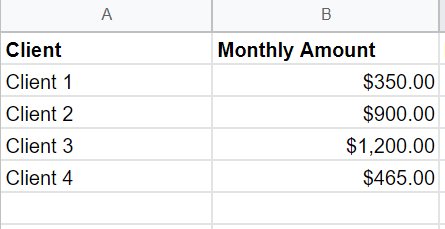
If your income varies with your clients, an average will work for your What-If Calculator.
Estimate your bandwidth
Are you currently at capacity? Or can you take on more work? You need this information for your What-If Calculator.
As a writer, I look at two different variables: total word count and number of articles requested. Sometimes I get requests for very short articles, and sometimes I get requests for eBooks. Looking at my income alone doesn’t tell me if I have the bandwidth for more work.
For each client, I add the Total Number of Deliverables and the Total Word Count to my What-If Calculator.
I know that I don’t want to exceed three deliverables per week (~13/month) or 3,500 words per week.
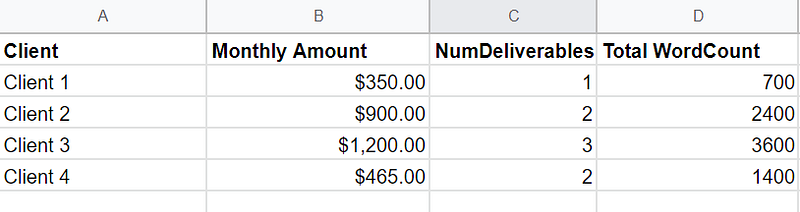
If you work hourly, you could add the total number of hours you commit to each client (keeping your eye on the total number of hours you want to work). For other types of work, you can assign “points” based on the complexity of the project and then identify the total number of “points” you would want to complete in a given week.
For example, if you’re a graphic designer, an infographic might be two points, an eBook might be four points, and you know that you only want to complete six points per week (something like that).
When you add in the number of deliverables / hours / points, you’ll be able to make changes with your What-If Calculator and see the impact on your workload and income.
Scenarios to include in your calculator
Now comes the interesting part: inputting different scenarios and seeing the results.
Let’s say that you expect that a current client might drop you or reduce the amount of work you do. What impact will that have?
Or maybe you have a “busy season” when you know your workload will be higher than normal.
You’re going to add additional columns into your Calculator:
- Percentage
- Projected Income

In your Projected Income column, you’ll add a simple calculation formula.
= Current Income X Percentage
The way you enter the formula will depend on the product you’re using. (A quick Google Search can help with this.)
I have several scenarios built into mine so that I can play around with different percentages.
Scenario 1: Current probability
This scenario estimates what my income will be if something changes with my current clients.
For example, what if a client decreases the amount of work by half? I’ll enter a percentage of 50%
I have a client that usually sends me four assignments per month, but sometimes it’s three. So I’ll change the percentage to 75%.
Other clients are on a contractual retainer, so they’ll stay at 100% if I’m projecting the current (or upcoming) month.
Sometimes, I’ll just use 80% across the board, whether the client has a contract or not. I figure that at least 80% of my overall work will continue from month to month and then I get a sense of what to expect for income.
Scenario 2: Low income
The second scenario is a “worst-case scenario” calculation: the lowest that I could expect my income to be.
In this scenario, I’ll put any iffy clients at 50% or lower. Some clients I’ll put at 0%. The only clients that I keep at high percentages are those with long-term, consistent relationships or retainers.
You can compare the total income at the low end to the minimum earnings you need. If it’s too low, then you know that you’ll need to pull from your savings or start drumming up some new business.
Scenario 3: New client
Whenever I send out a proposal to a new client, I like to look at the impact on my bandwidth (and income).
Sometimes I have simultaneous proposals out and am unsure if either client will accept. If both accept, I might be stretched a bit too thin.
You can add new rows to the bottom of your calculator for the potential new client, the number of deliverables, the total word count, and the total income. Then play around with the probability percentage.
Scenario 4: What-if income
Looking at what-if scenarios is the most fun (if playing with a calculator can be fun).
Look at scenarios like dropping a problematic client: change the percentage to 0%.
Or maybe you expect an existing client to send you more work in the future, so bump the percentage up to 150%.
Or you expect to get more income from passive sources and that reduces your reliance on your freelance income. All kinds of ways you can play with these numbers.
Review your calculations regularly
Giving up a 9–5 job often feels like you’re giving up stability. But if you review your calculations, it can remove some of the stress from your freelance finances.
Try to look at your calculator at least once a month for the upcoming month, and plan out two or three months (if that’s possible). You can also compare your actual invoices for the month compared to your what-if projections. If you find that you’re consistently over- or underestimating, then change your calculations going forward.
Using a what-if calculator can help shift your mindset from one of unpredictability to one of control. You can make more informed decisions about savings, bandwidth, and the need to find more clients.
This article is for informational purposes only. It should not be considered Financial or Legal Advice. Consult a financial professional before making any major financial decisions.
Check out my free eBook: 17 Smart Tools Solopreneurs Need to Start, Grow, and Scale.


