
Step-by-Step Guide to Creating a Kubernetes Cluster with KIND and KUBEADM
Learn how to effortlessly set up a Kubernetes cluster for microservices using KIND and KUBEADM with our practical guide.

Why using KIND?
With kind we can create a Kubernetes cluster on one machine, with the nodes running inside docker containers. This makes the development and the testing on such cluster, easier. As a prerequisite, docker must be already installed on the machine.
Run
docker info
to find out if docker is installed on your machine. If it’s not, install it. See here how.
- Install kind on Linux Mint
- download kind.
$curl -Lo ./kind https://kind.sigs.k8s.io/dl/v0.14.0/kind-linux-amd64- change the binary’s permissions to make it executable.
$chmod +x ./kind- move kind to an application directory, such as /usr/local/bin:
$sudo mv ./kind /bin/kind
$kind version
2. Creating a K8s Cluster with 3 nodes
First create a configuration yml file for this new cluster
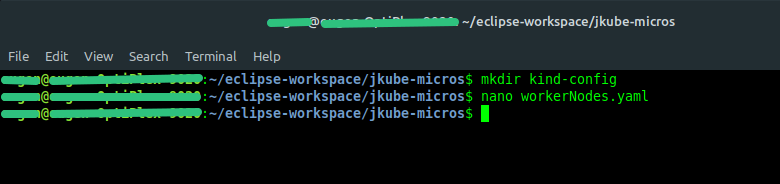
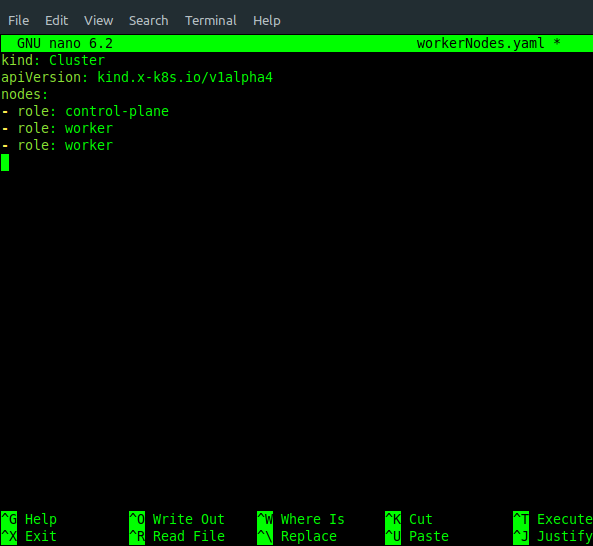
Let’s start the cluster and verify how much memory each node is using.
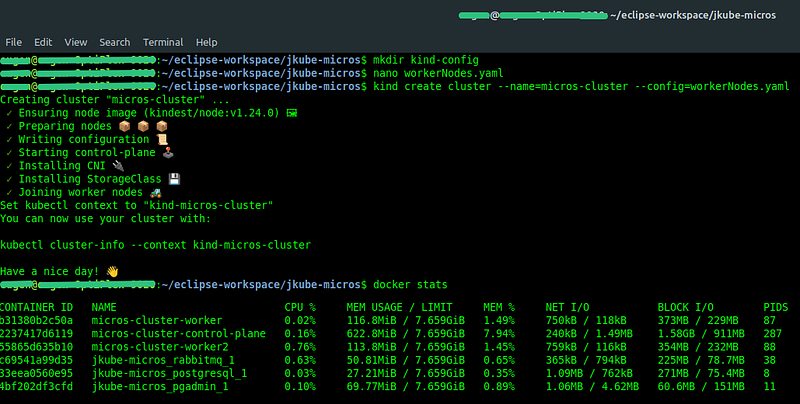
Here’s a breakdown of how kind interacts with Kubernetes:
Kubernetes Components: kind creates containers that run all the core Kubernetes components found in a real cluster, such as the kubelet, the API server, the controller manager, etc. These components are the same ones you would find in any Kubernetes cluster, regardless of the environment it’s deployed in.
Docker as Infrastructure: Docker provides the underlying infrastructure for kind clusters. Each Kubernetes “node” in a kind cluster is a Docker container simulating a real node. This setup allows kind to boot up clusters quickly for testing and development purposes.
Bootstrapping Tool: kind uses kubeadm internally to bootstrap the Kubernetes cluster inside Docker containers. kubeadm is a tool built into Kubernetes for creating and managing clusters. It initializes the cluster and joins nodes to the cluster, among other functions.
Container Networking: For networking between containers (nodes), kind uses standard Docker networking capabilities, along with specific configurations to enable Kubernetes networking features like Pod networking across nodes.
Let’s get a few more details about micros-cluster.
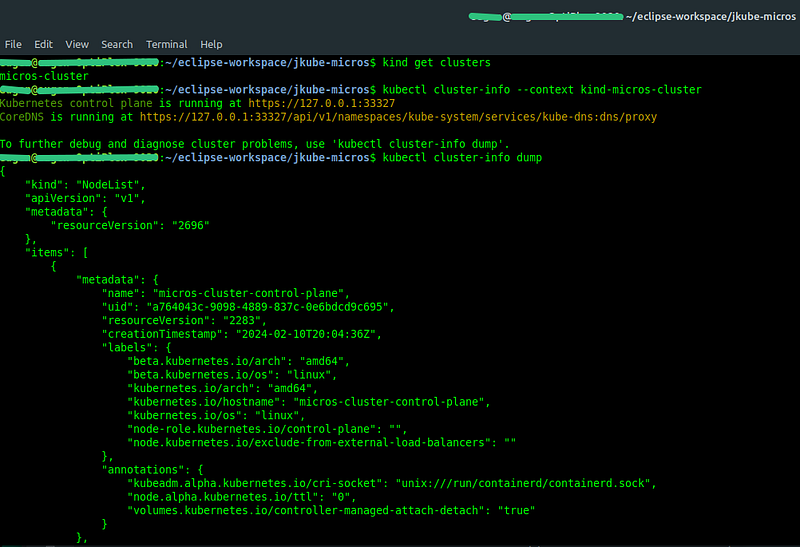
Note: CoreDNS is used in Kubernetes for DNS-based service discovery, allowing pods to communicate with each other and with external services efficiently. Beyond Kubernetes, CoreDNS can serve as a DNS server in any cloud-native environment, handling both forward and reverse DNS lookups.
We can further verify the logs for each node.
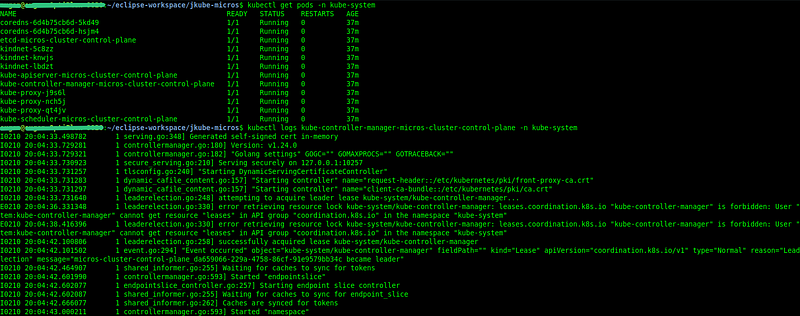
3. How to shutdown and restart a Kubernetes cluster created with kind.
Method 1: Stopping and Starting the Docker Containers
This method temporarily stops the cluster by stopping the underlying Docker containers and then starts them again. This method preserves the cluster state. To Shutdown (Stop) the Cluster:
List the Docker container IDs for your kind cluster nodes:
$docker ps - -filter "name=micros-cluster" - -format "{{.ID}}"Stop the Docker containers corresponding to your cluster nodes:
$docker stop $(docker ps -q - -filter "name=micros-cluster")To Restart (Start) the Cluster:
List the Docker container IDs for your stopped kind cluster nodes (this time, also listing stopped containers):
$docker ps -a - -filter "name=micros-cluster" - -format "{{.ID}}"Start the Docker containers corresponding to your cluster nodes:
$docker start $(docker ps -aq - -filter "name=micros-cluster")Method 2: Deleting and Recreating the Cluster
This method involves completely deleting the cluster and then recreating it. Note that this will destroy the cluster state and any resources (e.g., pods, services) within it.
To Shutdown the Cluster:
Delete the cluster using the kind delete cluster command:
$kind delete cluster - -name=micros-clusterTo Restart (Recreate) the Cluster:
Recreate the cluster using the kind create cluster command with the same or new configuration:
$kind create cluster - name=micros-clusterUse the same cluster name and configuration options as before if you want to recreate the cluster similarly.
Method 3: Using kind Export and Import (For State Preservation)
If you wish to preserve the state of your cluster across shutdowns and restarts but want to use the delete and recreate approach, you can use kind export and kind load commands to export cluster resources and then load them back into a new cluster. However, this method is more complex and may not perfectly preserve all cluster states and configurations.
Note: Always ensure you have backups or exports of any important data or configurations before stopping or deleting your clusters, especially if you’re working in a development environment where data persistence is crucial.
That’s it for now.
In the next tutorial, I’ll use this cluster to deploy and monitor a spring boot application.


