
Power of Your Own Wordlist — Fuzz for Log File Leads to Information Leakage

This is another story of my recent finding of sensitive information leakage. The target is a big hotel and resort Group which has operation in over 10 countries over the world. As I am not allowed to disclose the detail, I would use redacted.com as the target site and all parameters and directories shown in below passage are all made up.
This passage mainly about how I use my own wordlist to find this sensitive endpoint and how you can make a wordlist on your own. So, let’s begin:
Recon
During Recon stage, I found a subdomain called api.redacted.com. So, I try to access api.redacted.com but it returns 404. But it arouse my interest of what may contain in the subdomain. Thus, I decided to fuzz this subdomain mainpoint using ffuf.
Fuzzing
In case you are not familiar with ffuf, you may refer to my previous story about it. I then fuzz the endpoints of this subdomain like this:
ffuf -u https://api.redacted.com/FUZZ -w wordlist.txtI currently maintained a bunch of wordlist myself. Most of these are recorded from my previous research work. In one of the wordlists of sensitive information disclosure, I found that the below endpoint returns 200:
api.redacted.com/wp-content/uploads/api-v1.logWhen I open the website, it shows something like below:
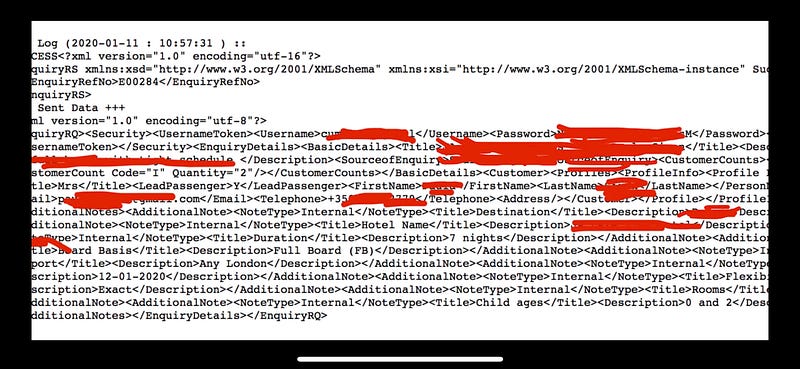
This page discloses over thousands of messages their customers sent to the website for enquiries. These information contains their customer’s name, email, phone etc. So, I have quickly report this issue to the site.
Making your Own Wordlist
So, I guess many of you have used wordlist in fuzzing web’s endpoints. However, as most people just blindly downloaded their wordlists from public source, it always lead to dup bugs. So, making your own wordlist is very crucial to your bug hunting journey.
The information disclosure bug I discovered above is benefited from my own wordlist. So, how did I make this wordlist? Well, to be honest, it took me a long long time to develop it and I am still updating it regularly. So, here is how I made it:
- Use some google dorking to find sensitive information in google search. For example,
filetype:log "@gmail.com",inurl:admin "@gmail.com"etc. - Then, you will find a lot of websites leaking their private data. If you find that they have VDP or BB program, report it. If not, just leave it or try to send a email to remind them. But most importantly, copy down the endpoint. For example:
/wp-content/uploads/23.log - In the endpoints you copied from google search, find out what is the standard part and what is the tailer-made part. For example, for
/wp-content/uploads/23.log, I found that different website would use different names for 23.log. But, most websites are under/wp-content/uploads/directoy. So, in my wordlist, I put in/wp-content/uploads/FUZZ.log - When you hunt on a target, in recon stage, try to find out the unique naming used by the site as much as you can. For example,
userid,api-v1etc. Then, combine these word with the sensitive endpoint list to generate a new list. - Use this new wordlist in fuzzing
So, in my case above, I used google dorking to find out that many websites have stored their sensitive information in the directory /wp-content/uploads/. However, I need to guess the correct log file name. So, I gathered a long list of unique naming the website used. One of the naming is api-v1. So, I put these names back to fuzzing. So, I end up find out the magic endpointwp-content/uploads/api-v1.log . You can also use this technique to find out hidden features, abandoned services of the site.
Conclusion
Using the technique above to make a list is very time consuming. But on the other hand, it is also very rewarding. I hope you enjoy this post and helps you in your bug hunting journey. Happy hacking!


