avatarTomas Kutac

Free AI web copilot to create summaries, insights and extended knowledge, download it at here

1541

Abstract

com/en-us/dax/switch-function-dax">SWITCH</a>:</p><div id="912f"><pre>SWITCH ( TRUE (), SELECTEDMEASURE () < 1000, “<span class="hljs-variable">#</span>,<span class="hljs-comment">##0”,</span> SELECTEDMEASURE () &lt; 1000000, “<span class="hljs-variable">#</span>,<span class="hljs-comment">##0,.0K”,</span><span class="hljs-variable">$#</span>,<span class="hljs-comment">##0,,.0M”</span> )</pre></div><p id="4420">We will get this result in the visualization:</p><figure id="c006"><img src="https://cdn-images-1.readmedium.com/v2/resize:fit:800/1*YsZ8Twqzaysd5fuvJijUVw.png"><figcaption></figcaption></figure><p id="2c4e">Another scenario for Measure “Data Transferred”:</p><p id="ebc4">Code:</p><div id="73ee"><pre>SWITCH ( <span class="hljs-literal">TRUE</span> (), SELECTEDMEASURE () < <span class="hljs-number">1000</span>, <span class="hljs-string">"#,##0 KB"</span>, SELECTEDMEASURE () < <span class="hljs-number">1000000</span>, <span class="hljs-string">"#,##0,.0 MB"</span>, <span class="hljs-string">"#,##0,,.0 GB"</span> )</pre></div><p id="101d">Output:</p><figure id="3de1"><img src="https://cdn-images-1.readmedium.com/v2/resize:fit:800/0*-U65DtXSCOYvpnk8"><figcaption></figcaption></figure><h1 id="46a5">Advanced Scenario — Conditions in separate table</h1><p id="9c29">But what if we would like to use specific country format? We can do it with supporting table where we will store different country formats.</p><p id="868a">Table with country formats:</p><figure id="8c08"><img

Options

src="https://cdn-images-1.readmedium.com/v2/resize:fit:800/1*8Stx4Oqz9D-fFAJBlVP2YQ.png"><figcaption></figcaption></figure><p id="c0d1">Data model:</p><figure id="b45f"><img src="https://cdn-images-1.readmedium.com/v2/resize:fit:800/1*Zrmxspy6y3EWFmAas34aAg.png"><figcaption></figcaption></figure><p id="60c5">Dynamic String Format for measure using DAX function <a href="https://learn.microsoft.com/en-us/dax/selectedvalue-function">SELECTEDVALUE</a>:</p><div id="f7ab"><pre>SELECTEDVALUE ( ‘Country Currency Format Strings'[Format], “$<span class="hljs-comment">#,0.00;($#,0.00);$#,0.00”</span> )</pre></div><p id="b391">Number format will be changing automatically according its currency:</p><figure id="4c8d"><img src="https://cdn-images-1.readmedium.com/v2/resize:fit:800/1*41ptYXRAzO5_VGo--wh4lQ.png"><figcaption></figcaption></figure><p id="b3b5">That’s it for today. I hope you enjoy this article and don’t forget to give me claps… as many as you can. :-)</p><blockquote id="630b"><p>This article was published in <a href="https://medium.com/microsoft-power-bi"><b>Microsoft Power BI publication</b></a>, subscribe it for more interesting Power BI Tutorials, Tips and Tricks.</p></blockquote><blockquote id="5956"><p>You can <a href="/@tomaskutac/membership?source=collection_about-------------------------------------"><b>subscribe</b></a> to read ours and thousands of other inspiring articles on Medium.com with only one subscription fee. This is where Medium.com makes the difference.</p></blockquote></article></body>

Power BI Feature News — Dynamic String Format for Measures

This new feature allows dynamically format displayed values for measures in Power BI visualizations. Typically we will use it in case we would like to change format of numbers based on its value or based on currency type. This helps to keep numbers in visualizations in compact format.
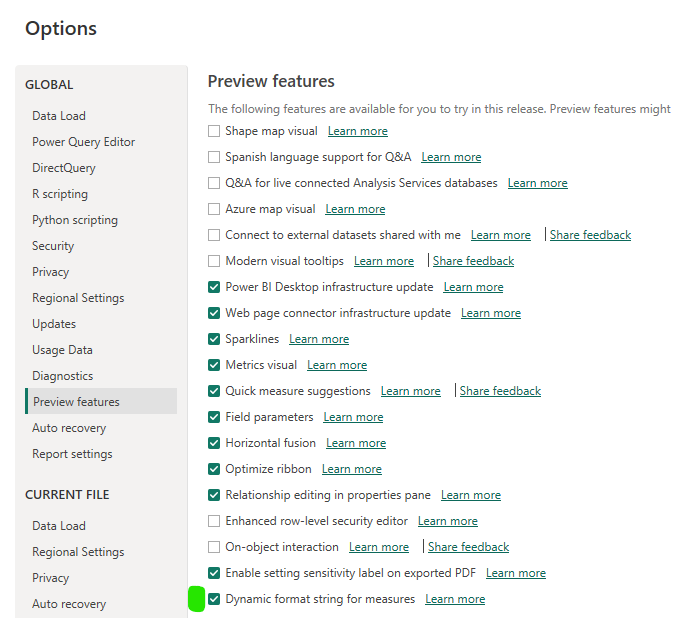
As this feature is still in preview we need first to activate it in Options menu:
Then when we choose any Measure, under Menu Measure Tools we can now set new Format — Dynamic:
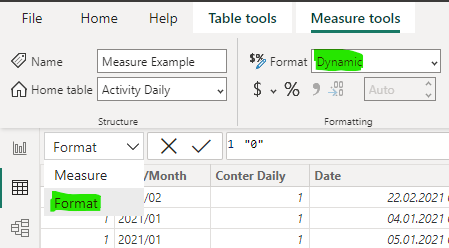
Now we are able to use DAX language to format Measure values based on various conditions. The static format string the measure had before switching to Dynamic will be pre-populated as a string in the DAX formula bar.

Simple scenario — condition within DAX code

Let’s say we would like to format numbers differently based on total displayed value. For this example we can use DAX function SWITCH:

SWITCH (
    TRUE (),
    SELECTEDMEASURE () < 1000, “$#,##0”,
    SELECTEDMEASURE () < 1000000, “$#,##0,.0K”,$#,##0,,.0M”
)

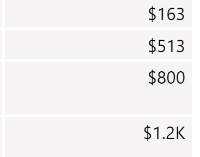
We will get this result in the visualization:
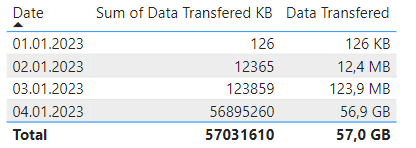
Another scenario for Measure “Data Transferred”:

Code:

SWITCH (
    TRUE (),
    SELECTEDMEASURE () < 1000, "#,##0 KB",
    SELECTEDMEASURE () < 1000000, "#,##0,.0 MB",
    "#,##0,,.0 GB"
)

Output:
Advanced Scenario — Conditions in separate table

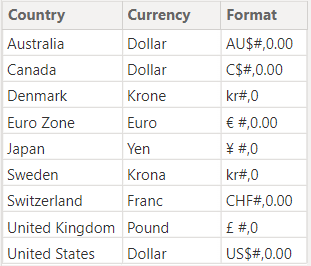
But what if we would like to use specific country format? We can do it with supporting table where we will store different country formats.

Table with country formats:
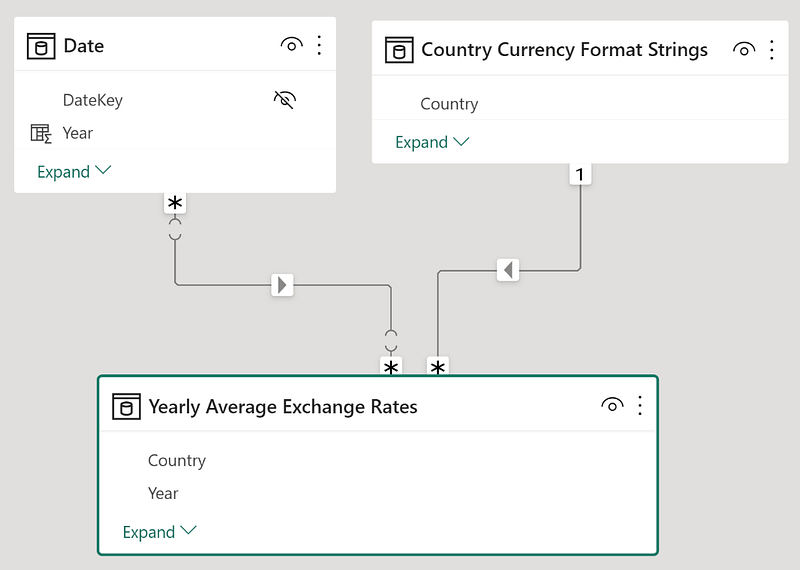
Data model:
Dynamic String Format for measure using DAX function SELECTEDVALUE:

SELECTEDVALUE (
    ‘Country Currency Format Strings'[Format],
    “\$#,0.00;(\$#,0.00);\$#,0.00”
)

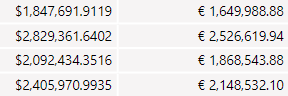
Number format will be changing automatically according its currency:
That’s it for today. I hope you enjoy this article and don’t forget to give me claps… as many as you can. :-)

This article was published in Microsoft Power BI publication, subscribe it for more interesting Power BI Tutorials, Tips and Tricks.

You can subscribe to read ours and thousands of other inspiring articles on Medium.com with only one subscription fee. This is where Medium.com makes the difference.

Data
Data Science
Power Bi
Power Bi News
Power Bi Features
Recommended from ReadMedium