
Potential fixes for NFC not working in iPhone after iOS upgrade
Recommended solutions by Apple Hotline and Genius from Apple Store. None of them works for me, but no harm in giving it a try.
Last week I updated my iPhone to the latest iOS 15.6, and suddenly the NFC function no longer works. I reached out to the Apple hotline and Genius Bar; We did every possible checking and potentials fix, but failed to identify the root cause, non could we bring the NFC function back.
Below are the 5 resolutions recommended by Apple and the Genius in the Apple Store; Nothing of them fixed my phone, but maybe it will work for you.
My Device
- iPhone SE (Gen 2), 128GB
- iOS 15.6
#1 Restart the iPhone
Simple restart your iPhone. See if there is any magic…
#2 Switch off and on AirPlay
This one is not technical from Apple officially, but something random that Apple Genius found in the Apple Community.
- Switch off AirPlay on your iPhone
- Switch on AirPlay on your iPhone
#3 Reset your Network Settings
Settings > General > Transfer or Reset iPhone > Reset > Reset Network Settings
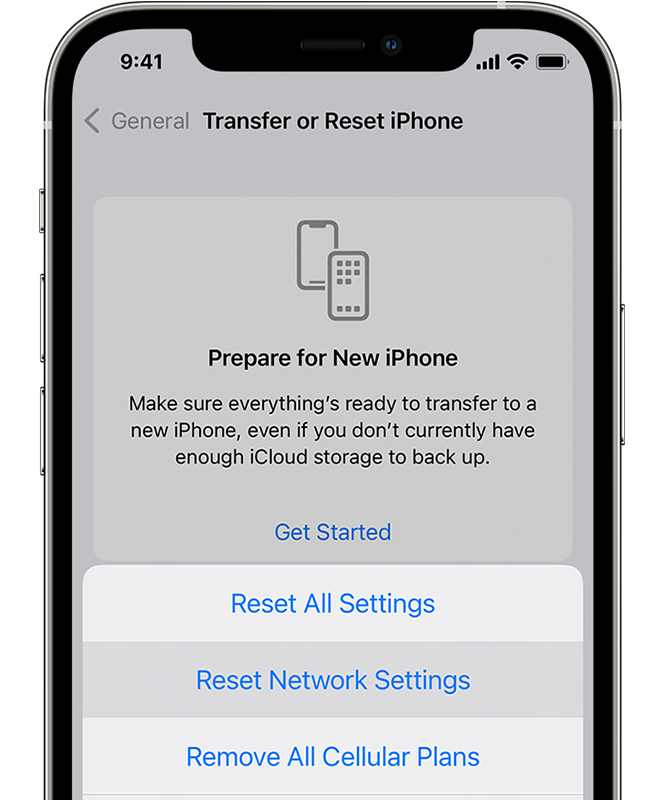
Remarks: This means you’d need to re-enter all your wifi passwords and config your network settings all over.
#4 Force upgrade via Mac
- Make sure your Mac has the latest macOS
- Enter the recovery mode screen in your phone
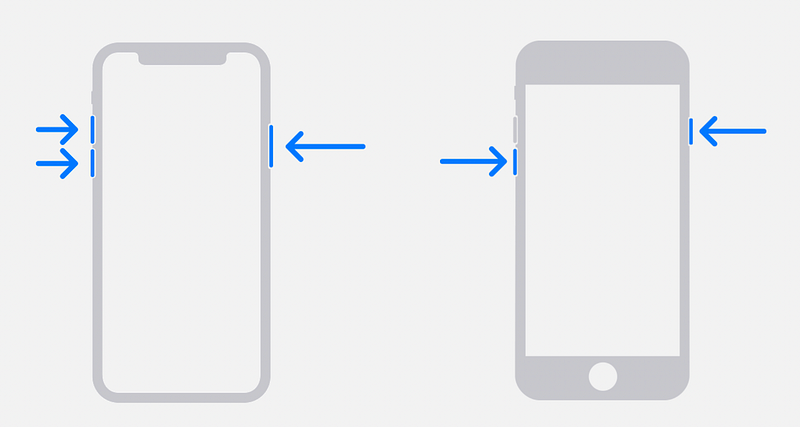
3. Plug in your iPhone to your Mac via a cable
4. In finder, locate your iPhone and hit the option “Update”
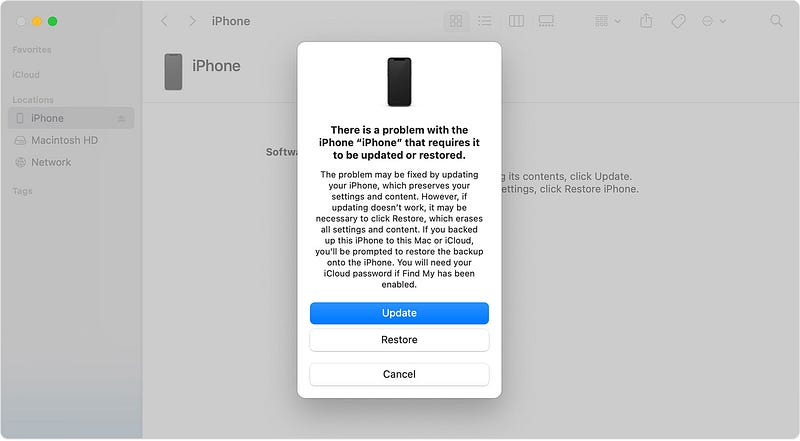
Reference: here
#5 Restore the whole iPhone
- Back up your iPhone on Mac / iCloud: I subscribed to iCloud 200GB for a month, and plan to cancel it next month
- Same as resolution # 3, make sure your Mac has the latest macOS
- Enter the recovery mode screen in your phone (similar as resolution #4)
- Plug in your iPhone to your Mac via a cable
- In finder, locate your iPhone and hit the option “Restore”
- Once you restore it, you can set it up as a brand new iPhone and check if NFC is fixed. If it works, it would mean something wrong with your profile.
- Upon testing, recover your data from Mac / iCloud
Reference: Restore & Restore from a backup
Remarks: This is a big step. Make sure your backup. Suggest doing it at night so that after restoration, you can plug in the charger and recover data from iCloud.
Conclusion
I really hope at least one of the above resolutions will work for you — Apple staff tried everything they could for me but, unfortunately, could not solve the problem. They mentioned they would escalate the issue to the global engineering team, and see if the team would include the fixes for the next updates for the iOS.
And for now, I will learn to live without NFC once again (while looking forward to iPhone's new release next month).
Good luck with your fixes, and let me know if there are something more I should try.