
Post Processing Methods to Improve Denoised Images
In the recent Kaggle Denoising ShabbyPages competition, we are required to denoise a series of noisy documents. In Kaggle competitions, the accuracy of even a few pixels can affect the outcome of a Root Mean Square Error (RMSE) score. Therefore, this article discusses how certain post processing methods can be used to denoise noisy images. These “shabby” documents are generated synthetically via an augmentation library called Augraphy.
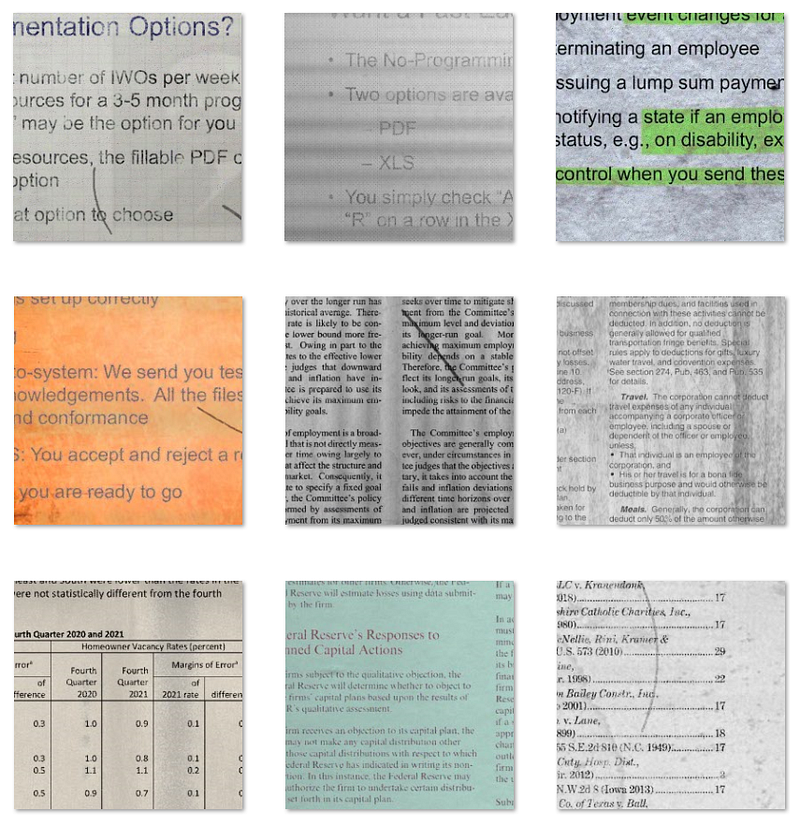
The goal is to get the lowest possible score because a lower score means a RMSE which indicates a better denoised image. Initially an Autoencoder model is used and the code can be found here. Without any post processing method, the competition score from using an Autoencoder model is 0.26884. The score is just average because at this moment the best score of the competition is 0.22303.
Single Post Processing Method
A total of 9 different post processing methods are experimented to investigate their effectiveness in improving the competition score. The fundamentals of each method will not be explained here but the snippet of code for each method will be presented instead.
Here are the list of experimented post processing methods:
- Median filter.
- Mean filter.
- Gaussian blur.
- Removing small blobs.
- Binarization.
- Crimmins speckle removal.
- Dilation and erosion.
- Fast Fourier Transform (FFT).
- Contrast Limited Adaptive Histogram Equalization (CLAHE).
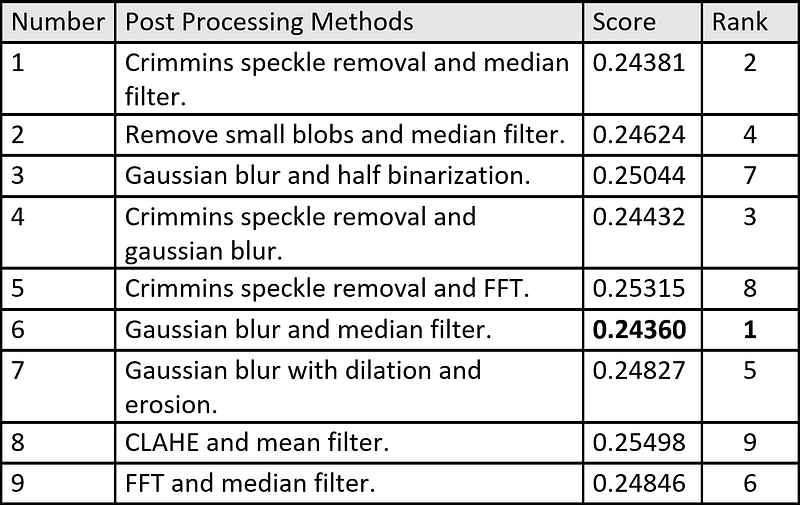
The table below summarized the competition score of the same solution using each post processing methods:
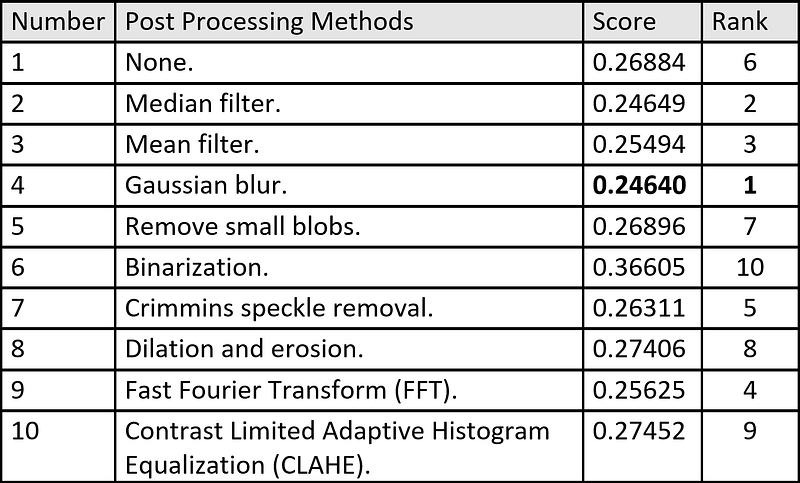
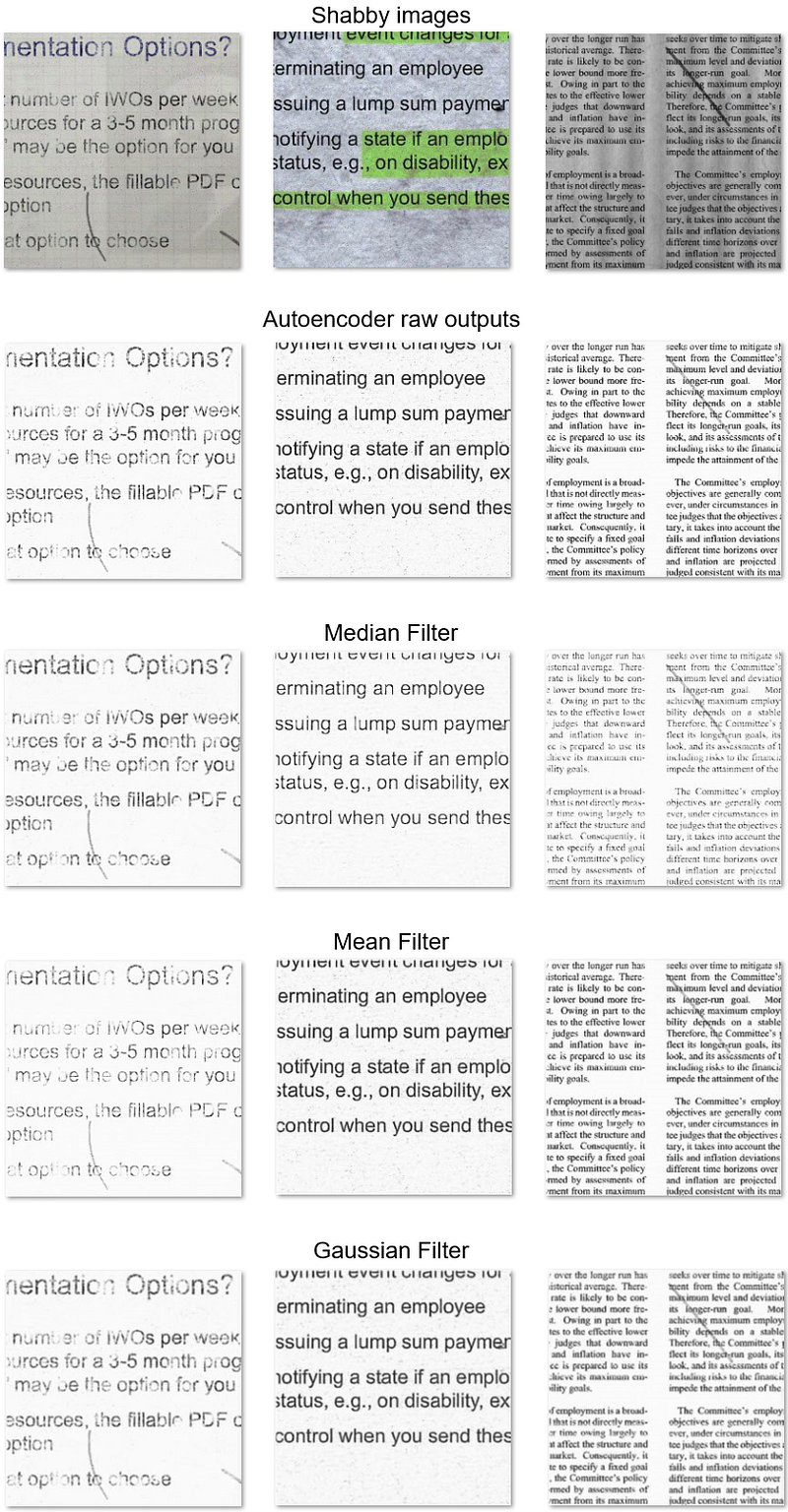
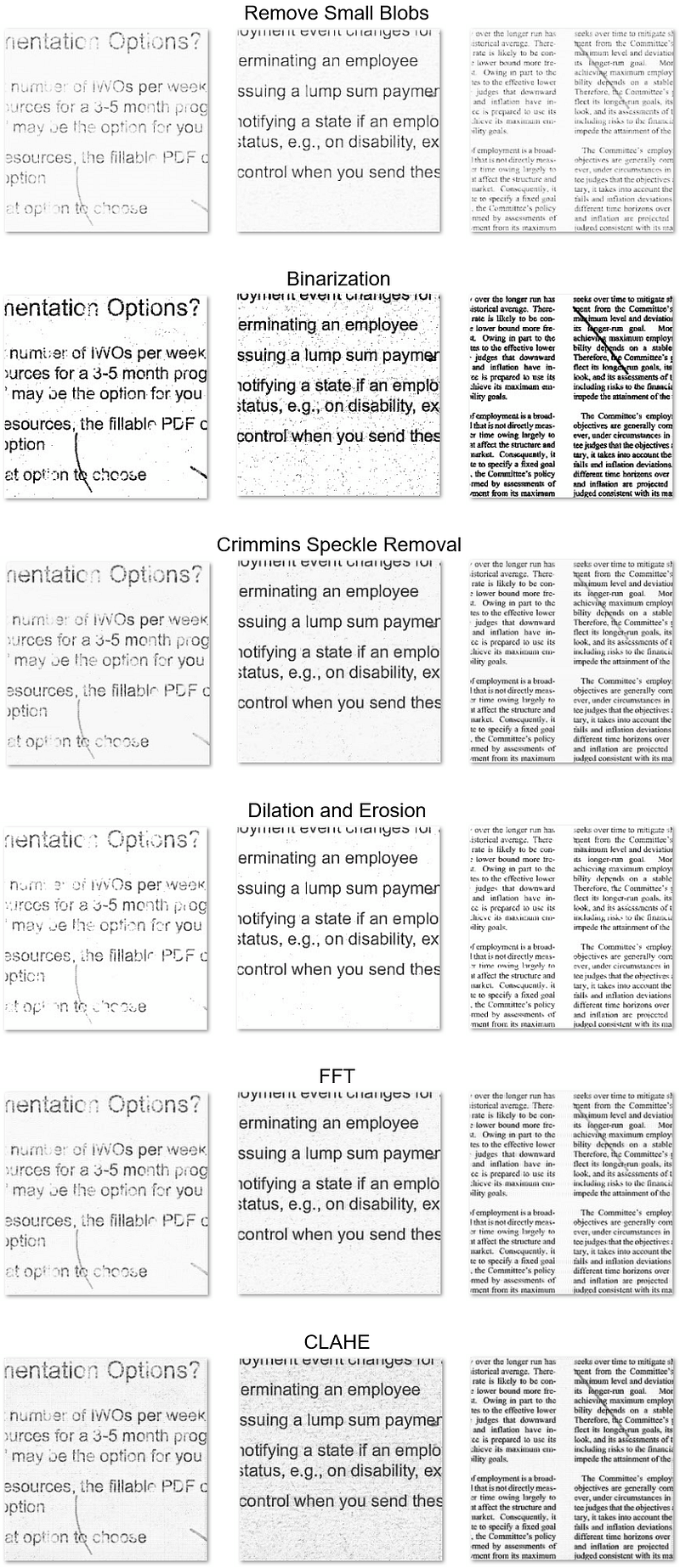
By looking at the scores , not all post processing methods are able to improve the competition result. Looking at the output images, post processing methods with blurring effect such as median filter, Gaussian blur, mean filter get a better score while post processing methods with thresholding effect such as binarization, CLAHE, dilation and erosion get a poorer score.
Fusion of Two or More Post Processing Method
Using a single post processing method is proven effective in improving the competition score. Next, from 9 post processing methods, 2 post processing methods are selected randomly and combined to see whether they will further improve the competition score.
The table below summarized the competition score from using fusion of two post processing methods:
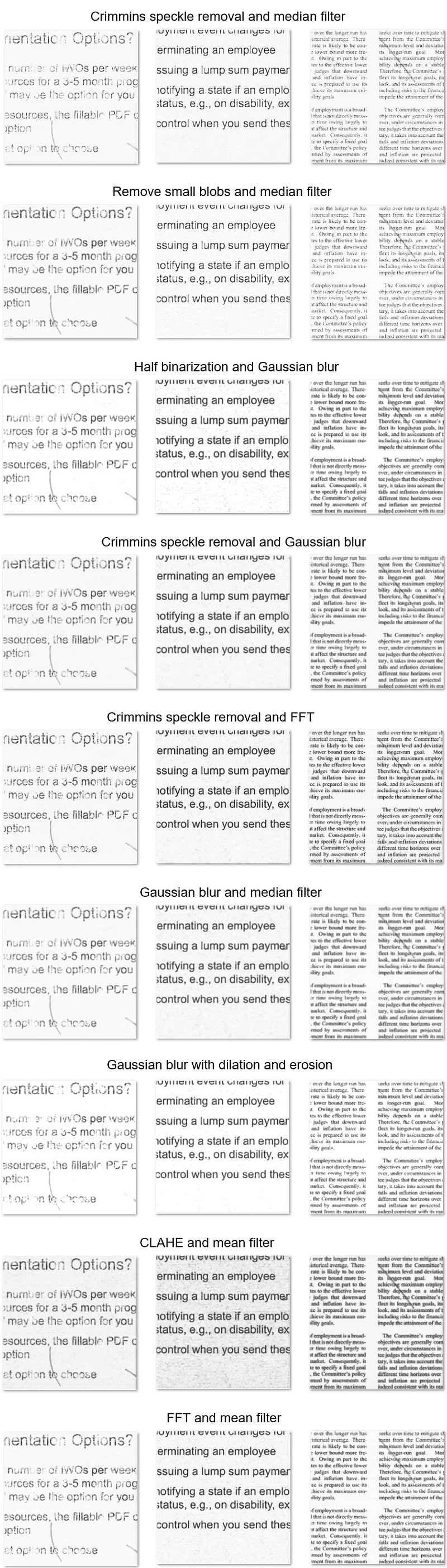
From the output scores, generally fusing 2 post processing methods is able to improve the competition score. Due to this, 4 post processing methods are tested again to see whether the competition scores can be better with the increasing number of combined post processing methods. From the experiments, their results are tabulated below:
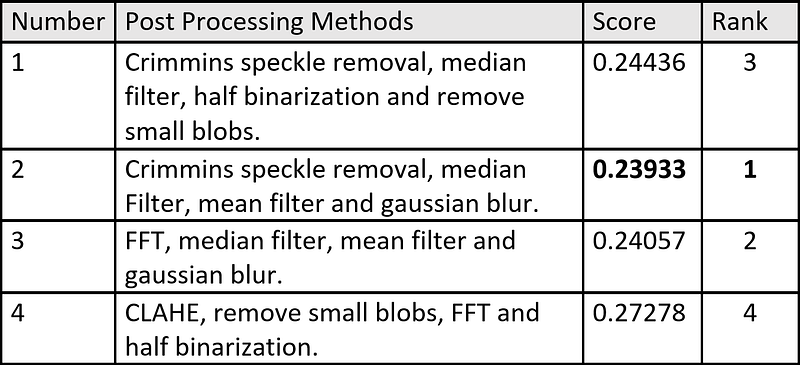
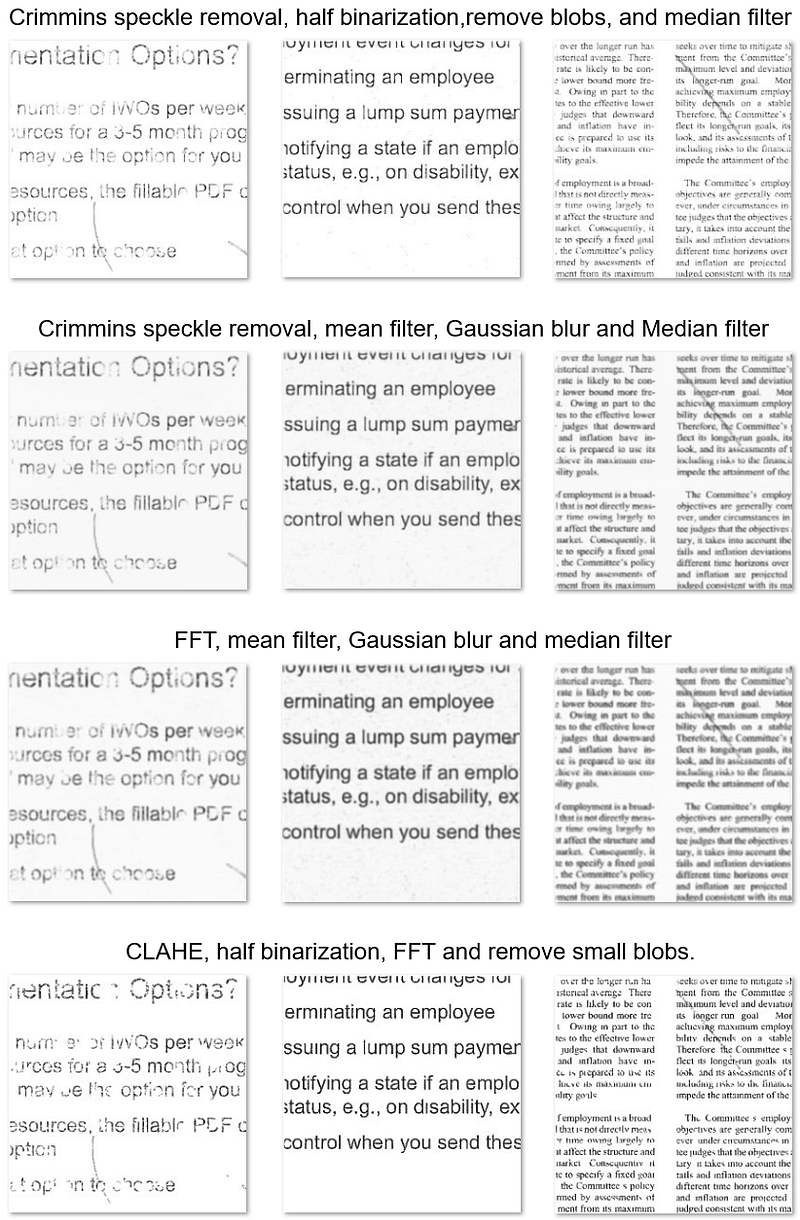
From the result, using a combination of Gaussian filter, mean filter and median filter work the best. This can be explained by their better individual score. Additionally, not all combinations of 4 post processing methods are effective in improving the competition score so increasing the number of post processing methods may not always improve the competition score. By fusing 4 post processing methods, we are able to improve the competition score from 0.26884 to 0.23933 , which is a huge improvement of 11%.
Snippet of code
- Median Filter
img_median = ndimage.median_filter(img_input, size=2)2. Mean Filter
ksize = 2
kernel = np.ones((ksize,ksize),np.float32)/(ksize*ksize)
kernel = np.ones((3,3),dtype=np.uint8)
img_mean = cv2.filter2D(img_input,-1,kernel)
3. Gaussian Blur
img_gaussian = cv2.GaussianBlur(img_input,(3,3), 3)4. Remove small blobs
# simple thresholding
threshold = 245
img_binary = img.copy()
img_binary[img_binary<threshold] = 0
img_binary[img_binary>=threshold] = 255

# invert so that small blob becomes white
img_binary = 255-img_binary

# get connected components
output = cv2.connectedComponentsWithStats(img_binary, 4, cv2.CV_32S)

# get stats
num_labels, labels, stats, centroids = output

# remove area < 5 pixels
for i in range(num_labels):
    area = stats[i, cv2.CC_STAT_AREA]
    if area<5:
        img[np.where(labels==i)] = 255
5. Thresholding
thres_val = 245
img[img>thres_val] = 255
img[img<=thres_val] = 0
During the fusion process, half binarization are used so that images will not entirely in black and white. Only pixels wtih value greater than threshold are set to white instead.
threshold = 245
img[img>=threshold] = 255
6. Crimmins Speckle Removal
The function to apply this method is adapted from here.
img_crimmins = crimmins(img_input)7. Dilation and Erosion
_, img_binary = cv2.threshold(img, 0, 255, cv2.THRESH_BINARY | cv2.THRESH_OTSU)
kernel = np.ones((3,3), np.uint8)

img_erosion = cv2.erode(img_binary, kernel, iterations=1)
img_dilation = cv2.dilate(img_erosion, kernel, iterations=1)

img[img_dilation==255] = 255
8. Fast Fourier Transform (FFT)
keep_fraction = 0.25
img_fft = fftpack.fft2(img_input)
r, c = img_fft.shape[:2]
img_fft[int(r*keep_fraction):int(r*(1-keep_fraction))] = 0
img_fft[:, int(c*keep_fraction):int(c*(1-keep_fraction))] = 0
img_fft_output = fftpack.ifft2(img_fft).real9. Contrast limited adaptive histogram equalization (CLAHE)
clahe = cv2.createCLAHE(clipLimit=3.0, tileGridSize=(16,16))
img_clahe = clahe.apply(img_input)
Summary
- Using post processing methods such as median filter or Gaussian blur is effective to improve denoising results.
- Post processing methods such as binarization, dilation and erosion is not a good choice in improving denoising results.
- Fusing several post processing methods is effective to further improve the denoising results.
Reference
- The Augraphy Project. Augraphy: an augmentation pipeline for rendering synthetic paper printing, faxing, scanning and copy machine processes (Version 7.0.0) [Computer software]. https://github.com/sparkfish/augraphy.
- Sekhon, M. (2019, November 24). Image filters in Python. Medium. Retrieved July 24, 2022, from https://towardsdatascience.com/image-filters-in-python-26ee938e57d2.


