
Popular Data Science Python Packages You Need to Know
Don’t miss out on these packages

If you are not subscribed as a Medium Member, please consider subscribing through my referral.
It’s almost the end of the year, and data popularity is still unstoppable. Many data Python packages have been exceptionally well developed this past year and have helped many data people out there.
Here are several popular Python Packages you should know to ensure you get all great Python packages.
1. Dask
Dask is a Python package for parallelization computing built on top popular packages such as Pandas, Numpy, and others. There are two main features of Dask:
- Task Scheduling for automating tasks and scheduling the activity,
- Big Data Collection for parallel data processing data.
In summary, Dask simplifies the Pandas Python package, such as a data frame object. Still, you could schedule the activity and have a faster execution time by parallelizing the process.
Let’s try Dask’s simple functions. But first, we must install the package (Anaconda already installed Dask by default).
#Install dask completely
python -m pip install "dask[complete]"

#Install dask core only
python -m pip install dask
As a starter, we could initiate the Dask dashboard to monitor our activity with Dask.
import dask
from dask.distributed import Client, progress

client = Client(processes=False, threads_per_worker=2,
                n_workers=1, memory_limit='2GB')
client
If we click on the dashboard link, we will end up with the following image.
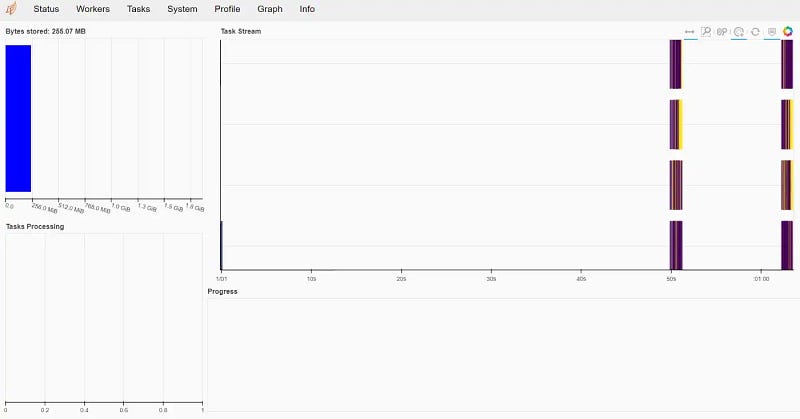
You can play around with the dashboard and see the function, but let’s try out the Dask data processing function. We could create a dask data frame from the Pandas object.
import dask.dataframe as dd

index = pd.date_range("2022-01-01", periods=2400, freq="1H")
df = pd.DataFrame({"a": np.arange(2400), "b": list("abcaddbe" * 300)}, index=index)
ddf = dd.from_pandas(df, npartitions=10)
ddf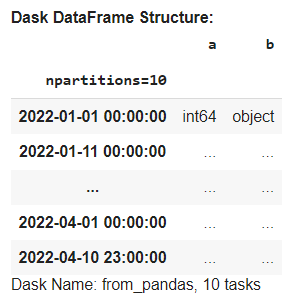
The Dask data frame is similar to the Pandas data frame, but it is lazy, which means the result would not be shown on the Jupyter Notebook. To display the data frame object, we need to run it with the computemethod.
ddf.compute()
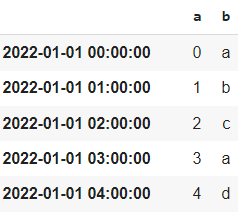
The data selection method in the Dask data frame is also similar to Pandas.
ddf[ddf['a'] >500].compute()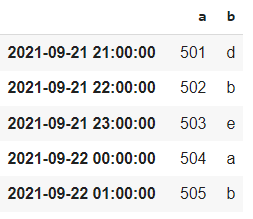
Dask is about fast computing with parallelization. Dask is good to use when we have big data and need high computational performance. However, smaller data is preferable to be processed with Pandas.
If interested in Dask, refer to the documentation to learn further.
2. Faker
Faker is a Python package for generating synthetic data with easy steps. It’s one of the basic packages which become the base of many advanced data synthetic packages.
Let’s try Faker to see how it works. First, we need to install the package.
pip install faker
The first step to using the Faker package is to initiate the Faker class.
from faker import Faker
fake = Faker()
After the class was initiated, we would try various methods to generate synthetic data.
print('Synthetic Name: ', fake.name())
print('\n')
print('Synthetic Address: ', fake.address())
print('\n')
print('Synthetic Text: ', fake.text())
Using the method name, address, and text respectively we end up with different synthetic data. Each time we ran the method, we would end up with something new.
Faker is not limited to the above example as there are still many more variables with Faker we could generate; for example, bank, credit score, and many more. If you want to explore more, please refer to the documentation.
3. Dulwich
Dulwich is a Python package for implementing Git without relying on the Git file and protocol. The package purely accesses the Git capability with Python without any hassle.
Let’s try the package to know better. First, we need to install Dulwich.
pip install dulwich
Using Dulwich would follow a similar procedure on Git. So, let’s try to initiate the repository.
from os import mkdir
import sys
from dulwich.repo import Repo

mkdir("myrepo")
repo = Repo.init("myrepo")
repo
The above code would initiate a repository called ‘myrepo’. Next, let’s try to stage a file that we have created.
df.to_csv('train1.csv', index = False)
repo.stage([b"train1.csv"])
In the example above, we create a CSV file and stage it to our repository. Then, we would commit the file with the following code.
commit_id = repo.do_commit(b"The first commit")
The commit would provide us with the ID we can use later for versioning. If we want to see the commit message, we can use the following code.
repo[commit_id].message

Finally, if we want to access the Git log, we could do that with the code below.
from dulwich import porcelain
porcelain.log('myrepo', max_entries=1)
You can access the documentation here if you want to know the full capability.
4. Pendulum
Pendulum is a Python package to make datetime data processing easy. It is intended to replace the standard datetime class function with a more intuitive function.
Let’s start by installing the package.
pip install pendulum
In the example below, we could initiate our timezone and access the time to shift it with the following code.
import pendulum
now = pendulum.now("Asia/Jakarta")# Changing timezone

now.to_iso8601_string()# Day Shifting
now.add(days=2)
With the Pendulum, it’s also easy to do date iteration to acquire the data you want.
dt = pendulum.now()

period = dt - dt.subtract(days=7)

for dt in period:
    print(dt)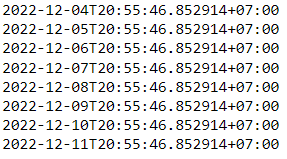
There is so much more that you could do with the Pendulum. Please refer to the documentation to learn more.
5. Selenium
Selenium is a Python package to automate browser activity. It automates any web browsing activity to do what you like—from opening the browser, clicking the button, logging in, collecting data, and others. You could automate the activity similar to the activity you do in a web browser.
Let’s start by installing the package.
pip install selenium
To open a particular browser, Selenium required the driver to be downloaded. You could refer to the documentation for all the browser detail, but I would use chromedrive_autoinstaller package to automate the download of Chrome driver.
from selenium import webdriver
import chromedriver_autoinstaller


chromedriver_autoinstaller.install()
For example, I want to open the Teepublic website and click the login button. To do that, I use the following code.
from selenium import webdriver

option = webdriver.ChromeOptions()

# Create new Instance of Chrome
browser = webdriver.Chrome(chrome_options=option)

browser.get('https://www.teepublic.com')
browser.find_element(By.LINK_TEXT, "Log In").click()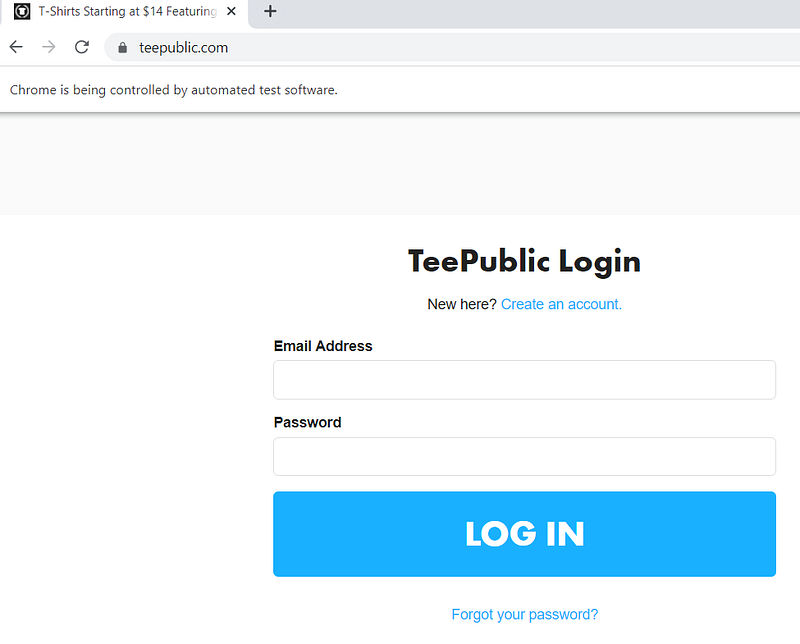
There are still many things you could do with Selenium. Learn from the documentation to learn more. Also, refer to this article for an example of Selenium implementation.
Conclusion
There are many popular data science Python packages that have been developed, and here are some of the packages that would help your data workflow:
- Dask
- Faker
- Dulwich
- Pendulum
- Selenium
I hope it helps!


