
Plain Text Accounting: Managing your Finances with Beancount

Beancount is one of the 3 main software used to perform plain text accounting. Plain text accounting is a way to perform accounting using just plain text files and command line tools.
I like plain text accounting because it makes accounting simple and fun. It also allows you to work with years of data stored in light text files. Also, the plain text accounting ecosystem is well-developed and there are tons of plugins you can use to customize your experience.
Installing Beancount
Beancount runs with Python, so first you need to install Python.
Then, you can just use pip to install Beancount:
pip install beancount
There are chances it doesn’t work, depending on your OS. Here is the doc if you’re having problems installing Beancount.
How Beancount Works
Beancount is a double-entry bookkeeping system. You have to create accounts for everything you want to record. For example, if you buy groceries, the account involved could be Expenses:Groceries . If you earn money on Medium, the account could be Income:Medium .
With Beancount, accounts fall into 5 categories:
- Assets
- Liabilities
- Equity
- Income
- Expenses
You probably already have an idea of what these accounts represent. If you want to be sure, just check the doc.
Then, to record transactions, Beancount uses what is called a “ledger” file. It contains the Beancount options, the definition of the accounts, the transactions… In short, everything.
Here is the syntax to open an account:
2014-02-03 open Assets:US:BofA:CheckingThen, about transactions. A transaction is just a variation between accounts. The total variation of a transaction should be 0.
For example, here is a correct transaction, using Beancount syntax:
2014-05-05 * "Cafe Mogador" "Lamb tagine with wine"
  Liabilities:CreditCard:CapitalOne         -37.45 USD
  Expenses:Restaurant
The variation of Expenses:Restaurant is calculated automatically and is equal to 37.45 USD, so that -37.45 USD + 37.45 USD = 0.
We can now create a complete Beancount file.
option "title" "My first ledger"
option "operating_currency" "USD"


2010-01-01 open Liabilities:CreditCard:CapitalOne
2010-01-01 open Expenses:Restaurant


2014-05-05 * "Cafe Mogador" "Lamb tagine with wine"
  Liabilities:CreditCard:CapitalOne         -37.45 USD
  Expenses:Restaurant
We can add comments to make our file more readable:
; Options
option "title" "My first ledger"
option "operating_currency" "USD"


; Accounts
2010-01-01 open Liabilities:CreditCard:CapitalOne
2010-01-01 open Expenses:Restaurant

; Transactions
2014-05-05 * "Cafe Mogador" "Lamb tagine with wine"
  Liabilities:CreditCard:CapitalOne         -37.45 USD
  Expenses:Restaurant
As you can see, it’s really easy to setup. If you want, you can use several files and then include them in a main file. For example, you can create your accounts in a file called accounts.beancount , your transactions in a file called journal.beancount , and include both in a file called main.beancount :
; main.beancount

include "accounts.beancount"
include "journal.beancount"
Challenges of Using Beancount
If you’ve understood how Beancount works, you’ll realize that it requires you to write down every transaction. That’s quite a lot of work, which is why I explained in an article on plain text accounting that I don’t recommend using Beancount if you have thousands of transactions a month. Unless you manage to automate everything, but if you have that many transactions you’ll certainly find better solutions than plain text accounting.
However, it’s still perfectly feasible if you only have a few hundred transactions a month. And even then, errors will always creep into your files.
So, be aware that using Beancount requires a bit of manual work, but I find it pleasant and relatively fast.
You’ll also find it hard to record transactions in Beancount that leave no trace. I’m thinking, for example, of certain cash transactions.
Generally speaking, you’ll have a bit of trouble keeping track of where the money goes.
The Correct Way to Define Accounts
One problem you may encounter if you use Beancount is that it’s so flexible that it’s hard to know what accounts to define.
I mean, you don’t want to be too specific, and at the same time, you don’t want to bee too general. For example, Expenses:Restaurant:McDonalds is too specific. You probably don’t care how much money you’ve spent to McDonalds, just stopping at Expenses:Restaurant is enough. Well, if you care go for it, but the more specific your accounts are, the harder the maintenance becomes.
Only use details when you need them, when they bring some useful information for you.
My Beancount Workflow
I’ve been using plain text accounting for just over a year, and so far so good. I’ve been able to design a workflow that works for me. The aim is to automate as many things as possible so as to spend as little time as possible.
First, I use beancount-import , which allows me to import CSV data from my bank easily.
Next, I store my beancount folder on a server I host, and I’ve installed Fava. Fava is a web UI for Beancount. This way, I can access my files easily and from anywhere.
Finally, I maintain my transactions by updating them every month. Originally, I used to do this every week, but it wasn’t optimal, as it wasted too much of my time. Updating your files every month, or even every two weeks, is I think ideal (however, note that the ideal period depends on the number of transactions you have).
Fava
I talked about Fava when talking about my workflow. Just a few more words about it, because it really improves the user experience.
To install it, you can use pip , like when installing Beancount:
pip install fava
Then, you can run Fava with the following command:
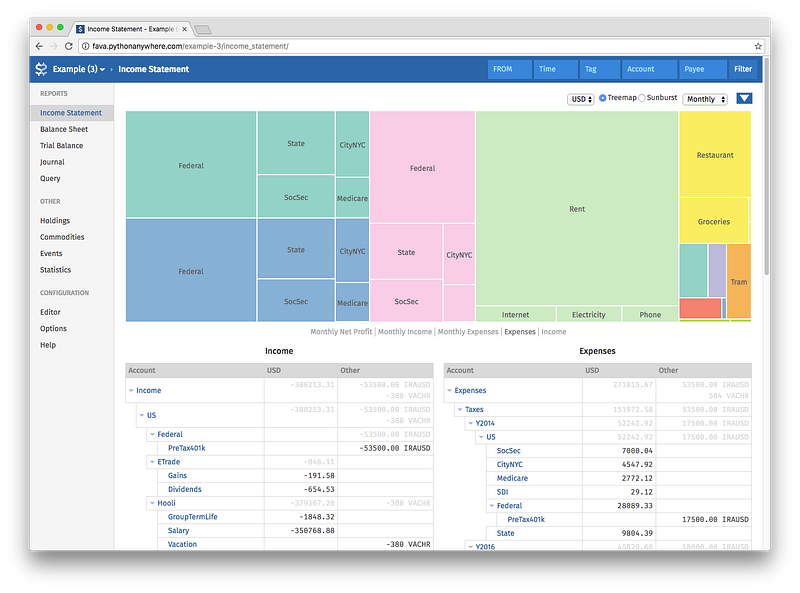
fava your_ledger_fileWithin Fava, you can visualize your transactions and your accounts. Below is an example from the Fava doc:
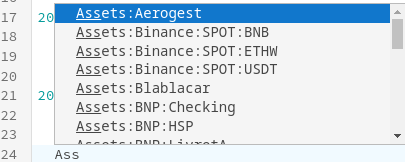
You can also edit your files within Fava, and I like to do this because you have an autofill feature to quickly type your accounts:
Fava also provides statistics such as the number of transactions per account, the number of entries by types (open, transaction, etc…), and more. It can be useful in some cases.
Final Note
That’s pretty much all I had to say about Beancount. I strongly recommend reading Beancount’s documentation, as my article was more about introducing Beancount and providing a quick overview of it than explaining how to use it in detail. The doc also explains some concepts such as the double entry counting method, which can be interesting to really know how Beancount works.
Here is the link to the doc: https://beancount.github.io/docs/index.html
Thanks for reading! Here are some links that may interest you:


