
Pinia, The New (and better) State Management System For Vue
If you haven’t heard about Pinia yet or considering switching from Vuex to Pinia, this article might help you.

I’ll try to give you a proper introduction to the new State Management System, Pinia for Vue. Why I think it’s a great tool, and why you should be using it today.
What is Pinia
Pinia is a new store/state management system for Vue. This is a great tool for when wanting to share data between components in your application. One of the reasons for using a tool like Pinia (or Vuex for that matter) is that throwing events around and listening for these events in your application can easily become quite messy and unstructured. State management systems like Pinia (Vuex, Redux, etc.) can help solve this.
Pinia is now also the recommended choice by Vue and is now an official part of the whole Vue ecosystem, maintained and developed by core members of the Vue team. Last but not least, Pinia is super lightweight, only 1kb in size which is freaking awesome.
Why do we need Pinia?
If you have been in the Vue community, you will know the preferred choice has been Vuex when talking about state management and the community has been very happy using it, so why do we actually need Pinia? Well… Vuex can be…. a hassle to work with! Let me go a bit deeper into why.
Flow of data
The data flow in Vuex can be somewhat hard to understand.
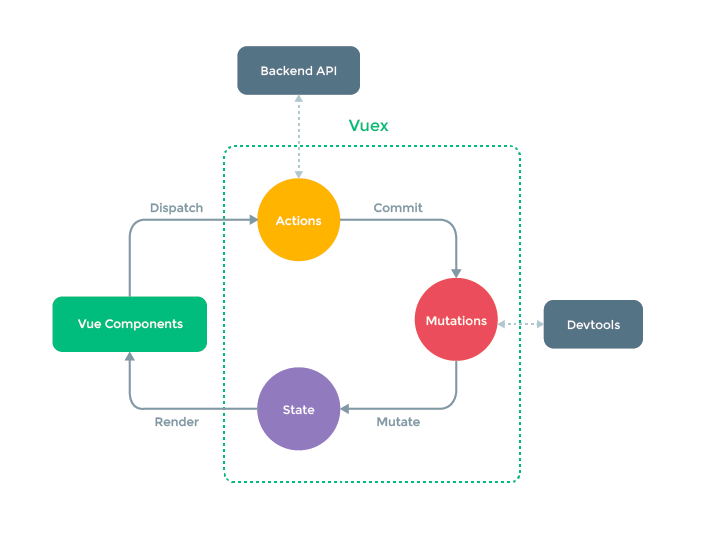
Getting overwhelmed by the diagram? I get why — At first glance, it can look somewhat complicated and intimidating — And when starting to work with Vuex and the principles around Vuex, it can take some time to really understand how you; change state, and use actions and mutations, etc.
Lots of bootstrapping
Vuex takes time to set up! It takes time to create a good solid architecture, create modules, split up files, and set up namespacing — Also modules often contain much of the same boilerplate code. Of thing that is really time-consuming is getting Vuex to work properly when doing a Typescript project. You will often find yourself in need of manually inferring types all over the place, of your state, getters, mutations, and actions. A real hassle!
Dependent on string values! Unsafe!
Once you have defined your mutations and actions, you often find yourself passing string values when wanting to call an action or commit;
store.dispatch('utils/addBodyClass', 'some-class'); //action
store.commit('utils/setData', response); //mutation
store.getters['user/userId'] //getter
As you can see in the above, we are using string values which is very unsafe. What if you have a typo? You also don't get intellisense/code completion out of the box, unless you have manually typed all actions, mutations, etc. Get the point? It is very prone to manual errors, which can lead to bugs! A lot of people would suggest using constants instead to get around this, however, that would also be very time consuming to setup
Pinia takes the pain away
Pinia solves a lot of the quirks that Vuex has. It has a much simpler API and if you have worked with composeables in Vue3, Pinia will feel very much familiar. It requires a lot less bootstrapping and setup than Vuex which will save you time! Pinia also comes with first-class Typescript support out of the box which is very nice, and you get better code completion in your IDE due to the way Pinia is built!
The store’s actions are dispatched as regular function calls rather than using the dispatch/commit method or MapAction/MapMutation helper function, which is common in Vuex. This also means that when calling an action, you don’t have to rely on passing string values like in Vuex! Huge win!
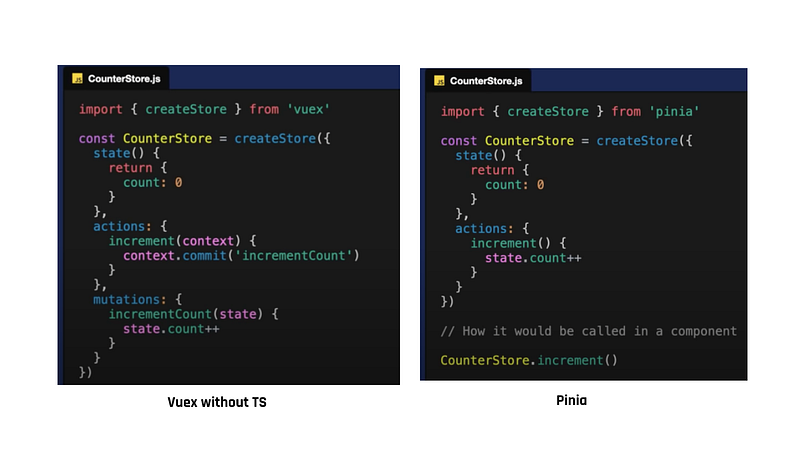
Besides it is easier to setup, your IDE will also give you much better autocompletion and support for Typescript — We will dive into this later on;
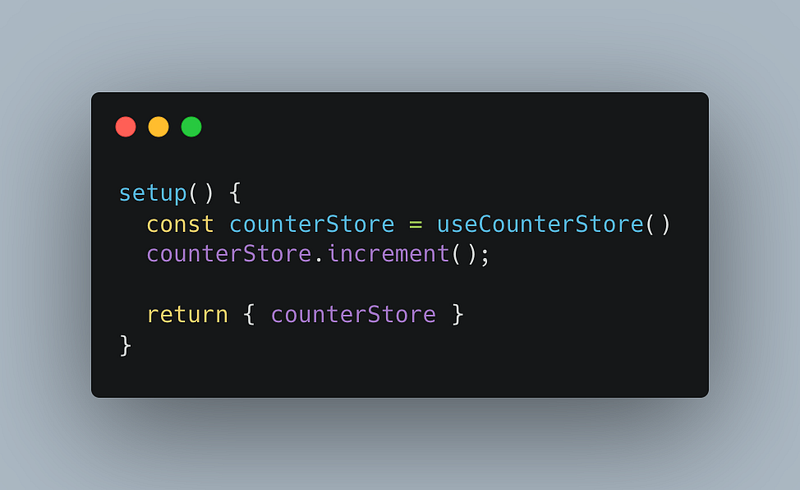
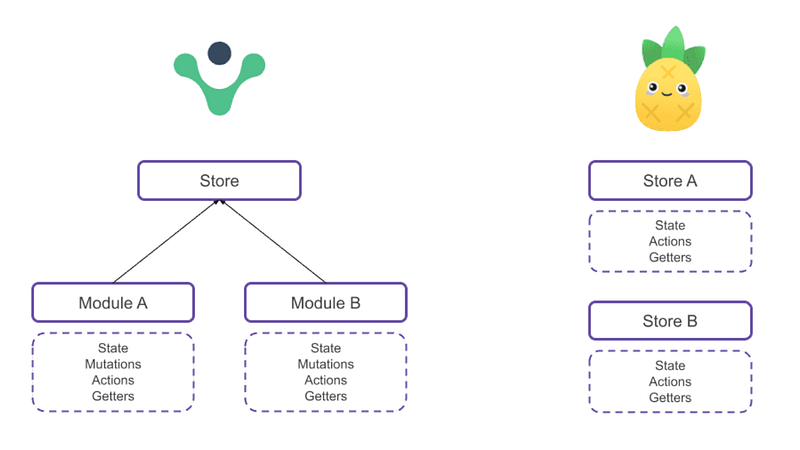
In Vuex, you only have 1 store — If you need a better separation and more structure, you will need to create Vuex modules. In Pinia, you have multiple stores. This also means that you don’t have to setup an index.ts file and import all modules you have in order to be able to use them, like in Vuex. In Pinia, you just import your store into your file, like the above screenshot:
Like Vuex, Pinia also integrates really well with Vue Devtools, allowing you use make full use of all capabilities as you did with Vuex — Not the biggest of differences in that area.
As I also stated earlier, If you have worked with Vue composeables, the Pinia syntax should be really familiar — Just see for yourself below:
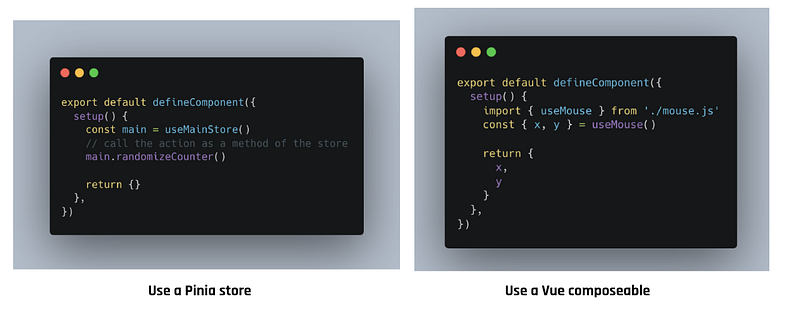
I really think Pinia is a step in the right direction compared to Vuex. It really solves many of the “issues” you have had previously in Vuex. I’m looking forward to following the next releases of Pinia to see which direction it will take and possibilities in will bring to developers. Im also excited to see which plugins the Vue community will create for Pinia. There is a lot of really nice plugins for Vuex, so I’m hoping they will also be available in Pinia in time.
1 Quirk with Pinia
Now that I have worked dived into Pinia a bit, I did find one thing I found somewhat quirky, or what I could consider as bad practice. In Pinia you can directly from your components mutate the state in your store:
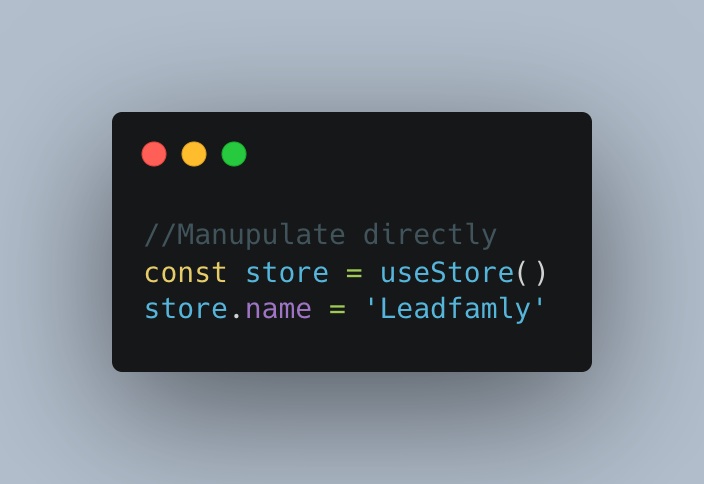
I’m not sure whether I like this or not. Maybe it is because in Vuex, if you want to change some state, you would have to do a mutation, which you don't have to do in Pinia. I don’t know if I would consider this bad practice in someway, but I think it could be dangerous as it could cause unintended side-effect, but I haven’t used in a large project just yet, so I’m also reluctant so say it’s bad practice just because I have been used to something else. I would love to hear your take on this?
Thanks for taking the time to read this article and I hope you liked it! If so, please help support me by hitting that clap button.
P.S.: First, you should get my posts in your inbox. Do that here!
Secondly, if you like to experience Medium yourself, consider supporting me and thousands of other writers by signing up for a membership. It only costs $5 per month, it supports us, writers, greatly, and you have the chance to make money with your writing as well and reach 1000s of people with your writings. By signing up with this link, you’ll support me directly with a portion of your fee, it won’t cost you more. If you do so, thank you a million times.
If you’d like to catch up with me sometime, follow me on Twitter | LinkedIn or simply visit my website.


