
Picking The Wrong SQL Join Key Cost Me Weeks Of Accurate Data. Don’t Let It Happen To You.
Even if you’re choosing the correct SQL JOIN, you could still make a tiny mistake that could cost you — or your org — big time.
Once you master SQL JOINs, create a job-worthy data science portfolio. Learn how with my free project guide.
Debugging A SQL JOIN Key Mistake
One of my most frustrating SQL debugging sessions at work didn’t involve overhauling a CTE or refactoring a user defined function; instead, it all came down to one function: LOWER().
In this instance even though I chose the correct JOIN to merge the necessary tables, I overlooked a critical and undervalued component of the JOIN: The join key, or column, I had chosen to match the rows in each table.
Because I was working with STRING types, there was the possibility that the data would include STRING representations in sentence case, all lower and capital forms.
By not applying a function that would make the values uniform, I was omitting data that couldn’t be matched and, by extension, producing an output that suggested our latest change wasn’t working.
After myself, fellow engineers and even our SQL-inclined management took a look, someone finally suggested LOWER() as the welcomed but also frustratingly simple fix.
A lot of SQL education focuses heavily on JOIN relationships: INNER, OUTER, LEFT, RIGHT, etc. But in doing so, misses an opportunity to teach what I believe to be an equally important focus: Understanding your JOIN keys and applying the right choice.
Because if you don’t begin with an understanding of the relationships between your table’s data, no JOIN combination can out-engineer a shaky and illogical foundation.
Though the episode I described above happened months ago (at the time of this publishing), I recently encountered this issue when developing a table for my personal data infrastructure.
First, context.

Don’t Let Your Little Bugs Become Big Problems
I’ve recently developed a report that allows me to track content performance so I can create writing that reaches and impacts as wide of an audience as possible, regardless of algorithmic constraints. I’m really proud of the final product and I’ve shared bits and pieces on this blog.
One of the foundational pieces of this process is a view that powers a Looker report. My view combines 3–4 tables.
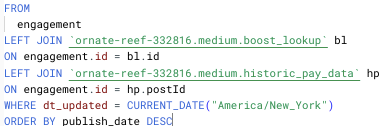
I was initially blinded by my satisfaction with how my project turned out that I decided to overlook “little” bugs in my build.
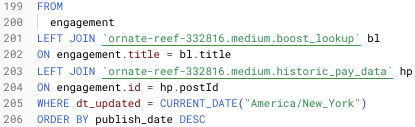
One bug I finally decided to address had to do with my improper use of a JOIN key. One of the common keys among all my tables was the “title” column, containing the article’s title.
Figuring this was a unique enough column (after all, I don’t use any repeat titles), for a while it looked like my ill-advised key choice was working.
But then I wanted to build out a visualization of particularly impactful stories and noticed that one was missing.
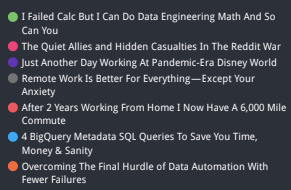
Curiously, when I looked at a count of my titles, I saw that all 187 (at the time) were present in the view. What wasn’t present, however, was a value in the attribute I was after.
Since this column is a boolean type, I expect True/False for every entry.


Seeing NULL tells me there’s an issue.
Finding The Fix
The issue, as I’ve discovered, is that the title I was trying to join on, “Python Logs Aren’t Code. They’re A Communication Tool”, contains two contractions which uses an apostrophe character.
These characters typically need to be escaped. I’m thinking because I didn’t escape the characters before joining that a proper match couldn’t be made.
Instead of just fixing this instance I wanted to address the underlying issue, which is that I was not using a reliable enough column to make my JOIN.
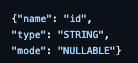
Since my sheet didn’t initially contain the new field: id (a unique key for each post), I needed to add it manually. I had the values in BigQuery, so, thankfully, it was just a matter of a simple query and then copy/paste.
SELECT title, id FROM `ornate-reef-332816.medium.v_story_stats`
ORDER BY DATE(publish_date) DESC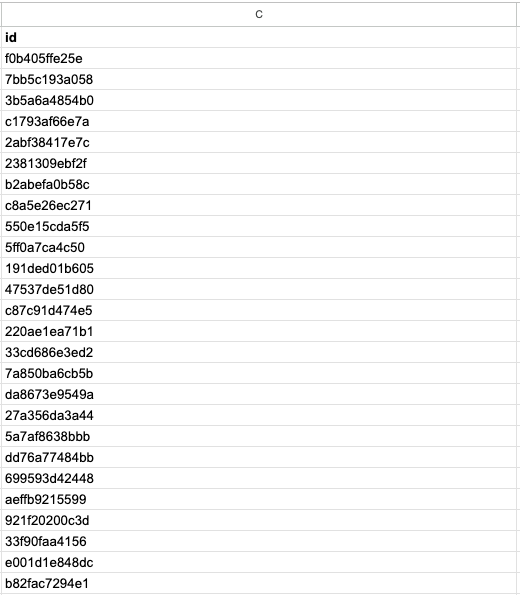
I also updated the schema in the cloud function I use to programmatically update this sheet so it accounts for the extra field.
With those tasks handled, you would think that would be the extent of my work.
However, because I wasn’t initially joining on the id field, I didn’t have a need for it in my JOIN.
So I had to do what we (though possibly only me) call exposing the field in the larger view.
Since I use a lot of CTEs, I had to ensure that the id field was accounted for in each one. Since I have multiple table references, I also needed to be sure this field was properly referenced with dot notation.

Finally, I could update my JOIN logic to use the id field.
And, as expected, I could now see the story show up in my table and in my visualization.
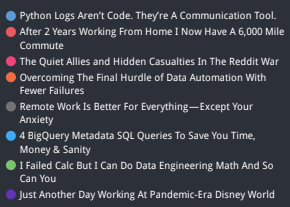
Though the consequences of a malfunction in my personal setup aren’t as dire as those at work, this did result in underreporting in my numbers. It wasn’t hugely significant, but there was an observable increase once I factored in the missing entry.
As you write JOINs in your personal and work projects, it’s important to remember to think deeply about the composition of the tables you want to combine.
Don’t just glance at your data and sign off on the product because it “looks right.”
Before You Go: A Review
As a review, when it comes to choosing a JOIN key, you want to ensure that you are:
- Using a unique value
- Using the correct data type
- Using data that is uniform (i.e. all lowercase, all capital if STRING values)
Outside of the JOIN you also need to expose the key in your query/script/view and, if you use a cloud function to update the source tables, you need to update the respective schema.
JOIN logic, especially key choices, can be tricky to grasp.
But taking the extra time to think deeply about your keys means you’ll save time and brain power debugging.
I need your help. Take a minute to answer a 3-question survey to tell me how I can help you outside this blog. All responses receive a free gift.


