
Phone in Lockdown Mode Unaffected by AT&T Outage — fluke?
The post on iPhone Lockdown Mode I have been meaning to write and this triggered me to get around to it
~~~~~~~~~~~~~~~~~~~~~~~~~~~~~~~~~~~~~~~~~~~~~~~~~~~~~~~~~~~
⚙️ Check out my series on Automating Cybersecurity Metrics. The Code.
🔒 Related Stories: Apple Security | Secure Code | Application Security
💻 Free Content on Jobs in Cybersecurity | ✉️ Sign up for the Email List
~~~~~~~~~~~~~~~~~~~~~~~~~~~~~~~~~~~~~~~~~~~~~~~~~~~~~~~~~~~
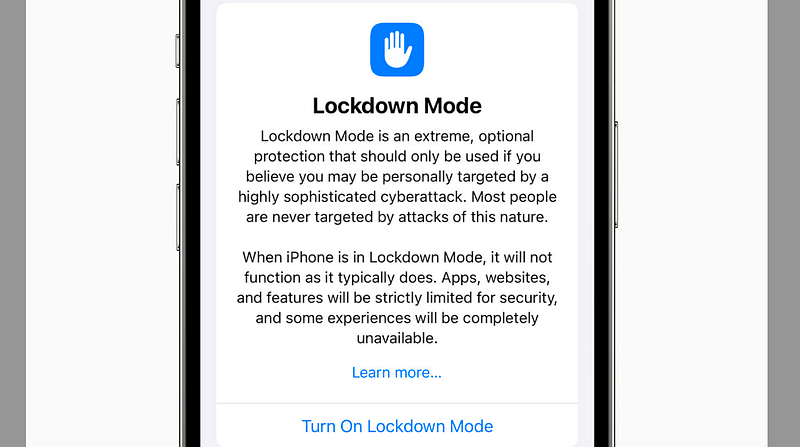
TLDR; Go to settings and search for Lockdown. Turn it on and restart to prevent certain zero-click malware attacks.
I’ve had this post in mind for some time and am finally getting around to it. I have a phone that was not affected by the AT&T outage. It may be a complete fluke of some kind. I mention some other differences between the phones I’m looking at below like settings, hardware versions, and firmware. People are speculating that it was caused by a solar flare. We’ll have to just wait for the facts. However, I think turning on lockdown mode is a good idea in any case. I’ll explain why.
When I woke up today, my husband who goes to work much earlier than I do texted me that there was an AT&T outage. The music on his phone wouldn’t work and he couldn’t make calls. He was on wifi texting me.
I told him, “Well it’s working here or I wouldn’t have gotten your text — haha.” But then I read that in SOS mode you can text? I’m still not sure what’s going on with the mobile carriers and we’ll have to wait for the details. But here’s something I noticed because we are dealing with three different phones.
I woke up around 6 a.m. ET. I looked at my phone — Twitter (x), some news, and went back to bed for a while because I had a slight headache.
I got up a bit later and got the text, was replying, and then looking at social media and news articles on my phone. Everything seemed to be working.
Meanwhile my husband said his phone didn’t work all the way from our house to where he works. It still wasn’t working. I presumed it was simply an outage in his area still.
But I started thinking, why is that? Is it working in downtown Savannah but not over there? What’s going on? I can’t really tell — we have to wait for all the facts — but here is one fact I can tell you.
My husband’s phone was not in lockdown mode but mine are (or so I thought). In order to try to see if lockdown might be the issue, I decided to call one phone from the other. If it worked perhaps it was because my phones were in lockdown mode.
Anyway, the call did not go through. It hung for a while and then I got the AT&T bell sound and a message saying the number could not be reached.
That’s when I took a look at my other phone to confirm it was in lockdown mode — it wasn’t. What? How did that happen?
So I tried to use a few apps and nothing worked. No Internet Connection it says. I turned on lockdown mode and restarted my phone. Still nothing. Presumably both phones in the same location are connecting to the same tower. Odd.
So did the one phone work still because it was in lockdown mode or just something random? I’ll let AT&T investigate and sort that out.
The phones are also two different models. The working phone is a 13. The non-working phone is a 12.
I have data roaming, wifi, and wifi calling turned off on both phones.
Here’s the other thing I noticed. The 13 has firmware version 3.20.05. The 12 has 4.20.05.
The other differences I noticed were that the AT&T section on my version 12 device has a Network Selection option that is not on my version 13 phone. It is set to automatic and I couldn’t turn it off initially. When I did, some options show up and I checked AT&T.
Here’s the other thing — I never, ever turn on iCloud Backup. Ever. I always make sure it is off. Somehow it got re-enabled on the phone that is not currently working.
One other thing I see is that there’s a crash dump on the non-working phone but the timestamp is a bit late. It may have been something I did while messsing around with the settings.
I also generally turn off Bluetooth on the phones unless actively using it. But in this case, the phone that is still working I believe had Bluetooth on.
Well, regardless of whether or not this has anything to do with Lockdown mode, I recommend that you turn it on and here’s why.
There are certain types of malware that can infect your phone just by sending you a text message. You don’t even have to click on the message or a link and your phone can become infected.
When you turn on LockDown mode you prevent some attacks like that.
It won’t stop every attack but it will stop some.
What’s the downside? Well a few things you do might be disrupted. You may have to copy and paste a link to your browser because it won’t automatically pop into some app. That’s the only thing I noticed but you might be affected by other things you use that I don’t. Perhaps those things are risky. 😁
I noticed recently that certain Youtube videos won’t play when I’m in lockdown mode. I presume because I am in Lockdown mode but I didn’t want to turn it off to test that theory. You can also get malware from videos so perhaps it was protecting me from something, perhaps not. I didn’t have time to investigate that. I just watched the videos another way or didn’t watch them at all if I wasn’t sure the source was OK.
How do you turn on Lockdown Mode?
Apple provides instructions here, but it’s pretty simple:
Go to Settings and search for Lockdown. Turn it on. Restart your phone.
I also have some thoughts about everyone connecting their phones to potentially vulnerable wifi networks when they can’t get on cellular. This is total speculation and may not be happening at all. It’s just a thought that came to mind.
In my last post, about a number of IPv6 attacks. I know some wifi devices meant to protect you didn’t do anything if you were on an IPv6 network in the past.
How would I even come up with a crazy idea like that? Because of cyber tactics used in the Iraq war used by the US that I read about in the spy related books I reviewed here:
Follow for updates.
Teri Radichel | © 2nd Sight Lab 2024
About Teri Radichel:
~~~~~~~~~~~~~~~~~~~~
⭐️ Author: Cybersecurity Books
⭐️ Presentations: Presentations by Teri Radichel
⭐️ Recognition: SANS Award, AWS Security Hero, IANS Faculty
⭐️ Certifications: SANS ~ GSE 240
⭐️ Education: BA Business, Master of Software Engineering, Master of Infosec
⭐️ Company: Penetration Tests, Assessments, Phone Consulting ~ 2nd Sight Lab
Need Help With Cybersecurity, Cloud, or Application Security?
~~~~~~~~~~~~~~~~~~~~~~~~~~~~~~~~~~~~~~~~~~~~~~~~~~~~~~~~~~~~~
🔒 Request a penetration test or security assessment
🔒 Schedule a consulting call
🔒 Cybersecurity Speaker for PresentationFollow for more stories like this:
~~~~~~~~~~~~~~~~~~~~~~~~~~~~~~~~~~~~~~~~~~~~~~~~~~~~~~~~~~~~~
❤️ Sign Up my Medium Email List
❤️ Twitter: @teriradichel
❤️ LinkedIn: https://www.linkedin.com/in/teriradichel
❤️ Mastodon: @teriradichel@infosec.exchange
❤️ Facebook: 2nd Sight Lab
❤️ YouTube: @2ndsightlab